
9 min read
How to Sell Online Piercing Courses with Certificates


You can sell online piercing courses with a completion certificate from a WordPress site using an LMS plugin, a payment gateway and a certificate template, and you can have the first course live in a weekend. The harder part is being honest about what the certificate means, because nobody becomes a piercer online, and the studios, health departments and insurers your students will deal with know it. This guide covers how to position the course so it sells and stays credible, which LMS to pick, how to set up certificates step by step, and the pricing and legal details that trip people up.
Tool versions and prices here are current as of August 2026.
Be clear about what an online piercing certificate can and cannot be

Piercing is a hands-on trade regulated at state, county or national level. In the US, OSHA requires annual bloodborne pathogens (BBP) training under 29 CFR 1910.1030 for anyone exposed to blood at work, and most states require piercers to hold a current BBP certificate plus a licence that depends on supervised practice. The Association of Professional Piercers (APP), the main industry body since 1994, runs its own online BBP course and makes clear that piercing itself is learned through apprenticeship.
That shapes your course catalogue. Topics that work well online, and that studios genuinely want staff to complete:
- Bloodborne pathogens and infection control for body art (check whether your state accepts non-approved providers before selling it as compliance training).
- Anatomy for piercers: placement, contraindications, healing timelines by site.
- Jewellery standards: implant-grade titanium (ASTM F-136), threadless versus threaded, sizing and gauge conversion.
- Aftercare consultation and client communication.
- Studio setup, sterilisation workflow and autoclave logging.
- Running a piercing business: pricing, booking, consent forms, insurance.
- Apprentice preparation: what a good apprenticeship looks like and how to get one.
Name the certificate for what it is: “Certificate of Completion: Piercing Anatomy and Placement”, never “Certified Piercer”. Put a one-line disclaimer on the certificate itself and on the sales page saying the course does not replace apprenticeship or local licensing. We have seen course sites get takedown complaints from industry bodies for implying otherwise, and the disclaimer also protects you if a student injures someone and names your course.
Choose the LMS: LearnDash, Tutor LMS or Learnomy
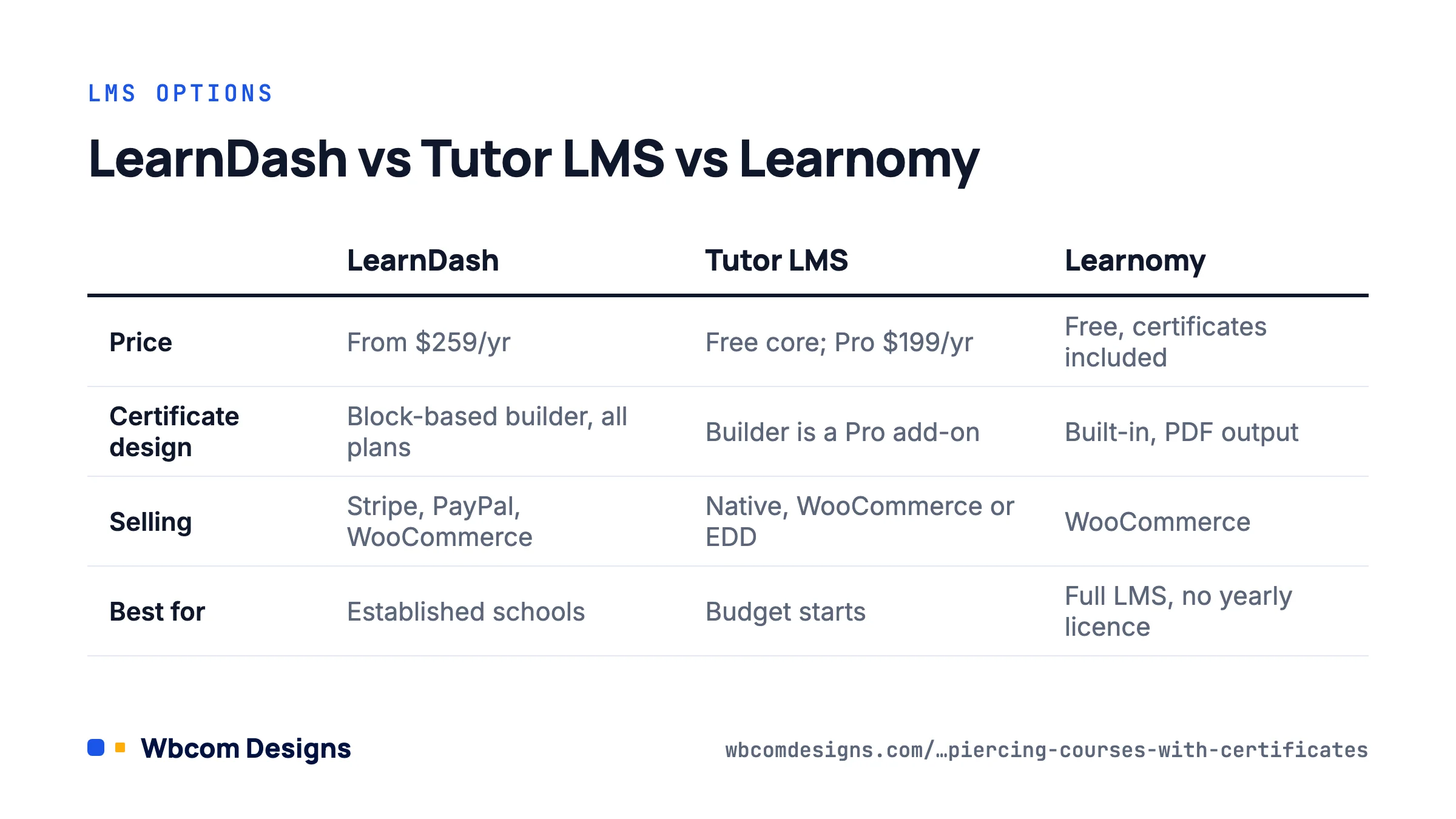
Three WordPress LMS plugins handle certificates well enough for this use case. The choice is mostly about budget and how much you want to build yourself.
| LearnDash | Tutor LMS | Learnomy | |
|---|---|---|---|
| Price | $259/yr Essentials, $399 Pro, $599 Elite; Certificate Builder add-on included with the core licence | Free core; Pro $199/yr (1 site), $399 (10 sites). Certificate Builder is a Pro add-on | Free core with certificates included; Pro tier for multi-instructor and institution features |
| Certificate design | Gutenberg-based builder over a background image, dynamic blocks for course, quiz, user and group data, custom fonts, PDF preview | Visual designer with templates in Pro; free version ships one or two fixed templates | Built-in builder with dynamic fields, PDF output, no add-on |
| Award trigger | Course completion, quiz pass, or completion of all courses in a group | Course completion; quiz pass via settings | Course completion, quiz pass |
| Selling | Built-in Stripe and PayPal, or WooCommerce integration | Native monetisation, WooCommerce or EDD | WooCommerce |
| Best for | Established schools that want the largest add-on ecosystem and reporting | Budget starts; the free tier is enough to validate demand | Anyone who wants certificates and a full LMS without a yearly licence |
Our recommendation for a first piercing course: start on Tutor LMS free or Learnomy, validate that people buy, then move up to LearnDash only if you need its group management for studios buying seats for staff. Migrating 50 students is easy; migrating 5,000 is not, so make the decision before you scale marketing.
Set up the site in this order
- Hosting and WordPress. A managed host with PHP 8.2+, SSL and daily backups. Video is the heavy part of a piercing course, so do not host video files on the web server; use Vimeo, Bunny Stream or YouTube unlisted and embed.
- Theme. Pick one with explicit LMS templates so the course player, lesson sidebar and certificate page look finished. Reign ships add-ons for LearnDash and Tutor LMS; BuddyX handles both with a lighter footprint.
- Install the LMS and run its setup wizard. Set currency, the course archive page and whether students need an account to enrol (yes, always, because certificates are tied to a user).
- Build one course completely before building a second. Four to eight lessons, one quiz, one certificate. A finished 90-minute course sells better than three half-built six-hour ones.
- Create the quiz that gates the certificate. Set a passing score (70 to 80 percent is typical), limit retakes to three, randomise question order. In LearnDash: LearnDash LMS → Quizzes → Settings → Passing Score. In Tutor: the quiz block’s Settings tab → Passing Grade.
- Design and attach the certificate (next section).
- Connect payments. For one-off course purchases, the LMS’s native Stripe is simplest. For bundles, coupons, subscriptions or selling a physical starter kit alongside, use WooCommerce. Our LearnDash add-ons cover the dashboard and reporting pieces the core plugin lacks.
- Test as a student. Buy the course with a test card, complete it, fail the quiz once, pass it, download the certificate, check the PDF on a phone. Only then publish.
Building the certificate in LearnDash, step by step
LearnDash’s Certificate Builder is the most flexible of the three, so here is the full procedure. Tutor and Learnomy follow the same logic with fewer steps.
- Go to LearnDash LMS → Add-ons, find Certificate Builder and activate it (it is included with your licence).
- Go to LearnDash LMS → Certificates → Add New. Give it a name students will recognise, for example “Piercing Anatomy and Placement: Certificate of Completion”.
- Click Use Certificate Builder. Upload a background image first; the builder requires one. Design it at 3508 × 2480 px (A4 landscape at 300 dpi) or 3300 × 2550 px (US Letter) so the PDF prints cleanly.
- Add blocks over the background. Use the User Meta block for the student’s name, the Course Info block for course title and completion date, and a plain Paragraph block for your disclaimer line and a certificate ID (the
[courseinfo show="course_id"]shortcode plus the user ID makes a cheap unique reference). - Upload a brand font under the builder’s font settings if you want one; the builder embeds it in the PDF.
- Use Preview to generate a sample PDF with real data. Check that long names do not overflow the name box.
- Open the course, go to Settings → Course Certificate, and select the certificate. If the certificate should depend on passing the quiz, attach it to the quiz instead under Quiz → Settings → Quiz Certificate, and leave the course-level certificate empty so students cannot get it by clicking through lessons.
Add a verification page. A simple page with a form where an employer enters the certificate ID and the site checks the user’s completion record (a short custom query against learndash_user_activity, or the Learnomy built-in verify endpoint) turns the certificate from a decorative PDF into something a studio manager will accept. This single feature is what gets piercing courses recommended inside the trade.
Pricing and packaging that works for trade courses

From the course sites we have built in trades like this, three pricing patterns hold up.
- Single compliance-style course: $25 to $60. BBP-style or aftercare courses compete with generic providers charging around $25. Price within reach and win on being piercing-specific.
- Skills course with certificate: $97 to $297. Anatomy, jewellery standards, studio setup. Include the certificate, a downloadable placement chart and a 30-day Q&A group, which is where a course community earns its keep.
- Studio seat licences: 5 seats for the price of 4. Studio owners buying for staff are your best customers. LearnDash Groups or Tutor’s enrolment by admin lets the owner assign seats and see who has completed what.
Offer a free 10-minute preview lesson on the sales page. Conversion on trade courses roughly doubles when a prospect can watch the instructor’s hands before paying, because credibility in this field is visual.
Legal and operational details that matter
- Terms and refunds. State a refund window (7 days if less than 20 percent completed is common) and whether the certificate is revoked on refund. The LMS can remove access; you should also mark the certificate void in your verification records.
- Age gating. Piercing content involving nipples or genitals is adult-adjacent; gate those modules behind an age confirmation and keep them out of public previews, or payment processors and ad platforms will flag the site.
- Liability insurance. Course-provider professional indemnity is cheap and worth having when your subject is a procedure that can cause injury.
- Accessibility. Caption the videos. Students with hearing loss exist, and captions double as searchable text that helps the sales page rank.
- Data. Completion records are personal data. Keep the privacy policy current and make sure the LMS is included in WordPress’s Tools → Export Personal Data tooling (LearnDash and Tutor both register exporters).
- Jurisdiction note on the certificate. One line: “This certificate confirms completion of online coursework and is not a licence to perform body piercing. Check local regulations.” Put it on every certificate, no exceptions.
A realistic launch plan
A piercer we worked with launched with exactly one course, “Ear Anatomy and Placement for Piercers”, priced at $149, on Tutor LMS free with Stripe. It had six video lessons filmed on a phone against a clean wall, a 20-question quiz, and a certificate made in Canva and uploaded as the background. She sold 31 seats in the first month, almost all from posting placement diagrams in piercing groups and linking to the free preview. The second course and the studio seat licences came three months later, once she knew the demand was real. Total software spend before first sale: zero.
Frequently asked questions
Can my certificate count toward a state piercing licence?
Only if your state’s health department has approved you as a training provider for the specific requirement, usually BBP. Contact the department before making any claim. Without approval, market it as professional development.
Do I need to make students prove identity before issuing a certificate?
Not legally for a completion certificate, but studio buyers trust it more if you do. A simple step is requiring the legal name at checkout and printing it on the certificate exactly as entered, with a note that it cannot be changed later.
Should I put the course on Udemy instead?
Udemy takes up to 63 percent of revenue on marketplace sales and owns the student relationship. Use it for discovery if you like, but keep the certificate courses on your own site where you set the price and own the email list.
How do I stop certificate PDFs being shared or forged?
You cannot stop sharing, which is why the verification page matters more than the PDF. A forged certificate fails verification; a real one passes. That is the whole protection.
Where to start
Pick the one topic you are asked about most in your studio, outline six lessons, and film them this week. Install Tutor LMS or Learnomy, attach a certificate with the disclaimer line, and put a single $97 to $149 course live with a free preview. The first ten sales will tell you whether to invest in LearnDash, a community, and studio licences, and you will have spent nothing but time finding out.
Related reading