
5 min read
11 Best Accessibility Checker Tools: Ensuring Your Website is Inclusive


In an increasingly digital world, making your website accessible to everyone isn’t just a nice-to-have, it’s essential. Accessibility means your site is usable by everyone, regardless of any disabilities they may have. From vision impairments to cognitive disabilities, individuals may face numerous challenges when interacting with digital content. This is where website Accessibility Checker Tools come into play. These tools help ensure your website complies with accessibility standards, making it inclusive and user-friendly for everyone.

Best Accessibility Checker Tools
1. WAVE (Web Accessibility Evaluation Tool)

WAVE, developed by WebAIM, is one of the most popular accessibility checker tools available. It’s user-friendly and provides a detailed visual representation of your website’s accessibility. WAVE highlights areas that need improvement by using colour-coded icons directly on your website’s page. This makes it easy to see where issues lie and what needs to be addressed.
Key Features:
- Visual feedback on accessibility issues
- Colour-coded icons for easy identification of problems
- Integration with Chrome and Firefox browsers via extensions
- Comprehensive reports on accessibility compliance
2. Axe Accessibility Checker
Axe by Deque Systems is a robust tool that integrates seamlessly with developer environments. This tool is particularly useful for web developers and testers as it provides in-depth insights into accessibility issues. Axe is available as a browser extension and can be used within development tools like Selenium and Cypress, making it versatile and powerful.
Key Features:
- Integrates with Chrome and Firefox browsers
- Provides detailed, actionable insights on accessibility issues
- Seamlessly works with development tools like Selenium and Cypress
- Offers both free and enterprise-level versions
3. Lighthouse
Lighthouse is an open-source tool by Google that audits your website’s performance, including accessibility. It’s available as a Chrome browser extension and in Chrome DevTools. Lighthouse offers a comprehensive report that covers accessibility, performance, SEO, and more. It’s an excellent tool for developers looking to improve their site’s overall quality.
Key Features:
- Open-source and free-to-use
- Accessible through Chrome DevTools
- Offers a full audit of accessibility, performance, and SEO
- Provides actionable recommendations to improve accessibility
4. Siteimprove Accessibility Checker
Siteimprove is a powerful tool that helps organisations manage their website’s accessibility, content quality, and performance. The accessibility checker provides a detailed analysis of your site’s compliance with WCAG (Web Content Accessibility Guidelines) standards. It offers insights into how to fix issues and helps maintain ongoing compliance.
Key Features:
- Provides a comprehensive analysis of accessibility compliance
- Detailed reports on WCAG compliance levels
- Integrated with content management systems for seamless updates
- Offers ongoing monitoring and automated checks
5. BrowserStack Accessibility Testing
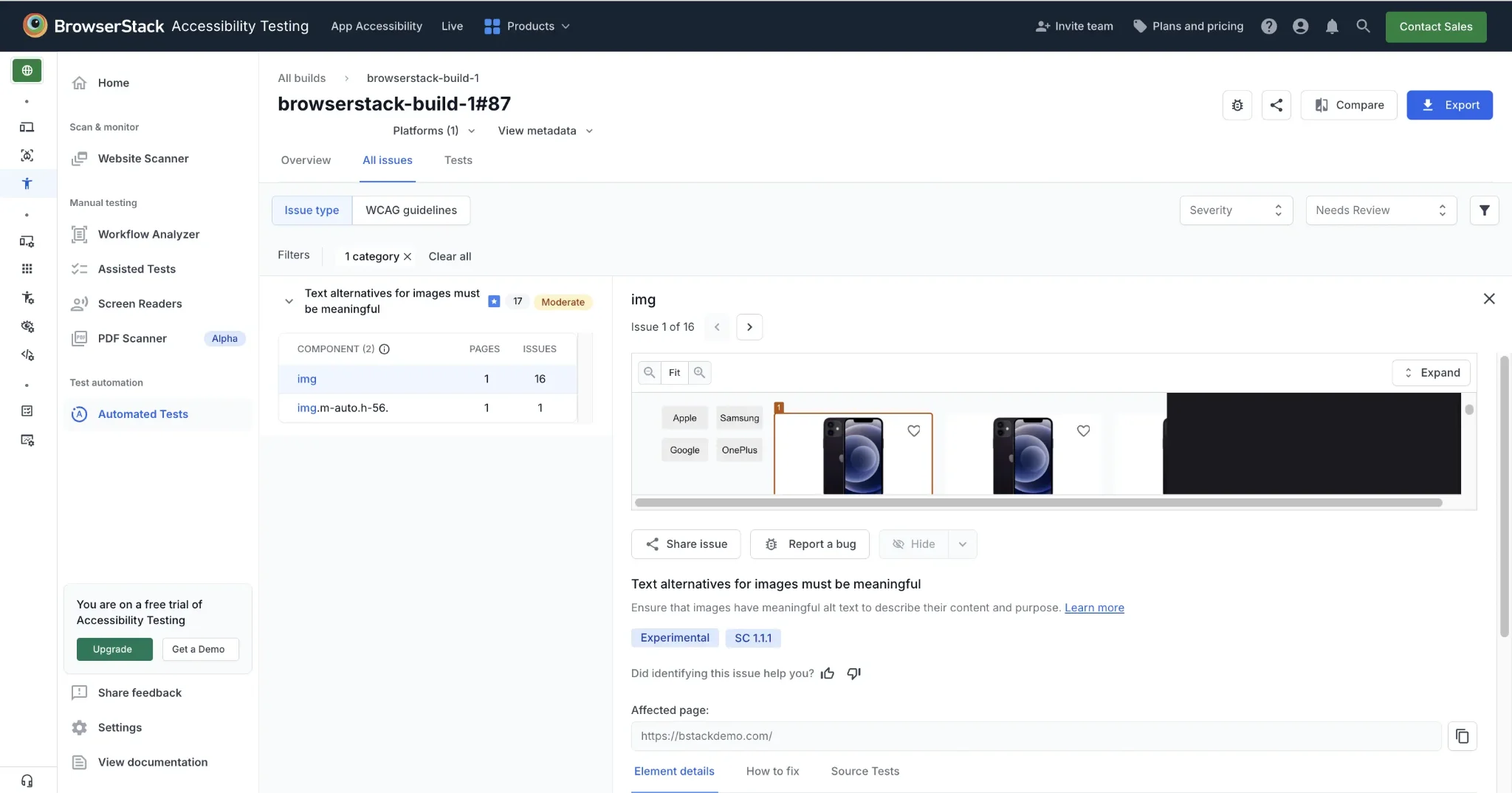
BrowserStack Accessibility Testing is a web accessibility testing platform that helps teams identify and monitor accessibility issues across websites and web applications. It combines automated scanning with assisted and manual testing to help teams find common and complex accessibility issues and improve compliance with WCAG standards.
Key Features:
- Automated scans to identify common accessibility issues
- Workflow testing across multiple pages and user states
- Assisted tests for keyboard navigation and interactive elements
- Screen reader testing on real devices with VoiceOver, NVDA, and TalkBack
- Accessibility monitoring with detailed reports and issue tracking
6. Tenon
Tenon is a flexible accessibility testing tool that caters to both beginners and experienced developers. It allows you to test your website against WCAG guidelines and provides clear, actionable insights into how to fix any issues. Tenon is especially useful for teams because it integrates with development workflows.
Key Features:
- Tests against WCAG guidelines
- Integration with development workflows like JIRA and GitHub
- API access for customised testing and reporting
- Detailed issue breakdowns with fix recommendations
7. Accessibility Checker by CKEditor

The Accessibility Checker by CKEditor is a fantastic tool for content creators and editors. It’s integrated into CKEditor, a popular web text editor, and allows users to check the accessibility of their content as they create it. The tool checks for common accessibility issues and provides suggestions for improvements, making it ideal for ensuring your content is accessible from the start.
Key Features:
- Integrated into CKEditor for real-time content checking
- Identifies common accessibility issues in text and images
- Offers suggestions for improving content accessibility
- Simple and easy-to-use interface
8. AChecker
AChecker is a free, open-source accessibility evaluation tool that allows you to check your website against various accessibility standards, including WCAG. It’s user-friendly and provides a detailed report on the accessibility issues found on your site. AChecker is a great tool for those who need a quick, no-frills check of their website’s accessibility.
Key Features:
- Free and open-source
- Checks against multiple accessibility standards (e.g., WCAG, Section 508)
- Provides detailed reports on accessibility issues
- Offers options for customising checks
9. SortSite
SortSite is a comprehensive website testing tool that covers accessibility, SEO, and usability. It checks your website against WCAG guidelines and other accessibility standards, providing a detailed report on how to improve your site. SortSite is ideal for large organisations that need to ensure their website is fully compliant with accessibility standards.
Key Features:
- Comprehensive testing for accessibility, SEO, and usability
- Detailed reports on WCAG compliance
- Suitable for large organisations with complex websites
- Offers ongoing monitoring and automated checks
10. Accessibility Insights
Accessibility Insights is a suite of tools by Microsoft that helps developers find and fix accessibility issues in web and software applications. It’s beneficial for those who want to integrate accessibility testing into their development workflow. The tool provides detailed insights and suggestions for improving accessibility.
Key Features:
- Developed by Microsoft, ensuring reliability and robustness
- Integrates with development workflows for seamless testing
- Provides detailed insights and suggestions for improvement
- Free to use with an open-source license
11. Pa11y
Pa11y is an open-source accessibility testing tool that provides detailed reports on your website’s compliance with accessibility standards. It’s designed for developers and can be integrated into your development process. Pa11y offers a command-line interface and a dashboard for easy monitoring of accessibility issues.
Key Features:
- Open-source and free-to-use
- Command-line interface for integration with development workflows
- Dashboard for easy monitoring of accessibility issues
- Detailed reports on WCAG compliance

Making Accessibility a Priority
Accessibility isn’t just about compliance, it’s about ensuring that everyone, regardless of ability, can access and enjoy your website. With the right tools, you can identify and fix accessibility issues, ensuring that your website is inclusive for all users. The tools we’ve explored here each offer unique features and benefits, whether you’re a developer looking for deep integration with your workflow or a content creator ensuring your text is accessible.
Investing time in accessibility is investing in a better experience for all your users, and these tools make it easier to achieve that goal. Start today by choosing the tool that best fits your needs, and make your website a welcoming space for everyone.
Interesting Reads:
Related reading