
65 min read
Ultimate Guide to SEO and E-commerce Tools for Amazon & Marketplaces in 2026


Over the past decade, online shopping has transformed from a luxury to a lifestyle. And if there’s one platform that completely changed the way people buy and sell products online, it’s Amazon. Add in other marketplaces like Walmart, eBay, Etsy, and Shopify, and suddenly we’re living in a world where small businesses and solo entrepreneurs can compete with big-box brands. But here’s the catch: with opportunity comes competition. Millions of sellers are fighting for the same digital shelf space. Success on Amazon or any marketplace isn’t just about having a fantastic product, it’s about getting found. And that’s where SEO/E-commerce Tools and Amazon SEO strategies come in.

Amazon SEO vs. Google SEO: What Makes It Different?
Most people are familiar with Google SEO, optimises your website so it ranks higher on Google’s search engine results pages. Amazon SEO, however, is very different. Amazon uses its own algorithm, often referred to as A9 (and more recently, A10).
- Google SEO is about delivering the most relevant information.
- Amazon SEO is about delivering the most relevant and profitable product.
That means if your listing isn’t optimised with the right keywords, competitive pricing, and strong conversion rates, you’re invisible to shoppers no matter how good your product is.
Why SEO/SEO/E-commerce Tools Are the Game-Changers
Imagine trying to sell on Amazon without knowing:
- What products are in demand?
- How many sales are competitors making?
- Which keywords are shoppers typing into the search bar?
- How pricing fluctuates over time.
- Which ad campaigns are eating your profits?
Doing this manually is like sailing across the ocean without a compass. Sure, you might reach land, but the odds are stacked against you.
This is where Amazon SEO tools and e-commerce software become your secret weapon. They:
- Save time: no more guessing or endless spreadsheets.
- Provide data: real-time keyword volume, sales estimates, and ad performance.
- Automate tasks: repricing, ad bidding, review requests.
- Boost rankings: keyword-optimised listings that climb Amazon’s search results.
- Increase profits: better decisions = better margins.
In short, the right tools let you play like the big brands, even if you’re just one person running a store from your laptop.
Common Myths About Amazon SEO (and the Truth)
Before diving deep into tools, let’s clear up a few misconceptions:
“If my product is good, it will sell itself.”
- Truth: A good product is step one, but without visibility and optimisation, even the best product will sit in Amazon’s back pages.
- “Amazon SEO is just about stuffing keywords.”
- Truth: Keywords matter, but so do images, reviews, pricing, and conversion rates. Amazon rewards products that actually sell.
- “I don’t need tools; I’ll just figure it out manually.”
Truth: Possible, yes. Smart, no. Competitors using Helium 10, Jungle Scout, and PPC automation will outrun you. - “Once optimised, I’m done with SEO.”
Truth: Amazon SEO is ongoing. Keyword trends change, competitors evolve, and algorithms shift. Continuous optimisation is a must.
How This Guide Will Help You
This guide isn’t just a list of tools. It’s a step-by-step playbook on how to:
- Research products with the highest chance of success.
- Find the right keywords to boost visibility.
- Optimise listings for both SEO and conversion.
- Run profitable PPC ads with automation.
- Analyse performance using powerful dashboards.
- Manage reviews, pricing, and inventory for long-term growth.
- Expand across multiple marketplaces with the right strategy.
By the end, you’ll know exactly which tools to use, when to use them, and how to integrate them into your daily seller workflow.
Quick SEO Takeaway
If you’re serious about selling on Amazon and other marketplaces, tools aren’t optional, they’re essential. Without them, you’re competing blind. With them, you’re building a data-driven, scalable, and profitable business.
Product Research Tools & Workflows
Why Product Research is the #1 Success Factor
Before you think about keywords, PPC, or even branding, the foundation of your business rests on what you sell.
On Amazon, shoppers come with high buying intent. They already want a product; the question is whether they’ll find and choose yours. That’s why product research tools are critical: they help you uncover high-demand, low-competition products that give you a fighting chance.
Think of it like real estate. You wouldn’t buy a house without checking the neighbourhood, demand, and pricing history. The same goes for Amazon products, you need to validate your “digital real estate” before investing in inventory.
What Makes a Winning Amazon Product?
Before diving into tools, let’s quickly outline the criteria that define a product with potential:
- Strong Demand: Consistent monthly sales (not just seasonal spikes).
- Low to Medium Competition: Opportunities where competitors aren’t fully optimised.
- Healthy Margins: At least 30 - 50% profit after fees, ads, and shipping.
- Lightweight & Small: Easier to ship, lower Amazon FBA storage costs.
- No Legal/Restricted Barriers: Avoid hazmat, patented items, or gated categories.
- Room for Differentiation: Can you improve the product or listing (better packaging, bundle, design, branding)?
The Big Players: Best Product Research Tools for Amazon
1. Helium 10 (Black Box, Xray, Trendster)

- Why it’s powerful: Helium 10 is often the first tool serious sellers invest in. With modules like Black Box (product database search) and Xray (Chrome extension for real-time sales estimates), it gives you demand, competition, and revenue data at a glance.
- Best for: Private label sellers and anyone validating multiple niches.
- Cool feature: Trendster shows seasonality, helping you avoid products that only sell during holidays.
Example: You search for “eco-friendly kitchen items” in Black Box, filter for 300+ monthly sales, price between $20 - $50, and review count under 200. It might show a bamboo utensil set making $10k/month with only 150 reviews, a strong signal.
2. Jungle Scout (Product Database & Opportunity Finder)

- Why it’s popular: Jungle Scout was one of the first Amazon research tools and is still trusted by thousands. Its Opportunity Finder is excellent for spotting underserved niches.
- Best for: Beginners and wholesale/private label sellers.
- Cool feature: Supplier Database lets you verify which suppliers top brands are using, a shortcut for sourcing.
Example: Using Opportunity Finder, you filter for low competition but high-demand products in “Home & Kitchen.” You discover a growing sub-niche in “magnetic spice racks” that has strong demand but few optimised listings.
3. Keepa (Price & Sales Rank History)
- Why it’s essential: Keepa tracks price history, sales rank history, and product performance trends. It’s the best way to spot whether a product has consistent demand or is just a seasonal fad.
- Best for: All sellers, should be in every toolkit.
- Cool feature: Graphs that show Buy Box changes, stockouts, and pricing wars.
Example: A toy looks profitable today, but Keepa shows sales rank plummets every February and only spikes at Christmas. Without this insight, you might have tied up cash in slow-moving stock.
4. AMZScout (Product Database & PRO Extension)
- Why it’s helpful: AMZScout’s PRO extension offers real-time sales estimates, margins, and competitor analysis right on the Amazon search results page.
- Best for: Budget-conscious sellers who want accuracy without overpaying.
- Cool feature: “Product Score” that quickly shows whether an idea is worth pursuing.
5. SellerApp (AI-powered Research)
- Why it stands out: Combines product research with keyword tracking and advertising insights.
- Best for: Sellers wanting all-in-one insights (product + keyword + PPC).
- Cool feature: Smart filters that identify “high-demand, low-competition” keywords linked to product opportunities.
6. Viral Launch (Market Intelligence)
- Why it’s unique: Strong competitor tracking and launch-focused features.
- Best for: Sellers ready to launch aggressively and monitor competitors.
- Cool feature: Shows a “Launch Strategy Score” for how hard (or easy) it will be to outrank competitors.
Honorable Mentions:
- CamelCamelCamel: Free alternative to Keepa for price history.
- ZonGuru: Great for smaller sellers who want simplicity.
- Algopix: Multichannel research tool (Amazon, eBay, Walmart).
Step-by-Step Workflow: Finding Winning Products
Here’s a practical 8-step workflow you can copy for your own research:
Step 1: Brainstorm Niches
Think categories you’re passionate about or trending industries: eco-friendly products, pet supplies, fitness gear, and home organisation.
Step 2: Use a Database Tool (Helium 10 / Jungle Scout)
Apply filters:
- Price: $20 - $50 (sweet spot for profits).
- Reviews: <200 (less competition).
- Sales: >300 units/month.
- Weight: <2 lbs.
Step 3: Validate Demand with Keepa
Check historical sales rank and pricing trends. Avoid products that are too seasonal or in a race to the bottom on price.
Step 4: Check Competition
Look at the top 10 listings:
- Do they have poor images or weak copy?
- Are reviews under 1,000?
- Are they keyword-stuffed instead of optimised?
This signals room to outperform with better SEO.
Step 5: Calculate Profitability
Use an FBA calculator (Helium 10 or Jungle Scout) to account for:
- Amazon referral fee.
- FBA storage & fulfilment.
- Shipping to Amazon.
- Landed cost from the supplier.
Target: 30 - 50% profit margin after ads.
Step 6: Supplier Check (Alibaba / Jungle Scout Supplier Database)
Always verify costs before you get too excited. MOQ (minimum order quantity), lead times, and packaging options matter.
Step 7: Test Order & Listing Creation
Order a small batch, create a keyword-optimised listing (we’ll cover SEO workflow in Part 3), and prepare ads.
Step 8: Monitor & Scale
Launch with ads, track sales velocity, and scale production if demand is validated.
SEO Angle: How Product Research Ties Into Amazon SEO

Here’s something many beginners overlook: product selection itself is an SEO decision.
- If demand is low (no one searches for it), SEO can’t save you.
- If competition is cutthroat (10,000+ reviews on page one), SEO won’t be enough.
- If a niche has a healthy balance of search demand and keyword gaps, SEO + ads can help you win visibility.
In short, the right product research makes SEO 10x easier because you’re not climbing Mount Everest from day one.
Real Example Walkthrough
Let’s say you want to sell “desk organisers.”
- Helium 10 Black Box: Shows products making $15k+/month, but competition is heavy with 5,000+ reviews.
- Dig deeper: Filter for keywords like “bamboo desk organiser” or “minimalist desk organiser.” Suddenly, you see products with 400 - 600 reviews making $5k/month.
- Keep a check: Confirms demand is stable, with no big seasonal drops.
- Supplier quotes: Alibaba suppliers can produce bamboo organisers for $4 each. Selling price on Amazon = $25.
- Margins: After Amazon fees and shipping, net margin = 38%.
- Decision: Instead of a generic “desk organiser,” you niche down to eco-friendly bamboo desk organisers, lower competition, strong demand, and SEO-friendly long-tail keywords.
Pro Tips for Smarter Research
- Look for bad listings: If competitors have poor images or generic titles, that’s your opportunity.
- Check reviews for pain points: Customers complain about durability? You can solve that.
- Don’t chase only “hot” products: Fads burn out; aim for evergreen items.
- Cross-check keywords: Make sure demand exists not just in the product, but in the keywords people use.
- Think branding: Can you turn this into a brand, not just a one-product hustle?
Quick Checklist (Save This!)
- 300+ monthly sales.
- Price $20 - $50.
- Less than 200 reviews.
- Consistent demand (via Keepa).
- Margins ≥ 30%.
- Lightweight (<2 lbs).
- Room to improve vs. competitors.
Keyword Research for Amazon SEO

If product research tells you what to sell, keyword research tells you how to get found. On Amazon, customers don’t “browse” as much as they do in physical stores. Instead, they type specific words or phrases into the search bar, and Amazon’s job is to show them the most relevant, best-converting products.
That means if you don’t know what keywords buyers are using, your product is basically invisible.
Let’s break down keyword research step by step.
Why Amazon Keywords Are Different from Google Keywords
You might think, “Keyword research? I already know how to do SEO.” But Amazon is a whole different ball game:
- Google Keywords: Focus on information (“How to fix back pain” or “best dog food reviews”).
- Amazon Keywords: Focus on buying intent (“memory foam pillow queen size” or “grain-free dog food 10lb”).
Shoppers on Amazon aren’t looking for information. They’re ready to buy. This makes Amazon keywords shorter, more specific, and purchase-driven.
Types of Keywords on Amazon
To really dominate keyword research, you need to understand the different types of keywords buyers use:
1. Short-Tail Keywords (Head Keywords)
- Example: “pillow”
- High search volume, very competitive, vague intent.
2. Long-Tail Keywords
- Example: “memory foam pillow for side sleepers”
- Lower search volume, but highly targeted and often result in higher conversions.
3. Branded Keywords
- Example: “Nike running shoes”
- High intent, but tough to compete if you’re not the brand.
4. Competitor Keywords
-
- Example: Targeting search terms your competitors rank for.
5. Backend Keywords
-
- Hidden keywords in your Amazon Seller Central backend fields.
- Help capture misspellings, alternate terms, and synonyms.
Key Metrics for Keyword Research

When analysing Amazon keywords, don’t just chase volume. Pay attention to:
- Search Volume - Number of times the keyword is searched per month.
- Cerebro IQ Score (Helium 10) - Balance between demand and competition.
- Competitiveness - How many products rank for the keyword.
- Relevance - Does the keyword actually describe your product?
- Conversion Potential - Does the keyword suggest purchase intent?
Best Keyword Research Tools for Amazon
1. Helium 10 - Magnet & Cerebro
Helium 10’s keyword tools are the gold standard.
- Magnet: Generates thousands of keyword ideas from seed terms.
- Cerebro: Reverse ASIN lookup (enter competitor’s ASIN to see what keywords they rank for).
- Best For: Deep research and competitor spying.
- Pro Tip: Use Cerebro to uncover high-converting competitor keywords that you’d never think of on your own.
2. Jungle Scout - Keyword Scout
A user-friendly keyword research tool that gives you exact and broad match volumes.
- Best For: Sellers who want simplicity.
- Pro Tip: Look at “Ease to Rank” scores to prioritise keywords for new listings.
3. AMZ Suggestion Expander (Free Chrome Extension)
This handy tool expands Amazon’s autocomplete suggestions when you type into the search bar.
- Best For: Quick keyword brainstorming.
- Pro Tip: Start with a seed term like “coffee mug” and see hundreds of variations like “coffee mug with lid” or “funny coffee mug for mom.”
4. Sonar by Sellics (Free Tool)
Sonar pulls keyword data directly from Amazon.
- Best For: Beginners who want free keyword insights.
- Pro Tip: Great for discovering backend keyword ideas you can add to hidden fields.
5. MerchantWords
Focuses on search term trends across Amazon marketplaces worldwide.
- Best For: Sellers expanding to international markets.
- Pro Tip: Perfect for testing product-market fit in non-US regions.
6. Keyword Dominator
A niche keyword tool that scrapes long-tail suggestions.
- Best For: Finding hyper-specific, buyer-intent keywords.
- Pro Tip: Use it to uncover hidden long-tail gems with low competition.
Keyword Research Workflow: Step-by-Step
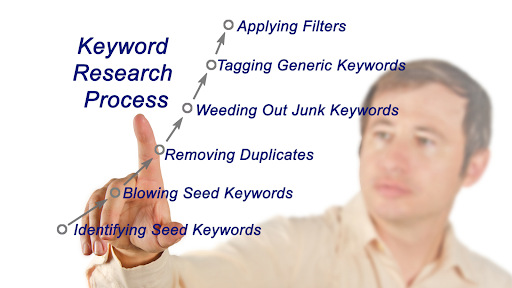
Let’s imagine you’re researching “memory foam pillows.”
Step 1: Seed Keyword Brainstorm
- Start with obvious terms: “memory foam pillow,” “orthopaedic pillow,” “pillow for side sleepers.”
- Use AMZ Suggestion Expander to generate hundreds of variations.
Step 2: Competitor Analysis
- Run Cerebro with top competitors’ ASINs.
- Extract a list of all the keywords they rank for.
- Filter out irrelevant ones.
Step 3: Filter & Prioritise
Use Magnet or Keyword Scout to see search volumes.
Filter by:
- Search volume (min 1,000/month).
- Review count of top competitors (<300 ideal).
- Relevancy (does it fit YOUR product?).
Step 4: Identify Long-Tail Opportunities
- Look for phrases like “best pillow for side sleepers with neck pain.”
- These may have only 500 - 800 searches, but convert at a much higher rate.
Step 5: Organise Keyword List
Group keywords into:
- Primary Keywords: High-volume, highly relevant.
- Secondary Keywords: Supportive, medium-volume.
- Long-Tail Keywords: Low volume, high intent.
- Backend Keywords: Misspellings, synonyms, and less obvious terms.
Using Keywords in Your Listing
It’s not enough to find keywords; you need to use them effectively. Here’s how:
- Title: Put your primary keyword at the beginning. Example:
“Memory Foam Pillow for Side Sleepers- Orthopaedic Support with Washable Cover.” - Bullet Points: Sprinkle in secondary and long-tail keywords naturally.
- Description / A+ Content: Use storytelling, but also weave in keywords for SEO.
- Backend Fields: Add misspellings, alternate spellings, and related terms. Example:
“foam pillow, memory foam pillow, orthopaedic cushion, bed pillow for sleeping.” - Images & Alt Text: Amazon doesn’t directly index alt text, but Google does. Optimise here too.
Common Keyword Research Mistakes (and Fixes)
- Chasing only high-volume keywords
Fix: Balance volume with competition. Sometimes 1,500 searches/month is better than 30,000. - Keyword stuffing
Fix: Write listings for humans first, algorithm second. - Ignoring backend keywords
Fix: Always use backend fields to capture misspellings and synonyms. - One-time keyword research
Fix: Update your keyword list every 2 - 3 months as trends shift.
Amazon Listing Optimisation - Rank Higher, Convert Better
Think of your Amazon listing like a storefront on the busiest street in the world. The title is your shop sign, the images are your window displays, and the bullet points are the salesperson convincing people to step inside. If any part is off, shoppers walk right past to your competitors.
That’s why listing optimisation is where Amazon SEO meets sales psychology. Done right, it boosts visibility, clicks, AND conversions, a triple win.
Why Listing Optimisation Matters
Amazon’s algorithm (A9/A10) doesn’t just look at keywords. It also rewards listings that convert into sales. Here’s the cycle:
- Higher keyword relevancy: More impressions.
- Better click-through rate (CTR): More traffic.
- Strong conversion rate (CVR): More sales.
- Amazon pushes your listing higher in rankings.
This cycle is why listing optimisation = SEO + CRO (Conversion Rate Optimisation).
Elements of an Optimised Amazon Listing
1. Product Title- SEO/E-commerce Tools
Why It Matters: It’s the single most important on-page SEO factor.
Best Practices:
- Put your primary keyword at the beginning.
- Include essential attributes: brand, size, quantity, and use case.
- Stay within character limits (Amazon usually allows 200 characters, but varies by category).
Example:
- “Pillow with Cover”
- “Memory Foam Pillow for Side Sleepers - Orthopaedic Neck Support with Washable Cover”
2. Bullet Points (Key Product Features)
Why They Matter: Most shoppers scan bullet points instead of reading descriptions.
Best Practices:
- Use five bullets (Amazon max).
- Start each with a benefit, not just a feature.
- Insert secondary and long-tail keywords naturally.
- Highlight pain points solved (comfort, durability, ease of use).
Example (for pillow):
- ERGONOMIC DESIGN - Perfect for side sleepers, reduces neck pain.
- PREMIUM MEMORY FOAM - Retains shape for long-lasting comfort.
- BREATHABLE COVER - Machine washable, keeps the pillow fresh.
3. Product Description / A+ Content
Why It Matters: It lets you tell a story and build emotional appeal.
Best Practices:
- Use storytelling: focus on who it helps and why it matters.
- Add keywords naturally (don’t stuff).
- Break text into short paragraphs for easy reading.
Pro Tip: If you’re brand registered, upgrade to A+ Content (Enhanced Brand Content).
- Add comparison charts.
- Showcase lifestyle images.
- Use rich formatting for readability.
4. Product Images
Why They Matter: Images drive CTR and conversions. 90% of buyers say images influence purchase decisions.
Best Practices:
Main Image: White background, product-centred, fills 85% of the frame.
Secondary Images:
-
-
- Lifestyle shots (show product in use).
- Infographics (dimensions, benefits, key features).
- “What’s included” images.
-
Resolution: 1000px minimum (so zoom works).
- Pro Tip: Test images with PickFu or Splitly before finalising.
5. Backend Keywords (Search Terms)
Why They Matter: They help capture misspellings, synonyms, and related terms without cluttering your visible listing.
Best Practices:
Max 249 bytes.
- No repetition of visible keywords.
- Add misspellings, foreign terms, and alternate names.
Example (for pillow): foam cushion, memory foam pillow, neck rest, orthopaedic bed pillow.
6. Pricing Strategy

Why It Matters: Pricing affects both conversion and Amazon SEO (since sales velocity boosts rank).
Best Practices:
- Utilise repricer tools (such as RepricerExpress and Seller Snap) to enhance competitiveness.
- Test psychological pricing (e.g., $29.99 vs. $30).
- Factor in promotions (coupons, lightning deals).
7. Reviews & Ratings
Why They Matter: Social proof makes or breaks trust. Amazon ranks higher listings with better reviews.
Best Practices:
- Use Follow-Up Email Sequences (Helium 10 Follow-Up or FeedbackWhiz) to request reviews.
- Avoid black-hat tactics (incentivised reviews risk suspension).
- Respond to negative reviews professionally.
Pro Tip: If you’re new, use the Vine Program (Amazon invites reviewers to test your product).
8. Q&A Section
Why It Matters: Builds trust and reduces hesitation.
Best Practices:
- Pre-load questions with answers (ask friends/customers to post).
- Answer quickly and in detail.
- Treat it like mini-sales copy.
Advanced Optimisation Tactics
1. Use Split Testing (A/B Testing)
- Tools like Splitly or Manage Your Experiments (Amazon Brand Registry) let you test different titles, images, and A+ content to see which converts better.
2. Leverage Keywords in Images & A+ Content (for Google SEO)
- While Amazon doesn’t index image alt text, Google does. Adding alt text can boost visibility outside Amazon.
3. Video Listings
- Add short product demos or unboxing videos. Video listings outperform non-video ones significantly.
4. Mobile Optimisation
- Over 60% of Amazon traffic is mobile. Keep titles short and bullets scannable for smaller screens.
Common Listing Optimisation Mistakes
- Keyword stuffing in titles → Looks spammy, reduces clicks.
- Low-quality or stock images → Shoppers skip your listing.
- Overfocusing on features → Forgetting to highlight benefits.
- Ignoring backend keywords → Losing traffic from alternate searches.
- “Set it and forget it” approach → Listings need to be updated every few months.
Optimisation Workflow (Step-by-Step)
- Keyword Prep: Gather your keyword list (from Part 3).
- Title First: Place the primary keyword at the front.
- Bullets Second: Weave in long-tails with benefits.
- Description: Tell the product’s story + add secondary keywords.
- Images: Upload 6 - 8 photos + one video if possible.
- Backend Fields: Add misspellings, synonyms, extras.
- Post-Launch Tweaks: Monitor CTR & CVR → adjust title/images as needed.
Amazon PPC & Advertising Tools
Why Advertising is the Engine of Growth on Amazon
Amazon is no longer just an online marketplace; it’s also one of the world’s largest advertising platforms. In fact, Amazon Advertising (Amazon Ads) is now the third-biggest digital ad platform after Google and Facebook.
Why? Because ads on Amazon reach shoppers who are already in buying mode. Unlike Facebook or Instagram, where people are scrolling for fun, Amazon customers are searching with intent: they want to buy.
But here’s the challenge:
- Millions of products compete for the same keywords.
- Ad costs (CPCs) keep rising.
- Campaigns are complex, with Sponsored Products, Sponsored Brands, and Sponsored Display.
This is why Amazon PPC tools are critical. They help sellers:
- Automate keyword bidding.
- Optimise ad spend.
- Identify winning keywords and eliminate waste.
- Improve ACOS (Advertising Cost of Sales) and boost ROI.
Amazon PPC: The Basics You Need to Know
Before diving into tools, let’s quickly recap Amazon’s ad types.
Sponsored Products
- Appear in search results and product detail pages.
- Best for driving visibility for specific products.
Sponsored Brands
- Show at the top of search results with your logo and brand message.
- Great for increasing brand awareness.
Sponsored Display
- Retarget shoppers on Amazon and off-Amazon (partner sites).
- Ideal for remarketing campaigns.
DSP (Demand-Side Platform)
- Programmatic advertising for advanced sellers/brands.
- Let’s target audiences beyond Amazon with data-driven campaigns.
The key to PPC success isn’t just setting up ads. It’s continuous optimisation, and this is where PPC tools come in.
What Amazon PPC Tools Do
Amazon PPC tools are designed to make ad management easier and more profitable. They help with:
- Keyword research: Finding the best converting keywords for ads.
- Bid optimisation: Automatically adjusting bids to save money.
- Negative keyword management: Eliminating unprofitable keywords.
- Campaign automation: Scaling ads without constant manual work.
- Analytics & reporting: Clear insights into ACOS, ROI, and campaign performance.
Top Amazon PPC & Advertising Tools
1. Helium 10 - Adtomic
Adtomic is Helium 10’s PPC automation platform.
- AI-powered bid optimisation for Sponsored Products and Sponsored Brands.
- Pre-built campaign templates (launch, ranking, profit-focused).
- Easy-to-read dashboards for ACOS, TACOS (Total Advertising Cost of Sales), and ROAS (Return on Ad Spend).
- Negative keyword automation.
👉 Best for sellers who already use Helium 10 and want PPC tools integrated with listing/keyword research.
Workflow Example:
- Launch a new product with Adtomic’s “Ranking Campaign Template.”
- Adtomic automatically splits keywords into auto/manual campaigns.
- Adjust bids daily based on conversion performance.
- Monitor TACOS to ensure ads fuel long-term organic growth.
2. PPC Entourage
One of the most popular dedicated PPC management tools.
- Simplifies campaign setup with guided workflows.
- Strong automation for negative keyword harvesting.
- “Bulk optimisation” to adjust multiple campaigns at once.
- Great for analysing wasted ad spend.
👉 Perfect for sellers who want easy campaign setup + powerful optimisation.
3. Sellics (Perpetua)
Sellics merged with Perpetua, creating a powerful PPC automation suite.
- AI-driven bid optimisation.
- Cross-channel support (Amazon + Walmart).
- Customizable campaign goals (growth, profitability, awareness).
- Beautiful, detailed dashboards with real-time reporting.
👉 Ideal for agencies or large sellers managing multiple brands.
4. Zon.Tools
Known for advanced automation rules.
- Uses “AI bid algorithms” to adjust bids 24/7.
- Offers keyword harvesting and negative keyword management.
- Bulk campaign creation and scaling.
- Integrates with Seller Central easily.
👉 Best for hands-off sellers who want PPC automation running in the background.
5. Teikametrics Flywheel 2.0
Flywheel is a data-driven Amazon advertising tool.
- Combines advertising + inventory insights.
- Machine-learning bid optimisation.
- Helps sellers understand profitability beyond ACOS (margins, seasonality).
- Integrates with Walmart Ads, too.
👉 Great for sellers who want profitability-focused advertising.
6. Quartile
One of the largest PPC platforms managing billions in ad spend.
- AI-powered full automation.
- Handles Sponsored Products, Brands, Display, and DSP.
- Custom strategies for aggressive scaling.
- 24/7 automation + expert account management.
👉 Perfect for 7-figure sellers and brands who want scale + automation.
Real-World Amazon PPC Workflow (Step by Step)
Let’s walk through a practical workflow using Helium 10 Adtomic + PPC Entourage.
Step 1: Research Keywords
- Use Helium 10’s Magnet to find high-volume keywords.
- Use Cerebro (reverse ASIN lookup) to see competitor keywords.
Step 2: Launch Auto Campaigns
- Start with an Auto Campaign to let Amazon find converting keywords.
- Run for 7 - 14 days to collect data.
Step 3: Harvest Keywords
- From the auto campaign, move converting keywords → Manual Campaigns.
- Add negative keywords for poor performers.
Step 4: Set Campaign Goals
- “Ranking Campaigns” → higher bids for the launch phase.
- “Profit Campaigns” → reduce bids for long-term ROI.
Step 5: Automate Bids
- Use Adtomic or PPC Entourage to adjust bids daily.
- Set rules: e.g., lower bids if ACOS > 40%, increase if ACOS < 20%.
Step 6: Monitor & Optimise
- Check TACOS (Total ACOS = Ads + Organic Sales).
- Aim for 10 - 15% TACOS for healthy growth.
- If TACOS rises too high → review ad efficiency.
Step 7: Scale Winning Campaigns
- Increase budget for keywords with low ACOS & high conversions.
- Test Sponsored Brands and Display ads to expand reach.
Best Practices for Amazon PPC
- Start small → Launch with auto campaigns, then expand.
- Track TACOS, not just ACOS → Ads should boost organic sales.
- Use negative keywords aggressively → Save ad spend.
- Test ad types → Don’t rely only on Sponsored Products.
- Use dayparting (time-based bidding) → Spend when customers shop.
- Don’t “set and forget” → Ads need ongoing optimisation.
Common Amazon PPC Mistakes (to Avoid)
- Bidding too high on every keyword → Bleeds profits fast.
- Ignoring negative keywords → Wastes budget on irrelevant clicks.
- Chasing low ACOS only → Sometimes, a higher ACOS is fine if it boosts organic rank.
- Not tracking TACOS → You may look profitable, but lose money overall.
- Stopping ads too soon → PPC takes time to collect meaningful data.
Review & Reputation Management Tools
Why Reviews Are the Lifeblood of Amazon Success
Imagine you’re shopping on Amazon for a pair of wireless earbuds. You see two products:
- Product A: 1,500 reviews, 4.5-star rating.
- Product B: 15 reviews, 4.0-star rating.
Which one would you pick? Almost everyone chooses Product A, even if it costs a few dollars more.
That’s the power of reviews. On Amazon, they are:
- Social proof: Reviews build trust with shoppers who can’t see or touch the product.
- Ranking signals: Amazon’s algorithm favours listings with higher review counts and ratings.
- Conversion boosters: More positive reviews = higher conversion rates.
Studies show:
- 90% of shoppers read reviews before buying.
- Products with 50+ reviews convert at least 3x better than those with fewer.
- Negative reviews, even a few, can tank sales by 20% or more.
This means reviews aren’t just “nice to have.” They’re the currency of Amazon’s success.
The Challenges of Review Management
But here’s the hard truth: reviews are not easy to manage. Sellers often struggle with:
- Amazon’s strict policies: You can’t incentivise reviews with discounts, gifts, or free products. Break the rules, and your account could be suspended.
- Getting enough reviews: With rising competition, standing out with just a handful of reviews is nearly impossible.
- Dealing with negative reviews: Even one harsh 1-star review can sink a product’s credibility.
- Scaling reputation across products: If you sell multiple products, tracking reviews manually is overwhelming.
This is where review & reputation management tools come in.
What Review Management Tools Actually Do
These tools take the headache out of managing reviews by:
- Automating review requests → Within Amazon’s Terms of Service (TOS).
- Monitoring reviews in real time → Instant alerts when new reviews (positive or negative) appear.
- Tracking seller feedback → Beyond product reviews, they track your overall seller rating.
- Analysing sentiment trends → Spot recurring complaints or praise to improve products.
- Managing communication → Some tools help send polite, automated messages to buyers.
Instead of spending hours refreshing your Seller Central dashboard, you get organised and automated workflows.
Top Review & Reputation Management Tools for Amazon
Let’s break down the best tools sellers actually use, their features, strengths, and who they’re best for.
1. FeedbackWhiz
FeedbackWhiz is a powerful all-in-one feedback and review management platform.
Key Features:
- Automates review requests with customizable templates.
- Sends instant notifications when you receive a negative review.
- Tracks product reviews and seller feedback separately.
- Provides analytics dashboards to spot review trends.
Best For:
Sellers who want a centralised dashboard to monitor reviews across multiple products.
Example Workflow:
- Set up FeedbackWhiz to send an automated “Request a Review” message 7 days after delivery.
- If a 1-star review appears, FeedbackWhiz immediately notifies you.
- You then reach out to the customer (within TOS) to resolve the issue.
2. FeedbackFive (by eComEngine)
One of the oldest and most trusted review tools.
Key Features:
- Automates requests using Amazon’s official “Request a Review” button.
- Monitors ASIN-level reviews with historical data.
- Sends daily or real-time review alerts.
- Allows scheduling of review request timing (e.g., after delivery).
Best For:
Sellers who want a straightforward, proven solution with compliance guaranteed.
3. Helium 10 Follow-Up
Part of the Helium 10 suite, this tool integrates review requests with your other seller workflows.
Key Features:
- Automates “Request a Review” with advanced triggers (e.g., delivered orders only).
- Tracks the success rate of review requests.
- Fully compliant with Amazon policies.
- Works seamlessly if you’re already using Helium 10 for SEO & PPC.
Best For:
Sellers are already invested in the Helium 10 ecosystem.
4. AMZFinder
A tool popular among international sellers.
Key Features:
- Automated review and feedback requests.
- Real-time review monitoring across multiple marketplaces.
- Invoice generation for Amazon orders.
- Email alerts for negative reviews.
Best For:
Global sellers managing products across Amazon US, UK, EU, etc.
5. SellerLabs Feedback Genius
One of the most customizable review request tools.
Key Features:
- Automates personalised review emails.
- Sends alerts for new reviews.
- Deep customisation options (personalisation tags, timing, language).
- Strong analytics for campaign performance.
Best For:
- Sellers who want to personalise buyer communication beyond basic templates.
- Real-World Workflow for Review Management
Here’s how a seller could set up a review strategy using these tools:
Step 1: Automate Review Requests
- Use Helium 10 Follow-Up to request reviews automatically 5 - 7 days after delivery.
- Keep the message short and neutral to stay compliant.
Step 2: Monitor Reviews
- Use FeedbackWhiz to get alerts when a review comes in.
- Prioritise negative reviews for quick response.
Step 3: Respond to Negative Reviews
- If a customer leaves a 1-star review about “defective packaging,” reply publicly with empathy.
Example: “We’re so sorry about the packaging issue. We’ve improved it, and our team will send a replacement immediately.” - This shows future shoppers that you care about customer service.
Step 4: Analyse Review Trends
- With FeedbackFive, run reports monthly.
- If 20% of reviews mention “battery life too short,” you know it’s time to fix the product.
Step 5: Protect Your Brand
- Track seller feedback scores (separate from product reviews).
- Aim for a 98%+ positive seller rating to stay competitive in Buy Box eligibility.
Best Practices for Amazon Review Management
- Stay 100% compliant: Never offer incentives, discounts, or freebies in exchange for reviews.
- Use the “Request a Review” button: Safe, simple, and effective (tools can automate this).
- Request reviews at the right time: 5 - 7 days after delivery is usually best.
- Respond to negative reviews quickly: Show you care and provide solutions.
- Leverage reviews for SEO: Positive keywords in reviews help boost listing visibility.
Common Mistakes Sellers Make
- Begging for 5-star reviews: Against Amazon’s rules and risky.
- Ignoring negative reviews: They’ll scare away buyers if unanswered.
- Not analysing reviews: You’re missing insights to improve your products.
- Sending too many requests: Can annoy buyers and lead to complaints.
Case Study: How Review Management Boosted Sales
Seller A launched a kitchen gadget with just 20 reviews. Sales were slow, despite strong PPC campaigns.
They implemented this strategy:
- Used FeedbackFive to automate review requests.
- Monitored reviews daily with FeedbackWhiz.
- Improved packaging based on customer complaints.
Within 3 months:
- Reviews jumped from 20 → 250.
- Average rating improved from 4.0 → 4.6.
- Conversion rate increased by 35%, leading to a higher organic ranking.
👉 Lesson: Reviews fuel both sales and SEO.
Why Reputation Management Goes Beyond Reviews
Reviews are crucial, but your overall reputation as a seller matters too. Amazon evaluates:
- Seller feedback score: Impacts Buy Box eligibility.
- Customer service performance: Response time to customer queries.
- Order defect rate: Returns, refunds, and complaints.
Using review & reputation tools ensures you stay on top of these metrics while focusing on growth.
Quick SEO Takeaway
Reviews are the heartbeat of Amazon SEO and conversions. With the right review management tools (FeedbackWhiz, FeedbackFive, Helium 10 Follow-Up), you can:
- Automate review collection.
Protect your brand reputation. - Improve products based on customer feedback.
Build trust that drives long-term growth.
In short: Reviews don’t just drive sales today, they build the brand credibility that fuels tomorrow.
Inventory & Profitability Tools
Why Inventory & Profitability Management is the Heart of Amazon’s Success
Many sellers focus on keywords, ads, and flashy branding, but forget the basics:
- Inventory control: If you run out of stock, Amazon buries your rankings.
- Profit tracking: Sales mean nothing if fees and costs eat your margins.
Think of it this way: SEO brings traffic, PPC brings clicks, but inventory and profitability tools keep your business alive.
Without them:
- You might oversell and get hit with penalties.
- Stockouts could ruin your rankings overnight.
- Miscalculating fees could mean selling at a loss without realising it.
That’s why top Amazon sellers rely on inventory + profitability tools to keep their operations smooth and sustainable.
What Inventory & Profitability Tools Actually Do
These tools help sellers:
- Forecast demand: Predict how much stock you’ll need to avoid stockouts.
- Track profitability: Calculate net profit after Amazon fees, shipping, and ads.
- Automate restocking alerts: Get notified before inventory runs too low.
- Prevent overstocking: Avoid tying up cash in excess inventory.
- Monitor cash flow: See real-time revenue, costs, and net margins.
- Connect suppliers: Simplify purchase orders and lead times.
Top Inventory & Profitability Tools for Amazon Sellers
Here’s a breakdown of the most powerful tools to keep your Amazon business profitable and stocked.
1. Helium 10 Profits + Inventory Protector
Helium 10 isn’t just for SEO; it also has profit-tracking and inventory features.
- Profits Dashboard: Real-time view of sales, revenue, and net profits.
- Inventory Protector: Prevents coupon abuse (buyers can’t buy 500 units at $1).
- Alerts: Notifications for low inventory and suspicious activity.
Best For: Sellers who want one tool for keywords, ads, and profits.
2. Jungle Scout Inventory Manager
Jungle Scout shines when it comes to inventory forecasting.
- AI-powered demand forecasting.
- Restock suggestions based on sales velocity.
- Integration with supplier lead times.
- Calculates reorder dates to avoid stockouts.
Best For: Sellers who struggle with inventory planning.
3. SoStocked
Built specifically for Amazon inventory management.
- Tracks inventory across multiple marketplaces.
- Custom restocking formulas (based on lead times, seasonality, promos).
- Tracks storage fees (FBA long-term fees, overstock penalties).
- PO (Purchase Order) management is built in.
Best For: Medium-to-large sellers with complex supply chains.
4. Sellerboard
A profitability powerhouse.
- Profit & loss dashboard updated in real-time.
- Tracks PPC costs, refunds, storage fees, and hidden costs.
- Automates restock alerts.
- Can track across multiple marketplaces.
Best For: Sellers who want profit-first tracking.
5. RestockPro
A tool by eComEngine, loved by multi-channel sellers.
- Restocking recommendations.
- Works with Amazon FBA and FBM.
- Manages shipments, suppliers, and purchase orders.
- Advanced inventory forecasting for seasonal products.
Best For: Sellers who juggle multiple suppliers and SKUs.
6. Fetcher
A lightweight profit analytics tool.
- Tracks net margins, ROI, and ad costs.
- Shows which products are actually profitable.
- Helps with cash flow insights.
Best For: Beginners who want simple profit tracking.
7. Skubana
Enterprise-level inventory + profitability solution.
- Centralises inventory across Amazon, Shopify, Walmart, and eBay.
- Real-time profit analytics.
- Automates purchase orders and reorders.
- Predictive forecasting for large catalogue sellers.
Best For: Large brands scaling across multiple marketplaces.
Real-World Workflow: Managing Inventory & Profits
Here’s how a 6-figure Amazon seller might use these tools in practice.
Step 1: Track Real-Time Profits
- Use Sellerboard or Helium 10 Profits.
- See how much net profit you’re making after fees, PPC, and storage costs.
- Example: Product shows $10,000 in revenue but only $2,500 net profit due to ads + storage fees → time to adjust ad strategy.
Step 2: Forecast Demand
- Plug sales history into Jungle Scout Inventory Manager or SoStocked.
- The tool predicts how many units you’ll sell next month.
- It then suggests a reorder date (e.g., “Order 500 units by Oct 10 to avoid stockout”).
Step 3: Create Purchase Orders
- Use SoStocked or RestockPro to send automated purchase orders to suppliers.
- Factor in lead times (e.g., 30 days manufacturing + 15 days shipping).
- Avoids last-minute panic orders.
Step 4: Prevent Stockouts & Overstocking
- Enable alerts in Helium 10 or Sellerboard.
- Example: Get notified when stock hits 200 units → trigger reorder.
- Avoid Amazon’s long-term storage fees by tracking excess inventory.
Step 5: Monitor Cash Flow & ROI
- Use Fetcher or Sellerboard for profit per product.
- Example:
- Product A → $15 profit per unit, 30% margin.
- Product B → $2 profit per unit, 5% margin (not worth scaling).
- Helps sellers double down on winners and cut losers.
Best Practices for Inventory & Profit Management
- Always plan for lead times - If your supplier takes 60 days, reorder early.
- Track hidden costs - Storage, refunds, and PPC often eat margins.
- Don’t overstock - Too much inventory ties up cash flow and racks up storage fees.
- Prioritise profit over revenue - A $100K revenue business with 5% margins is worse than a $50K business with 30% margins.
- Use multiple tools - Profit tracking + inventory forecasting work best together.
Common Mistakes Sellers Make
- Only focusing on sales revenue → High revenue can hide razor-thin margins.
- Ignoring seasonality → Not stocking up before holidays = missed sales.
- Manual spreadsheets → Prone to errors and delays.
- Reordering too late → Losing your BSR (Best Seller Rank) due to stockouts can take months to recover.
- Overbuying → Locking cash into slow-moving inventory drains resources.
Case Study: Avoiding Stockouts During Q4
Seller C sells kitchen gadgets and often runs out of stock during Christmas.
Strategy Used:
- Used Jungle Scout Inventory Manager to analyse Q4 sales velocity.
- Set reorder alerts 90 days ahead.
- Coordinated with suppliers using SoStocked’s PO system.
- Tracked profits with Sellerboard to avoid overspending on ads.
Results:
- No stockouts during Q4.
- Increased sales by 40% YoY.
- Maintained high BSR (instead of losing it to competitors).
👉 Lesson: Smart inventory planning = more sales AND stronger long-term rankings.
Why These Tools Are Essential for Scaling
As you grow, managing hundreds or thousands of units across multiple products becomes impossible without automation.
Inventory & profitability tools help sellers:
- Scale without chaos.
- Free up mental energy for growth (instead of firefighting).
- Keep profits healthy while expanding product lines.
Think of them as the accounting + operations department for your Amazon business.
Quick SEO Takeaway
Inventory & profitability tools like Jungle Scout Inventory Manager, SoStocked, Sellerboard, and Helium 10 Profits are the lifeline of Amazon sellers.
They help you:
- Avoid stockouts and lost rankings.
- Prevent overstock and wasted storage fees.
- Track true profits after Amazon fees.
- Automate reorders and purchase orders
Remember: On Amazon, inventory = visibility, and profit = survival
Part 9: Review & Reputation Management Tools
Why Reviews Are the Lifeblood of Amazon Success
Here’s the reality: On Amazon, reviews are the currency of trust.
- 95% of shoppers read reviews before making a purchase.
- A product with 4.5 stars and 500 reviews will almost always outsell a 5-star product with only 10 reviews.
- Reviews influence organic rankings, PPC conversions, and brand reputation.
But managing reviews isn’t easy:
- Negative reviews can tank your product overnight.
- Fake reviews (positive or negative) can distort competition.
- Getting reviews under Amazon’s strict policies is tricky.
That’s where review & reputation management tools come in.
They help sellers request, monitor, analyse, and respond to reviews, while staying compliant with Amazon’s terms of service.
What Review & Reputation Management Tools Do
These tools give sellers control over their product feedback and brand reputation. They allow you to:
- Automate review requests → Stay compliant with Amazon’s “Request a Review” button.
- Monitor new reviews instantly → Get alerts when you receive positive or negative feedback.
- Analyse customer sentiment → Spot trends in complaints and praises.
- Track seller feedback → Monitor account health beyond product reviews.
- Identify fake or malicious reviews → Report them to Amazon for removal.
- Improve product development → Use reviews as real-world customer research.
Top Review & Reputation Management Tools for Amazon Sellers
Here are the top platforms that serious Amazon sellers use to keep reviews healthy.
1. FeedbackWhiz
One of the most popular review management platforms.
- Automates review request emails within Amazon’s rules.
- Tracks reviews and seller feedback in real time.
- Provides sentiment analysis to highlight recurring complaints.
- Customizable dashboards to see review trends across products.
Best For: Sellers who want automation + customer insights.
2. Helium 10 - Follow-Up
Part of the Helium 10 suite, focused on review requests.
- Automates review requests at the right time (post-delivery).
- Pre-built templates compliant with Amazon.
- Works with both FBM and FBA orders.
- Integrates into your overall Amazon growth system.
Best For: Sellers already using Helium 10 for SEO, PPC, and profits.
3. Jungle Scout Review Automation
Jungle Scout’s built-in tool for sellers.
- Sends automated review requests on every order.
- Requires zero manual clicking of the “Request a Review” button.
- Tracks review growth over time.
Best For: Sellers who already use Jungle Scout for research + inventory.
4. AMZFinder
Affordable review management tool.
- Automates review and feedback requests.
- Real-time alerts for new reviews.
- Central dashboard to monitor multiple marketplaces.
Best For: Beginners and small sellers on a budget.
5. SellerApp Feedback & Review Management
All-in-one platform with strong reputation tools.
- Automated review requests.
- Seller feedback monitoring.
- Sentiment analysis to track product reputation.
- Helps identify fake reviews.
Best For: Sellers who want data-driven review analysis.
6. FeedbackFive by eComEngine
Trusted Amazon feedback tool since 2009.
- Fully compliant automated review requests.
- Instant alerts for negative reviews.
- Analytics for review trends across products.
- Multi-store and multi-country support.
Best For: Established sellers who value long-term credibility.
7. Trustpilot / Yotpo (for external reputation)
While not Amazon-only, these tools help manage off-Amazon reviews.
- Collects customer reviews on websites, email, and social.
- Boosts brand credibility outside Amazon.
- Helps sellers build trust for D2C (Direct-to-Consumer) expansion.
Best For: Brands selling on Amazon + own websites.
Real-World Workflow: Managing Reviews Like a Pro
Here’s how an Amazon seller might use these tools step by step.
Step 1: Automate Review Requests
- Use Helium 10 Follow-Up or Jungle Scout Review Automation.
- Set up auto-requests right after delivery.
- Amazon handles the message → no risk of policy violations.
Step 2: Monitor Reviews in Real Time
- Use FeedbackWhiz or FeedbackFive for instant alerts.
- Example: If a buyer leaves a 1-star review, you get notified instantly.
- Respond quickly → either solve the issue or politely engage via customer service.
Step 3: Analyze Customer Sentiment
- Tools like SellerApp or FeedbackWhiz analyse words in reviews.
- Example: If 30% of reviews mention “battery life,” that’s a weakness to fix.
- Feed insights back into product development and listing optimisation.
Step 4: Protect Against Fake Reviews
- Use SellerApp or manual monitoring to detect suspicious patterns (e.g., sudden 10 negative reviews in 24 hours).
- Report them to Amazon Seller Central → often they remove malicious reviews.
Step 5: Leverage Positive Reviews
- Highlight great reviews in product images (Amazon allows “social proof” text).
- Use reviews in A+ Content (quote real customer feedback).
- Run the Amazon Vine Program for new products to build credibility faster.
Best Practices for Review & Reputation Management
- Always follow Amazon’s rules → Never offer discounts, refunds, or gifts in exchange for reviews.
- Request reviews at scale → Automate to maximise review count legally.
- Respond to negative reviews quickly → Show buyers (and Amazon) that you care.
- Use reviews as product research → Improve your next launch with feedback data.
- Balance product & seller feedback → Both affect your account health.
Common Mistakes Sellers Make
- Begging for reviews manually → Wastes time and risks policy violations.
- Ignoring reviews for weeks → Negative reviews left unanswered hurt trust.
- Panicking over one 1-star review → Focus on overall ratings, not single outliers.
- Relying on fake review farms → Amazon bans accounts for this.
- Not tracking competitor reviews → Rivals’ reviews reveal market opportunities too.
Case Study: Turning Negative Reviews Into Growth
Seller D launched a portable blender but was hit with multiple 2-star reviews complaining about charging issues.
Strategy Used:
- Used FeedbackWhiz alerts to spot negative reviews early.
- Contacted customers through official Amazon support channels to resolve complaints.
- Updated product listing to clarify charging instructions.
- Used review insights to improve the next manufacturing batch.
Results:
- Rating improved from 3.8 → 4.4 stars in 3 months.
- Sales doubled after regaining shopper trust.
- The seller built a reputation for excellent customer service.
Lesson: Reviews aren’t just ratings; they’re opportunities for better branding.
Why Review Tools Are Non-Negotiable for Scaling
As your business grows, reviews become harder to manage manually.
Review & reputation management tools help you:
- Automate feedback collection.
- Protect your brand from malicious attacks.
- Use customer feedback to improve your products.
- Build long-term trust with shoppers.
In other words: Reviews = Rankings = Revenue. Managing them well is a growth multiplier.
Quick SEO Takeaway
Review & reputation management tools like FeedbackWhiz, Helium 10 Follow-Up, Jungle Scout Automation, and FeedbackFive are essential for:
- Collecting reviews automatically (Amazon-compliant).
- Monitoring feedback in real time.
- Protecting against fake or malicious reviews.
- Turning customer sentiment into product improvements.
Remember: On Amazon, reviews aren’t optional; they’re survival.
Analytics & Reporting Tools
Why Analytics is the GPS of Your Amazon Business
Think of your Amazon business as a car.
- SEO is the fuel.
- PPC ads are the engine.
- Inventory management is the tyres.
- But without analytics, you’re driving blind.
Amazon gives sellers a mountain of raw data (traffic, sales, conversion, ad spend). But if you don’t interpret it correctly, you risk:
- Overspending on ads that don’t convert.
- Missing profitable keywords.
- Misjudging your best-performing products.
- Losing money on hidden Amazon fees.
That’s why analytics & reporting tools exist: they transform raw numbers into actionable insights.
What Analytics & Reporting Tools Do
These tools help sellers:
- Track key metrics (KPIs): Sales, conversion rates, ACoS (Advertising Cost of Sales), TACoS (Total Advertising Cost of Sales).
- Identify best & worst performers: Know which products are driving profits.
- Measure keyword performance: See which keywords generate revenue.
- Monitor PPC ROI: Track spend vs. sales to optimise ads.
- Consolidate data: Pull data from multiple marketplaces (Amazon US, UK, DE, etc.).
- Custom reports: Create dashboards for quick decision-making.
Top Analytics & Reporting Tools for Amazon Sellers
Here are the leading platforms that help sellers stay on top of their numbers.
1. Amazon Brand Analytics (ABA), Free for Brand-Registered Sellers
Amazon itself provides powerful analytics.
- Search Term Report: Shows top customer search terms and click share.
- Market Basket Analysis: Tells you which products are often bought together.
- Demographics Report: Buyer age, gender, and income insights.
- Item Comparison Report: See what products shoppers considered instead of yours.
Brand-registered sellers who want free first-party data.
2. Helium 10 - Profits & Analytics Suite
Helium 10 isn’t just for keyword research; its analytics suite is strong.
- Real-time profit dashboards (after fees & ads).
- PPC performance tracking (ACoS, TACoS).
- Keyword tracking to monitor ranking changes.
- Historical trends to spot seasonality.
Best For: Sellers who want all-in-one analytics + SEO + PPC insights.
3. Jungle Scout Sales Analytics
Jungle Scout simplifies reporting for sellers.
- Tracks revenue, costs, and net profits.
- Visualises sales trends across products.
- Breaks down Amazon fees (storage, fulfilment, referral).
- Multi-product dashboards.
Best For: Sellers who want simple but clear reporting.
4. SellerApp Analytics Dashboard
Data-heavy platform with advanced insights.
- Keyword performance tracking (organic + PPC).
- AI-powered ad spend optimisation.
- Share of Voice reporting- See your visibility vs. competitors.
- Conversion rate analysis by keyword.
Best For: Sellers scaling with PPC-heavy strategies.
5. DataHawk
Enterprise-level analytics platform.
- Combines SEO, ads, and finance data.
- Product sales performance dashboards.
- Market intelligence reports (competitors, category trends).
- Custom reporting for large teams.
Best For: Growing brands managing multiple marketplaces & large catalogues.
6. Sellics (now Perpetua)
Known for PPC and profit analytics.
- Tracks ad spend efficiency across campaigns.
- Breaks down sales by organic vs. paid.
- Profit margin analysis (after PPC).
- Automated reporting to stakeholders.
Best For: Brands focused on PPC-driven growth.
7. ManageByStats
A veteran Amazon analytics tool.
- Sales & profit dashboards.
- Customer database analysis.
- KPI tracking (sessions, conversion, ROI).
- Custom exports for accountants.
Best For: Sellers who need detailed financial reporting.
Real-World Workflow: Using Analytics for Growth
Here’s how a seller might use analytics & reporting tools step by step.
Step 1: Track Sales & Profits Daily
- Use Helium 10 Profits or Jungle Scout Sales Analytics.
- Example: See yesterday’s sales → $8,000 revenue, $2,500 net profit.
- Identify hidden costs (ads + storage fees eating into margins).
Step 2: Analyse Keyword Performance
- Use Amazon Brand Analytics or SellerApp.
- Example: Discover that your ad spend on “wireless earbuds” has 200 clicks but zero conversions.
- Decision: Cut spend → reallocate to “Bluetooth gym earbuds” (higher conversions).
Step 3: Monitor PPC ROI
- Use Sellics / Perpetua.
- Track ACoS (Advertising Cost of Sales) and TACoS.
- Example: ACoS = 40% (too high), TACoS = 10% (healthy).
- Decision: Reduce spend on low-ROI ads.
Step 4: Spot Competitor Trends
- Use DataHawk or SellerApp Share of Voice reports.
- Example: Competitor gained 5% more visibility for your main keyword.
- Action: Optimise listing images & test PPC campaigns.
Step 5: Forecast Future Sales
- Use Jungle Scout or DataHawk trend analysis.
- Example: Sales spike every December (holiday season).
- Decision: Increase inventory orders in October to meet demand.
Best Practices for Amazon Analytics
- Focus on the right KPIs → Sales, profit, ACoS, TACoS, conversion rate.
- Combine first-party + third-party data → Amazon Brand Analytics + external tools.
- Check trends weekly, not hourly → Avoid overreacting to daily fluctuations.
- Segment reports by product → Don’t lump all products together; winners/losses vary.
- Use dashboards for decision-making → Don’t drown in spreadsheets.
Common Mistakes Sellers Make
- Obsessing over revenue only → Revenue without profit is a vanity metric.
- Not separating organic vs. paid sales → You might be “buying” sales instead of earning them.
- Ignoring TACoS → ACoS shows ad efficiency, but TACoS shows long-term profitability.
- Relying only on Amazon reports → They’re good, but third-party tools add competitive insights.
- Not acting on data → Data without action is wasted potential.
Case Study: Boosting Profits with Analytics
Seller E sold pet supplies but struggled with shrinking profits despite strong revenue.
Strategy Used:
- Used Helium 10 Profits → Found PPC spend was eating 35% of revenue.
- Switched to Sellics to optimise ad spend.
- Used Amazon Brand Analytics to find high-converting long-tail keywords.
- Cut low-performing ads and doubled down on profitable campaigns.
Results:
- Revenue stayed steady, but profits jumped +22% in 60 days.
- TACoS dropped from 18% → 9%.
- Seller finally scaled sustainably instead of “chasing sales.”
Lesson: Analytics revealed the problem wasn’t sales- it was profit leakage from ads.
Why Analytics & Reporting Tools Are a Growth Multiplier
Without analytics, you’re guessing. With analytics, you’re strategising.
They help you:
- See what’s really making money.
- Cut wasted ad spend.
- Anticipate demand shifts.
- Benchmark against competitors.
- Build a scalable, profitable business.
Analytics = the GPS that keeps your Amazon business from crashing.
Quick SEO Takeaway
Analytics & reporting tools like Amazon Brand Analytics, Helium 10, Jungle Scout, SellerApp, and Sellics turn raw data into clear, profitable decisions.
They help sellers:
- Track real profits (not just revenue).
- Optimise PPC campaigns.
- Monitor competitor visibility.
- Forecast future demand.
Remember: On Amazon, data is the edge. Sellers who master analytics win in the long term.
Part 11: International Expansion Tools
Why Selling Internationally is a Game-Changer
If you’re only selling in your home Amazon marketplace, you’re leaving money on the table. Amazon operates in 20+ marketplaces worldwide (US, UK, Germany, Japan, India, UAE, and more).
Here’s why expanding matters:
- Bigger customer base → Millions of shoppers you’re not reaching yet.
- Diversified revenue → Reduce dependency on one market.
- Growth potential → Some regions (like Amazon India & UAE) are growing faster than the US.
But… going international isn’t as simple as clicking “sell worldwide.” You need to manage:
- Currency conversions.
- Tax and VAT compliance.
- Language & cultural localisation.
- Cross-border shipping & logistics.
That’s where international expansion tools come in, they make the process smoother, faster, and legally compliant.
Key Challenges in Global Amazon Selling
Before diving into tools, here are the hurdles sellers face:
Currency & Payments
- Amazon pays in the marketplace’s local currency.
- Exchange rates & transfer fees can eat into profits.
Taxes & Compliance
- Europe requires VAT registration.
- Each country has unique tax laws.
Language Barriers
- Listings must be translated accurately.
- Cultural nuances affect conversion rates.
Shipping & Logistics
- Customs clearance.
- Import duties.
- Longer delivery times.
Market Research
- Demand varies by region.
- Competitors may dominate certain niches.
👉 Without the right tools, these challenges can turn expansion into a nightmare.
Best Tools for International Amazon Expansion
Here’s the toolkit sellers use to go global without headaches.
1. Amazon Global Selling (AGS) - Official Amazon Program
Amazon itself offers tools to help you expand.
- List products worldwide from one Seller Central account.
- Currency conversion → Amazon transfers payments in your local currency.
- FBA Export → Amazon ships your products to global customers.
- VAT Services (for EU sellers).
Best For: Beginners wanting a direct route into global markets.
2. Payoneer - Global Payment Solution
Amazon may pay you in different currencies. Payoneer simplifies it.
- Receive Amazon payouts in local currency accounts.
- Convert at lower fees than traditional banks.
- Withdraw in your home currency.
- Supports 200+ countries.
Best For: Sellers who want to save money on cross-border payments.
3. WorldFirst - Multi-Currency Accounts
Similar to Payoneer, but popular among Amazon EU & Asia sellers.
- Get local receiving accounts in USD, GBP, EUR, JPY, etc.
- Lower FX (foreign exchange) fees.
- Connect to multiple Amazon marketplaces.
Best For: Sellers with multi-region operations.
4. Avalara - Tax Compliance Tool
Tax laws abroad = headache. Avalara automates it.
- VAT/GST registration & filing.
- Calculates duties & import taxes.
- Integrates with Amazon Seller Central.
- Works across 50+ countries.
Best For: Sellers entering Europe & other VAT-heavy regions.
5. TaxJar- SEO/E-commerce Tools
A strong alternative for US + international sellers.
- Automated tax calculations.
- Simplifies VAT & sales tax compliance.
- Filing services for multiple states/countries.
Best For: Sellers managing both US sales tax + international VAT.
6. GlobePay & OFX - FX & Payment Optimization
Both tools help reduce fees when receiving money internationally.
- Competitive currency exchange rates.
- Lower transfer costs than Amazon’s built-in conversion.
- Faster payouts.
Best For: Sellers frustrated with Amazon’s currency conversion fees.
7. TransPerfect / AMZ Translate - Localization Services
Selling in Germany, Japan, or France? Translation is key.
- Human + AI-powered translation.
- Optimised for Amazon SEO in local languages.
- Cultural adaptation (not just word-for-word).
Best For: Sellers targeting non-English-speaking countries.
8. Jungle Scout Global Market Finder
Research tool for global demand.
- Shows which Amazon marketplaces have demand for your product.
- Competitive analysis across regions.
- Trend tracking by country.
Best For: Sellers unsure which country to expand into first.
9. Zonos - Cross-Border Shipping & Duties
Handles international shipping complexity.
- Duty & tax calculation.
- Customs compliance.
- Real-time landed cost estimates.
Best For: Sellers shipping outside Amazon FBA Export.
10. Webinterpret - End-to-End Expansion Tool
All-in-one solution for global selling.
- Automatic translation of listings.
- Localized pricing in each currency.
- Tax & duties compliance.
- Marketing support in new regions.
Best For: Sellers who want a hands-off international setup.
Real-World Workflow: Expanding Internationally with Tools
Here’s how a seller might use these tools step by step.
Step 1: Market Research
- Use Jungle Scout Global Market Finder.
- Example: Discover that “eco-friendly water bottles” have strong demand in Germany.
Step 2: Payment Setup
- Open a Payoneer or WorldFirst account.
- Receive payouts in EUR → convert to USD at lower fees.
Step 3: Tax Compliance- SEO/E-commerce Tools
- Register for EU VAT via Avalara.
- Automate filing every quarter.
Step 4: Localize Listings
- Use TransPerfect / AMZ Translate.
- Translate product titles + descriptions into German with local keywords.
Step 5: Shipping & Logistics
- Enroll in Amazon FBA Export OR use Zonos for custom cross-border shipping.
Step 6: Scale Efficiently
- Monitor payments with OFX / GlobePay.
- Expand into the next country using the same workflow.
Best Practices for Global Amazon Sellers
- Start with one region at a time → Don’t expand everywhere at once.
- Always register for taxes before selling → Avoid penalties later.
- Don’t rely on Google Translate → Poor translations kill conversions.
- Watch shipping times → Customers won’t wait 30 days.
- Price competitively → Consider duties + VAT in final price.
Common Mistakes Sellers Make
- Expanding without research → Not every product sells well globally.
- Ignoring currency fees → Amazon’s conversion fees eat profits silently.
- Overlooking VAT → Fines can shut down your account.
- Copy-pasting English listings → Customers won’t trust poorly translated text.
- Expanding too fast → It’s better to dominate one region before jumping to five.
Case Study: Scaling with International Expansion Tools
Seller F was doing well selling kitchen gadgets in the US, but wanted to expand to Europe.
Strategy Used:
- Used Jungle Scout Global Market Finder → Found strong demand in Germany.
- Opened a WorldFirst account → Saved 2% on FX fees.
- Registered for EU VAT via Avalara.
- Localised listings with TransPerfect translations.
- Used Amazon FBA Export for logistics.
Results:
- Entered Germany & UK within 6 months.
- Revenue grew +45% year-over-year.
- Saved $12,000 annually in currency conversion fees.
👉 Lesson: Expansion success = research + compliance + localization + efficient payments.
Why International Expansion Tools Are Essential
Expanding globally on Amazon is a huge opportunity, but without tools, it’s a maze of taxes, currencies, and logistics.
These tools help sellers:
- Simplify tax & VAT compliance.
- Reduce hidden costs in payments.
- Reach customers in their local language.
- Navigate customs & shipping with ease.
Going international doesn’t have to be overwhelming; the right tools make it profitable and scalable.
Quick SEO Takeaway
International expansion tools like Payoneer, Avalara, WorldFirst, Jungle Scout Global Market Finder, and Webinterpret help Amazon sellers:
- Handle cross-border payments.
- Stay tax compliant.
- Translate listings for local SEO.
- Ship globally with fewer headaches.
With these in your toolkit, scaling beyond your home market becomes a realistic path to long-term growth.
Amazon Business Automation Tools

Why Automation is the Secret Weapon for Amazon Sellers
Running an Amazon business sounds exciting, until you’re buried under endless tasks:
- Manually adjusting prices.
- Responding to reviews.
- Monitoring ad campaigns 24/7.
- Updating inventory across multiple marketplaces.
- Preparing tax and sales reports.
If you’re doing all this by hand, it’s time-consuming, error-prone, and exhausting. That’s why top sellers turn to automation tools.
Amazon automation doesn’t mean “set it and forget it.” Instead, it means streamlining repetitive tasks so you can focus on growth strategies, like product sourcing, branding, and scaling internationally.
What Amazon Automation Tools Actually Do
Here’s what you can automate today as a seller:
- Repricing: Keep your product prices competitive without manual changes.
- Inventory Management: Restock at the right time and avoid stockouts.
- Review Requests: Automate Amazon-compliant emails.
- Reporting & Analytics: Generate accurate reports without spreadsheets.
- PPC Campaigns: Automate bidding and keyword targeting.
- Accounting & Taxes: Automate tax calculations and filings.
The result? Less time on operations, more time on growth.
Best Amazon Automation Tools
Let’s break them down by category.
1. Repricing Tools
Repricing is crucial on Amazon. Prices change constantly due to competitors, demand, and promotions. Manual repricing? Impossible at scale.
🔹 RepricerExpress
- Real-time automatic repricing.
- Works across Amazon & eBay.
- Custom rules (stay above certain profit margins).
- Win the Buy Box without racing to the bottom.
Best For: Sellers who want aggressive repricing strategies.
🔹 BQool Repricer
- AI-powered repricing engine.
- Competes based on Buy Box ownership, not just price.
- Supports conditional strategies (e.g., reprice only when stock < 50).
Best For: Sellers wanting AI-driven repricing with flexibility.
2. Inventory Management Tools- SEO/E-commerce Tools
Running out of stock = lost sales + lower rankings. Overstocking = wasted capital. Inventory automation prevents both.
🔹 SoStocked
- Forecasts demand based on sales velocity.
- Alerts for reorder times.
- Syncs with Amazon FBA.
- Custom reporting dashboards.
Best For: FBA sellers managing large catalogues.
🔹 RestockPro
- Tracks supplier lead times.
- Automates purchase order creation.
- Forecasts demand seasonally.
Best For: Sellers managing multiple suppliers.
3. Review Automation Tools
We already covered review management, but automation deserves a shoutout here.
🔹 FeedbackWhiz
- Automates Amazon’s “Request a Review” button.
- Tracks which products get better response rates.
- Custom scheduling for best timing.
🔹 Helium 10 Follow-Up
- Condition-based automation (send review requests only after a positive delivery experience).
- Integrates with the entire Helium 10 suite.
4. PPC Automation Tools
Amazon PPC eats time if done manually. Automation = smart bidding with less effort.
🔹 Teikametrics Flywheel 2.0
- AI-driven PPC bidding.
- Optimises based on profit, not just clicks.
- Tracks ACOS (Advertising Cost of Sales).
🔹 Sellics (Perpetua)
- Automates keyword targeting.
- Bid optimisation at scale.
- Visual dashboards for ROI tracking.
5. Accounting & Tax Automation
Tax and bookkeeping are a nightmare for sellers. Automation makes it painless.
🔹 A2X Accounting
- Syncs Amazon transactions with QuickBooks or Xero.
- Breaks down sales, fees, and refunds automatically.
- Reconciles payouts with bank accounts.
🔹 TaxJar
- Automates sales tax calculations.
- Files state & VAT returns.
- Works across marketplaces.
6. All-in-One Automation Suites
Some platforms combine everything into one.
🔹 Sellerboard
- Profit analytics + PPC automation + review requests.
- Tracks refunds, storage fees, and ad spend.
🔹 SellerApp
- Keyword tracking + PPC optimisation + inventory management.
- All-in-one growth dashboard.
Real Workflow: Automating an Amazon Business
Here’s how automation looks in practice:
Step 1: Pricing Automation
- Use BQool Repricer.
- Example: Compete for Buy Box but never drop below 20% profit margin.
Step 2: Inventory Automation
- Use SoStocked.
- Forecasts show you’ll run out of yoga mats in 21 days → automatically generates PO to supplier.
Step 3: Review Automation
- Use FeedbackWhiz.
- Schedule review requests 7 days after delivery.
Step 4: PPC Automation
- Use Teikametrics Flywheel 2.0.
- Automatically increases bids for keywords with ACOS < 20%.
Step 5: Accounting Automation
- Use A2X + TaxJar.
- Sync sales data with QuickBooks.
- Files quarterly VAT in the EU automatically.
👉 Result? You save 20+ hours a week and reduce costly human errors.
Best Practices for Amazon Automation
Automate repetitive tasks, not strategy → Automation saves time, but you still need to analyse growth opportunities.
Start small → Don’t automate everything at once. Begin with pricing or inventory.
Always monitor performance → Automation tools need fine-tuning.
Stay Amazon TOS-compliant → Especially for reviews and messaging.
Combine tools smartly → One for repricing, one for PPC, one for accounting = efficiency.
Common Mistakes Sellers Make
Blindly trusting automation → Set rules, but keep oversight.
Using too many tools at once → Causes data silos and confusion.
Not updating strategies → Automation without a fresh strategy = stale growth.
Ignoring fees → Some automation tools are expensive, cutting into profits.
Case Study: Scaling with Automation
Seller G ran a small home décor store on Amazon. Revenue = $30k/month, but they spent 40+ hours weekly managing pricing, ads, and inventory.
Strategy Used:
- Adopted BQool Repricer → Automated Buy Box repricing.
- Added SoStocked → Prevented stockouts on best-sellers.
- Integrated A2X + QuickBooks → Automated accounting.
- Used Teikametrics → PPC optimisation.
Results:
- Time saved: 25+ hours weekly.
- Revenue grew to $60k/month in 6 months.
- Reduced ACOS by 18%.
- More time for new product research.
👉 Lesson: Automation frees sellers to focus on scaling instead of firefighting.
Why Automation Tools Are Essential
Amazon is competitive. Without automation, sellers drown in busywork while competitors scale. Automation tools help you:
- Save time.
- Cut costs.
- Reduce errors.
- Scale faster.
Instead of working in your business, automation lets you work on your business.
Quick SEO Takeaway
Amazon automation tools like RepricerExpress, BQool, SoStocked, FeedbackWhiz, Teikametrics, A2X, and Sellerboard help sellers:
- Automate pricing & inventory.
- Streamline reviews & PPC campaigns.
- Simplify accounting & tax compliance.
With automation in place, sellers unlock time for strategy, product research, and global expansion, the real growth drivers.
AI-Powered Tools for Amazon Sellers
Why AI is the Future of Amazon Selling
The Amazon marketplace is more competitive than ever. Millions of sellers, countless products, and constant price wars mean you can’t afford to rely on guesswork. That’s where AI (Artificial Intelligence) steps in.
AI is no longer just a buzzword, it’s transforming how Amazon sellers:
- Find profitable products.
- Optimise listings for SEO.
- Manage ads & pricing.
- Predict demand.
- Provide customer service at scale.
In short, AI helps sellers make smarter, faster, and more profitable decisions.
What AI Can Do for Amazon Sellers
Here’s how AI is changing the game:
- Product Research: Predicts winning products before competitors.
- SEO & Listings: Generates keyword-optimised titles, bullets, and descriptions.
- Dynamic Pricing: AI-powered repricing for the Buy Box.
- Advertising: AI automates bidding and targeting in PPC campaigns.
- Inventory Forecasting: Predicts when to restock based on demand trends.
- Customer Service: Chatbots answer FAQs and resolve issues 24/7.
- Predictive Analytics: Anticipates sales trends, seasonality, and competitor moves.
Best AI-Powered Tools for Amazon Sellers
Let’s explore the most powerful AI tools across categories.
1. Helium 10 (AI Upgrades)- SEO/E-commerce Tools
Helium 10 is already a giant in Amazon software, but its AI features make it stand out.
- AI-powered keyword research.
- AI listing optimisation suggestions.
- Automated review request workflows.
- Demand forecasting using historical sales + seasonality.
Example: If you’re selling yoga mats, Helium 10 AI will suggest trending long-tail keywords like “eco-friendly yoga mat for beginners” to help your product rank faster.
2. Jungle Scout Cobalt (AI Analytics)
Jungle Scout’s advanced suite, Cobalt, leverages AI for enterprise-level sellers.
- Predicts product trends across regions.
- AI-driven competitor tracking.
- Smart sales forecasting.
- Market share analysis by keyword.
Example: A seller considering entry into Amazon Japan could use Cobalt AI to check if demand is growing for reusable kitchenware before investing.
3. ZonGuru AI Listing Optimiser
AI-powered listing creation & optimisation.
- Analyses keywords competitors rank for.
- Suggests optimised product titles, bullet points, and descriptions.
- Provides a listing score with actionable insights.
Example: If competitors’ listings mention “BPA-free water bottle” and you don’t, ZonGuru AI will flag it so you can update and rank higher.
4. ChatGPT & Custom AI Copywriting Tools
Yes, many sellers are already using ChatGPT-style tools to:
- Generate product descriptions.
- Write Amazon A+ content.
- Translate listings for international markets.
- Brainstorm ad creatives.
Best for sellers who need high-quality, human-like copywriting at scale.
5. AI-Powered PPC Tools
Amazon ads can be overwhelming.
AI makes them manageable.
- Teikametrics Flywheel 2.0: AI-driven PPC optimisation that adjusts bids automatically.
- Perpetua: AI analyses ad performance in real time and reallocates budget to winning campaigns.
- Quartile: AI-driven advertising automation for Amazon + Walmart.
Example: Instead of manually pausing poor-performing ads, AI identifies wasteful keywords and reassigns budget to high-converting ones.
6. AI Repricing Tools
Traditional repricing tools use rules. AI repricing takes it further with predictive insights.
- BQool AI Repricer: Learns competitor behaviour & reprices before you lose the Buy Box.
- Informed Repricer: Uses machine learning to test strategies for maximising profit, not just sales.
Example: AI might predict that competitors will drop prices at midnight → it adjusts your pricing strategy proactively.
7. AI Customer Support Tools
Managing customer messages is draining. AI chatbots + automation = stress-free support.
- Zendesk with AI Add-ons: Automates ticket routing & FAQ responses.
- ManyChat AI: Automates Messenger & WhatsApp support for Amazon brand stores.
- eDesk AI: AI-powered helpdesk designed for e-commerce.
Example: If a customer asks, “Where’s my order?”- AI pulls tracking info and responds instantly.
8. AI Inventory & Demand Forecasting
Stockouts kill rankings. AI forecasting helps prevent it.
- SoStocked with AI → Forecasts seasonal demand with advanced predictive models.
- Flieber → Uses AI to balance supply & demand across marketplaces.
- Inventory Planner AI → Suggests reorder points & quantities automatically.
Example: If AI predicts higher demand for “Christmas-themed candles” in October, it notifies you months in advance to stock up.
9. AI Review Sentiment Analysis
Reviews contain gold, if you know how to mine it. AI helps analyse feedback at scale.
- FeedbackWhiz AI: Scans reviews for sentiment and identifies common issues.
- SellerLabs AI: Categorises positive vs. negative reviews automatically.
Example: If 30 customers mention “lid breaks easily,” AI flags it - you fix the product design.
Real Workflow: Using AI to Scale an Amazon Business
Let’s walk through a scenario.
Step 1: Product Research
- Use Helium 10 AI - Identifies trending niche: “collapsible silicone lunch boxes.”
Step 2: Listing Optimisation
- Use ZonGuru AI Optimiser- Generates keyword-rich titles and bullet points.
Step 3: PPC Automation
- Use Teikametrics AI - Automatically increases bids on “BPA-free lunch box” (high ROI keyword).
Step 4: Review Analysis
- Use FeedbackWhiz AI- Flags customer complaints about colour fading. Seller switches suppliers.
Step 5: Inventory Forecasting
- Use Flieber AI → Predicts peak demand during back-to-school season. Orders extra stock early.
Result? Seller increases revenue by 65% in six months while spending less time on daily operations.
Best Practices for AI-Powered Selling
- Combine AI with human oversight: AI is powerful, but strategy still needs human judgment.
- Use AI for data-heavy tasks: Product research, forecasting, and ad optimisation.
- Keep listings human-friendly: AI can suggest keywords, but always write for readability.
- Don’t ignore compliance: AI tools must follow Amazon TOS, especially for reviews.
- Start with one AI tool: Test results before scaling into a full AI stack.
Common Mistakes Sellers Make with AI
- Over-relying on AI: AI can suggest, but final decisions should be human-driven.
- Using AI for shortcuts: Don’t copy-paste AI product listings without editing.
- Not monitoring AI campaigns: AI needs tuning, especially in PPC.
- Ignoring customer experience: AI helps efficiency, but can’t replace real brand building.
Case Study: AI-Driven Growth
Seller H sold fitness gear on Amazon but struggled with:
- High ACOS in PPC.
- Constant stockouts.
- Poorly optimised listings.
AI Strategy:
- Used Helium 10 AI: Found better keywords.
- Adopted Teikametrics AI PPC: Reduced wasted ad spend.
- Implemented SoStocked AI forecasting: Prevented stockouts.
- Monitored FeedbackWhiz AI sentiment: Fixed product flaws faster.
Results:
- PPC ACOS dropped from 38% → 22%.
- Revenue grew 50% in 6 months.
- Customer satisfaction ratings improved by 23%.
Lesson: AI didn’t replace the seller: it gave them leverage to scale smarter.
Why AI Tools Are Essential for the Future
The Amazon game is evolving. Sellers relying on manual methods will fall behind. AI tools:
- Help predict demand before competitors.
- Automate PPC with precision.
- Unlock insights hidden in reviews.
- Optimise pricing dynamically.
In short: AI = competitive advantage. Sellers who adopt it now will dominate tomorrow’s marketplace.
Quick SEO Takeaway
AI-powered Amazon tools like Helium 10 AI, Jungle Scout Cobalt, ZonGuru, Teikametrics, BQool, and FeedbackWhiz AI empower sellers to:
- Research products faster.
- Optimise SEO-rich listings.
- Automate PPC campaigns.
- Predict demand accurately.
- Deliver better customer support.
With AI, Amazon sellers scale smarter, not harder.
Part 14: Reporting & Analytics Tools

Why Reporting & Analytics Matter for Amazon Sellers
Running an Amazon business without proper reporting is like driving with a blindfold on. Sure, you might move forward, but you won’t know if you’re heading towards success or a cliff.
Amazon provides sellers with a wealth of raw data, including sales reports, ad metrics, and fee breakdowns, but most of it is buried in spreadsheets that are time-consuming to interpret.
That’s where reporting and analytics tools come in. They don’t just show numbers, they turn data into clear insights, helping you answer questions like:
- Am I actually making a profit after fees and ads?
- Which products are my real money-makers?
- How much did I spend on ads vs. how much I earned?
- Is my business growing month-over-month?
Simply put, analytics tools give you the complete financial picture of your Amazon business.
What These Tools Do
Modern reporting & analytics tools go way beyond basic Amazon reports. They help sellers:
- Track true profit after fees, shipping, returns, and ad spend.
- Monitor PPC performance across campaigns.
- Forecast inventory demand based on sales velocity.
- Consolidate multi-channel data (Amazon, eBay, Shopify, Walmart, etc.) in one place.
- Generate customizable dashboards for quick decision-making.
Think of them as your CFO in the cloud, always calculating, constantly analysing, and always ready with the numbers you need.
Top Reporting & Analytics Tools for Amazon Sellers
1. Sellerboard
- One of the most popular profit analytics tools.
- Tracks sales, fees, PPC spend, returns, and even storage costs.
- Real-time dashboards show net profit margins.
- Offers tools for inventory forecasting and PPC tracking.
- Pricing starts low, making it great for new and growing sellers.
Best for sellers who want a clear profit breakdown without spreadsheets.
2. HelloProfit
- Known for detailed profit dashboards.
- Tracks sales per ASIN, ad performance, and ROI.
- Allows you to split profits by brand or product group.
- Great for sellers managing multiple product lines.
Perfect for advanced sellers who want granular data per product.
3. Sellics Benchmarker
- Focuses on PPC performance analytics.
- Compare your ad campaigns with competitors in your niche.
- Identifies wasted spend and optimisation opportunities.
- Provides detailed ACoS, TACoS, and ROI reports.
Ideal if you run heavy Amazon advertising and want to fine-tune campaigns.
4. DataHawk
- All-in-one analytics for SEO, ads, finance, and operations.
- Tracks product rankings, keyword performance, and profit.
- Integrates with external data sources (Google Data Studio, Power BI).
- Useful for brands that want big-picture analytics.
Best for agencies or large sellers with complex reporting needs.
Jungle Scout Sales Analytics
- Part of Jungle Scout’s suite, focused on profit tracking.
- Tracks sales, COGS, refunds, fees, and PPC spend.
- Helps sellers forecast profitability for future product launches.
Great for sellers already using Jungle Scout for research.
Key Metrics Sellers Should Track
Here are the must-track numbers every seller needs to monitor:
- Revenue vs. Profit: Many sellers confuse sales with profit. Analytics tools subtract fees, ads, and costs so you see true earnings.
- ACoS (Advertising Cost of Sales): Measures how much ad spend it takes to generate $1 of sales.
- TACoS (Total Advertising Cost of Sales): Ad spend compared to total revenue (organic + paid).
- Return Rates: High return rates kill profit margins.
- Storage Fees & FBA Costs: Amazon charges for every cubic foot, watch these carefully.
- Sales Trends: Are you growing steadily, seasonally, or declining?
Example Workflow: How a Seller Uses Analytics Daily
Let’s imagine Sarah, who sells kitchen gadgets on Amazon. Here’s how she uses Sellerboard:
Morning Check-In
- Logs into her Sellerboard dashboard.
- Sees yesterday’s revenue: $2,400.
- Actual profit after ads, fees, and returns: $480.
Ad Spend Monitoring
- Sees ACoS creeping up from 25% to 33%.
- Adjusts bids on underperforming keywords.
Product Profitability Review
- Notices one garlic press is making 40% margins.
- Another cutting board is losing money after returns.
- Decides to scale the ad budget for the garlic press and consider discontinuing the cutting board.
Monthly Forecasting
- Uses the forecasting feature to order inventory for her best-sellers before stockouts.
Instead of guessing, Sarah makes data-backed decisions every day.
Why This Matters for Scaling an Amazon Business
You can’t scale what you can’t measure. Sellers who track the right numbers:
- Avoid overspending on ads.
- Identify and double down on profitable products.
- Cut products that drain profit.
- Forecast cash flow to reinvest wisely.
Without analytics, many sellers grow sales but lose money because of hidden costs. With analytics, you ensure growth = profit.
SEO Takeaway
When shoppers search for tools to track Amazon business health, they’re really asking: “How do I know if I’m making money?”
The answer: use reporting & analytics tools like Sellerboard, HelloProfit, or DataHawk to track true profit, ad spend, and long-term performance. With these insights, sellers can make smarter decisions, scale confidently, and build sustainable e-commerce businesses.
Part 15: Inventory & Fulfilment Tools
Why Inventory & Fulfilment Are the Backbone of Amazon’s Success
On Amazon, having the best product and ads doesn’t matter if you run into one problem: stockouts.
- If your product goes out of stock, your rankings plummet.
- If you overstock, you pay huge Amazon storage fees.
- If you can’t fulfil orders quickly, customers leave negative reviews.
In fact, inventory is one of the biggest pain points for Amazon sellers. Managing supply chains, forecasting demand, and staying ahead of FBA’s storage limits is a constant balancing act. That’s where inventory & fulfilment tools come in.
These tools help sellers:
- Forecast demand so you don’t run out of stock.
- Automate restocking alerts before it’s too late.
- Track FBA inventory health to avoid extra fees.
- Manage multi-channel fulfilment (Amazon + Shopify + Walmart).
- Streamline logistics with suppliers and warehouses.
Think of them as your inventory safety net, making sure you’re never understocked or overstocked.
What Inventory & Fulfilment Tools Do
- Forecast demand: Predict how many units you’ll sell in the next 30/60/90 days.
- Track inventory health: Monitor FBA limits, stranded inventory, and unsellable units.
- Send restock alerts: Get reminders when it’s time to reorder.
- Simplify supply chain: Connect directly with suppliers, track purchase orders.
- Handle multi-channel orders: Manage inventory across Amazon, eBay, Walmart, and Shopify from one dashboard.
Top Inventory & Fulfilment Tools for Amazon Sellers
1. SoStocked
- Designed specifically for Amazon sellers.
- Tracks inventory velocity (how fast products sell).
- Helps avoid stockouts while reducing overstock fees.
- Forecasting considers seasonality, sales spikes, and promos.
- Custom dashboards for tracking lead times and shipping.
Best for sellers who want hands-on inventory control.
2. RestockPro
- Built for FBA sellers.
- Automates restock suggestions.
- Tracks supplier lead times and purchase orders.
- Integrates with Amazon’s storage limits.
Great for medium-to-large sellers juggling many SKUs.
3. SkuVault
- A full inventory management system.
- Syncs inventory across Amazon, Walmart, eBay, and Shopify.
- Tracks warehouse stock levels in real-time.
- Barcode scanning + pick-pack-ship features.
Perfect for sellers running multi-channel e-commerce businesses.
4. Sellerboard Inventory Forecasting
- Sellerboard isn’t just profit analytics, it also forecasts inventory.
- Predicts restocking needs using past sales + seasonality.
- Helps align inventory with PPC ad campaigns.
Best for sellers already using Sellerboard for finance tracking.
5. TradeGecko (QuickBooks Commerce)
- Comprehensive inventory + order management.
- Integrates with Amazon + accounting tools like QuickBooks.
- Great for larger brands scaling operations.
Best for businesses that want inventory + accounting in one place.
Real-World Example: How Inventory Tools Save Businesses
Case Study: Emma’s Fitness Brand
- Emma sells resistance bands and yoga mats on Amazon.
- Before using SoStocked, she frequently ran out of stock during January (New Year’s fitness rush).
- Each time she went out of stock, she lost ranking → which meant spending double on ads to recover.
After SoStocked:
- She set up forecasting for January’s seasonal spike.
- Ordered inventory 2 months in advance.
- Added buffer stock for delays.
- Used restock alerts to never miss reorder dates.
Results:
- Maintained stock during Q1 peak.
- Sales increased 45% year-over-year.
- Saved thousands in ad recovery costs.
Lesson: Inventory forecasting is not optional, it’s the difference between scaling and stalling.
Best Practices for Inventory & Fulfilment on Amazon
- Always calculate lead time: Factor in production + shipping + Amazon receiving times.
- Use buffer stock: Keep at least 10 - 15% extra in case of delays.
- Align with PPC campaigns: Don’t run heavy ads if you’re low on stock.
- Monitor IPI (Inventory Performance Index): Amazon scores sellers on inventory health. Keep IPI high to avoid storage restrictions.
- Diversify suppliers: Don’t rely on one factory, disruptions can cripple your business.
Why Inventory Ties Into SEO & Rankings
Most sellers don’t realise this: inventory affects SEO.
- If you go out of stock, you lose ranking.
- When you come back in stock, you don’t return to the same position.
- Amazon favours sellers who stay consistently stocked.
So, managing inventory isn’t just about logistics; it’s a direct SEO strategy for Amazon rankings.
SEO Takeaway- SEO/E-commerce Tools
When buyers search for inventory tools, they’re asking: “How do I avoid running out of stock or paying too much in storage fees?”
The answer: tools like SoStocked, RestockPro, or SkuVault help Amazon sellers:
- Predict demand accurately.
- Automate restocking.
- Manage multi-channel fulfilment.
- Keep inventory aligned with ad campaigns and seasonal demand.
With the right tools, sellers stay in stock, keep rankings high, and scale profitably.
Pricing Optimisation Tools
Pricing isn’t just about setting a number and hoping for the best, it’s one of the most powerful levers you have as an Amazon seller. In fact, Amazon’s algorithm heavily favours competitive pricing when determining Buy Box winners. And since over 80% of Amazon sales flow through the Buy Box, getting your pricing strategy right is critical for growth.
That’s where pricing optimisation tools (also called repricers) come in. These tools help sellers automatically adjust product prices based on real-time market conditions, competitor activity, and profit margin goals. Instead of manually checking listings and tweaking numbers all day, you can set smart rules and let the software do the heavy lifting.
Why Pricing Optimisation Matters
- Win the Buy Box More Often - Automated repricing ensures your listings stay competitive without undercutting too much.
- Protect Your Margins - Set minimum/maximum price thresholds so you never sell at a loss.
- React to Market Trends - Adjust prices based on competitor changes, seasonality, and demand surges.
- Save Time - No more manual price changes across dozens or hundreds of SKUs.
Key Features to Look For in a Repricer
- Rule-Based vs. AI-Powered - Rule-based repricers let you set conditions (e.g., always stay $0.10 below lowest FBA seller). AI repricers use machine learning to balance competitiveness with profitability.
- Buy Box Targeting - Tools that specifically optimise for Buy Box wins are essential.
- Multi-Marketplace Support - If you sell beyond Amazon (eBay, Walmart, Shopify), look for cross-channel repricing.
- Analytics & Reporting - Price history, competitor tracking, and performance reports help refine strategy.
- Bulk Management - For larger catalogues, the ability to update hundreds of listings at once is a must.
Popular Pricing Optimisation Tools
1. RepricerExpress
- Specialises in Amazon and eBay repricing.
- Rule-based system with Buy Box optimisation features.
- Great for medium to large sellers managing multiple SKUs.
- Workflow Example: You set rules like “Always price 2% below the lowest FBA seller, but never below $15.” The tool automatically applies these rules across your catalogue.
2. Informed.co (formerly Appeagle)
- AI-driven repricing that balances competitiveness with profitability.
- Supports multiple marketplaces (Amazon, Walmart, eBay).
- Offers detailed analytics for tracking how repricing affects sales.
- Workflow Example: Instead of just undercutting, it uses algorithms to predict when you can safely increase prices and still hold the Buy Box.
3. Seller Snap
- AI-powered repricing with a focus on game theory.
- Competes smartly rather than racing to the bottom.
- Great for high-volume sellers looking to maximise margins.
- Workflow Example: Instead of blindly lowering your price, Seller Snap may hold your price steady if it predicts competitors will sell out soon, allowing you to capture higher profits.
4. BQool Repricer
- Highly affordable and user-friendly.
- Offers both rule-based and AI-powered repricing.
- Includes features like price change frequency, competitor filtering, and Buy Box alerts.
- Workflow Example: You can set a “floor price” to ensure your profit margin stays intact, while the AI repricer automatically adjusts prices every 15 minutes.
5. Feedvisor
- Premium AI repricer for enterprise-level sellers.
- Uses machine learning to analyse demand, competition, and seasonality.
- Also integrates with advertising tools for a unified optimisation strategy.
- Workflow Example: It doesn’t just change prices, it tells you which products should be repriced more aggressively and when to run ads to support higher pricing.
Real-World Example of Repricing in Action
Imagine you’re selling a popular kitchen gadget priced at $24.99.
- Competitor A drops their price to $23.95.
- Instead of manually adjusting, your repricer automatically updates your listing to $23.90, keeping you competitive while still protecting your minimum margin.
- Later, Competitor A runs out of stock. The repricer detects this and raises your price back up to $24.99 (or higher), maximising profit while you hold the Buy Box.
This balance of competitiveness and profitability is exactly what makes repricing tools indispensable.

Conclusion: Building Your Complete Amazon Seller Toolkit
Selling on Amazon in 2025 is no longer just about listing products and waiting for sales to roll in. The marketplace is highly competitive, algorithm-driven, and increasingly reliant on data. That’s why having the right toolkit is the difference between sellers who plateau and sellers who scale.
Here’s what we’ve covered in this guide:
- Keyword Research Tools: To rank higher and get discovered.
- PPC & Advertising Tools: To run profitable campaigns.
- Review & Feedback Tools: To build trust and social proof.
- Analytics & Reporting Tools: To track profit, ad spend, and performance.
- Inventory & Fulfilment Tools: To avoid stockouts and manage logistics smoothly.
- Pricing Optimisation Tools: To win the Buy Box while protecting margins.
The beauty of these tools is how they work together:
- Keywords bring in traffic - Ads convert it - Reviews build trust - Analytics measure growth - Inventory ensures availability - Pricing secures competitiveness.
When all these parts move in sync, your Amazon business doesn’t just survive, it thrives.
Whether you’re just starting or already scaling, investing in the right tools today will save you time, protect your profits, and give you the edge in one of the most competitive marketplaces in the world.
Interesting Reads:
WordPress Multi-Vendor Marketplace Ecommerce Themes
20 Google Analytics Metrics You Need to Track for Different Types of Websites
Send Individual Marketing Bulk Emails in WooCommerce: Step-by-Step Guide
How to Make Your WooCommerce Store Multilingual: Translate Products, Categories & Checkout
Related reading