
12 min read
Visual Storytelling on WordPress: Beyond Text-Based Blogging


Why Visitors Prefer Visual Content Over Text
The way people read on the web has changed drastically over the past decade, and the data tells a stark story. The average visitor spends just 52 seconds on a web page. Eye-tracking studies show that most readers scan in an F-shaped pattern, skimming headlines and bullet points while skipping entire paragraphs of text. And when given the choice between a text-based article and a visual experience covering the same topic, 80 percent of people choose the visual version.
This is not because your audience is lazy. It is because the human brain processes visual information 60,000 times faster than text. We are wired for images, movement, and spatial relationships. A photograph communicates mood, context, and meaning in milliseconds. A paragraph of text requires sustained attention and cognitive effort to deliver the same information.
For WordPress site owners, this creates a fundamental tension. The platform was built for text. The classic editor, the block editor, the theme ecosystem: everything is optimized for writing words and publishing articles. And while text-based content remains essential for SEO, documentation, and detailed explanations, it is no longer sufficient on its own for driving engagement.
The sites that are winning attention in 2026 are the ones that combine the depth of text-based content with the immediacy of visual storytelling. They use images not as decorations for their words but as primary vehicles for communication. They tell stories through sequences of visuals rather than sequences of paragraphs. And they do it in formats that feel native to how modern audiences consume content: full-screen, swipeable, and immersive.
Visual storytelling shouldn’t be limited to just site admins. To create a highly engaging platform, give your community members the creative freedom to share their own multimedia articles. By activating the BuddyPress Member Blog plugin, users can seamlessly format rich media, upload images, and publish visual blog posts directly from their profile timeline.
The Shift from Blog Posts to Visual Micro-Narratives
Traditional blogging follows a predictable structure: headline, introduction, body paragraphs, conclusion. It is a format borrowed from print journalism and academic writing, and it serves certain purposes well. But it is not the only way to tell a story, and for many types of content, it is not the best way.
Visual micro-narratives take a different approach. Instead of one long-form piece, the story is broken into a sequence of discrete visual moments. Each moment, whether it is an image, a short video clip, or a text-over-image card, advances the narrative by one beat. The viewer taps or swipes to progress, maintaining active control over the pacing.
This format has several advantages over traditional blog posts:
- Higher completion rates: Story-format content sees completion rates of 70 to 85 percent, compared to 20 to 30 percent for traditional blog posts (where most readers never scroll past the midpoint).
- Mobile-native experience: Visual micro-narratives fill the screen and respond to touch gestures, creating an experience that feels designed for the device most people are using. Learn more about optimizing for mobile in our guide to mobile-first content for WordPress.
- Lower barrier to creation: A story can be a series of photos with brief text overlays. You do not need to write 2,000 words. You need to capture a few compelling moments and arrange them in order.
- Emotional resonance: Visual sequences create emotional responses more effectively than text alone. A before-and-after renovation story told in images hits harder than a paragraph describing the same transformation.
- Shareability: Visual content is shared 40 times more frequently than text-only content on social platforms. When your WordPress stories are compelling, they become shareable assets.
The key insight is that visual micro-narratives do not replace blog posts. They complement them. A detailed tutorial still works best as a written post. But the announcement of that tutorial, the behind-the-scenes process of creating it, the community reactions to it: these are all better served by visual storytelling.
Three Display Styles That Match Your Brand Identity
One of the most practical decisions when implementing visual storytelling on your WordPress site is how stories appear in your layout. The display style sets the visual tone for the entire feature and affects how users interact with it. WP Stories provides three distinct display styles, each suited to different brand aesthetics and use cases.
Circle Style: The Social-Native Approach
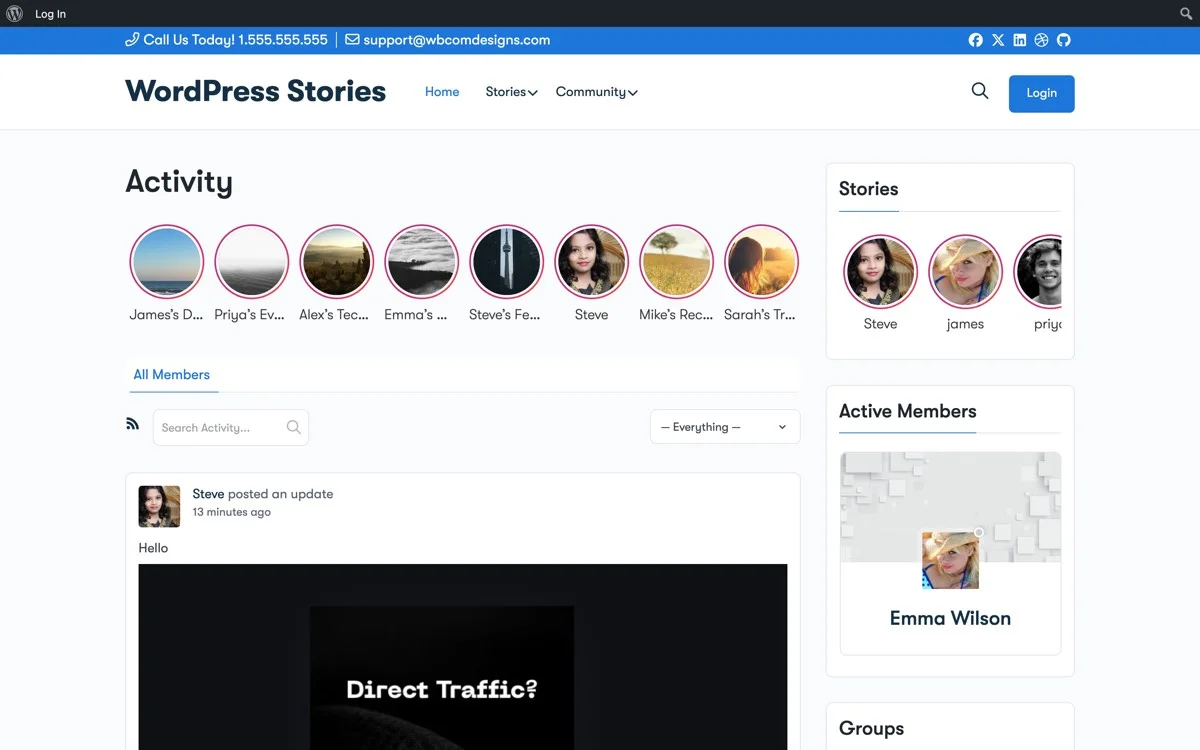
The circle style displays story avatars with familiar ring indicators in the activity feed, creating a social-native experience that users instantly recognize from platforms like Instagram and Facebook.
The circle style is the format most users recognize immediately. Story indicators appear as circular avatars with a colored ring, typically displayed in a horizontal scrollable row at the top of the activity feed or page. This is the same visual language used by Instagram, Facebook, and WhatsApp, which means your community members already know what it means and how to interact with it.
Best suited for:
- BuddyPress communities where member profiles drive engagement
- Social networking sites that want a familiar, approachable feel
- Sites where user-generated stories are the primary content type
- Platforms that prioritize mobile users
Square Style: The Editorial Approach
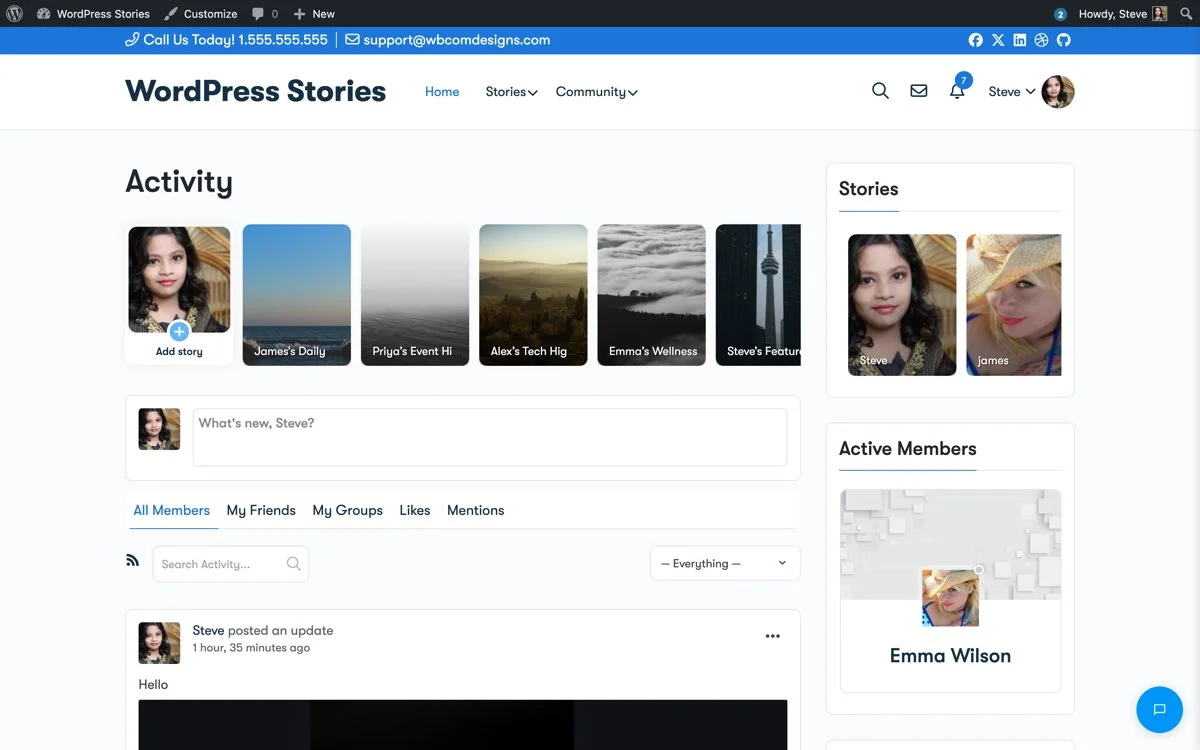
The square style presents stories as thumbnail previews in a clean grid layout, giving visitors a visual preview of story content before they tap to view.
The square style presents stories as thumbnail previews rather than circular avatars. Each story shows a preview of its content in a square card format, often with the creator’s name and a visual indicator overlaid. This style gives visitors a glimpse of what each story contains before they tap to view it.
Best suited for:
- Photography and portfolio communities where visual preview matters
- E-commerce sites showcasing products through stories
- Content-first platforms where the story content is more important than the creator
- Sites with a magazine or editorial aesthetic
List Style: The Content-Forward Approach
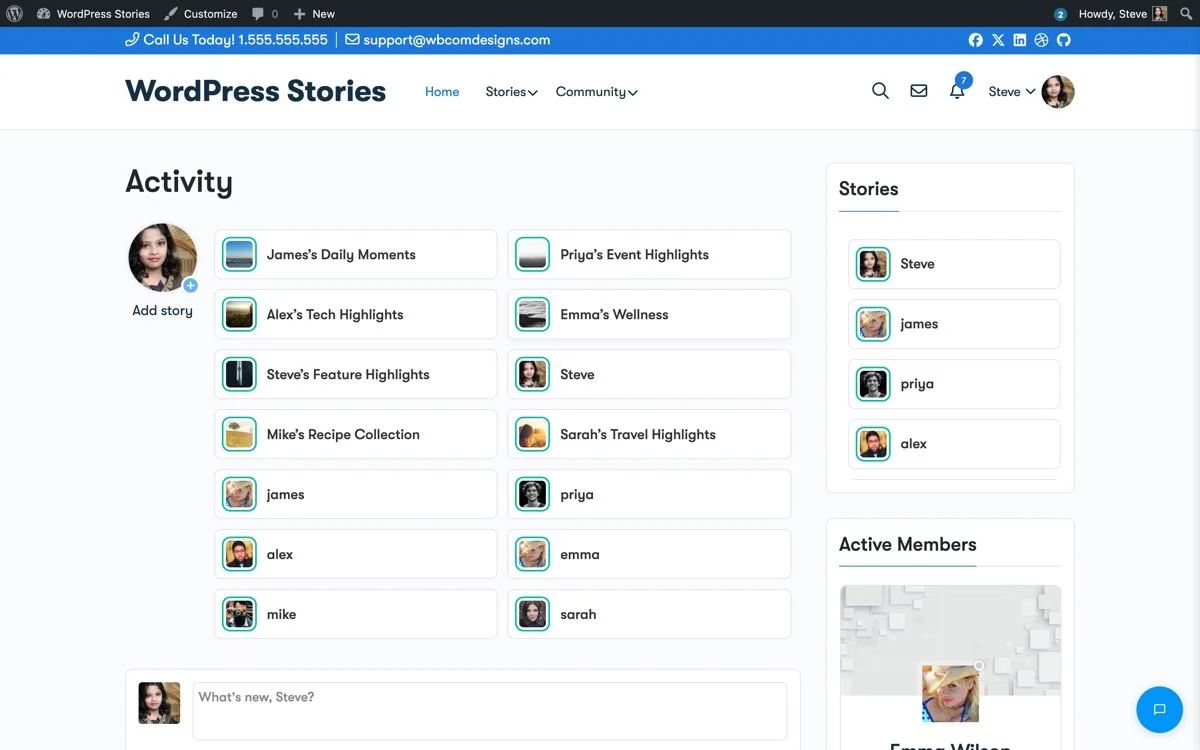
The list style arranges stories in a vertical list format, combining user details with story previews for a content-forward layout that works well on wider screens.
The list style arranges story indicators in a vertical list rather than a horizontal scroll. Each entry includes the creator’s name, avatar, and a text or visual preview of the story. This format works well on wider screens and desktop layouts where horizontal scrolling feels less natural.
Best suited for:
- Professional communities and intranet-style platforms
- Sites with a sidebar layout where stories appear in a widget area
- Platforms that serve a mixed desktop and mobile audience
- News and update-focused sites where story context matters
Choosing the Right Style
The right display style depends on your brand, your audience, and where stories appear in your layout. You are not locked into one choice. WP Stories allows you to use different styles in different locations. You might use circles in the activity feed header and squares in a sidebar widget. The flexibility lets you match the display to the context.
Adding Full-Screen Stories Without Custom Development
One of the biggest barriers to visual storytelling on WordPress has been the development effort required. Building a full-screen, swipeable story viewer from scratch involves complex JavaScript, touch event handling, animation timing, media loading optimization, and responsive design considerations. It is a significant engineering project, and most WordPress site owners do not have the resources to build and maintain it.
WP Stories eliminates this barrier entirely. The plugin provides a production-ready story viewer that handles all the technical complexity behind the scenes:
- Full-screen overlay: Stories open in an immersive full-screen view that overlays the current page. The rest of the site fades into the background, focusing all attention on the story content.
- Auto-progression: Each story segment advances automatically after a configurable duration, typically five to seven seconds for images and the full length for video content. Users can also tap to advance, tap and hold to pause, or swipe to skip to the next story.
- Progress indicators: A segmented progress bar at the top of the viewer shows how many segments are in the current story and which one is currently playing.
- Responsive media handling: Images and videos are automatically sized and positioned to fill the viewer, regardless of their original dimensions or the device’s screen size.
- Smooth transitions: Segment transitions use subtle fade and slide animations that feel polished without being distracting.
All of this works out of the box. There is no custom CSS to write, no JavaScript to configure, and no template files to override. Install the plugin, activate it, and the full-screen story viewer is ready.
Built-in Image Editing for Story Creation
A common friction point in visual storytelling is the gap between capturing an image and publishing it as part of a story. On native apps, this gap is minimal: take a photo, add a filter, overlay some text, and share. On WordPress, the traditional workflow involves uploading to the media library, possibly editing in an external tool, and then embedding the result. WP Stories closes this gap with built-in image editing tools that work directly in the story creation flow.
The image editor within WP Stories provides several capabilities that make story creation fast and accessible:
- Cropping and resizing: Adjust the frame of your image to focus on the most important visual element. Preset ratios for common story dimensions ensure your content looks right in the viewer.
- Text overlays: Add text directly to your images with customizable font size, color, and positioning. This is essential for creating context-rich story segments without relying on separate graphics tools.
- Filters and adjustments: Apply basic color filters and brightness or contrast adjustments to maintain a consistent visual style across your stories.
- Stickers and graphics: Add visual elements like arrows, highlights, or branded graphics to draw attention or add context to specific parts of your image.
These tools are intentionally kept simple. The goal is not to replace Photoshop but to remove the need for it in the story creation workflow. A community member should be able to upload a photo and publish a polished story segment in under a minute.
Before-and-After: A Real-World Case Study
To illustrate the impact of visual storytelling, consider a practical before-and-after scenario.
Before: Text-Only Community Updates
A BuddyPress community site with 2,000 active members publishes weekly updates as traditional blog posts. Each update is 500 to 800 words covering new features, community highlights, and upcoming events. The engagement pattern is predictable:
- 15 percent of members read the update within 48 hours
- Average time on page: 1 minute 20 seconds
- Comments per update: 3 to 5
- Return visit rate: 2.1 times per week
The content is solid, but the format does not match how the community wants to consume it. Members skim the headline, maybe read the first paragraph, and move on.
After: Visual Stories Plus Blog Posts
The same site adds WP Stories and supplements each weekly blog post with daily visual stories. Monday’s story teases the upcoming update. Tuesday through Thursday stories feature individual community members and their projects. Friday’s story links back to the full blog post. The results after 60 days:
- 42 percent of members view at least one story per day
- Story completion rate: 78 percent
- Blog post readership increased to 28 percent (driven by story teasers)
- Comments per update: 8 to 12
- Return visit rate: 4.3 times per week
- 15 percent of members actively creating their own stories
The blog posts did not change. The community did not grow. What changed was the addition of a visual storytelling layer that gave members a reason to check in daily and a format that matched their content consumption habits. Pairing visual stories with ephemeral 24-hour content amplifies these results even further by adding urgency to the engagement equation.
Beyond Stories: A Permanent Visual Media Layer
Stories are ephemeral by design, they drive daily check-ins through urgency and FOMO. But your community also needs a permanent visual layer where members build portfolios, organize albums, and curate lasting collections of their best work. This is where WPMediaVerse completes the picture.
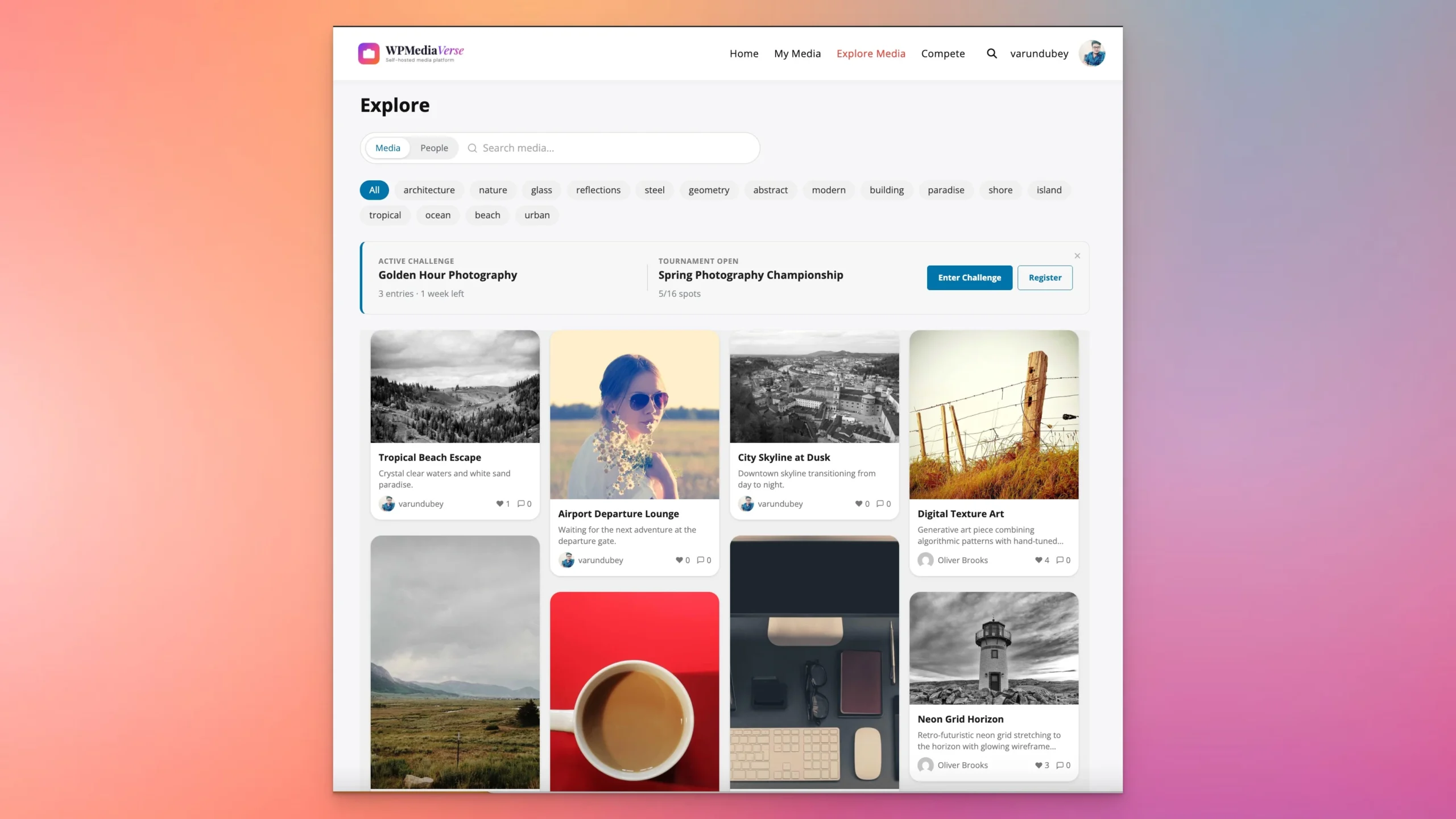
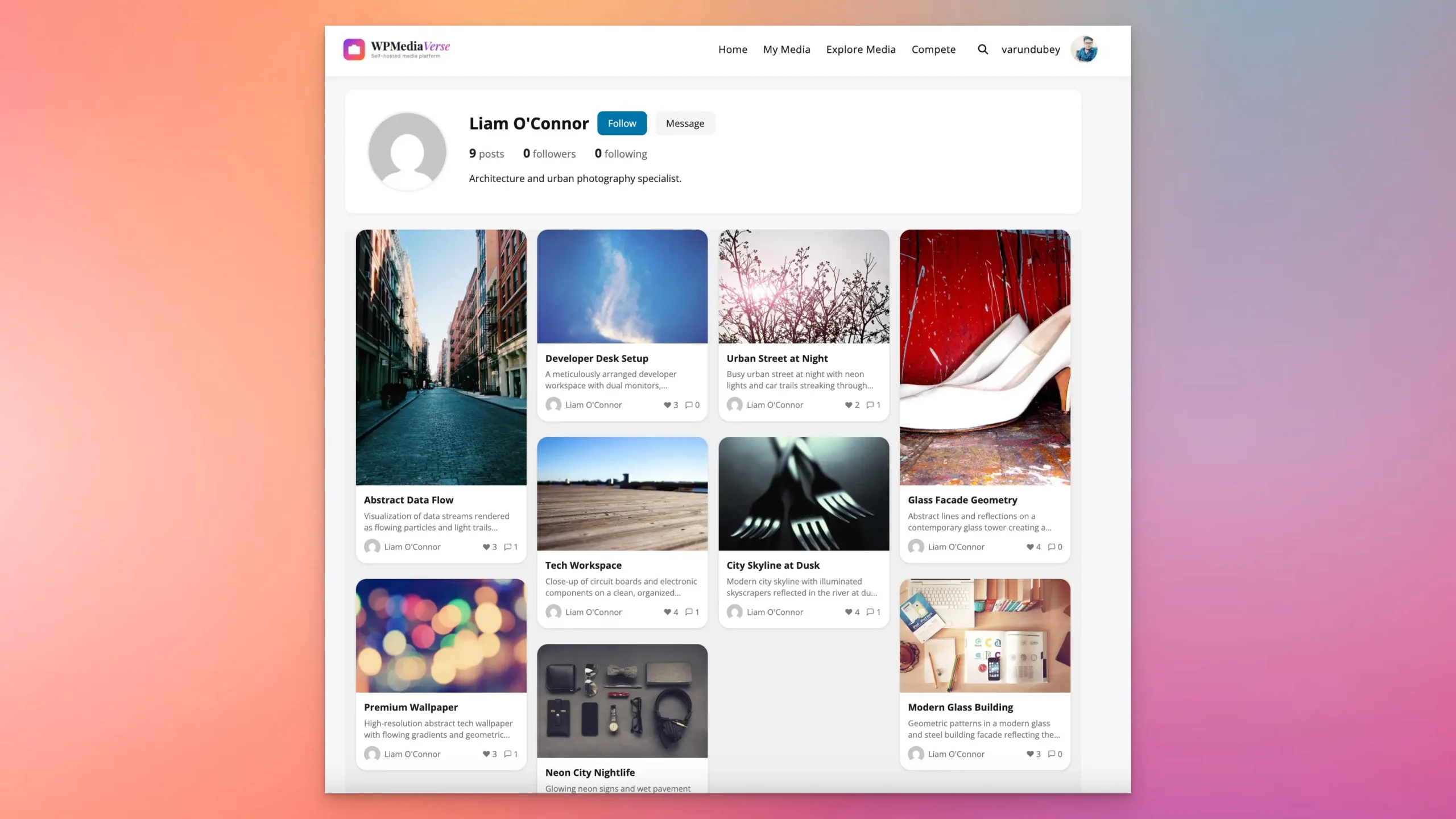
WPMediaVerse transforms your WordPress site into a full media sharing platform, think Instagram’s permanent grid combined with Flickr’s albums and 500px’s community features. Members upload photos and videos, organize them into albums and smart collections, react with six emoji types, leave threaded comments, follow creators, and discover content through a filterable explore feed. Every piece of visual content lives permanently on your site, searchable, browsable, and engagement-ready.
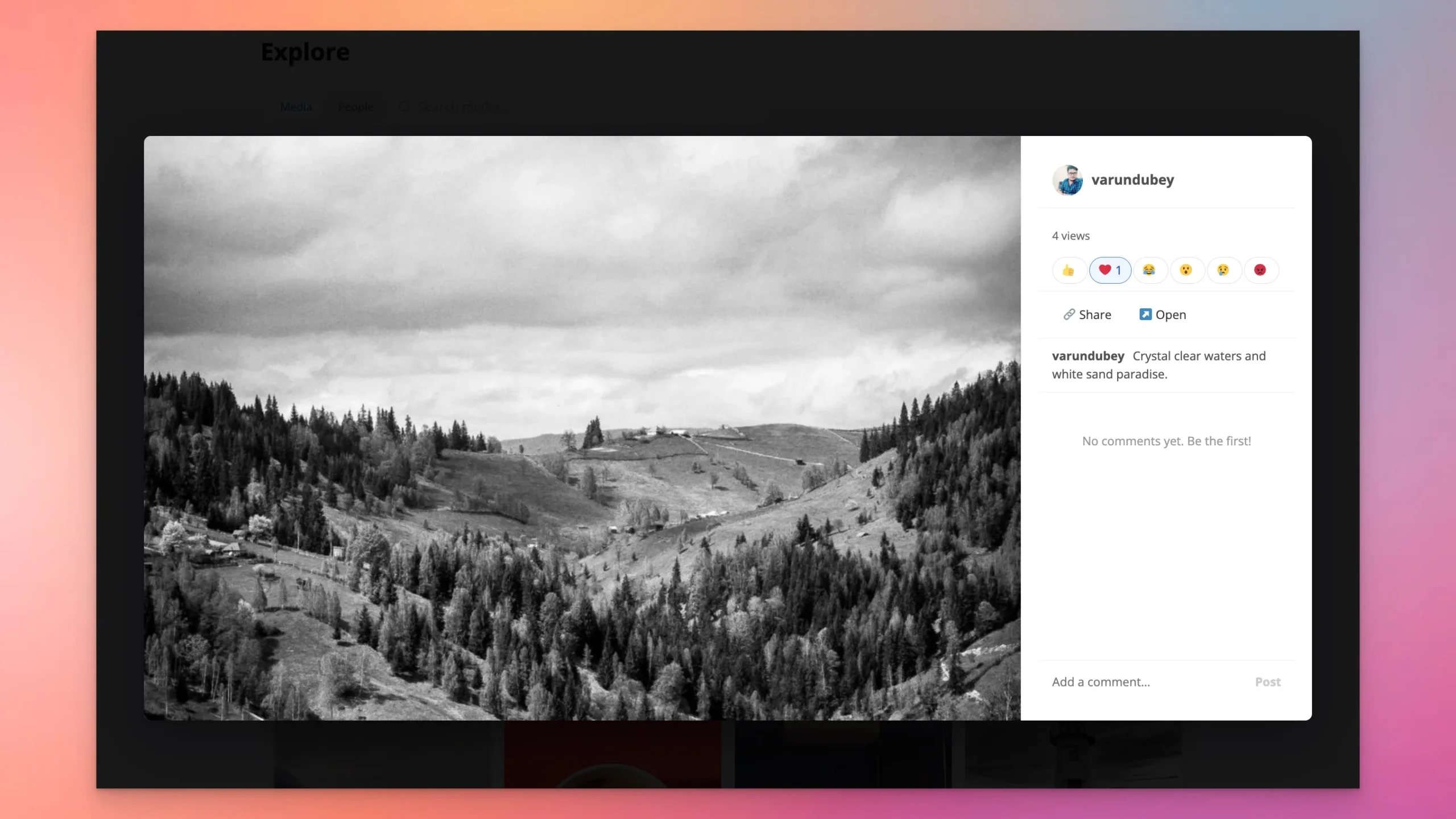
The combination is powerful: WP Stories for ephemeral daily engagement + WPMediaVerse for permanent visual portfolios. A member shares a behind-the-scenes moment in their story (gone tomorrow), then uploads the finished photo to their WPMediaVerse album (permanent). The story drives the daily visit; the album drives the lasting value. Both work with BuddyPress, both integrate with Reign and BuddyX Pro themes.
The Pro version adds photo challenges and tournaments, run themed competitions where the community votes on the best submissions. This turns passive browsing into active participation. Try WPMediaVerse free in a sandbox.
Implementing Visual Storytelling with WP Stories
If you are ready to move beyond text-only blogging and add visual storytelling to your WordPress site, here is a practical implementation path:
Phase 1: Foundation (Week 1)
- Install and activate WP Stories from the WBCom Designs store.
- Choose your display style based on your brand aesthetic and audience (circle, square, or list).
- Configure story duration and expiration settings.
- Create three to five sample stories to populate the feature at launch.
- Announce the new feature to your community with a blog post and an introductory story.
Phase 2: Momentum (Weeks 2-4)
- Post at least one story per day from your admin account to keep the feature active.
- Invite power users and community moderators to create stories.
- Experiment with different content types: images, text overlays, short videos, polls.
- Track view rates and completion rates to identify what resonates.
Phase 3: Scale (Month 2+)
- Open story creation to all members (if appropriate for your community).
- Establish content guidelines for story quality and appropriateness.
- Integrate stories into your content calendar alongside blog posts.
- Use story analytics to inform your broader content strategy.
- Consider featuring top community stories on your homepage for additional visibility.
Best Practices for Visual Story Content
Creating effective visual stories requires a slightly different mindset than writing blog posts. Here are proven practices that drive engagement:
- Lead with the strongest visual: The first segment of your story determines whether viewers continue or exit. Start with your most compelling image or your most intriguing question.
- Keep text minimal: Aim for 15 to 20 words maximum per story segment. If you need more text, use multiple segments. Stories are a visual medium, and text should enhance images, not replace them.
- Use consistent visual branding: Apply the same color palette, font choices, and style across your stories. This builds recognition and makes your stories feel cohesive rather than random.
- End with a clear next step: Every story should guide the viewer somewhere: a blog post, a discussion, a product page, a profile to follow, or an action to take.
- Embrace imperfection: Stories should feel authentic and immediate. A genuine behind-the-scenes moment outperforms a designed graphic.
- Vary your content mix: Alternate between educational content, entertainment, community spotlights, and promotional material. A varied mix keeps the stories feed interesting.
Building a thriving WordPress community means giving members multiple ways to express themselves, and visual stories are one of the most powerful formats for member-generated content.
Transform Your WordPress Site with Visual Storytelling
Text-based blogging is not dead, but it is no longer enough on its own. Your audience expects visual, immersive, and interactive content experiences. They expect stories.
WP Stories brings the visual storytelling format directly to your WordPress site, giving you three display styles to match your brand, a full-screen viewer for immersive content, built-in image editing for fast story creation, and seamless BuddyPress integration for community-driven storytelling. No custom development required.
Get WP Stories today for ephemeral visual storytelling, and pair it with WPMediaVerse for the permanent media platform, albums, galleries, reactions, follows, explore feed, and AI moderation. Together, they transform your WordPress site from a text-based blog into a complete visual community platform.
Related: Introducing WPMediaVerse: A Complete Media Platform for WordPress
Related reading
- Ephemeral Content on Wordpress The 24 Hour Post Strategy
- Mobile First Content For Wordpress Vertical Swipeable Fast
- Interactive Audience Feedback Lightweight Wordpress Polls Surveys
- Share Code Text Snippets Standalone Pastebin Engine For Wordpress
- Protect Your Visual Assets Digital Watermarking Anti Hotlinking For Wordpress
- Collaborative Documentation in Wordpress Wiki Engine For Communities