
13 min read
Kirki Privilege Escalation Hits 500,000 Sites: What WordPress Site Owners Should Do Now

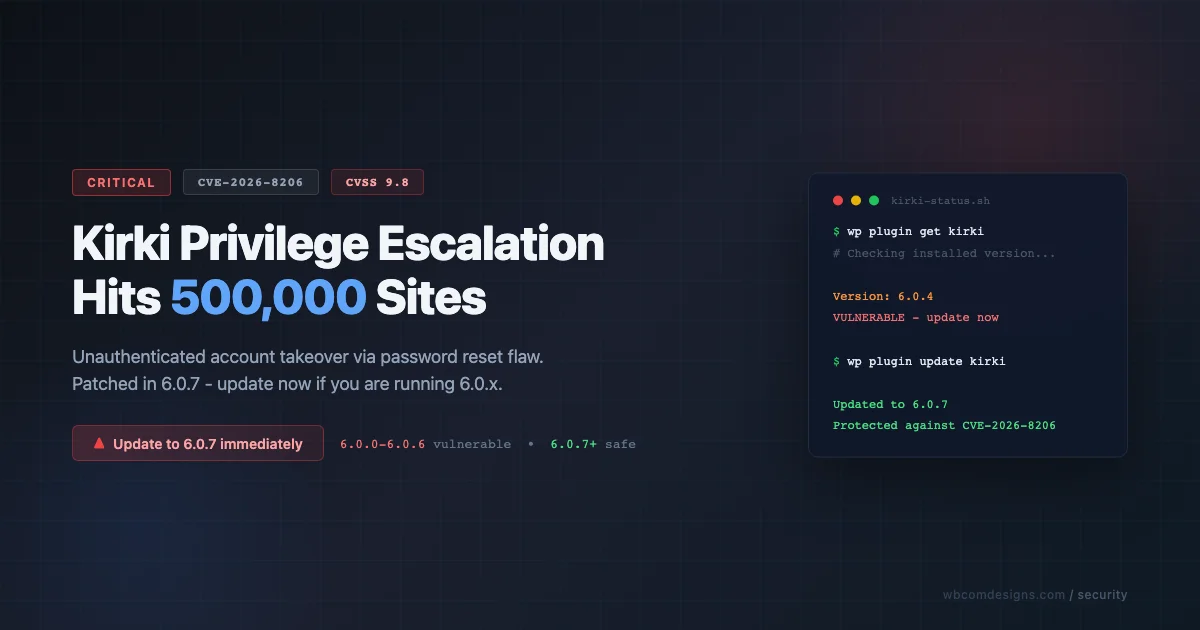
A critical-severity vulnerability in the Kirki WordPress plugin was disclosed on June 1, 2026: unauthenticated attackers can take over any account on a site running a vulnerable version, including administrator accounts. The plugin has 500,000 active installations, and Wordfence estimates roughly 150,000 of those are running a vulnerable version. If Kirki is active on your site, the action is simple: update to version 6.0.7 or later immediately.
What Happened
On May 4, 2026, security researcher CHOIGYEONGMIN submitted a vulnerability report to Wordfence affecting the Kirki - Freeform Page Builder, Website Builder & Customizer plugin (WordPress.org slug: kirki, developed by Themeum). Wordfence published the full advisory on June 1, 2026.
The vulnerability is tracked as CVE-2026-8206 and carries a CVSS score of 9.8 (Critical) - the highest severity category. It affects all versions from 6.0.0 through 6.0.6. Themeum released the patched version, 6.0.7, on May 18, 2026 - roughly two weeks after receiving Wordfence’s full disclosure.
What the Vulnerability Does (Plain Language)
Kirki 6.x includes its own password reset flow for sites using the plugin’s form builder features. The flaw is in a function called handle_forgot_password. When a user submits a password reset request using a username (rather than an email address), the plugin does not verify that the recovery link should go to the email address registered to that username. Instead, it accepts an attacker-supplied email address and sends the reset link there.
In practice: an attacker who knows any registered username on your site - admin, editor, anyone - can request a password reset, redirect the reset link to their own inbox, click the link, and log in as that user. No authentication required at any step. This is why the CVSS score is 9.8: the attack is network-accessible, requires no prior credentials, and gives an attacker full control over the targeted account.
“This vulnerability makes it possible for unauthenticated attackers to send a password reset link for any user registered on the site to their own email address.”
Wordfence advisory, June 1, 2026
Why ~150,000 Sites Are Exposed (Not All 500,000)
Kirki’s history matters here. The plugin originally started life as a developer-oriented Customizer framework used by WordPress themes. It went through a significant transformation and, starting with the 6.0 major release, became a full-featured freeform page builder and website builder by Themeum. The vulnerability was introduced in the 6.0 line - sites that never upgraded from older major versions of Kirki are not affected by this specific CVE, though they face other risks from running outdated software.
This matters for site owners who know they have Kirki installed but assume they are running an older “theme customizer” version. If your site is running any Kirki version from 6.0.0 to 6.0.6, you are vulnerable. The fix is to update to 6.0.7.
Am I Affected? How to Check
This vulnerability only affects sites where the Kirki plugin is installed and active. Here is how to check your exposure in under two minutes.
Step 1: Is Kirki Installed?
Log in to your WordPress admin dashboard. Go to Plugins > Installed Plugins and search for “Kirki.” You are looking for the plugin named “Kirki - Freeform Page Builder, Website Builder & Customizer” by Themeum. Note that there are multiple Kirki-named products; the vulnerable one is the page builder at wordpress.org/plugins/kirki.
Step 2: What Version Are You Running?
In the plugin list, the version number appears under the plugin name. If it shows 6.0.0, 6.0.1, 6.0.2, 6.0.3, 6.0.4, 6.0.5, or 6.0.6, your site is exposed and needs an immediate update. Version 6.0.7 and higher are safe.
- Running 6.0.0-6.0.6: Update immediately - see fix steps below.
- Running 6.0.7 or later: You are protected against CVE-2026-8206.
- Running a version below 6.0.0 (e.g., 4.x or 5.x): Not affected by this specific CVE. Still, you should evaluate whether updating to a current version is appropriate for your site, as older versions receive no security patches.
- Kirki not installed: No action required for this vulnerability.
Does Your Theme Bundle Kirki?
Some themes include or require Kirki as a bundled dependency loaded from within the theme’s own files. If this applies to your theme, the WordPress plugin list may not show Kirki, even though it is running. To check: look in your active theme’s folder for a directory or file referencing Kirki. If your theme uses TGMPA (Theme Plugin Activation) to install Kirki, it will appear in Appearance > Install Required Plugins. The safest path when a theme bundles a plugin is to contact the theme developer directly for a patched release.
Fix Steps
1. Update Kirki to 6.0.7 or Later
This is the complete fix. Go to Plugins > Updates in your WordPress admin, find Kirki, and apply the update. Alternatively, update from the plugin list directly. Themeum released 6.0.7 on May 18, 2026, and it is available now from the WordPress plugin repository.
If you manage multiple WordPress sites, update Kirki across all of them - not just your primary site. Sites that are less frequently used often lag on updates and make attractive targets precisely because they are less monitored.
2. What If Your Theme Bundles a Vulnerable Copy?
If Kirki is bundled inside your theme (rather than installed as a standalone plugin), updating the plugin from the dashboard will not fix it - the theme’s bundled copy will continue to load. Your options:
- Check for a theme update that ships the patched Kirki. Theme developers who bundle Kirki should be releasing an update now if they have not already.
- Contact the theme developer and ask whether they have released a patched version. If the theme has not been updated in months, this is a red flag about the maintenance posture of that theme.
- Consider a WAF firewall rule as a temporary measure (see below) while waiting for the theme update.
3. Firewall / Virtual Patching (Temporary Measure)
If you cannot update immediately - for example, because a theme developer has not yet shipped a bundled-copy fix - a web application firewall rule targeting the Kirki password reset endpoint can block exploitation while you wait. Wordfence Premium, Wordfence Care, and Wordfence Response users received a firewall rule on May 9, 2026. Sites using the free version of Wordfence receive the same protection on June 8, 2026. Cloudflare WAF and other commercial WAF providers may offer their own rules; check your provider’s threat feed.
A firewall rule is a stopgap, not a fix. Update the plugin as the permanent solution.
4. Check Your User Accounts for Compromise
If your site ran a vulnerable version of Kirki for an extended period - particularly between May and early June 2026 - review your WordPress user accounts for unexpected changes. Look for new administrator accounts you did not create, email address changes on existing admin accounts, and suspicious login activity in your server access logs. If you find anything unexpected, treat it as a potential compromise: rotate all admin passwords, revoke active sessions (use a security plugin or WP-CLI’s wp user session destroy --all), and review any content or setting changes made during the exposure window.
The Bigger Lesson: Plugin Dependencies as Attack Surface
The Kirki story illustrates a pattern that is becoming more common as WordPress plugins expand beyond their original scope. Kirki began as a developer toolkit for theme customization. As it matured into a full-featured page builder and website builder, it added its own authentication-adjacent flows - password resets, form submissions, user management features. Every new feature that touches user identity or authentication is a new attack surface.
This is not a critique of Kirki specifically. The same principle applies to any plugin that expands into territory adjacent to WordPress’s core authentication system. When a plugin handles password resets, or registration flows, or any operation that can affect user accounts, it inherits the security burden that WordPress core carries. That is a high bar. For WooCommerce stores handling customer accounts, subscriptions, payments, and checkout workflows, regular security reviews and professional WooCommerce Development Services can help reduce risks from plugin vulnerabilities and third-party dependencies.
The Week’s Broader Pattern
Kirki is not an isolated case this week. Wordfence’s June 2026 advisories also cover critical vulnerabilities in Everest Forms Pro (file upload and code execution) and Burst Statistics (a popular analytics plugin). Three widely-used plugins, each with hundreds of thousands of installations, each disclosed within days of each other. This is not unusual - coordinated disclosure windows and active bug bounty programs tend to surface clusters of vulnerabilities together - but it reinforces the importance of treating plugin updates as a routine, non-deferrable maintenance task.
When you select a plugin for a long-running production site, you are making a bet on that plugin’s maintenance and security posture for years. A plugin that gains features quickly but has a thin security review process is a liability, not just an asset.
How BuddyX Approaches This Problem
We want to be transparent about where our own products stand. BuddyX, our flagship free community theme, historically used Kirki as a Customizer framework dependency. As part of our BuddyX 5.1.0 release, we removed that dependency entirely - the theme now ships with an in-house Customizer_Framework class that handles all Customizer fields, panels, and CSS token output without relying on any external plugin.
The motivation was not specifically about security - it was about stability and control. Every external dependency is a point of failure: the upstream plugin can change its API, introduce breaking changes, or (as in this case) introduce a vulnerability that your users inherit even though it has nothing to do with your theme’s purpose. Owning the code means owning the maintenance burden, but it also means the attack surface does not expand outside your control.
That said, we want to be honest: BuddyX Pro, Reign, KnowX, and our other premium themes may still include Kirki as a dependency in some versions. We are reviewing all of our premium themes now and will update this post as we confirm the status of each. If you are running one of our premium themes and want to know whether it uses Kirki, check the plugin list in your WordPress admin or contact our support team. We will give you a direct answer.
If you are using BuddyX (free, version 5.1.0 or later), your theme does not load Kirki, and you are not affected by CVE-2026-8206 through the theme. If you have Kirki installed separately for other reasons, update it regardless.
You can read more about what changed in BuddyX 5.1.0, including the Customizer Framework rewrite and the reasoning behind it, in our BuddyX 5.1.0 release post.
Plugin Security Hardening Checklist
Use this checklist as a starting point for a plugin security review on any WordPress site you manage. It is not exhaustive, but it covers the highest-leverage actions.
Immediate Actions (Do These Now)
- Update Kirki to 6.0.7 or later if it is installed anywhere on your site or multisite network.
- Apply all pending plugin updates across all WordPress sites you manage. Deferred updates accumulate risk.
- Check for Kirki bundled in themes by reviewing installed themes that may bundle Kirki as a dependency. Contact theme authors if a patch has not been issued.
- Review admin user accounts on any site that ran Kirki 6.0.0-6.0.6, especially if installed for an extended period before this disclosure.
Ongoing Maintenance
- Subscribe to security feeds for the plugins you run. Wordfence publishes a free vulnerability database at wordfence.com/threat-intel. Patchstack and WPScan also maintain active databases. A brief weekly scan of these is worth more than reactive panic after a breach.
- Audit your plugin list for scope creep - any plugin that now handles authentication, password resets, or user registration should be reviewed. If the plugin was installed for a narrow purpose but has expanded into identity management, make sure its security posture matches that expanded responsibility.
- Keep a short plugin list. Every active plugin is a maintained dependency. Deactivate and delete plugins you are not using. A deactivated plugin can still be exploited in some configurations; deletion removes the attack surface entirely.
- Know which plugins handle authentication-adjacent flows on your site: login, registration, password reset, account management. These get the highest scrutiny when new vulnerabilities are disclosed.
- Run plugin updates in a staging environment first for high-traffic production sites. An unplanned compatibility break hurts, but it hurts less than an unpatched critical vulnerability. See our guide on plugin update testing workflows for community sites for a practical process.
- Use a WAF. A web application firewall adds a layer of protection against exploitation even when you cannot immediately patch. Wordfence (free tier) provides rule-based protection. Cloudflare’s WAF works at the edge for additional coverage.
- Enable two-factor authentication on all administrator accounts. Even if an attacker gains access to a reset link through a vulnerability like this, 2FA adds a second gate they would need to pass.
Evaluation Criteria When Selecting New Plugins
- Is the plugin actively maintained? Check the “last updated” date on the plugin page and the changelog frequency. A plugin that has not shipped a release in 12 months is likely not receiving security review either.
- Does the plugin touch user accounts or authentication? If yes, hold it to a higher standard. Review recent changelogs for security fixes; the presence of prior security patches (properly disclosed) is a positive signal - it indicates the team is receptive to responsible disclosure and fixes issues when found.
- How quickly has the plugin developer responded to past vulnerabilities? Themeum received the Kirki report on May 15 and shipped the patch on May 18 - three days. That is a good response time. A developer who takes months to patch a critical issue is a maintenance risk.
- Are there dependency chains you are inheriting? A theme that bundles a plugin that itself has sub-dependencies means your attack surface extends beyond what you can directly update from your WordPress dashboard.
Staying Current With WordPress Security
Security disclosures like CVE-2026-8206 can feel alarming when the headlines lead with “500,000 sites affected.” The reality is less dramatic when you have a maintenance process in place. Themeum patched this vulnerability within three days of disclosure. The window between disclosure and patching was closed quickly; the window between patch availability and your site being updated is the part you control.
For context, the April 2026 patch cycle also included several high-severity vulnerabilities across widely-installed plugins. The April 2026 WordPress vulnerability roundup and patch checklist we published covers that batch and provides a repeatable checklist format you can adapt for each new disclosure cycle.
Running community sites on WordPress adds additional urgency because your user accounts represent real people. A compromised administrator account on a community site does not just affect you - it can expose your members’ private messages, profile data, and any content they have shared with the expectation of controlled access. That is a different risk profile from a brochure site, and it warrants treating plugin security as a first-class maintenance concern, not an afterthought.
If you are building or running a WordPress community site and want to reduce your dependency surface - fewer external plugins handling critical paths, more ownership of the features your members rely on - our community site plugins built on BuddyPress are designed with that architecture in mind. BuddyX Pro provides a full-featured community theme stack without the Kirki dependency, and our plugin library covers the most common community features without requiring external page builder frameworks.
Summary
- Vulnerability: CVE-2026-8206, CVSS 9.8 Critical - unauthenticated privilege escalation via password reset flaw in Kirki Freeform Page Builder.
- Affected versions: Kirki 6.0.0 through 6.0.6 (the 6.0 major release line; older Kirki versions are not affected by this specific CVE).
- Patched version: 6.0.7 (released May 18, 2026). Update now.
- Exposed installs: ~150,000 sites estimated by Wordfence (out of 500,000 total Kirki installs).
- BuddyX free theme (5.1.0+): Does not use Kirki. Not affected through the theme.
- If you use any premium theme or plugin that bundles Kirki: Contact the developer and verify a patched version is available.
- Wordfence free users: Receive the firewall rule on June 8, 2026. Update the plugin regardless - the rule is a temporary safeguard.
If you have questions about whether your specific theme or site configuration is affected, leave a comment below or reach out to our support team. We will give you a straight answer.
Interesting Reads
Why Community, Membership, and Marketplace Sites Should NOT Go Headless
10 Best Nitter Alternatives and Competitors
Top 11 WooCommerce Abandoned Cart Recovery Plugins For Online Store
Related reading