
12 min read
How to Make Money on Instagram: Build Your Own Platform with WordPress


Instagram is a great place to build an audience. It is a terrible place to run a business. The moment you depend on Instagram for revenue, you are operating on borrowed infrastructure - subject to algorithm changes, policy updates, account restrictions, and a platform that takes a cut of every transaction it touches.
The smarter strategy: use Instagram to build your audience, then move that audience to a platform you own. WordPress gives you the foundation to turn Instagram followers into real customers - on your terms, with your branding, keeping all your revenue.
This guide covers both: how to actually make money through Instagram, and how to build the WordPress infrastructure that makes those income streams sustainable and durable over the long term.
The creators who earn the most from Instagram in 2026 are the ones who treat it as a traffic source, not a destination. Instagram gets people interested. WordPress closes the transaction.
This is not abstract risk management. Creators who built entire businesses on Instagram’s in-app shopping features lost significant revenue when those features were pulled from certain markets. Creators who had moved their audience to an email list and a WooCommerce store were largely insulated. The platform diversification is not optional - it is the difference between a business and a following.
Instagram vs. Your Own Platform: A Side-by-Side
| Factor | Instagram Only | WordPress + Instagram |
|---|---|---|
| Revenue cut | Meta takes % of in-app purchases | You keep all revenue (minus payment processing) |
| Customer data | Owned by Meta | Owned by you |
| Email list | No email collection | Full email list in your platform |
| Platform risk | Account ban = business gone | WordPress site persists regardless of Instagram |
| SEO traffic | None | Organic search can equal or exceed Instagram traffic |
| Customization | Fixed Instagram features | Any product, format, or experience you want |
| Follower Count | Niche Relevance | Approximate Per-Post Rate |
|---|---|---|
| 10K - 50K (Micro) | High (finance, health, parenting) | $200 - $1,000 |
| 50K - 200K (Mid-tier) | High | $1,000 - $5,000 |
| 200K - 1M (Macro) | Any | $5,000 - $25,000 |
| 1M+ (Mega) | Any | $25,000+ |
Micro-influencers with 10,000 to 50,000 followers in a specific niche often have higher engagement rates than larger accounts and deliver better ROI for brands. A fitness creator with 20,000 highly engaged followers in a specific training niche can charge more per post than a lifestyle creator with 200,000 passive followers.
To attract brand partnerships, maintain a professional media kit on your WordPress site: follower demographics, average engagement rates, past brand collaborations, and a contact form or booking system. When brands search for creators in your niche, your website is where they land to evaluate whether you are worth reaching out to.
How to Build a Media Kit That Gets Brand Deals
A professional media kit is a one-page document (or a simple WordPress page) that includes: your audience demographics and size, engagement rate (not just follower count), examples of past brand content and any testimonials from previous brand partners, your content niches and formats, and your contact and rate information. Brands review dozens of creator profiles - a clean, specific media kit that answers their questions immediately stands out from a generic DM asking for a partnership.
2. Affiliate Marketing Through Instagram
Promote products with affiliate links and earn commission on sales. Instagram’s link-in-bio is the primary mechanism - tools like Linktree or a custom WordPress link page let you have multiple affiliate links accessible from one bio link.
Instagram affiliate marketing works best for physical products, fashion, beauty, fitness equipment, and tech gear where visual demonstration drives purchase decisions. Your Instagram content demonstrates the product in use. The link-in-bio captures the click. Your affiliate tracking converts it to commission.
The highest-earning affiliate creators in most niches have their own WordPress site running alongside their Instagram presence. They use Instagram to drive traffic to product review pages, comparison posts, and buying guides - content that ranks in search and converts at higher rates than an Instagram post alone.
3. Instagram Shop and Product Tags
Instagram Shopping lets you tag products in posts and stories, linking directly to your store. If you sell physical or digital products, product tags reduce friction by letting followers go from content to checkout without leaving Instagram.
Important: Instagram Shopping links can point to your WooCommerce store. This means the transaction happens on your platform, not Meta’s - you keep the customer relationship and the data. The customer’s email address, order history, and purchase behavior are yours rather than locked in Meta’s ecosystem.
4. Paid Subscriptions via Instagram
Meta has rolled out native Instagram subscription features that let creators charge followers for exclusive content. The income is real but comes with Meta taking a percentage and controlling the relationship. More on a better alternative in the WordPress section below.
5. Sell Your Own Products and Services
Use Instagram to demonstrate your products or expertise and drive interested followers to your website to purchase. This is the model that creates the most durable income - Instagram generates awareness, WordPress closes the sale, you own the customer.
Replace Linktree with a custom links page on your own WordPress site. This keeps all traffic on your domain, builds your site’s authority, and lets you track conversions properly. A simple WordPress page with styled link buttons does everything Linktree does - and you own it.
More importantly, every visitor to your link-in-bio page is now on your site rather than Linktree’s. You can track them with analytics, show them your other content, retarget them with ads, and capture their email address if they click through to a lead magnet. None of that is possible on Linktree.
How to Build Your Link-in-Bio Page on WordPress
- Create a new page in WordPress (not a post)
- Give it a short URL: yoursite.com/links or yoursite.com/instagram
- Add your profile photo and a brief intro at the top
- Add buttons for your most important links: latest content, lead magnet, product/store, contact
- Install a simple analytics plugin or use Google Analytics to track which links get clicked
- Update the page monthly to feature your current promotions and newest content
Sell Products with WooCommerce
Drive Instagram followers to your WooCommerce store to buy. WooCommerce handles the full purchase flow - product pages, checkout, payment processing, digital delivery, and order management. You keep 100% of revenue beyond payment processor fees.
Products that work especially well for Instagram creators on WooCommerce:
- Digital downloads (presets, templates, guides, ebooks)
- Print-on-demand merchandise
- Physical products you create or source
- Online consultations and 1:1 sessions (booked and paid through WooCommerce)
Build a Paid Community with BuddyPress
Instead of (or alongside) Instagram’s subscription feature, build your own paid community on WordPress. BuddyPress adds social networking features to WordPress - profiles, activity feeds, groups, messaging, and notifications. Pair it with MemberPress or Paid Memberships Pro to gate access.
Your community members get an experience closer to a private social network than a generic membership site. And you control the platform, the pricing, the rules, and the relationship - Meta does not take a cut.
WBCom’s Reign theme and 48+ BuddyPress plugins make building this kind of community significantly faster than starting from scratch. The Reign theme handles the community design, and BuddyPress plugins add specific features - polls, reactions, badges, member blogs - based on what your audience needs.
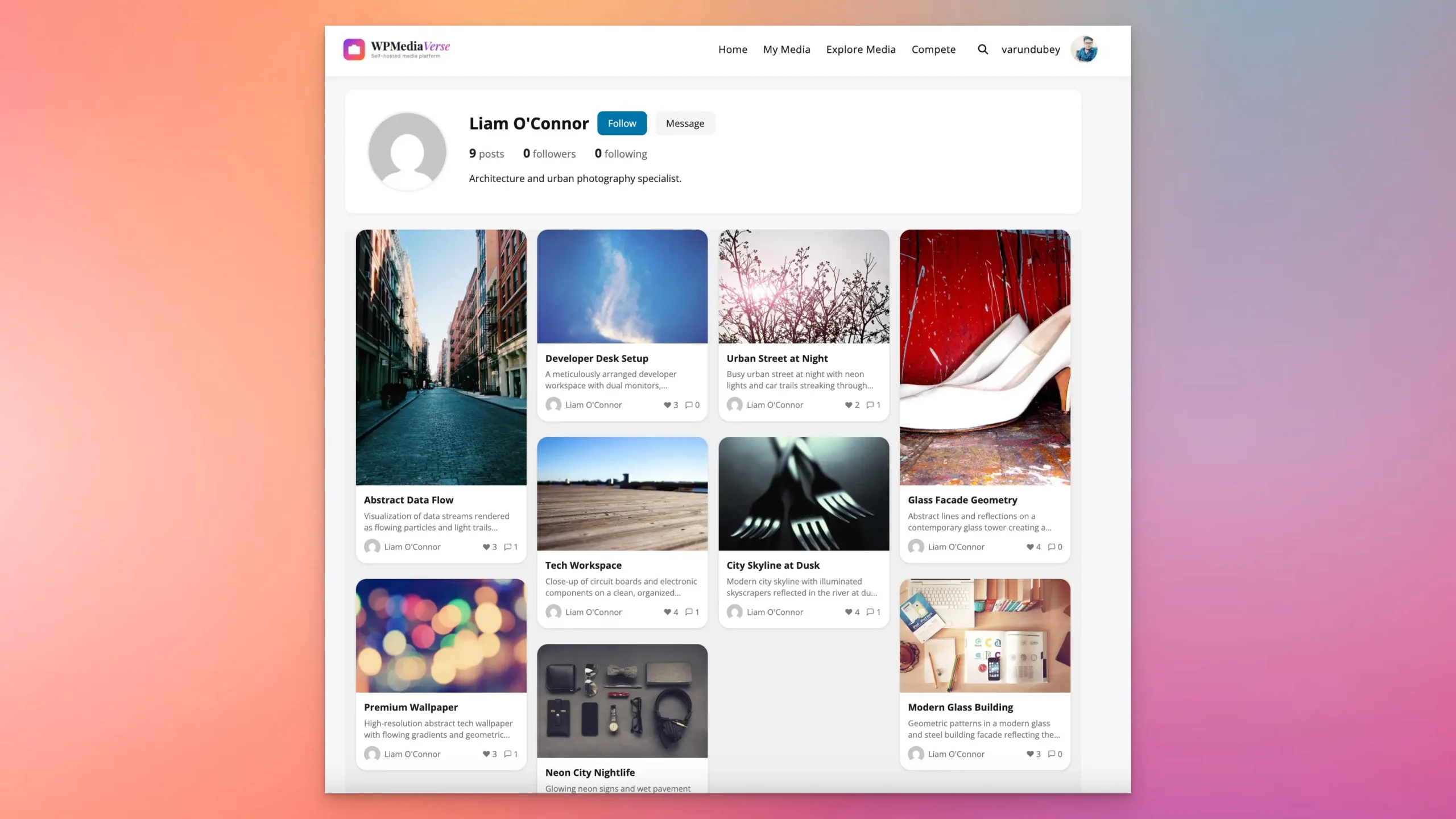
For the media layer - the part that makes your community feel like Instagram - add WPMediaVerse. It gives your members drag-and-drop photo and video uploads, albums, an explore feed for discovering content, six emoji reactions, threaded comments, a follow system, and direct messaging. Your community gets the Instagram-like visual experience, but self-hosted - no algorithm, no platform cut, your data.
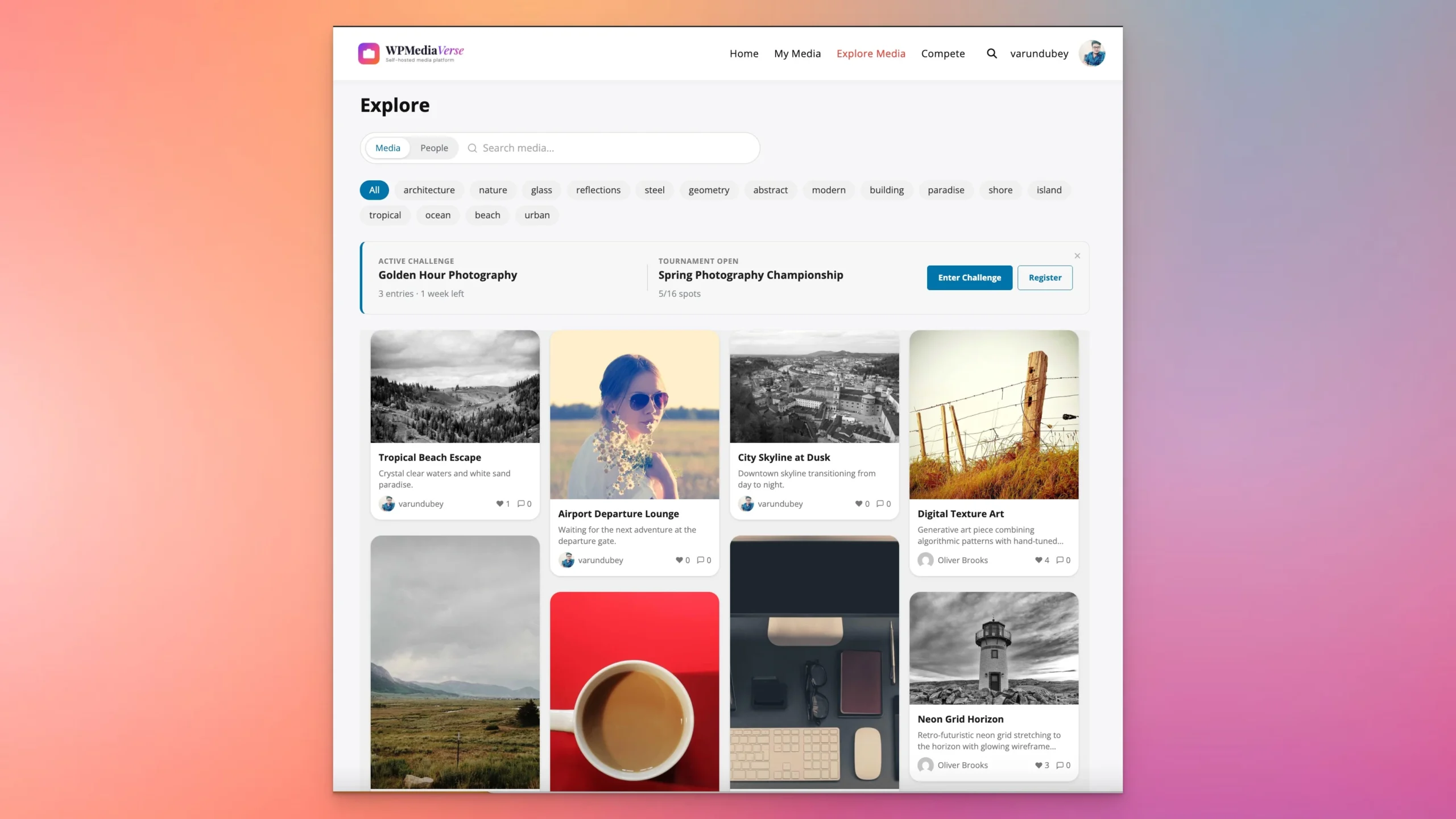
The Pro version adds five layout modes (Grid, Instagram, Pinterest, Flickr, Dribbble), cloud storage via S3 or BunnyCDN, video transcoding with HLS streaming, photo battles and tournaments, and per-user storage quotas tied to membership tiers. Try it free in a sandbox.
Build Your Email List from Instagram
An Instagram follower is on loan. An email subscriber is yours. Make email capture a priority from day one:
- Offer a free lead magnet in your bio link (checklist, template, guide)
- Promote email-exclusive content in your Instagram stories
- Use a landing page on your WordPress site to capture emails in exchange for something valuable
- Send a welcome sequence that moves new subscribers toward your paid products or membership
Once you have an email list, you can monetize it independently of Instagram. If your Instagram account disappears tomorrow, your email list remains. Email consistently outperforms social media for conversion rates - subscribers who opted in specifically for your content are more likely to buy than followers who added you to a list of 500 accounts they scroll past.
Sell Online Courses from WordPress
Instagram is an excellent platform for establishing expertise and building demand for a course. If you regularly share tips, tutorials, and insights in your niche, followers will pay to go deeper with you. Drive them to LearnDash, Learnomy, or LifterLMS on your WordPress site - no third-party platform taking 30% of your revenue.
Instagram short-form content is naturally course-promotional: share the tip, tease the depth behind it, and invite people to learn more in your full course. Each short post positions the paid course as the “full version” of what you share for free - a natural conversion funnel with no hard selling required.
Funnel Metrics to Track
Track each step of the funnel to find where the drop-off happens. If you have 10,000 followers and only 50 people visit your link-in-bio page each month, the problem is in your bio CTA or post CTAs. If 500 people visit your link-in-bio but only 10 subscribe to your list, your lead magnet is not compelling enough. Tracking at each step tells you exactly where to invest your optimization effort.
| Funnel Step | Metric to Track | Healthy Benchmark |
|---|---|---|
| Instagram posts to bio clicks | Link-in-bio click rate | 2-5% of followers/month |
| Bio page visitors to email subscribers | Email opt-in conversion rate | 20-40% of page visitors |
| Email subscribers to buyers | Email list purchase conversion rate | 1-5% per campaign |
| Buyers to repeat customers | Repeat purchase rate | 20-30% within 6 months |
Consistency Over Volume
Posting 3 times per week for a year outperforms posting 3 times per day for 3 months. Instagram’s algorithm rewards consistent engagement over time. More importantly, an audience that sees your content regularly develops familiarity and trust that converts to purchases. Irregular posting - even high-quality posting - does not build the same relationship.
Clear Calls to Action
Every post that drives traffic to WordPress should have a clear call to action. “Link in bio for the full guide” works. “The template I mentioned is in my bio link” works. Vague CTAs (“check out my website”) do not convert. The more specific and relevant the CTA is to the content of the post, the higher the click-through rate from bio link visits.
Save-Worthy Content
Instagram’s algorithm weights saves heavily - they signal that a post has lasting value rather than momentary entertainment. Content that people save is typically practical and reference-worthy: step-by-step guides, resource lists, comparison charts, how-to breakdowns. For creators selling expertise-based products, this type of content also serves as a proof of knowledge that builds trust before a purchase decision. Understanding how audiences browse and consume visual content across content aggregation platforms can also help you shape the kind of save-worthy, scrollable content that performs well on Instagram.
Content Formats and Their Best Uses
| Format | Algorithm Favor | Best Use | Drives Traffic to WordPress? |
|---|---|---|---|
| Feed photos | Moderate | Brand aesthetic, product showcase | Yes (via bio link CTA) |
| Carousels | High (saves) | Step-by-step guides, education, lists | Strong (save-worthy = more reach) |
| Reels | Very high (reach) | Tips, tutorials, trending topics | Good for follower growth |
| Stories | Engagement focus | Behind-the-scenes, polls, direct CTAs | Direct (swipe-up for 10K+ accounts) |
| Lives | High (real-time) | Q&A, product demos, community events | Moderate (mention link in bio) |
A homepage is designed to orient new visitors to an entire website. A link-in-bio visitor has a specific intent: they saw your post, they want whatever you referenced. Sending them to your homepage forces them to hunt for what they want, and most will not bother. Always send Instagram traffic to a specific landing page, a specific product, or a dedicated links page that shows exactly the next step you want them to take. The more closely the destination matches what you said in the post, the higher the conversion rate.
Building a Store Before Building an Audience
Many creators invest significant time setting up a full WooCommerce store with multiple products, custom design, and payment gateways before they have an audience large enough to generate meaningful sales. The order should be reversed. Build your Instagram audience first, understand exactly what your followers ask for and struggle with, and then build the minimum viable product that solves that specific problem. A single well-chosen product sold to an engaged audience of 5,000 outperforms a full catalog launched to 500 followers who are not yet ready to buy.
Treating the Email List as an Afterthought
Creators who spend years building Instagram followings without simultaneously building an email list are one algorithm change away from losing their primary distribution channel. The email list should be built in parallel with the Instagram audience from the very beginning - not after reaching some follower milestone. Even a list of 200 subscribers who are actively engaged converts better than 10,000 passive Instagram followers for almost every monetization method. Start the list on day one, even if it feels too early.
Ignoring Mobile Experience on WordPress
Virtually all Instagram traffic that clicks through to WordPress arrives on a mobile device. If your WordPress site is not fast and clean on mobile, you will lose those visitors before they have a chance to subscribe or buy. Check your WordPress theme’s mobile performance with Google PageSpeed Insights and test the checkout process on a real phone. A checkout that takes 8 taps on mobile will lose sales that a 3-tap checkout would have captured. Mobile optimization is not optional when your traffic source is a mobile-first social platform.
Can I run a WordPress store and Instagram shop at the same time?
Yes - and this is often the best approach. Instagram Shopping sends buyers from your Instagram content to your WooCommerce product pages. The purchase happens on your site. Instagram gets credit for the referral, and you get the transaction, the customer data, and the email address. You benefit from Instagram’s product discovery features while building your own customer database rather than Meta’s. Use Instagram Shopping as a top-of-funnel discovery channel that feeds into your owned WooCommerce infrastructure.
How do I convert Instagram followers to email subscribers?
The most effective method: create a specific, valuable free resource (checklist, template, guide, mini-course) and promote it consistently in your Instagram content. In posts, mention “the template for this is in my bio link.” In stories, show the resource and use the link sticker. In Reels, reference the free download at the end. Your link-in-bio page should have the email opt-in front and center. A compelling lead magnet with clear promotion across your content types typically converts 20-40% of bio page visitors to email subscribers - meaning every 100 people who click your bio link, 20-40 will join your list if the offer is good enough.
What kinds of digital products sell best for Instagram creators?
Products that directly solve a problem your audience has expressed in comments or DMs. If followers regularly ask “what editing app do you use?” and you teach photography, a Lightroom preset pack is the obvious product. If followers ask “how did you grow your Instagram?” and you are a social media creator, a course or playbook on your growth method is the natural fit. The best product ideas come from paying attention to the questions you answer repeatedly - each repeated question is a potential product. Presets and templates work especially well for Instagram because they are visual, immediately understandable from a single post, and impulse-purchasable at low prices.
Build both. But when you need to choose where to invest your time and energy, invest in the infrastructure you own. Instagram followers can disappear overnight. A WooCommerce store, an email list, and a BuddyPress community cannot.
Related reading