
7 min read
How to Create a School Alumni Community Website

Most schools run their alumni group on Facebook, and most of those groups go quiet after the reunion thread dies down. A school alumni community website fixes that by giving graduates a permanent home you control: a searchable directory by class year, a mentorship and job board, and simple engagement tools, BuddyNext, WP Career Board, and WB Gamification, that cost nothing to start and run on WordPress you already own.
Why a Facebook Group Isn’t Enough Anymore
Facebook groups feel free. They aren’t, you’re renting attention on a platform that changes its algorithm every year and can bury your posts for reasons entirely outside your control.
Three specific problems come up in almost every conversation we have with alumni offices.
Nobody outside Facebook can find the group. Search traffic for “[school name] alumni” goes nowhere, because there’s nothing to rank.
There’s no way to search by class year, location, or industry. Everything lives in one long, scrolling timeline that nobody scrolls past page two of.
And graduates who leave Facebook, there are more of them every year, leave the community too.
Why Alumni Engagement Actually Matters to a School
A school’s alumni base is a bigger asset than most administrations treat it as. Scholarship funding, guest speakers for career days, internship connections for current students, and a meaningful share of capital-campaign donations all trace back to graduates who still feel some pull toward the place, and that pull fades fastest when the school’s only contact is an annual fundraising letter.
Reunion attendance is the visible metric, but it’s a lagging one. Schools with active, year-round alumni engagement don’t see reunion turnout as the goal, they see it as evidence that something is already working. The relationship has to exist for eleven months before a reunion event can capitalize on it.
What Makes School Alumni Networks Fail
Three patterns show up again and again in alumni groups that never really take off.
Nothing to do besides browse. A directory with no mentorship board and no reason to check in gives someone a reason to join once and vanish. Ongoing utility drives return visits, a static list doesn’t.
All outbound, no conversation. A Facebook group or newsletter alumni can only read, not post to, reads as the school’s marketing channel, not a community graduates own.
Opening to everyone at once. A launch to 40 years of graduates with no seed content and no early activity looks empty regardless of the member count. Start with one class, let it feel alive, then widen.
What Should a School Alumni Website Actually Do?
Strip away the marketing language and an alumni platform needs to do four things well.
- Find people. A directory sorted by graduation year, location, and industry, not a group members list nobody scrolls through.
- Reconnect people. Activity feeds and class-year spaces so the class of 2014 has its own corner instead of drowning in a twenty-year mixed feed.
- Help people. A place for alumni to post job openings and mentor current students or recent grads, consistently the single most-requested feature from alumni offices we’ve worked with.
- Keep people coming back. Some reason to check in more than once a year around reunion season.
How to Build It on WordPress
Step 1: Install BuddyNext, the free Community OS
BuddyNext, the free Community OS for WordPress, gives you the directory, activity feed, and Spaces (BuddyNext’s term for sub-groups) out of the box. It’s free forever, not a trial, 31 capabilities including profiles with custom fields, a member directory, following and connections, and native moderation. Install it, and you have a working alumni network before lunch.
Step 2: Organize alumni into Spaces
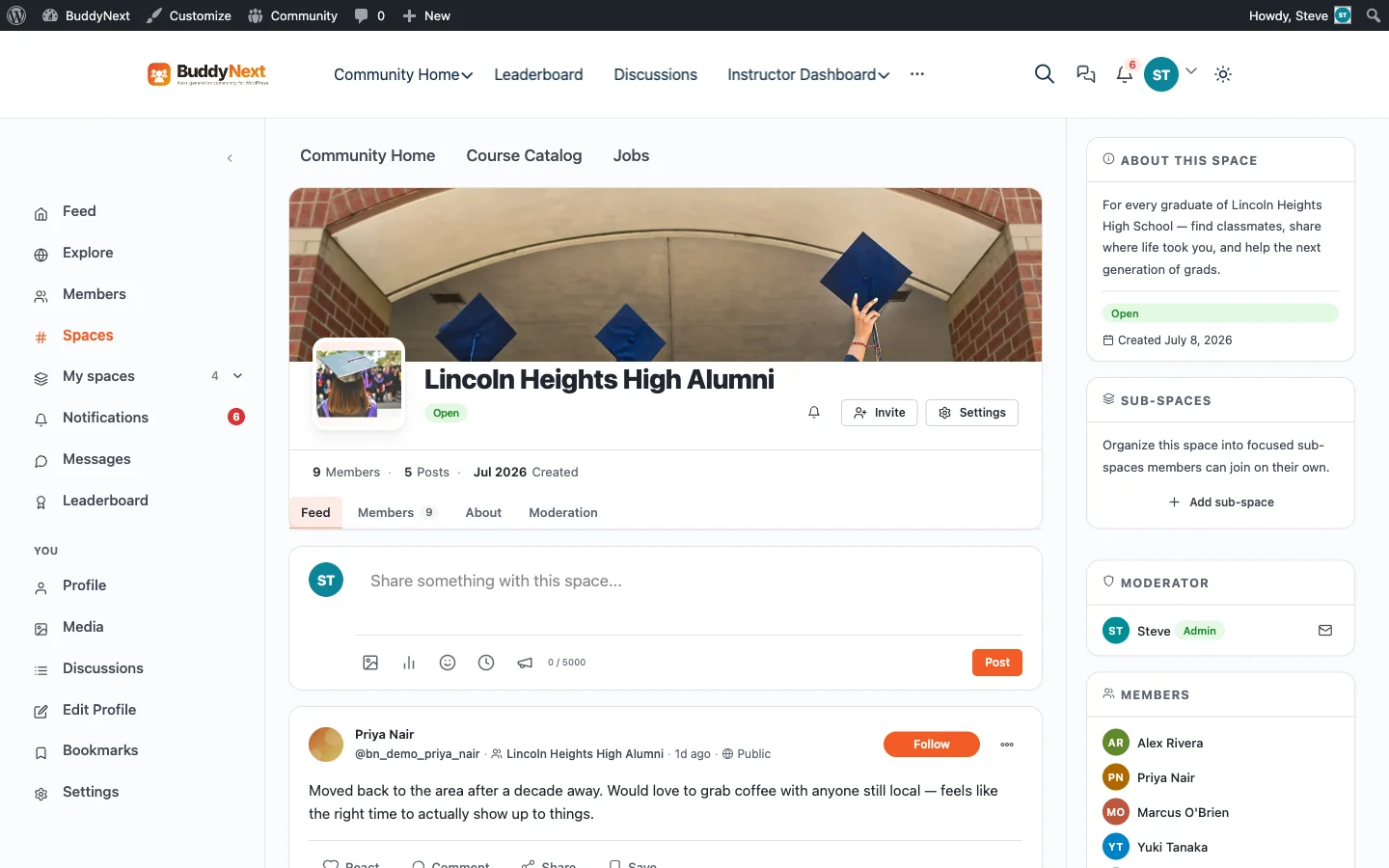
Create one Space per graduating class, sport team, or club, open, private, or secret, your call. We built a working example to show what this looks like once it’s actually populated: Lincoln Heights High Alumni, a real BuddyNext Space with real members and a real activity feed.
And the member directory itself, sorted by role and searchable:
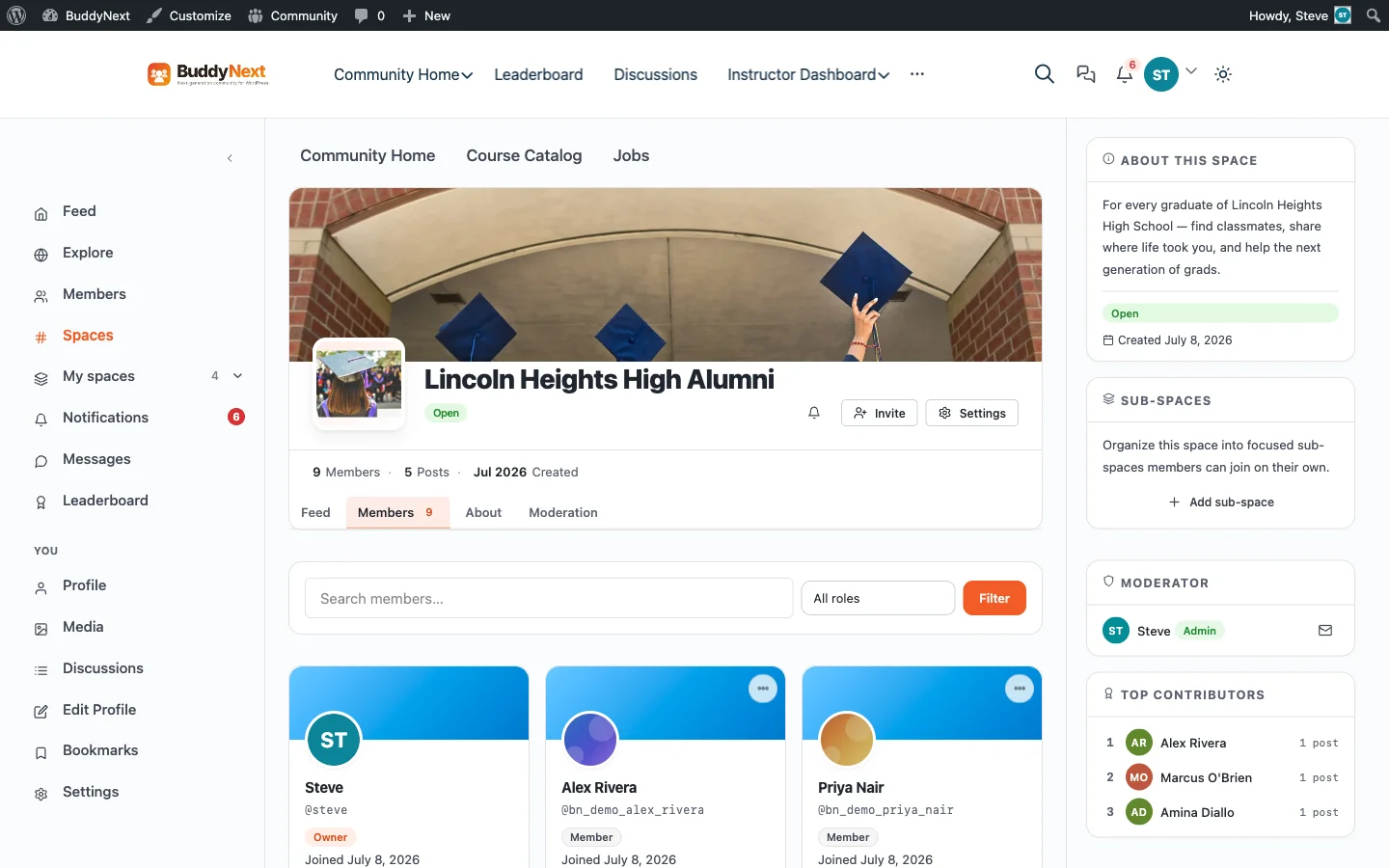
Eight members joined within the first seeding round. Five posts went up in the first week, that’s the pace worth aiming for at launch. Quiet at first, then it compounds.
Step 3: Add a mentorship and job board with WP Career Board

This is the feature that actually gets alumni to come back. WP Career Board, a free block-first WordPress job board plugin, lets graduates post openings at their own companies, run a mentorship board for students and recent grads, and search by location, industry, or remote-only. It’s free, needs no separate plugin subscription, and every listing carries Google-Jobs-ready schema automatically.
Set the tone early: post one internal job or mentorship slot yourself before opening submissions, so the board doesn’t launch empty.
Step 4: Turn on WB Gamification for the reunion effect year-round
WB Gamification, a 100% free gamification plugin for WordPress, every integration included, adds points, badges, and a leaderboard so showing up isn’t limited to reunion week. Award a badge for updating your profile, joining a class Space, or posting your first job lead. Unlike GamiPress or myCred, every integration ships in core, you’re not paying $39 to $299 per feature to make it work with the rest of your stack.
Step 5: Launch to your first cohort
Start with one graduating class or the alumni board itself, not the whole school at once. Seed the directory, post a few conversation starters, and let the first 20 to 30 people make it feel alive before opening it wider.
Don’t invite everyone on day one. An empty room with a hundred people in it feels emptier than a full room with twenty.
What Changed: BuddyPress + a Theme vs. BuddyNext
If you’ve read older advice on this, including our own, it probably told you to pair BuddyPress with a theme like BuddyX. That’s not wrong. It still works. But BuddyNext is a newer, standalone alternative built to be the whole platform, not a plugin-plus-theme combination.
| BuddyPress + BuddyX Pro Theme | BuddyNext | |
|---|---|---|
| Setup | Plugin + separate theme purchase | Single plugin, works with your existing theme |
| Cost to start | Theme from $79 | $0 |
| Directory + Spaces | Via BuddyPress groups | Built in (Spaces) |
| Native moderation | Limited | Reports, strikes, shadow-ban, appeals |
| Paid membership tiers | Needs a separate plugin | Built into BuddyNext Pro (Stripe) |
Both approaches are legitimate. If you already run BuddyPress and like your theme, there’s no reason to rip it out. If you’re starting from zero, BuddyNext gets you there with one less moving part.
What It Costs
| Product | Free | Pro (1 site) |
|---|---|---|
| BuddyNext | $0, full platform | $149/yr or $399 lifetime |
| WP Career Board | $0, full job board | $48.30/yr (EarlyBird) |
| WB Gamification | $0, every feature, forever | No Pro tier exists |
All Pro tiers carry a 30-day money-back guarantee. The free tier isn’t a trial, nothing you build on it disappears later.
Frequently Asked Questions
Is BuddyNext really free, or is this a trial?
Free means free, not a time-limited trial. Pro ($149/yr) adds Stripe membership tiers, analytics, and AI features, but the free version is a complete, permanent community platform.
Do I need to know how to code?
No. BuddyNext, WP Career Board, and WB Gamification are all block-based WordPress plugins. Install, activate, configure through the dashboard.
Can graduates post job openings themselves?
Yes. WP Career Board’s frontend submission lets any logged-in alumnus post a listing, which goes through a moderation queue before it goes public.
What happens to our existing Facebook group?
Keep it running during the transition. Post an announcement pointing members to the new site, and let the Facebook group wind down naturally once the directory has critical mass. Don’t delete it on day one.
Can we import members from our current alumni database or spreadsheet?
Yes, through standard CSV-based WordPress user import. For larger schools with an existing alumni database, WP-CLI bulk import is the faster path.
What if turnout is low after launch?
Normal. Most alumni sites don’t take off until reunion season gives people a reason to log in. Time your public launch to land 6 to 8 weeks before a reunion, homecoming, or graduation, not in the middle of summer when nobody’s thinking about the school.
Building This for Your School
We can set this up for you, directory structure, class-year Spaces, mentorship board, and gamification rules configured for your specific alumni base. Talk to us, or start with the BuddyNext and WP Career Board plugin pages.
See how BuddyNext compares to running everything on Facebook Groups, or read our broader guide to building a niche community website on WordPress.
Building an alumni network for a specific program? See our guides for MBA alumni, engineering alumni, medical school alumni, or our full guide to university alumni network websites.
Related reading