
22 min read
How to Build a Subscription Community with WordPress


Most online businesses chase one-time sales. You spend money acquiring a customer, they buy once, and you start the whole cycle again next month. Subscription communities flip that model entirely, you earn recurring revenue from members who pay monthly or annually to stay connected, keep learning, and keep growing alongside people who share their goals.
The subscription economy grew 437% over nine years according to the Zuora Subscription Economy Index. That growth is not limited to SaaS software. Community operators, educators, coaches, and niche media publishers have built sustainable businesses on recurring memberships that cost anywhere from $25 to $75 per month on average.
WordPress powers more membership and subscription community sites than any other platform. With the right stack, membership plugin, community layer, payment gateway, you can build a fully self-hosted subscription community that you own outright, without paying 30% to a platform like Circle or Mighty Networks.
This guide walks through every step: choosing plugins, setting up tiers, configuring payments, reducing churn, and pricing your community to grow. By the end, you will have a complete blueprint to launch a recurring revenue community on WordPress in 2026.
Updated August 2026: this guide now covers BuddyNext.
Table of Contents
- Why Subscription Communities Beat One-Time Sales
- The Four Subscription Community Models
- The Modern Path: BuddyNext Pro with Built-In Stripe Memberships
- The Classic Stack: MemberPress + BuddyPress + BuddyX Pro
- Choosing a Membership Plugin
- Adding the Community Layer
- Designing Your Membership Tiers
- Payment Gateway Setup: Stripe and PayPal
- Content Restriction That Converts
- Email Automation That Retains Members
- Tracking MRR, Churn, and Growth
- Pricing Your Subscription Community
- Reducing Churn
- Real-World Subscription Community Models
- WordPress vs Circle and Mighty Networks
- Frequently Asked Questions
Why Subscription Communities Beat One-Time Sales
One-time product sales create a revenue roller coaster. You hit your launch numbers, maybe do a promotion in the next quarter, and then watch revenue flatten until you build something new. Subscription communities smooth that curve.
Predictable monthly recurring revenue (MRR) means you can hire, plan, and invest with confidence. If you have 500 members at $39/month, you start each month knowing your floor is $19,500 before you do a single sale.
Lower acquisition cost per dollar earned is the second reason community operators prefer subscriptions. Acquiring a member costs roughly the same as acquiring a one-time buyer, but a member who stays for 18 months is worth 18x the revenue of a single-purchase customer. That lifetime value shifts your entire economics.
Community as a retention mechanism is what makes subscriptions sticky in ways that pure content products are not. When your members have built relationships, contributed to discussions, and earned reputation inside your community, canceling means losing those social connections, not just losing access to content. That psychological cost of leaving dramatically reduces churn compared to a newsletter or course. See also: The Power of Community: Building Student Engagement in Online Courses.
Network effects over time make your community genuinely more valuable as it grows. A 1,000-member community has more connections, more peer expertise, and more activity than a 100-member one. Members who joined early benefit from the growth, which creates loyalty that pure content cannot generate.
The Four Subscription Community Models
Before choosing plugins and setting up payment pages, you need to know which community model fits your audience. The four main models each monetize differently.
Access-based communities sell access to a group of people, a peer network, a mastermind, or an industry cohort. The content is secondary; the value is in who else is in the room. These communities typically charge higher prices ($99 - $499/month) because membership itself is the product. Example: a community for bootstrapped SaaS founders, or a private network for senior HR professionals.
Content-based communities are primarily a library of courses, tutorials, templates, or resources, with discussion as a supporting feature. The content keeps members paying, and the community creates accountability and reduces cancellations. These typically price in the $19 - $79/month range. Example: a WordPress developer community with weekly tutorials and a members forum.
Cohort-based communities blend live programming, weekly calls, workshops, accountability groups, with ongoing access. Members pay for structured experience alongside peers. These tend to have higher completion rates than self-paced content and can justify $50 - $200/month. Example: a 12-week content marketing program that feeds into an ongoing community.
Hybrid communities combine all three. A free or low-cost tier gives access to content, a mid tier adds community access, and a premium tier includes live calls and direct access to you. This tiered structure is what the data consistently favors: according to the Community Roundtable, communities with three or more membership tiers earn 3.2x more revenue than single-tier communities.
The Modern Path: BuddyNext Pro with Built-In Stripe Memberships
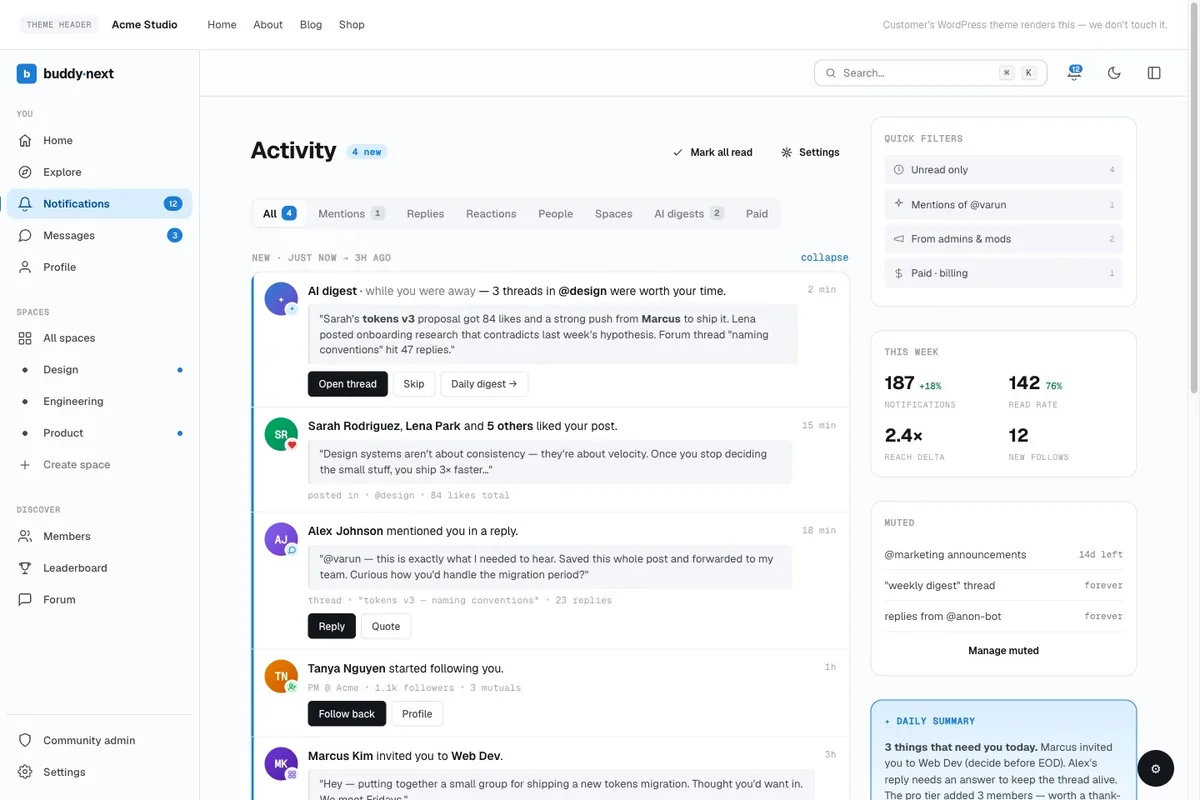
Before we cover the classic multi-plugin stack, there is now a simpler route. BuddyNext, the free Community OS for WordPress, collapses the “membership plugin + community plugin” architecture into one platform. The free core ships the entire community layer: activity feed, member Spaces (open, private, and secret), profiles with custom fields, member directory, private messaging, notifications, and native moderation.
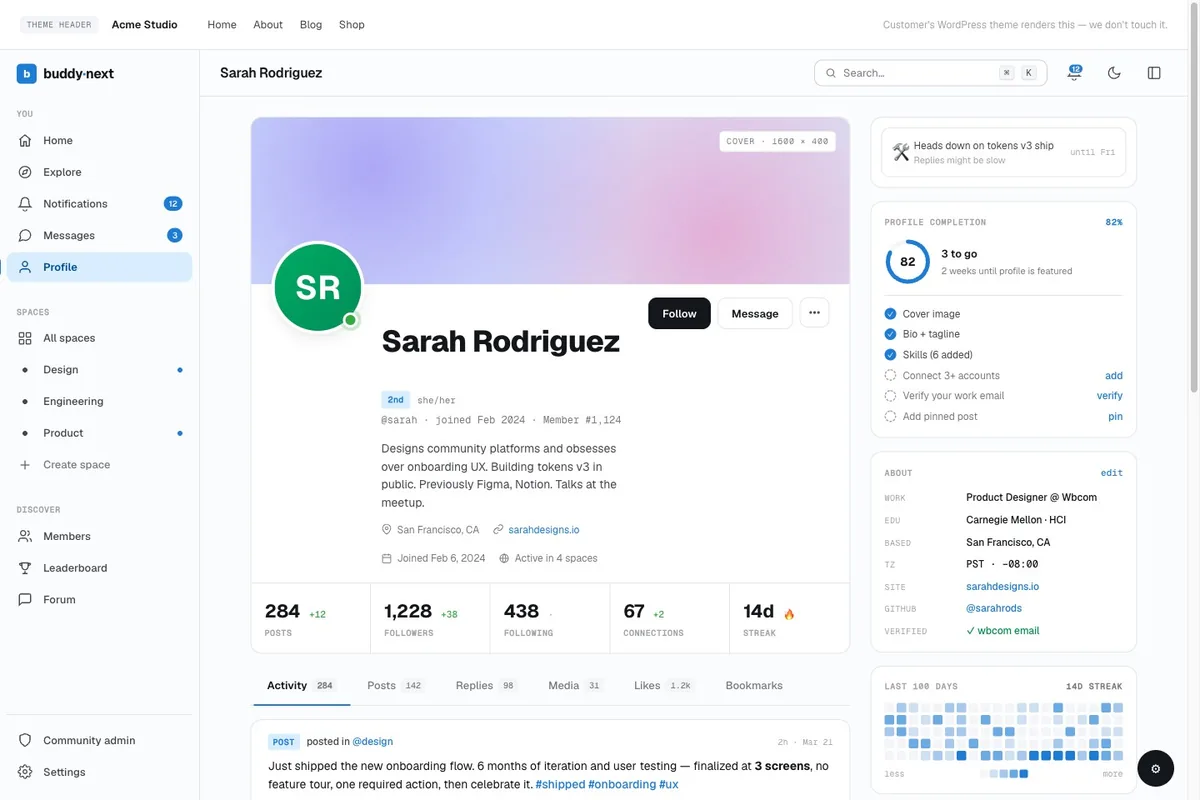
Then BuddyNext Pro (from $149/year) adds the monetization layer natively: Stripe-powered membership tiers with monthly, yearly, or one-time billing, free trials, gated Spaces, inline content protection with teaser locks, automatic renewals with past-due handling, a self-service customer portal, and a live MRR dashboard. That is the same job MemberPress does, but built into the community platform itself, so there is no integration add-on to configure, no plugin pair to keep compatible, and one support team when something needs attention.
- Cost math: BuddyNext free + Pro from $149/year vs MemberPress ($349/year) + theme + integration add-ons
- Tiers: free plans, trial days, per-tier perks and caps, whole Spaces gated behind a plan
- Retention tooling built in: email digests, drip sequences and campaigns (Pro), points and badges via the free WB Gamification plugin
- Course-led communities: pair with Learnomy, the same team’s free LMS with 0% transaction fees, when structured courses are part of the paid offer
Prefer the battle-tested multi-plugin approach? Or you already run MemberPress? The classic stack below is still a proven path. Everything here about tiers, pricing, churn, and email applies to both.
The Classic Stack: MemberPress + BuddyPress + BuddyX Pro
A subscription community on WordPress is not a single plugin. It is four layers working together:
- WordPress core, your foundation, giving you full ownership and extensibility
- Membership plugin, handles subscription tiers, payment processing, and content restriction
- Community plugin, adds social features: member profiles, activity feeds, groups, messaging
- Supporting tools, email automation, analytics, Stripe/PayPal integration, and LMS if you have courses
The most battle-tested combination in 2026 is MemberPress + BuddyPress + BuddyX Pro theme. MemberPress powers over 300,000 membership sites and handles the subscription billing and access control with precision. BuddyPress adds the social community layer. BuddyX Pro is a WordPress theme specifically built for BuddyPress communities, with deep integration for member directories, group pages, and activity feeds that look polished out of the box.
For a more detailed breakdown of platform options, see our guide on membership site platforms and how to build an online community with WordPress.
Choosing a Membership Plugin
Three plugins dominate the WordPress membership space. Each has a different philosophy, pricing model, and integration footprint. Here is a direct comparison.
MemberPress is the most feature-complete option with the tightest Stripe integration and the best developer documentation. It handles recurring subscriptions, free trials, coupons, and content dripping natively. The interface is clean and admin overhead is low. At $349/year for the basic plan, it is not the cheapest option, but the time you save on setup and support is worth the price for most serious community operators.
Paid Memberships Pro (PMPro) takes a freemium approach, the core plugin is free, and you pay for add-ons. This makes it attractive for early-stage communities watching costs, but the total price adds up quickly once you add the integrations you actually need (Stripe, BuddyPress, email marketing). PMPro has an enormous add-on library and a strong developer community. If you are technical and want maximum flexibility, PMPro rewards the investment.
Restrict Content Pro (RCP) is the cleanest, most developer-friendly option from the team at Sandhills Development. It has less bloat than MemberPress and a straightforward subscription management interface. RCP is often the choice for content-heavy communities that need precise per-page and per-category access control without a lot of extra features.
Membership Plugin Comparison
| Plugin | Price/yr | Members Limit | Payment Gateways | BuddyPress Integration |
|---|---|---|---|---|
| BuddyNext Pro (community + memberships in one) | $149 - $399 | Unlimited | Stripe (native) | Not needed - community built in |
| MemberPress | $349 - $699 | Unlimited | Stripe, PayPal, Authorize.net | Native add-on |
| Paid Memberships Pro | Free + add-ons ($297 - $697) | Unlimited | Stripe, PayPal, Braintree, + more | Free add-on |
| Restrict Content Pro | $99 - $299 | Unlimited | Stripe, PayPal, 2Checkout | Via add-on |
Our recommendation: For a new build, start with BuddyNext free and add Pro when you are ready to charge - one platform, native Stripe tiers, no integration maintenance. If you prefer assembling a stack from specialist plugins, MemberPress is the right default. Its Stripe integration is reliable, the subscription management dashboard is easy to hand to a non-technical team member, and the BuddyPress add-on works without custom code. If budget is tight in year one, start with PMPro Free and upgrade as revenue grows.
Adding the Community Layer
Membership plugins handle access control and billing. They do not add social community features. For that, you need BuddyPress.
BuddyPress is a free WordPress plugin that transforms your site into a social network. It adds member profiles, an activity feed, private messaging, user groups, and friend connections. For a subscription community, these features are what differentiate your site from a simple course or content library.
Install BuddyPress from the WordPress plugin directory, then activate the components you need. For most subscription communities, the essential components are:
- Extended Profiles, lets members fill out rich profile fields (location, bio, expertise, company)
- Activity Streams, the community’s live feed, showing posts, comments, and member actions
- User Groups, create sub-communities by interest, membership tier, or cohort
- Private Messaging, member-to-member direct messages
- Member Directory, searchable list of all community members with profile previews
After installing BuddyPress, install the BuddyX Pro theme or the Reign BuddyPress theme from Wbcom Designs. These themes are purpose-built for BuddyPress communities and solve the biggest visual problem with BuddyPress: out of the box, it does not look like a modern community platform. BuddyX Pro adds a polished activity feed layout, a clean member directory, group cover photos, and mobile-responsive community pages that your members will actually enjoy using. You can also enhance member engagement with BuddyPress Business Profile to turn your community into a professional directory.
Then install BuddyPress for MemberPress (if using MemberPress) or the corresponding PMPro BuddyPress add-on. This integration lets you restrict BuddyPress groups, profile fields, and activity feeds by membership level, so your premium members see exclusive groups and your free members see the open community.
Designing Your Membership Tiers
Tier structure is where most community operators underinvest. The temptation is to launch with a single membership level, keep things simple, and add tiers later. That approach leaves revenue on the table.
The three-tier model that works for most subscription communities is:
Free tier (Community Member): Access to the public forum, member directory, and a limited content library. The free tier exists to reduce friction to joining and to give prospective members a taste of the community before upgrading. Do not give away too much, the free tier should create genuine desire for the next level.
Basic tier ($29 - $49/month): Access to the full content library, all community groups, and member messaging. This is your high-volume tier and will likely represent the majority of your members. Monthly billing with a discounted annual option ($249 - $399/year at roughly 30% off) works well at this level.
Premium tier ($79 - $149/month): Everything in basic, plus monthly live Q&A calls, a private premium group with direct access to you, early access to new content, and possibly 1:1 onboarding for new members. Keep premium membership capped or uncapped based on your capacity for live engagement, if you cap it, the scarcity increases perceived value.
In MemberPress, create these as three separate membership levels under MemberPress > Memberships. Set the pricing, billing period, and trial options for each. Then use the Rules section to assign which content categories, pages, and BuddyPress groups each tier can access.
Payment Gateway Setup: Stripe and PayPal
A subscription community lives or dies by its billing reliability. Payment failures, cards that expire, banks that flag recurring charges, are one of the leading causes of involuntary churn. Your payment gateway setup needs to handle retries, dunning, and failed payment notifications automatically.
Stripe is the default recommendation for subscription communities. It handles recurring billing natively, has excellent webhook support for syncing subscription status back to MemberPress, and its Smart Retries feature automatically attempts failed payments at optimal times, recovering charges that would otherwise be lost.
To set up Stripe in MemberPress: go to MemberPress > Settings > Payments, add a new payment method, select Stripe, and enter your Stripe API keys. Enable the Stripe Checkout option for a smoother mobile payment experience. Activate webhooks in your Stripe dashboard pointing to your site’s webhook URL (MemberPress shows you this URL in settings).
PayPal is worth adding as a second option because a meaningful percentage of buyers, particularly in non-US markets, prefer PayPal to entering card details. Add PayPal as a second gateway in MemberPress settings. Members can choose their preferred payment method at checkout.
For communities with international members, consider Stripe’s built-in local payment methods (SEPA, iDEAL, Bancontact) which you can enable in your Stripe dashboard. This can increase conversion rates significantly in European markets.
Tax handling: If you sell to EU customers, configure Stripe Tax or a WordPress plugin like TaxJar to handle VAT collection automatically. This is not optional if you have meaningful EU traffic.
Content Restriction That Converts
Subscription revenue depends on members perceiving that their tier delivers obvious value. That means clearly delineating what free members see versus what paid members get, without making the free experience so bad that new visitors leave immediately.
In MemberPress, the Rules system controls content access. Create rules for:
- Post categories, assign entire categories of posts to specific membership levels
- Individual pages, gate high-value pages like your resource library or expert interviews
- BuddyPress groups, use the BuddyPress integration to restrict group access by tier
- Custom post types, if you use a course plugin like LearnDash or LifterLMS, gate course content by membership level
Set up Unauthorized Access behavior for each rule. MemberPress lets you redirect non-members to a custom upgrade page, or show a teaser excerpt with an upgrade call to action. The teaser approach generally converts better than a hard redirect because visitors can see what they are missing.
Drip content (releasing content on a schedule after a member joins, not by calendar date) is worth setting up for onboarding-heavy communities. MemberPress handles this natively. Dripping your best content over the first 30 - 60 days keeps new members engaged during the period when they are most likely to cancel.
Email Automation That Retains Members
Email is still the highest-converting channel for subscription community engagement. A member who stops opening your emails and stops logging into the community is weeks away from canceling. Your email strategy needs to cover three things: onboarding, ongoing engagement, and win-back.
Onboarding sequence (days 1 - 14): When a member joins, trigger a 4 - 5 email sequence that walks them through the community. Day 1: welcome and the single most important action to take (complete profile, join their first group). Day 3: introduce the content library with your three best pieces. Day 7: highlight the community discussion happening right now. Day 14: check-in asking what they want to learn next.
MemberPress integrates with ActiveCampaign, Mailchimp, ConvertKit, and Drip. Connect your email platform via MemberPress > Settings > Marketing and set up automation tags that trigger based on membership level.
BuddyPress email notifications are separate from your membership emails. In Settings > Email, configure which activity events trigger emails, new private messages, replies to forum threads, group invitations. Be conservative here: too many emails from BuddyPress causes unsubscribes. Turn off low-value notifications like “X liked your update.”
Payment failure notifications are non-negotiable. When a card fails, MemberPress can automatically email the member with a link to update their payment method. Set this up before launch. Every day between a payment failure and a card update is a day that member might decide not to bother renewing.
Tracking MRR, Churn, and Growth
Running a subscription community without tracking MRR and churn is flying blind. You need four metrics on your dashboard every week: MRR, churn rate, new member signups, and average revenue per user (ARPU).
MemberPress built-in reports show you active members, revenue, and new signups. This is a good start. Go to MemberPress > Reports and bookmark the Monthly Summary view.
Stripe Dashboard gives you more granular subscription analytics. The Stripe Revenue Recognition tab (available on Stripe Sigma or with Revenue Recognition add-on) shows MRR trends, churned revenue, and expansion revenue from upgrades. For a subscription community doing more than $10k MRR, Stripe’s analytics are worth the time investment to learn.
Google Analytics 4 with conversion events tracks which content drives upgrades. Set up a custom event for the thank-you page after a successful subscription payment. Then use the user journey reports to see which pages members visited before upgrading. This tells you what content is converting free members into paying ones.
Churn tracking formula: Monthly churn rate = (Members who canceled this month / Total members at start of month) × 100. A healthy subscription community targets under 5% monthly churn. Above 8% indicates a value delivery problem. Above 12% is a crisis that requires direct member interviews to diagnose.
Pricing Your Subscription Community
Data from 500+ online communities shows that most operators underprice by 30 - 50% in year one. Here is a framework for setting prices that reflect actual value.
Start with comparable communities. Find three to five communities serving your audience and note their pricing. Your pricing should be in the same range unless you have a clear differentiation story.
Anchor on hourly value. A $49/month community costs members about $1.60 per day. If your community saves a member two hours of work per month, answering questions faster, providing templates, facilitating connections, it is priced well below its value.
Monthly vs. annual billing: Offer both. Annual billing should be priced at 8 - 10 months equivalent (roughly 15 - 20% off monthly). Most well-run communities see 30 - 40% of new members choose annual billing, which dramatically improves cash flow and reduces churn (annual members cancel at roughly half the rate of monthly members).
Free trial strategy: A 7-day free trial reduces signup friction but can attract tire-kickers. A 14-day trial with a credit card required converts better for serious communities. A 30-day money-back guarantee (no free trial) is worth testing, it gives the same risk-free assurance but gets payment immediately, which improves commitment.
Price increases: Most subscription communities raise prices once per year, typically 10 - 20%. Grandfather existing members at their current rate for 12 months. This rewards loyalty and almost never triggers mass cancellations, while new members pay the higher price.
Reducing Churn
Churn is the single biggest lever in subscription community economics. Reducing monthly churn from 8% to 5%, all else equal, roughly doubles the average member lifetime.
Quick win events: Monthly live events (calls, workshops, AMA sessions) are the single most effective churn reducer in community research. Members cancel during the week after an event far less than during quiet weeks. Structure your calendar so there is always a next event on the horizon.
Progress indicators: Members who feel they are making progress do not cancel. Add completion tracking to your content, show members how far they have come in onboarding, celebrate their milestones in the activity feed. BuddyX Pro includes member profile badges that you can configure to recognize engagement milestones. For deeper engagement, consider adding BuddyPress Reactions to let members express more nuanced responses to community activity.
At-risk member detection: Watch for two signals, members who have not logged in for 21+ days, and members whose email open rate drops to zero. Both predict cancellation. Reach out personally to at-risk members with a “how can we help” message. The response rate is surprisingly high, and a direct message from the community leader often reactivates dormant members.
Exit surveys: When a member cancels, ask one question: “What was the main reason you decided to cancel?” Do not give them a multiple-choice list, ask the open-ended question and read the responses. Price concerns, lack of time, and not finding value are the three most common answers. Each has a different fix.
Pause option: Offer members the ability to pause their subscription for 1 - 3 months instead of canceling. A meaningful percentage of members who would otherwise cancel take the pause option, and most of them resume. MemberPress does not have a native pause feature but it can be simulated with a low-cost “pause” membership tier.
Real-World Subscription Community Models
WP Beginner Pro Community (hypothetical model at scale): A content-first WordPress tutorial community that charges $49/month for full library access and forum participation. Relies on MemberPress + BuddyPress with a classic theme. Revenue is content-driven; the community layer reduces churn from 9% to 4%.
A niche fitness coaching community: Charges $79/month for access to workout programs, nutrition guides, and a BuddyPress-powered accountability group with daily check-ins. Monthly live Q&A with the founder is gated at a $149 premium tier. The founder reports that 40% of members are on the premium tier because live access to expertise is worth the price premium.
A SaaS operator community: $199/month for peer access, weekly teardowns of member businesses, and an expert directory. No content library, all value is in relationships and structured peer review. MemberPress handles billing; BuddyX Pro handles the community UI. Churn is under 3% monthly because the relationships are irreplaceable.
These examples share a pattern: the community layer (BuddyPress) is what makes them different from a simple paywall around content. The social features are what members stay for, even when they have consumed all the content.
WordPress vs Circle and Mighty Networks
The most common question from community operators evaluating WordPress is: why not just use Circle or Mighty Networks and skip the technical setup?
The honest answer is: it depends on your time horizon and revenue scale.
Circle charges $89 - $360/month plus a 4% transaction fee on lower plans. At $360/month (business plan), transaction fees are eliminated. For a community doing $10,000/month in subscription revenue, Circle’s platform fee alone is $4,320/year, before payment processing.
Mighty Networks charges $41 - $360/month plus 2 - 3% transaction fees. Similar economics.
WordPress with MemberPress + BuddyX Pro: WordPress hosting at $50 - $150/month, MemberPress at $349/year, BuddyX Pro at $99/year, Stripe fees at 2.9% + $0.30. Total platform cost: $1,200 - $2,200/year in software, plus hosting. Stripe fees apply regardless of platform.
At $10,000/month MRR, the WordPress stack saves $2,000 - $3,000 per year in platform fees. At $50,000/month MRR, the savings exceed $15,000/year. Those numbers compound. On the BuddyNext path the math is even simpler: free core plus Pro from $149/year, against Circle’s $4,320/year at the business tier. The BuddyNext vs Circle comparison breaks this down feature by feature.
The real trade-off is not cost, it is time. Circle and Mighty Networks are faster to set up for a non-technical operator. WordPress requires plugin configuration, theme setup, and more ongoing maintenance. If you are technical (or have a developer), WordPress wins on economics at any meaningful revenue scale. If you are non-technical and need to launch in 48 hours, Circle is a reasonable starting point.
But here is the important part: if you start on Circle and outgrow it, migrating a community to WordPress is painful. Member data, content, and community history do not export cleanly. Starting on WordPress means you own your data, your community, and your economics from day one.
For subscription community operators weighing these two platforms specifically, our guide on how Circle stacks up against BuddyBoss covers the differences in subscription management, community features, and total cost of ownership.
Frequently Asked Questions
Do I still need a separate membership plugin if I use BuddyNext?
No. BuddyNext Pro includes Stripe membership tiers, gated Spaces, trials, content protection, and a customer billing portal natively, so a separate membership plugin is unnecessary. You would only add MemberPress or Paid Memberships Pro if you need their specific integrations or already run them on an established site.
Can I run a subscription community on WordPress without a developer?
Yes, with some caveats. MemberPress and BuddyX Pro are both designed for non-technical users, and the setup guides are thorough. The areas where you might need help are custom integrations (connecting your email platform via API, setting up Stripe webhooks, or configuring complex content restriction rules) and performance optimization once your community grows past a few hundred active members.
What is the minimum viable stack to launch a WordPress subscription community?
WordPress hosting, MemberPress (or PMPro Free), BuddyPress, a simple BuddyPress-compatible theme, and Stripe. You can launch this stack for under $500 in year one. BuddyX Pro adds significant visual polish and saves time on customization, but it is not required to validate your concept.
How many members do you need to make a WordPress subscription community profitable?
At $39/month average revenue per member, you reach $1,000 MRR at 26 members. That covers hosting and plugin costs with margin to spare. Most community operators find that 50 - 100 committed paying members is the inflection point where the community starts feeling alive and self-sustaining. Getting to 50 members requires marketing, not more plugins.
Should I offer a free tier?
A free tier accelerates growth by reducing signup friction and giving prospective members a real experience of the community. The risk is that free members dilute the quality of community interactions and strain your moderation capacity. Run a free tier if your paid value proposition is clearly differentiated, specific groups, content, and live access that free members cannot touch. Avoid a free tier if the value is primarily in the quality of members, where dilution hurts the premium experience.
How do I handle members in multiple countries with different currencies?
Stripe handles multi-currency billing well. You can configure your MemberPress prices in USD and Stripe will present local currency estimates to buyers. For full local currency pricing, create separate membership tiers with local currency pricing, this requires a Stripe account that supports multiple settlement currencies. Alternatively, Lemon Squeezy handles global tax compliance and currency conversion as an all-in-one merchant of record, though it has fewer native MemberPress integrations than Stripe.
The Bottom Line
A subscription community built on WordPress gives you something most online businesses never achieve: predictable, recurring revenue that compounds month over month, owned entirely by you on infrastructure you control.
The stack is proven. MemberPress powers hundreds of thousands of membership sites. BuddyPress has been the foundation of WordPress social communities for over a decade. BuddyX Pro brings both together in a package that looks and works like a modern community platform.
The hard part is not the technology, it is identifying the specific value your community delivers that members will pay $39 or $79 per month for consistently. Once you have that clarity, WordPress gives you everything you need to build, monetize, and grow it.
Start with one tier, one payment gateway, and one type of community value. Add tiers, live events, and content as your member count grows. The communities that fail are the ones that over-engineer the platform before proving the concept. The ones that succeed launch imperfectly and iterate based on what members actually use and value.
Your subscription community is one WordPress installation away. For the wider tooling landscape, see our guides to the best WordPress community plugins and the best community platforms we have tested.
Related reading