
18 min read
How to Build an Online Community From Scratch: A Step-by-Step Guide


Building an online community is one of the most rewarding - and most challenging - things you can do in the digital space. When it works, a community becomes a self-reinforcing flywheel: engaged members attract more members, shared conversations create value that keeps people coming back, and the network effect compounds over time.
When it does not work, it is because of a predictable set of mistakes: starting too broad, underinvesting in early member experience, choosing the wrong platform, or launching before there is enough critical mass to make the community feel alive.
This guide covers how to build an online community that actually works, using WordPress as your platform. The engine we recommend for new builds is BuddyNext, the free Community OS for WordPress; the veteran BuddyPress path is covered too. Either way, you get the tools without the SaaS subscription overhead - and you can try a free BuddyNext sandbox in your browser before you build anything.
Updated August 2026: this guide now covers BuddyNext.
Table of Contents
- Why Build Your Community on WordPress?
- Step 1: Define Your Community’s Specific Purpose
- Step 2: Choose Your WordPress Community Stack
- Step 3: Build the Member Experience
- Step 4: Launch Strategy - The First 90 Days
- Step 5: Monetization Models
- Community Management at Scale
- Measuring Community Health
- Technical Setup Checklist
- Frequently Asked Questions
Why Build Your Community on WordPress?
Most community builders default to Slack, Discord, Facebook Groups, or Circle. These work - to a point. The limitation is always the same: you do not own the platform. When the platform changes its pricing, restricts features, or shifts its business model, your community is affected whether you like it or not.
WordPress with BuddyPress gives you a self-hosted community platform where you control everything: the data, the experience, the pricing, the rules. You can customize the design to match your brand, add features through plugins, and integrate with your existing email marketing and payment systems. No monthly per-member fees that scale against you as your community grows.
The economics become particularly compelling as you scale. A SaaS community platform charging $1 per member per month costs $1,000/month at 1,000 members and $10,000/month at 10,000 members. A self-hosted WordPress community costs essentially the same whether you have 100 or 100,000 members - your hosting costs grow marginally, but there is no per-member fee. For any community with serious scale ambitions, the math points clearly to self-hosted.
Platform Comparison: Where Should You Build?
| Platform | Monthly Cost (1,000 members) | Data Ownership | Customization | WooCommerce Integration |
|---|---|---|---|---|
| WordPress + BuddyNext | $20-50 (hosting only) | Full | Unlimited | Native |
| WordPress + BuddyPress | $20-50 (hosting only) | Full | Unlimited | Native |
| Circle | $89-$399 | Limited export | Moderate | No native integration |
| Mighty Networks | $119-$360 | Limited export | Limited | No native integration |
| Slack | $750+ (Pro) | No | Very limited | No |
| Discord | Free (or $10/month Nitro) | No | Limited | No |
| Facebook Groups | Free | None | None | No |
Step 1: Define Your Community’s Specific Purpose
Successful communities are specific. “A community for entrepreneurs” is too broad. “A community for first-generation entrepreneurs building B2B SaaS products” is specific enough to attract the right people and create meaningful connections.
Answer these questions before building anything:
- Who is this community specifically for? (Define the person, not just the topic)
- What transformation or outcome does membership enable?
- What can members get here that they cannot get from a Google search or a Facebook Group?
- What is the one thing members will do most in this community?
The answers shape every technical decision that follows - the features you need, the content you produce, and how you price membership. A community where the primary activity is discussing industry news needs a different setup than one where members collaborate on projects, get coaching, or access a structured curriculum.
Write a one-sentence community positioning statement before you build anything: “[Community name] is where [specific member type] come to [specific outcome or activity].” If you cannot write this sentence with confidence, the community purpose is not defined well enough yet.
Community Type and Feature Match
| Community Type | Primary Activity | Key Features Needed | Example |
|---|---|---|---|
| Professional network | Networking, job opportunities | Profiles, DMs, directory, job board | WordPress developers community |
| Learning community | Skill development, courses | Courses, groups, progress tracking | Content marketing masterclass |
| Customer community | Product support, user tips | Forums, docs integration, product tagging | WooCommerce store owners group |
| Interest community | Discussions, sharing content | Activity feed, groups, reactions | Sustainable living enthusiasts |
| Mastermind group | Accountability, peer advice | Small groups, private spaces, events | Agency owner peer group |
Step 2: Choose Your WordPress Community Stack
BuddyNext: The Community OS (Our Pick for New Builds)
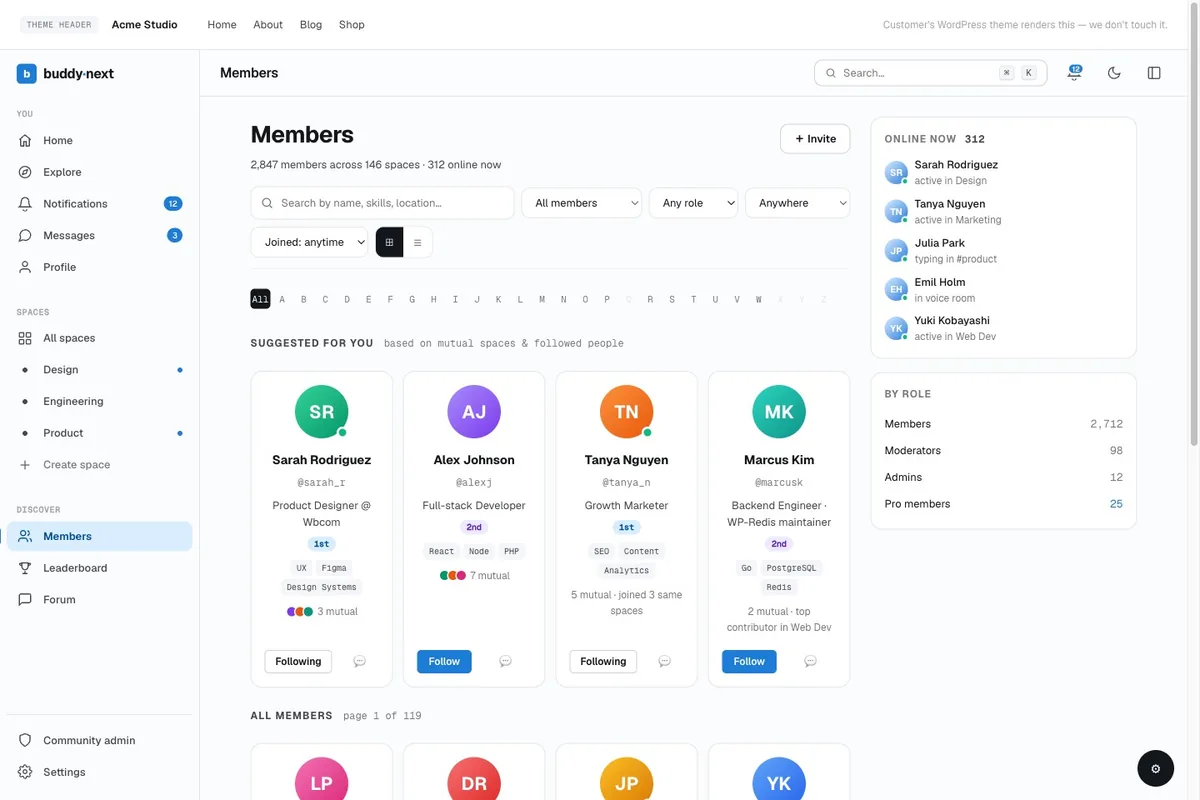
BuddyNext is the free Community OS for WordPress: a standalone engine (not built on BuddyPress) that ships everything from Step 3 in one plugin. Activity feed with reactions and threaded comments. Member Spaces - open, private, and secret - with roles and join flows. Profiles with 13 field types and per-field privacy. Member directory, following and connections, notifications, a branded email engine, and a moderation suite with reports, strikes, and appeals. Social login and 2FA are built in.
When you reach Step 5, BuddyNext Pro (from $149/year) adds Stripe membership tiers natively - so the membership plugin layer below becomes optional rather than required. And the engine grows through apps from the same team: Jetonomy for forums and Q&A, MediaVerse for photo and video, Learnomy for courses, and the free WB Gamification for points and badges. Spin up a free sandbox to see a working community before you commit.
BuddyPress: The Veteran Community Layer
BuddyPress is the standard community plugin for WordPress. It adds the social networking infrastructure that makes WordPress a community platform: user profiles with activity feeds, friend connections, private messaging, groups, and notifications. It is free, actively maintained, and has a large ecosystem of add-ons.
WBCom has built 48+ BuddyPress plugins that extend the platform with features like media albums, reactions, polls, hashtags, badges, and more. These let you add specific features to your community without custom development.
Themes for Community Sites
Your theme determines the first impression new members get. Two themes from WBCom are purpose-built for community sites:
- BuddyX - All-in-one community and blog theme. Clean, modern, fully compatible with BuddyPress and WooCommerce. Good for communities that blend social networking with content
- Reign - Purpose-built for membership communities and social networks. More feature-rich out of the box, with advanced layout options and deeper BuddyPress integration
Membership and Access Control
For paid communities, you need a membership plugin that controls access:
- Paid Memberships Pro - free plugin with solid free tier, highly compatible with BuddyPress
- MemberPress - premium option with more features, excellent for complex access rules
- Restrict Content Pro - clean and lightweight, works well for simpler community membership models
Forums
If discussion threads are a primary feature of your community, you have two paths. Jetonomy, a standalone forum, Q&A, and ideas plugin that also plugs into BuddyNext, adds voting, accepted answers, and six trust levels that let the community moderate itself - and it imports from bbPress with URLs preserved. On the BuddyPress path, bbPress remains the lightweight classic. Both work within the same WordPress installation.
Choosing the Right Combination
The right plugin combination depends on your community type. A professional network primarily needs BuddyPress profiles, messaging, and groups - with Reign theme for design. A learning community needs LearnDash or LifterLMS added to the stack. A customer community needs WooCommerce integration. A content-focused community needs bbPress forums prominently. Do not install everything available - choose the plugins that match the primary activities of your specific community and add others only when members need them.
On the BuddyNext path the combinations are simpler: community + courses = BuddyNext + Learnomy. Community + Instagram-style media = BuddyNext + MediaVerse. Community + structured Q&A = BuddyNext + Jetonomy. Each app also works standalone, so you can start with the one tool you need today and grow into the full stack later.
Step 3: Build the Member Experience
Profile Design
Member profiles are how people present themselves to the community. Good profiles have: a photo, a brief bio, key fields relevant to your niche (role, industry, location, goals), and links to their work or social profiles. BuddyPress extended profiles let you add custom fields that are specific to your community’s context.
For a professional community, profile fields like “Primary skill,” “Looking for,” and “Can help with” are more valuable than generic bio fields. They facilitate the connections your members actually want to make. A well-designed profile system makes the member directory useful - people can browse profiles to find collaborators, advisors, or potential clients without needing to post a request in the main feed.
Groups and Subspaces
As communities grow, a single shared space becomes too noisy for everyone. BuddyPress groups let members self-organize around subtopics, roles, or interests. A general WordPress developer community might have groups for plugin development, WooCommerce, theme design, and freelancing. Members join the groups most relevant to them and filter their activity feed accordingly.
Start with fewer groups than you think you need. Empty groups look dead and discourage participation. Launch with 3 to 5 groups that you are confident will have enough activity to feel alive. Add groups as the community grows and member-driven demand for new spaces becomes evident.
Direct Messaging
Private messaging between members is one of the highest-value features in professional communities. It is where relationships form, collaborations start, and the real value of networking happens. BuddyPress includes basic private messaging. WBCom’s messaging plugins extend this with group messaging, rich media sharing, and read receipts.
Notifications and Engagement Loops
Members who do not receive notifications about replies and mentions stop returning. BuddyPress handles on-site notifications. Extend this with email notifications for direct messages, mentions, group activity, and replies to posts a member has participated in. The notification system is what converts a “joined and forgot about it” member into a regular participant - when someone replies to your post and you get an email, you come back.
Step 4: Launch Strategy - The Critical First 90 Days
The biggest mistake community builders make is launching too publicly before the community has energy. A community with 5 active members feels empty and discourages new joiners. A community with 50 highly engaged members feels vibrant and draws people in.
Pre-Launch: Build Your Founding Members
Before opening your community to the public, recruit 20 to 50 founding members personally. These are people who know you, believe in the community’s purpose, and will participate actively in the early days. They provide the initial energy that makes the community feel alive to new joiners.
Founding members often get special status, reduced pricing, or recognition in exchange for their early participation. This is not just a nice gesture - it creates a group of invested stakeholders who want the community to succeed. They have social skin in the game: when they invite others and show off the community, its success reflects on them.
Seed Initial Content and Discussions
Your founding members should seed the community with posts, questions, and discussions before you invite the broader audience. Post questions yourself. Start discussions. Share resources. A community with 20 active threads from day one gives new members things to engage with immediately.
The Onboarding Sequence
Every new member should receive an automated onboarding email sequence that:
- Welcomes them personally and sets expectations
- Shows them where to start (introduce yourself here)
- Points to the most active discussions right now
- Introduces one or two long-term members they should connect with
- Asks a simple question to prompt their first response
The onboarding sequence is not a formality - it is the highest-impact intervention you have to turn new sign-ups into active members. Members who complete a first action within their first week are significantly more likely to remain active at 90 days than those who do not. Design the sequence to prompt that first action as quickly and specifically as possible.
90-Day Launch Checklist
| Phase | Action | Success Signal |
|---|---|---|
| Week 1-2 (Pre-launch) | Recruit 20-50 founding members personally | Founding members join and post at least once |
| Week 3-4 (Soft launch) | Invite founding members, seed 20 discussions | At least 10 discussions have replies |
| Month 2 | Open registration, share publicly in niche channels | First 100 members, 30% activation rate |
| Month 3 | Introduce paid tier, first sponsored event | First 10 paying members |
Step 5: Monetization Models
Paid Membership
The most straightforward model: charge monthly or annual fees for community access. Typical pricing ranges from $9/month for basic community access to $99+/month for premium communities with significant added value (live calls, coaching, job boards, exclusive tools). BuddyNext Pro handles this natively with Stripe membership tiers - monthly, yearly, or one-time plans, gated Spaces, and free trials - while on the BuddyPress path a membership plugin does the same job. Our full guide to building a subscription community on WordPress covers pricing, churn, and payment setup in depth.
Freemium with Premium Tiers
A free tier grows your member base quickly. Premium tiers unlock additional features (more groups, advanced profile features, direct access to experts, premium content). This model trades slower revenue growth for faster community growth. The larger free community provides a network effect that makes the premium tier more valuable.
Sponsorship and Featured Listings
Companies that want access to your specific community audience will pay for visibility. Sponsored newsletters, featured vendor listings, sponsored discussions, and job board placements are all viable revenue streams once your community reaches meaningful size.
Events and Courses
Live events (virtual AMAs, workshops, masterminds) and recorded courses add paid layers on top of community access. Members who value the community often pay for premium events within it. LearnDash integrated with BuddyPress lets you sell courses directly to community members, with progress and completion tracked in the community profile.
Community Management at Scale
A community of 50 can be managed by one person with part-time effort. At 500 members, you need systems. At 5,000, you need dedicated community managers or a strong volunteer moderator network.
Keys to sustainable community management:
- Clear community guidelines - enforce them consistently from day one
- Volunteer moderators - recruit active members who become invested in the community’s health
- Regular programming - weekly themes, monthly events, AMAs - structure creates participation habits
- Member spotlights - recognize active members publicly; recognition is one of the most powerful engagement tools
The most valuable thing you can do as a community builder at any scale is respond to members quickly and consistently. A community where the founder or team is visibly present and engaged creates a fundamentally different culture than one where the founders post occasionally. Your presence signals that the community matters enough for you to show up.
Community Management Tasks by Stage
| Stage | Members | Time Investment | Key Tasks |
|---|---|---|---|
| Early | 0-100 | 5-10 hrs/week | Seed content, respond to everything, recruit members personally |
| Growing | 100-500 | 10-20 hrs/week | Onboarding automation, weekly events, moderator recruitment |
| Established | 500-2,000 | 20-30 hrs/week | Dedicated community manager, programs calendar, churn tracking |
| Scaled | 2,000+ | Full-time team | Multiple moderators, editorial calendar, member success function |
Measuring Community Health
Vanity metrics (total members, total posts) do not tell you whether a community is healthy. Focus on these:
- Weekly active members (WAM) - what percentage of total members participated in the last 7 days? Below 10% is a concern. Above 30% is healthy.
- New member activation rate - what percentage of new members complete a first action within 7 days?
- Post response rate - what percentage of posts receive at least one reply within 24 hours?
- Member retention - what percentage of members from 90 days ago are still active?
- Content-to-member ratio - are a small number of members creating most of the content, or is participation distributed?
Warning Signs to Watch For
Certain patterns signal a community in trouble before the numbers make it obvious. Watch for these early indicators: new member posts going unanswered for more than 24 hours (kills activation), the same 3-5 members posting 80% of content (over-reliance on a few contributors), a spike in unsubscribes after a specific type of content or event (something is turning members off), and questions that keep getting asked repeatedly (your onboarding is not answering something members need to know).
Each warning sign has a specific fix. Unanswered posts: implement a 24-hour check by the community manager. Over-reliance on core members: start a “new voices” initiative that explicitly invites quieter members to share. Unsubscribe spikes: survey churned members and ask why. Repeated questions: add a pinned resource or FAQ post that addresses them.
Technical Setup: BuddyPress Configuration Checklist
Before launching, work through this configuration checklist to make sure the technical foundation is solid. (Running BuddyNext instead? Its 4-step setup wizard plus member onboarding flow covers most of items 1 - 5 automatically - the checklist below is for the BuddyPress path.)
- Install BuddyPress and activate the components you need (Activity, Members, Groups, Notifications, Messages, Extended Profiles)
- Set up extended profile fields - add fields specific to your niche, set required fields
- Configure group settings - decide whether groups are open or require approval, who can create groups
- Set up private messaging - decide whether all members can message each other or if connections are required first
- Configure email notifications - make sure all notification emails are sending and branded correctly
- Set up your membership plugin and create your membership tiers
- Install your chosen theme (BuddyX or Reign) and configure the community homepage
- Create your onboarding email sequence in your email platform (ConvertKit, Mailchimp, etc.)
- Set up community guidelines page and link it from registration and navigation
- Test the full new member experience end-to-end before opening to real members
Frequently Asked Questions
Should I build on BuddyPress or BuddyNext?
For a brand-new community, start with BuddyNext: it is a free, standalone Community OS with a modern architecture, built-in moderation, and native Stripe membership tiers in Pro (from $149/year). Choose BuddyPress when you already run it, depend on its 15-year add-on ecosystem, or need specific integrations that only exist there. Both are free and both are actively supported by Wbcom Designs, so this is a choice of architecture, not a bet on survival.
How many members do you need before a community feels active?
Most community builders find that 50-100 genuinely active members is the threshold where a community starts feeling self-sustaining. Below that, you need to be intentional about seeding every conversation and prompting participation manually. Above it, organic activity starts to maintain itself and new members find things to engage with without your direct intervention. The key word is “active” - 500 inactive members is worse than 50 engaged ones because the ratio of posts to members sends a clear signal that the community is not valuable to most of its members.
Should I use Discord or Slack instead of building on WordPress?
Discord and Slack work well for real-time chat-focused communities, especially developer or gaming communities where instant messaging is the primary interaction pattern. They do not work well for communities where asynchronous content - member profiles, resource libraries, forums, courses - is important. They also give you no data ownership and no monetization infrastructure. If your community’s primary value is in-the-moment conversation, Discord may be the right tool. If members need rich profiles, a searchable knowledge base, paid access tiers, or integration with WooCommerce or course platforms, WordPress with BuddyPress is substantially better.
What causes most online communities to fail?
The most common causes of community failure are: starting too broad without a clear positioning (attracts no one specifically), launching publicly before there is any internal energy (new joiners find an empty space and leave), underinvesting in the first 30 days of a member’s experience (activation is too slow), and the founder becoming less visible over time (community culture reflects the founder’s engagement level). Technology is almost never the reason communities fail - the reasons are almost always about the human and strategic layer. Build the purpose and the founding member group before you worry about plugins and themes.
How do I get members to participate and not just lurk?
Lurking is normal - most online communities follow a pattern where a small percentage of members create most of the content. To raise participation rates: ask direct questions to specific members (tagging someone in a relevant discussion gets a response more often than posting to the general feed), create low-effort participation opportunities (polls, reactions, one-sentence replies to prompts), publicly recognize early contributions (recognition creates the desire for more), and make the first post experience as frictionless as possible (a dedicated “introduce yourself” space with a simple prompt does more for activation than any other single feature).
Can I migrate an existing Facebook Group or Slack workspace to WordPress?
You cannot automatically migrate conversation history from Facebook or Slack to BuddyPress - the data formats are too different and neither platform provides clean export tools. What you can do is migrate your members. Announce the move, explain why (ownership, features, no ads), give members a compelling reason to join the new platform (founding member status, a free month if paid, access to something exclusive), and maintain both platforms briefly during the transition to bring people along. Most community builders who have made this move report 30-60% of active members following them to the new platform - which is actually most of the people who mattered, since lurkers rarely make the move and often were not providing value anyway.
Final Thoughts
Building an online community is a long game. The communities that succeed are the ones with a clear purpose, a specific audience, and a committed founder who shows up consistently for the first 12 months while the community finds its rhythm.
WordPress with BuddyPress gives you the technical foundation to build any community you can imagine - without the platform risk of SaaS tools or the recurring per-member fees that make community building expensive as you grow. The platform is proven. The tools are mature. The work is in building the human side of the community.
Start with clarity of purpose. Build the minimum feature set that supports that purpose. Invest heavily in founding members and early activation. Measure the right things. And be patient - communities that last are built over years, not months.
Related Reads:
Why You Need a BuddyPress Business Profile for Your Website
Browse All WBCom BuddyPress Plugins
Best WordPress Community Plugins (2026)
Related reading
- Self Hosted Wordpress Community Course Plugins
- Engagement Plugins For Buddypress And Buddyboss Platform
- How to Schedule Buddypress Activity Posts Complete Guide
- Buddynext Launch 13 Years Wordpress Communities
- What a Week 2 New Wordpress Plugins Launch 22 Updates Ship
- Why we Built wb Member Wiki Community Knowledge Base