
8 min read
How to Make Money as a Photographer: WordPress Portfolio and Client Community


Photography is one of those professions where the gap between talented and profitable is surprisingly wide. Many skilled photographers earn far less than they could because they spend their energy on the wrong things - chasing individual clients, undercharging for their work, and depending on platforms like Instagram for discoverability. WordPress changes that calculation.
A well-built WordPress site does three things simultaneously: it showcases your portfolio, attracts clients through search and referral, and creates opportunities to generate passive income alongside your active photography work. This guide covers the practical steps to build a photography business on WordPress and the revenue streams that successful photographers are using in 2026.
A WordPress site solves all of these problems. You control the presentation of your portfolio, you capture leads directly through contact forms and email signups, you rank in Google for local and specialized photography searches, and you can build a community of clients and photography enthusiasts around your brand.
Building Your Photography Portfolio on WordPress
Choosing a Photography Theme
Your theme needs to do one thing above all else: make your images look exceptional. Photography-specific WordPress themes are designed to showcase images at full resolution with minimal visual clutter. Key features to look for:
- Full-width image galleries with masonry or grid layouts
- Fast image loading with lazy load support
- Clean, minimal aesthetic that does not compete with your images
- Mobile-responsive layouts that work on all screen sizes
- Client area or gallery sharing functionality (if you offer client proofing)
If you plan to add community features - a photography workshop community, a client portal, or a peer network for aspiring photographers - the BuddyX theme can support both portfolio functionality and community features through BuddyPress integration.
Portfolio Structure That Converts Visitors to Clients
Most photography portfolios show too much and explain too little. A portfolio that converts visitors into clients needs more than beautiful images - it needs clear context about what you shoot, who you serve, and how to hire you.
Organize your portfolio by service rather than just by genre. “Wedding Photography,” “Commercial Product Photography,” and “Brand Photography for Small Businesses” are clearer navigation options than “Portfolio - 2023,” “Portfolio - 2024,” etc. Each service page should include your best images in that category, a brief description of your approach, client testimonials, and a clear call to action.
SEO for Photography Sites
Local SEO is the most immediate traffic opportunity for most photographers. People searching “wedding photographer in [city]” or “newborn photographer near me” are actively looking to hire. Optimizing your site for these searches - with location-specific service pages, local business schema markup, and Google Business Profile integration - drives high-intent traffic that converts into bookings.
Beyond local SEO, niche photography keywords can drive national or international traffic. A photographer who specializes in adventure elopements might target “adventure elopement photographer” or “mountain wedding photography” - searches with lower volume but very high purchase intent from people who would specifically seek out your style.
Present your pricing in a way that anchors expectations correctly. Rather than showing your lowest price as the headline number, design your packages so the mid-tier option looks like the obvious best value. Most clients will choose the middle option when presented with three tiers - this is known as the decoy pricing effect, and it reliably increases average booking value.
For service-based photographers, publishing clear pricing on your website reduces the number of low-budget inquiries you receive and signals that you are a professional with established rates. For photographers selling products (prints, presets, courses), clear pricing reduces cart abandonment and eliminates the “I need to think about it” friction that costs sales.
Presenting Packages Online
WooCommerce is the most flexible solution for presenting photography packages online. You can create product listings for each service tier, enable add-ons (extra hours, albums, rush delivery), and allow clients to pay deposits directly through your site. This removes the back-and-forth of email negotiation and converts more inquiries into confirmed bookings because the client can commit immediately when they are ready to hire you.
Your WordPress site’s primary job in most photographers’ businesses is generating and converting client leads. A professional portfolio that ranks in search, captures contact form submissions, and presents packages clearly will consistently outperform a social media-only presence for attracting quality clients willing to pay professional rates.
Online booking and quoting tools - plugins like Bookly or WooCommerce Bookings - let potential clients check availability and request quotes directly from your site. This removes friction from the inquiry process and signals professionalism, both of which improve conversion rates and average booking value.
2. Selling Prints and Licensing Images
Your photography library is a sellable asset. WooCommerce enables you to sell prints directly from your portfolio - customers can browse your work and order prints in various sizes and formats. Services like Printful integrate with WooCommerce for print-on-demand fulfillment, meaning you never touch inventory; orders go directly from customer to printer to delivery.
Image licensing is a separate opportunity: businesses, publications, and individuals pay licensing fees to use your images in their materials. You can sell licenses directly through your WordPress site, removing the 30-50% commission that stock photo platforms take.
3. Photography Education and Online Courses
Teaching photography is one of the most scalable income streams available. Your expertise - built over years of practice - can be packaged into courses that sell while you sleep. Online photography courses sell in a wide price range: beginner courses covering camera basics ($47-$97), intermediate courses covering specific techniques or genres ($97-$297), and advanced or portfolio-building programs ($297-$997).
An LMS plugin like LearnDash, Learnomy, or LifterLMS lets you deliver structured courses with video lessons, downloadable guides, quizzes, and progress tracking. These integrate with BuddyPress so students can discuss course content in groups, making the learning experience more engaging and the community more valuable.
4. Photography Community and Membership
Building a community of photography enthusiasts or aspiring professionals around your brand creates recurring subscription revenue. Members pay monthly for access to exclusive content, critique sessions where you review member work, monthly challenges, group discussions, and access to your course library.
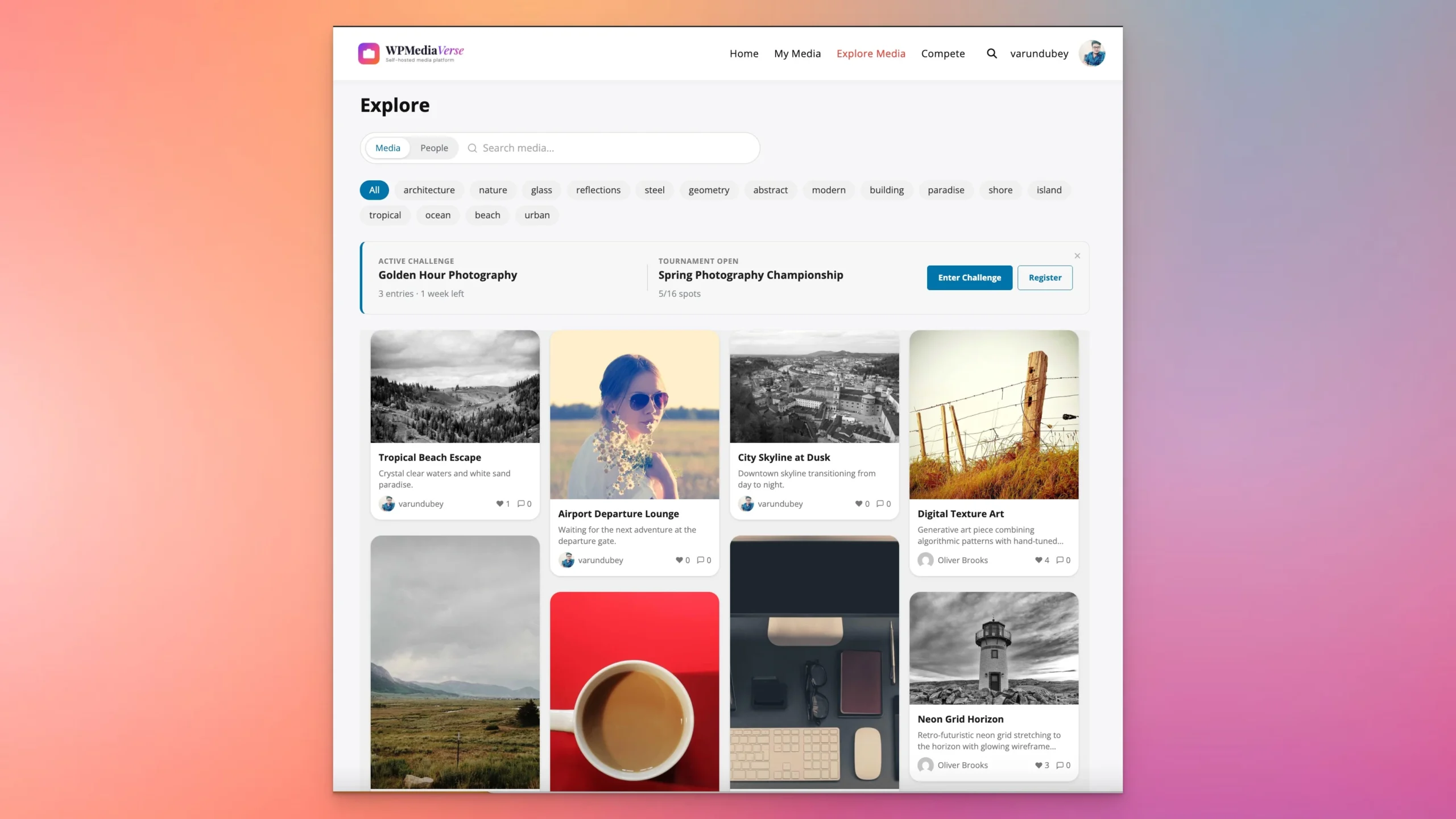
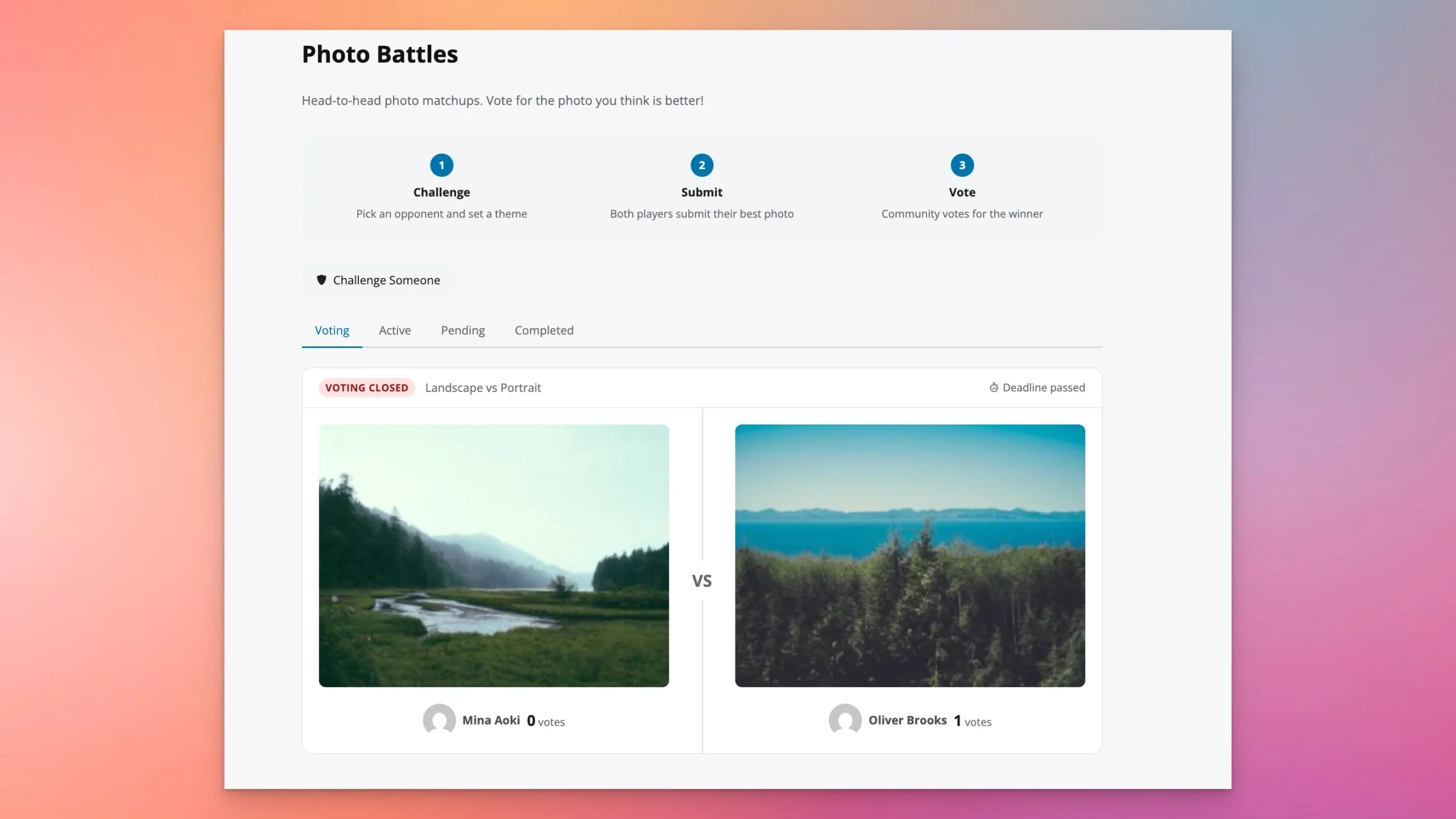
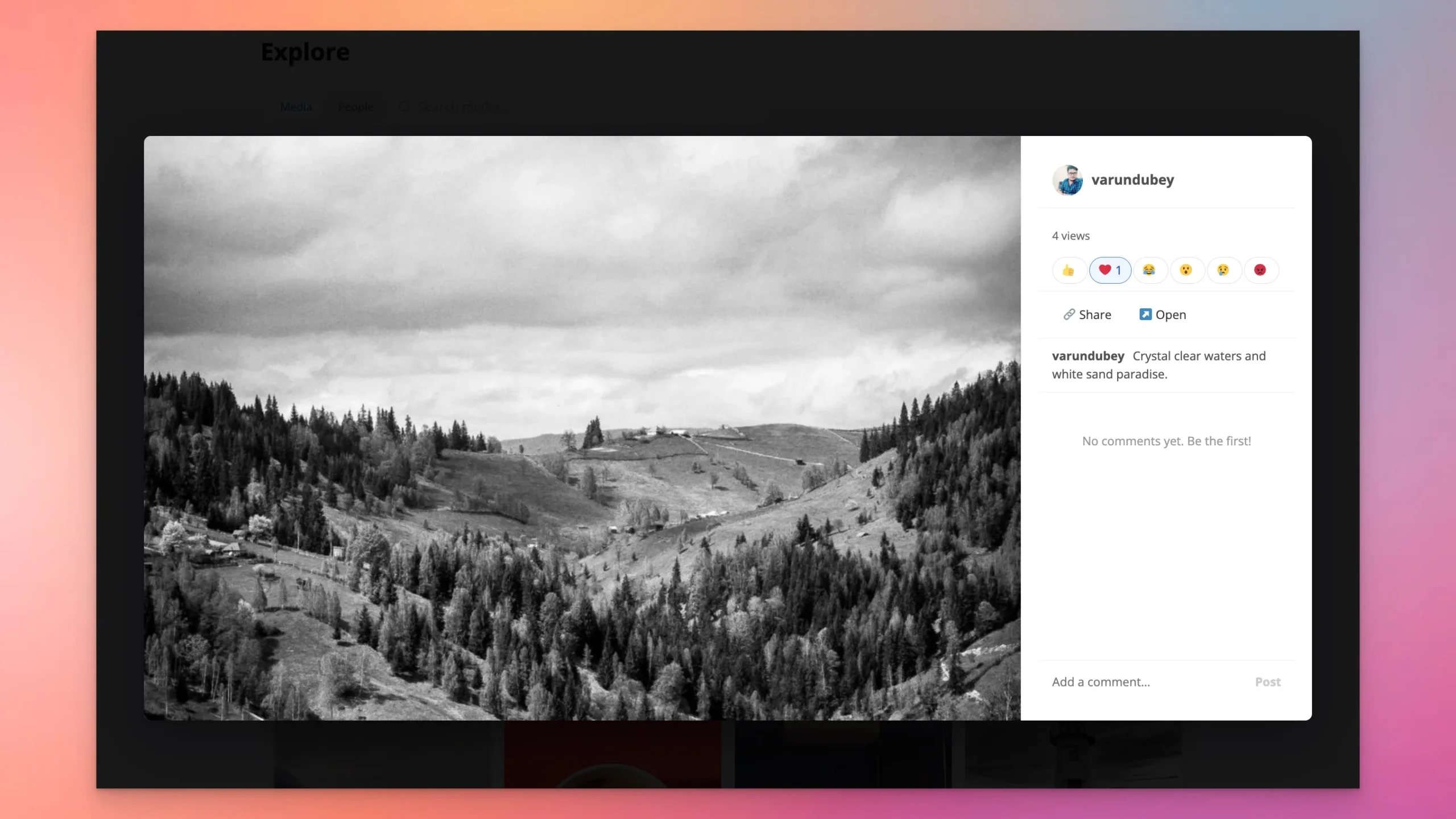
This model works particularly well for photographers who have developed a distinct style or approach that inspires other photographers. A community built on BuddyPress can include portfolio sharing groups, genre-specific sub-communities, and direct messaging with instructors and mentors. The BuddyPress Community Bundle provides the full toolkit for this kind of photography learning community. For the media layer, WPMediaVerse is purpose-built for exactly this use case. Members upload photos to albums, organize collections, react to each other’s work with six emoji types, leave threaded comments, and follow their favourite creators, all within your WordPress site. It includes an explore feed for discovering member work, six privacy levels (public portfolios alongside private client galleries), watermarking to protect originals, and AI moderation to keep content standards high. The Pro version adds photo challenges and tournaments, run monthly themed contests that keep your photography community engaged and competitive. Try it in a free sandbox.
5. Photography Presets and Digital Tools
Lightroom presets, Photoshop actions, and Capture One styles have become significant revenue generators for photographers with distinctive editing aesthetics. If your processing style is one that others admire, packaging and selling it as a preset pack can generate steady passive income. Preset packs typically sell for $25-$70, and successful photographers sell hundreds of copies per month with minimal ongoing effort after the initial creation.
6. Affiliate Marketing for Photography Gear
Photography gear reviews, equipment recommendations, and buying guides generate excellent affiliate revenue because photography equipment is expensive and buyers research purchases extensively. Writing honest, detailed reviews of the cameras, lenses, bags, and accessories you actually use, with affiliate links to purchase, creates content that ranks in search and earns commissions on high-value purchases.
Amazon Associates covers most photography equipment. B&H Photo, Adorama, and manufacturer affiliate programs often offer higher commissions for dedicated photography purchases.
7. Workshop and Event Photography Instruction
In-person photography workshops command premium prices - $500 to $3,000 per person for multi-day retreats and workshop experiences. Your WordPress site handles the marketing, registration, and payment processing. You can list workshops using WooCommerce with booking functionality, build anticipation through your community, and use email marketing to fill seats with your existing audience before opening to the public.
A BuddyPress-powered client community might include:
- Private client groups for wedding photography clients to share previews before delivery
- A public community gallery where clients can share their images and tag you
- Educational resources for clients about getting the most from their sessions
- A referral program managed through the community platform
- Behind-the-scenes content exclusive to community members
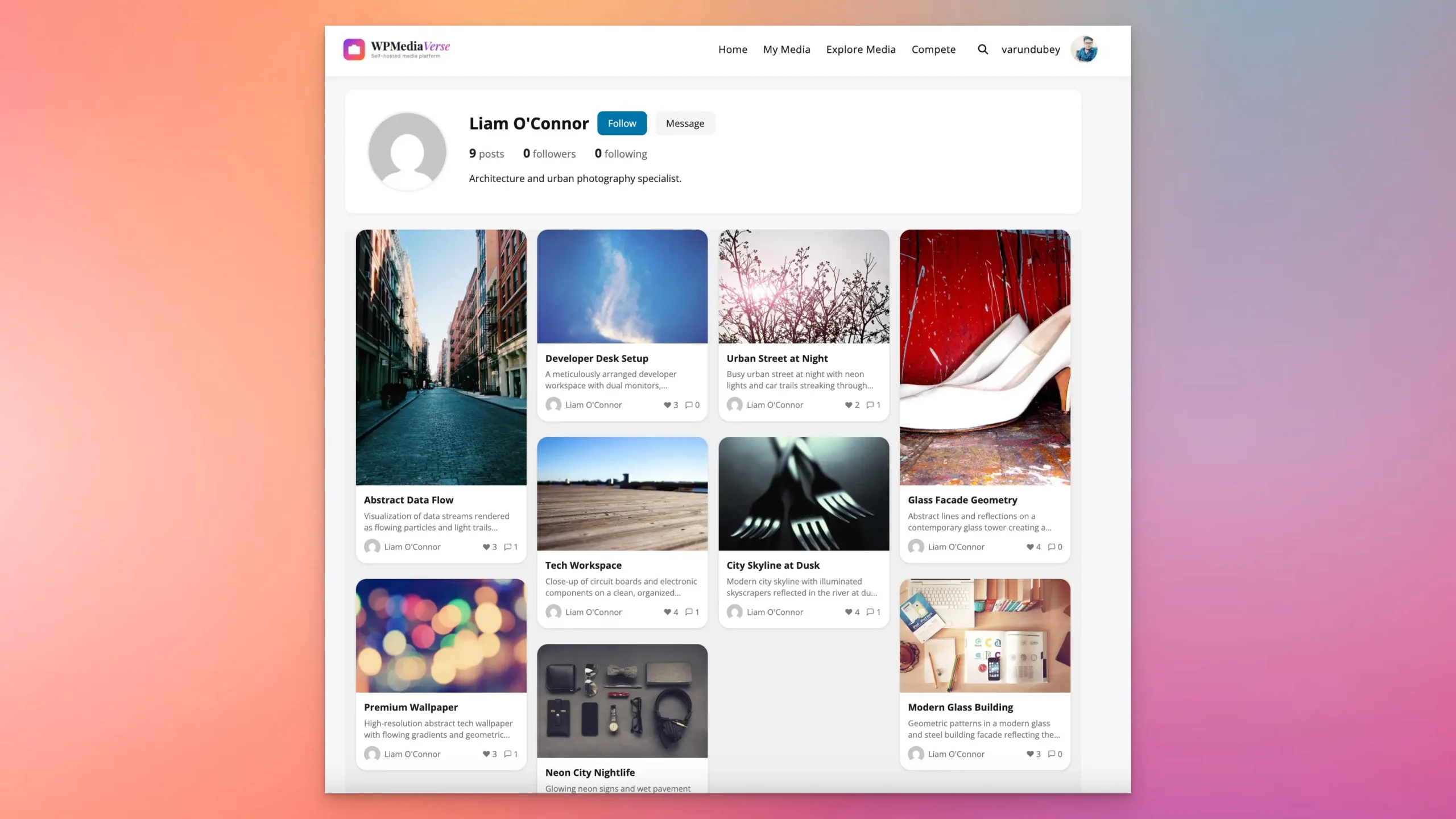
WPMediaVerse makes this kind of client community practical. Its six privacy levels mean wedding clients see only their own gallery (friends-only or custom access), while your public community gallery stays open to everyone. Watermarking protects undelivered proofs, clients see watermarked previews, and you release originals after final payment. Signed URLs with expiration prevent link sharing of private content. And the built-in direct messaging system lets clients send feedback on specific images without leaving your site.
Essential WordPress Plugins for Photographers
| Plugin | Purpose | Best For |
|---|---|---|
| WPMediaVerse | Media platform, albums, galleries, reactions, privacy, watermarking | Photography communities and client portals |
| Envira Gallery | Portfolio galleries | All photographers |
| WooCommerce | Print sales and digital downloads | Selling images and presets |
| Bookly | Session booking and scheduling | Portrait and commercial photographers |
| LearnDash | Photography courses | Education-focused photographers |
| BuddyPress | Client and student community | Building ongoing relationships |
| Yoast SEO | Search engine optimization | Local and niche SEO |
From Portfolio to Platform
The photographers who build the most sustainable businesses are the ones who stop thinking of their WordPress site as a digital business card and start treating it as a full platform. A portfolio that also houses courses, a community, digital product sales, and a print shop is exponentially more valuable than one that just shows images and lists a contact email.
Start with what you have. If you have a portfolio site, add one revenue layer - a print shop, a single course, or a community. Build from there. The compounding effect of multiple revenue streams, each supporting the others, is what turns a photography side project into a genuine business.
Related reading