
10 min read
How to Build a Creator Community Platform with WordPress


The creator economy is worth $250 billion today. By 2027, Goldman Sachs projects that number hits $480 billion. Millions of people are building audiences, monetizing content, and turning their expertise into income. But most of them are doing it on platforms they don’t own.
That’s the trap.
I spent three years building an audience on Patreon and Instagram before I realized I was working for someone else’s business. My content, my fans, my revenue. All of it sitting inside systems that could change their algorithm tomorrow, cut my payout rate next quarter, or ban my account without warning.
When I moved to a self-hosted WordPress creator community platform, I kept 100% of every dollar. I owned the email list. I could see exactly who my fans were, what they loved, and how to serve them better. No middleman. No platform fees eating 5-12% off the top.
This guide walks you through how to build that same kind of owned creator community on WordPress, from the first plugin install to your launch day and beyond.
- Change monetization rules with little notice
- Shift algorithmic reach away from existing audiences
- Introduce competing products that undercut creator revenue
- Enforce terms that are vague, inconsistently applied, and hard to appeal
The response from serious creators has been consistent: build an owned community. Not a presence on someone else’s platform. An actual home where you control the experience, the data, and the money.
An owned creator community is where your most dedicated fans gather, pay for exclusive access, and feel like members rather than followers. When you own it, you decide everything: pricing, content format, access tiers, community rules, branding, and the relationship with your audience.
WordPress is the best platform for building that community. It runs 43% of all websites, it has a mature ecosystem of community and membership plugins, and it charges you nothing to exist on it. Your money stays yours.
Platform bans are the extreme version, but they happen more than most people realize. And when they do, creators lose not just their income but their contact list, their content archive, and their relationship with their audience. There’s no export button for your community.
The fee problem is constant and compounds over time. Patreon charges 5-12% of your revenue depending on your plan. That’s before payment processing fees. On a $10,000/month business, you’re handing Patreon $500-$1,200 every single month. That’s $6,000-$14,400 per year for the privilege of using their platform.
WordPress charges $0 in platform fees.
Research consistently shows that top creators who move to owned platforms earn significantly more. The top 1% of Patreon creators who migrate to self-hosted solutions report earning 6x more within 12 months, largely because they keep their full revenue and can design membership structures that actually fit their audience.
The solution isn’t to abandon social platforms, since they’re still useful for discovery. The solution is to stop using them as your primary home. Use social for reach. Use your WordPress community for relationships and revenue. Many creators also draw audiences from Scrolller-style content browsing sites like Reddit and Imgur, which makes owning your platform even more important since those sites offer zero monetization tools for creators. For a detailed side-by-side comparison, see our breakdown of WordPress vs SaaS Community Platforms.
Membership and access control: Paid Memberships Pro or MemberPress, both integrate cleanly with BuddyPress and WooCommerce.
Ecommerce: WooCommerce, for digital products, course access, and one-time purchases.
Courses: LearnDash, Learnomy, or Tutor LMS, for structured educational content.
Email: FluentCRM (self-hosted), ConvertKit, or Mailchimp, for newsletters and automated sequences.
Gamification: myCred or GamiPress, for badges, points, and fan recognition.
Media platform: WPMediaVerse for the Instagram/Flickr-style visual layer, member uploads, albums, explore feed, reactions, follows, DMs, AI moderation, and privacy controls. Works standalone or with BuddyPress. Free core; Pro adds cloud storage, HLS video streaming, photo battles, and five layout modes.
Video: Bunny.net or Vimeo for video hosting; native embed for YouTube or Loom. WPMediaVerse Pro can offload media to S3 or BunnyCDN directly.
This stack isn’t expensive. Most of these tools cost a fraction of what you’d spend on platform fees, and they’re yours to keep regardless of what any third-party platform decides to do.
For the theme, install BuddyX Pro or Reign from Wbcom Designs. These aren’t generic themes that happen to support BuddyPress. They’re designed from the ground up around community experiences. Member profile pages look like actual social profiles. Group pages feel like community hubs. The activity feed is readable and engaging.
BuddyX Pro works well if you want a cleaner, more modern aesthetic that appeals to younger creator audiences. Reign is more feature-rich out of the box and suits communities where members are highly engaged and spend significant time in the platform.
Set up your core pages: Home, Membership/Join, Members, Groups (if you’re using them), and a content hub for your exclusive posts.
Activity Streams, the social feed where members can post updates, comment on your content, and interact with each other. This is the pulse of your community.
Groups, create spaces for different interests, membership tiers, or topics. A paid “inner circle” group where you share early access and unfiltered thoughts is one of the most compelling membership benefits you can offer.
Private Messaging, lets you respond to fan questions personally, or lets members connect with each other.
With BuddyX Pro or Reign as your theme, these features integrate visually. It doesn’t look like you bolted social features onto a blog. It looks like a community that was designed to be one.
One tactic that works well: create a free tier with basic community access (profile, activity feed, public groups) and a paid tier with exclusive groups, direct messaging access to you, and gated content. This gives potential members something to experience before they pay, which dramatically improves conversion.
Digital products work well for creators who want one-time purchases alongside subscriptions. Sell presets, templates, guides, resource packs, or tools through WooCommerce. These have no ongoing obligation for the buyer and can serve as a lower-commitment entry point to your paid ecosystem.
Courses add significant revenue potential. LearnDash integrates with BuddyPress and WooCommerce, meaning you can sell course access and have the discussion happen inside your community rather than in a separate platform. Students stay in your community after completing the course, which keeps them engaged with your ongoing content.
Tips and one-time support are worth adding even if they’re not your primary revenue. Some fans don’t want a subscription but want to support you for specific content. WooCommerce with a “Buy Me a Coffee” style product works fine for this.
Sponsorships and partnerships become easier when you own your platform because you can provide sponsors with real data about your audience (demographics, engagement rates, content preferences) that you simply can’t access on social platforms.
ConvertKit is the external option most creators know. It connects to WordPress through its official plugin, syncs new members automatically, and has a visual automation builder that non-technical creators find intuitive. The paid plans are priced per subscriber.
Mailchimp has the largest free tier (500 subscribers) and integrates with WooCommerce for purchase-triggered automations. The interface is dated compared to ConvertKit but it gets the job done for creators just starting out.
Regardless of which tool you use, set up these automations from day one:
- Welcome sequence for new free members (3-5 emails over two weeks)
- Upgrade sequence for free members who haven’t converted after 30 days
- Onboarding sequence for new paid members
- Win-back sequence for members who cancel or go inactive
Your email list is the most valuable asset your creator business owns. Grow it actively, segment it well, and treat it as your primary communication channel, not social or push notifications.
Vimeo Pro is clean, professional, and lets you restrict embeds to your domain only, which is useful for gated content. More expensive than Bunny.net but the UX is polished.
YouTube works for public content but is a poor choice for gated paid content. Members can screenshot links, download videos, or share access. Use YouTube for discovery; use Bunny.net or Vimeo for what members pay for.
For other content types:
- Drip content, both LearnDash and MemberPress support drip schedules, releasing content weekly or at set intervals after purchase
- Downloadable files, WooCommerce handles this cleanly; you can attach PDFs, audio files, or any download to a product
- Live sessions, embed Zoom or StreamYard inside a members-only page, or use a BuddyPress group for live text Q&A
Badges, visual recognition for milestones (“First Post,” “100 Days Member,” “Course Graduate,” “Founding Member”). Badges display on member profiles and in activity feeds, making achievements visible to the community.
Levels or ranks, as members accumulate points, they move through tiers. Higher ranks can unlock access to exclusive content or groups, creating intrinsic motivation to stay engaged.
Leaderboards, optional, but effective in communities with competitive or achievement-oriented audiences. Show top contributors, most active members, or top earners in referral programs.
Custom WordPress roles, beyond gamification, set up distinct WordPress user roles for your membership tiers. A “Founding Member” role can unlock a private group, a custom profile badge, and early access to content, based on their membership level rather than gamification points. WooCommerce Memberships and MemberPress both handle role assignment on purchase.
Announce across all channels at once, your existing social platforms, email list (if you have one), YouTube channel, podcast, wherever your audience already exists. The launch email should be direct: you’re building a home, you want your most engaged fans there, here’s what they get, here’s the price, here’s the link.
Post something exclusive immediately, members who join and find empty rooms leave. Have at least three to five pieces of exclusive content ready on day one, with the next piece scheduled to drop within a week.
Engage personally in the first 30 days, reply to every post in your community for the first month. Comment on member activity. Start discussions. Your engagement signals to members that this is an active space worth participating in.
Growth after launch uses the same playbook:
- Post your best content inside the community first, then adapted versions on social
- Run referral campaigns (myCred supports referral rewards)
- Partner with complementary creators for cross-promotion
- Use your email sequences to convert free members to paid
Add a course ($97 one-time), a digital product pack ($29), and a founding member tier ($99/year), and the actual revenue potential multiplies significantly.
But once the setup is done, WordPress gives you something no other platform can: complete ownership. For a deeper dive into setup, pricing, and growth strategies, check our membership sites guide. You can move hosts. You can switch payment processors. You can change your entire site design. You can export your full member database whenever you want. The platform can never change the rules on you because you are the platform.
For more context on how WordPress stacks up against the alternatives, see our detailed breakdown of the best Patreon alternatives and why more creators are choosing WordPress over Circle.
Creators deciding between hosted community platforms should also read our comparison of Circle or BuddyBoss to understand the trade-offs in pricing, ownership, and community features.
Creators who have outgrown BuddyBoss specifically can explore the best BuddyBoss alternatives to find a platform that better fits their community and monetization needs.
Writers and journalists who’ve migrated from Substack to WordPress maintain full control over their subscriber list, don’t pay 10% on revenue, and can build community features (reader discussion, member groups by interest) that Substack doesn’t offer.
Musicians and artists use WordPress communities to sell digital downloads (stems, sheet music, prints), offer fan tiers with exclusive behind-the-scenes content, and build genuine fan relationships that platforms like Instagram systematically prevent. WPMediaVerse adds the visual media layer these creators need, albums for artwork collections, playlists for audio, an explore feed for fan discovery, photo challenges for community engagement, and six privacy levels to control who sees what. Try it in a sandbox.
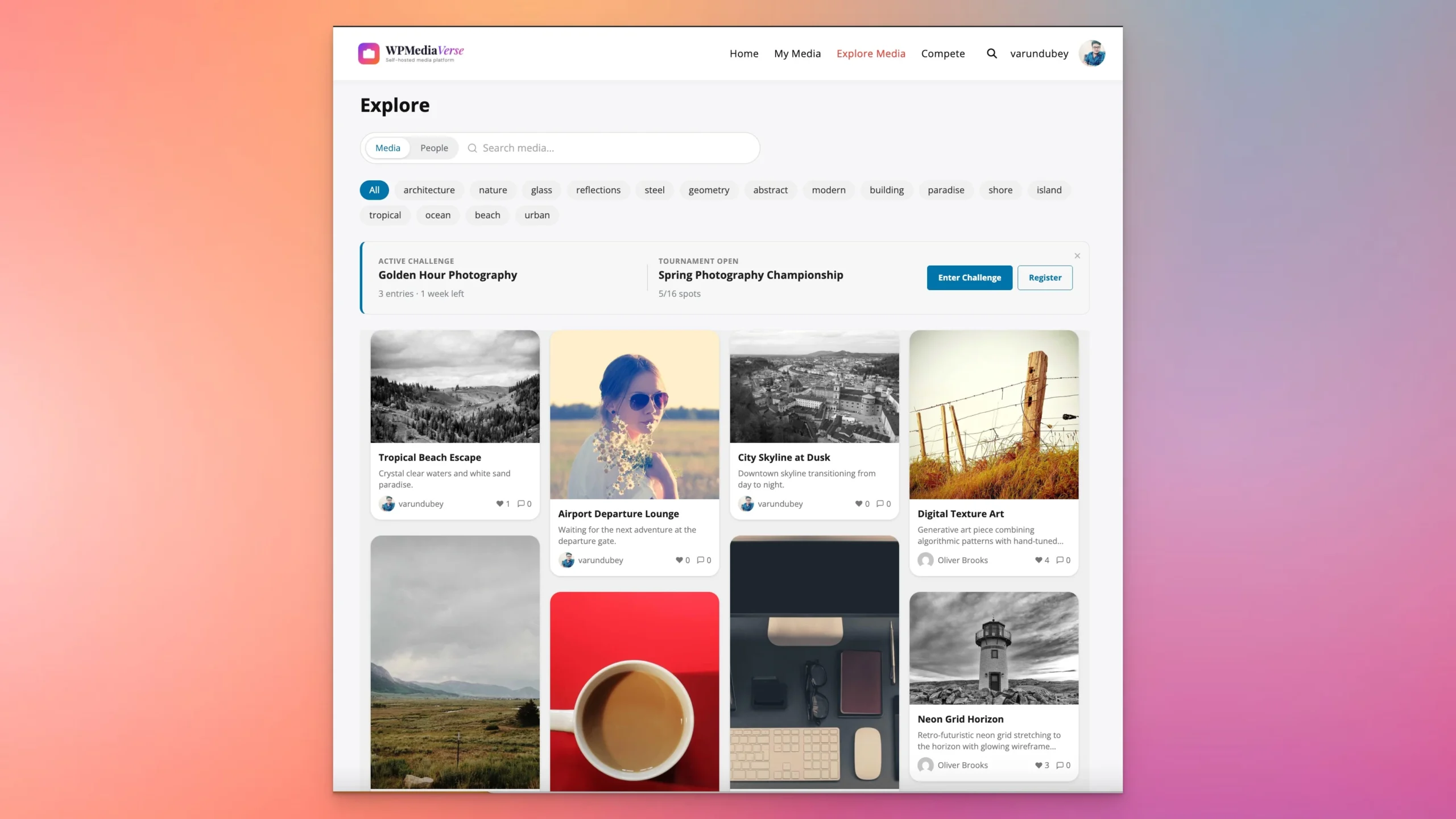
Niche content creators in craft hobbies, financial education, language learning, and professional development consistently find that a focused owned community outperforms broad social reach for both engagement and revenue.
You need a moderate comfort level with WordPress: installing plugins, configuring settings, managing pages. You don’t need to write code. BuddyX Pro and Reign are designed to be configured without custom development. For anything beyond standard setup, the WordPress freelance ecosystem is deep and affordable.
Can I migrate my existing Patreon or Substack subscribers to WordPress?
Yes, with some caveats. You can export your patron list from Patreon (name, email, tier) and import those members into your WordPress membership plugin. Substack lets you export subscriber emails. What you can’t do is migrate payment authorizations, members will need to re-enter payment information on your new platform. Most creators who do this offer their existing subscribers a migration discount or a free month as an incentive to re-subscribe.
What’s the best WordPress theme for a creator community?
BuddyX Pro and Reign from Wbcom Designs are purpose-built for creator communities that use BuddyPress. Both are actively maintained, well-documented, and designed to make community features look native rather than bolted on. BuddyX Pro has a cleaner, more modern aesthetic. Reign is more feature-dense and suits communities with high interaction volume.
How long does it take to launch a creator community on WordPress?
A basic community (BuddyPress, membership tiers, payment processing, email integration) can be ready in two to three weeks with focused effort. A more complete setup with courses, gamification, and polished design takes four to six weeks. The launch timeline is separate from the build. Plan two to four weeks of pre-launch audience warming before you open the doors.
Related reading