
13 min read
How to Run Photo Contests on Your WordPress Community Site (2026 Guide)


Why Photo Contests Are the Best Engagement Tool for Visual Communities
If you run a photography community, creative portfolio site, or any WordPress platform where members share visual content, you already know the challenge: keeping people coming back every day. Photo contests solve that problem better than almost any other feature.
Contests create a trifecta of engagement. They generate urgency through deadlines, spark competition through voting, and produce fresh content through submissions. Every contest entry is a piece of user-generated content your community creates for free.
Most WordPress sites still run photo contests using contact form plugins, manual spreadsheets for judging, and patchwork solutions that create more admin work than community value. We built purpose-built photo competitions into WPMediaVerse Pro specifically to fix this. Three distinct contest formats, Photo Challenges, Photo Battles, and Tournaments, each designed for different engagement goals, all running natively inside your WordPress site.
This guide covers everything you need to run successful photo contests: choosing the right format, setting up your first challenge, contest ideas that work, gamification strategy, and monetization.
Why Photo Contests Drive Engagement
Photo contests change the dynamic of your community from passive consumption to active participation. Instead of members scrolling through a feed and leaving, they have a reason to create, submit, vote, and return to check results.
Here is what happens when you introduce recurring contests:
Members create content instead of just consuming it. Every contest entry is a new photo in your community. A single challenge with 30 participants gives you 30 new pieces of original content without writing a single blog post.
Deadlines create urgency and daily check-ins. When a challenge closes on Friday, members come back Monday to plan their shot, Wednesday to submit, and Thursday to see how their entry is doing. That is multiple visits from a single contest.
Voting gives every member a role. Not everyone wants to compete, but nearly everyone wants to have an opinion. Community voting turns lurkers into active participants. Members who vote today may submit an entry next week.
Winners get recognition that drives future participation. Public recognition is a powerful motivator. When members see contest winners celebrated on the site, they want that spotlight too. Each round of winners creates the next round of contestants.
Fresh content appears automatically. As entries come in, your site’s feed, galleries, and activity stream all update with new media. This makes the site feel alive without any effort from your admin team.
You get ready-made social media content. Contest entries, voting calls, winner announcements, and bracket updates give you a steady stream of content to share on Instagram, Twitter, and Facebook.
Communities that run recurring contests consistently see 2-3x more daily active users compared to periods without contests. The combination of creation, competition, and recognition hits three of the strongest engagement drivers at once.
Three Contest Types in WPMediaVerse Pro
WPMediaVerse Pro includes three distinct competition formats. Each serves a different purpose, and you can run all three simultaneously or pick the one that fits your community best.
Photo Challenges
Photo Challenges are themed contests with a deadline. The admin sets a theme, “Golden Hour,” “Street Photography,” “Minimalism”, writes a description, and picks a closing date. Members submit their best photo matching the theme before the deadline.
All entries appear in a dedicated challenge gallery where the community can browse, react, and comment. This creates a curated collection of themed photography that builds over time.
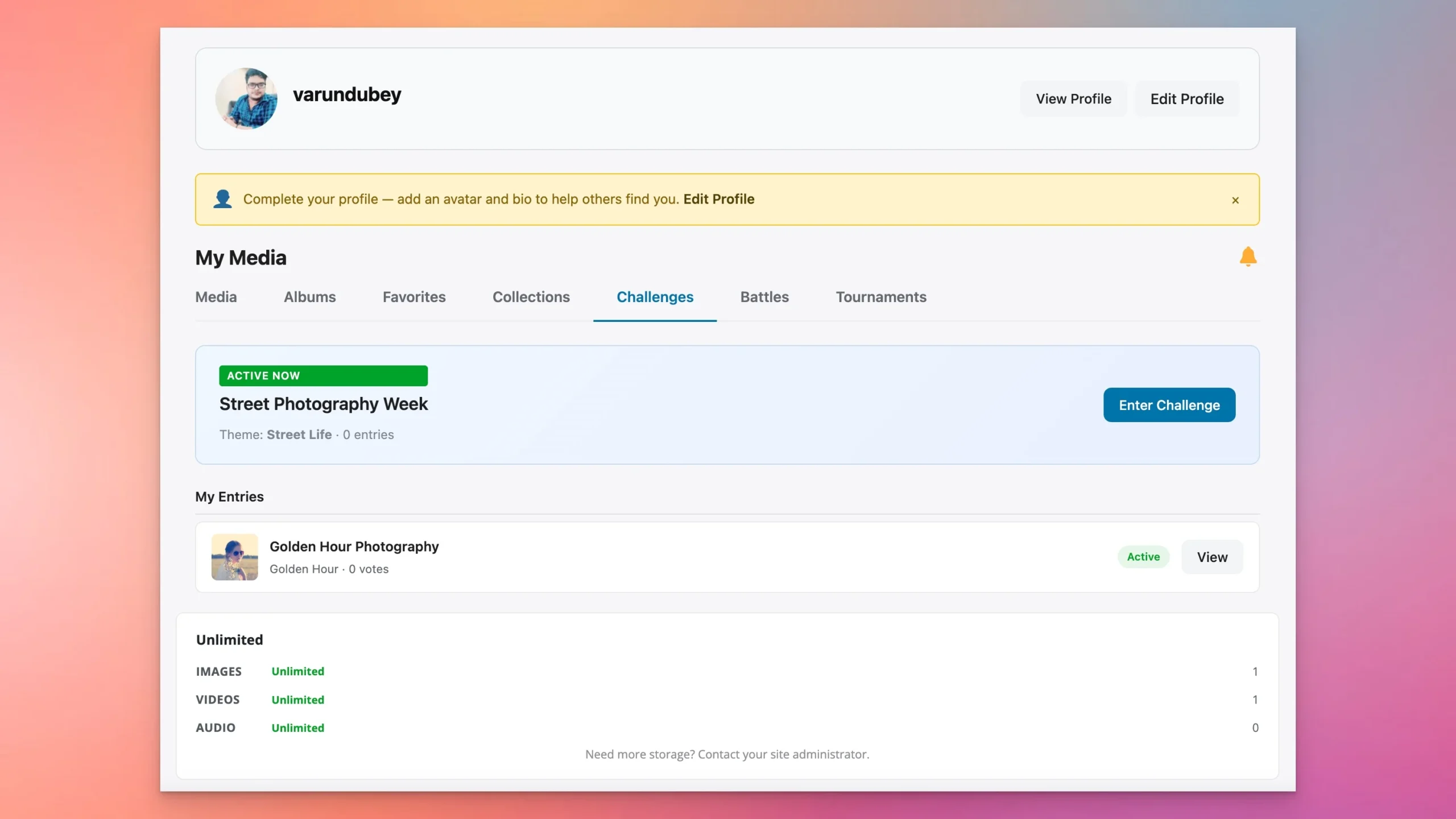
Photo Challenges are the workhorse contest format. They are easy to set up, easy for members to understand, and they work on a recurring schedule. Run a weekly challenge and you have 52 themed galleries by the end of the year.
Best for: Recurring weekly or monthly engagement. Photography communities, creative groups, and any site that wants a steady rhythm of fresh content.
Photo Battles (1v1)
Photo Battles are head-to-head matchups. One member challenges another, both submit their best photo for the theme, and the community votes for the winner. Results are visible with vote counts so everyone can see how the battle played out.
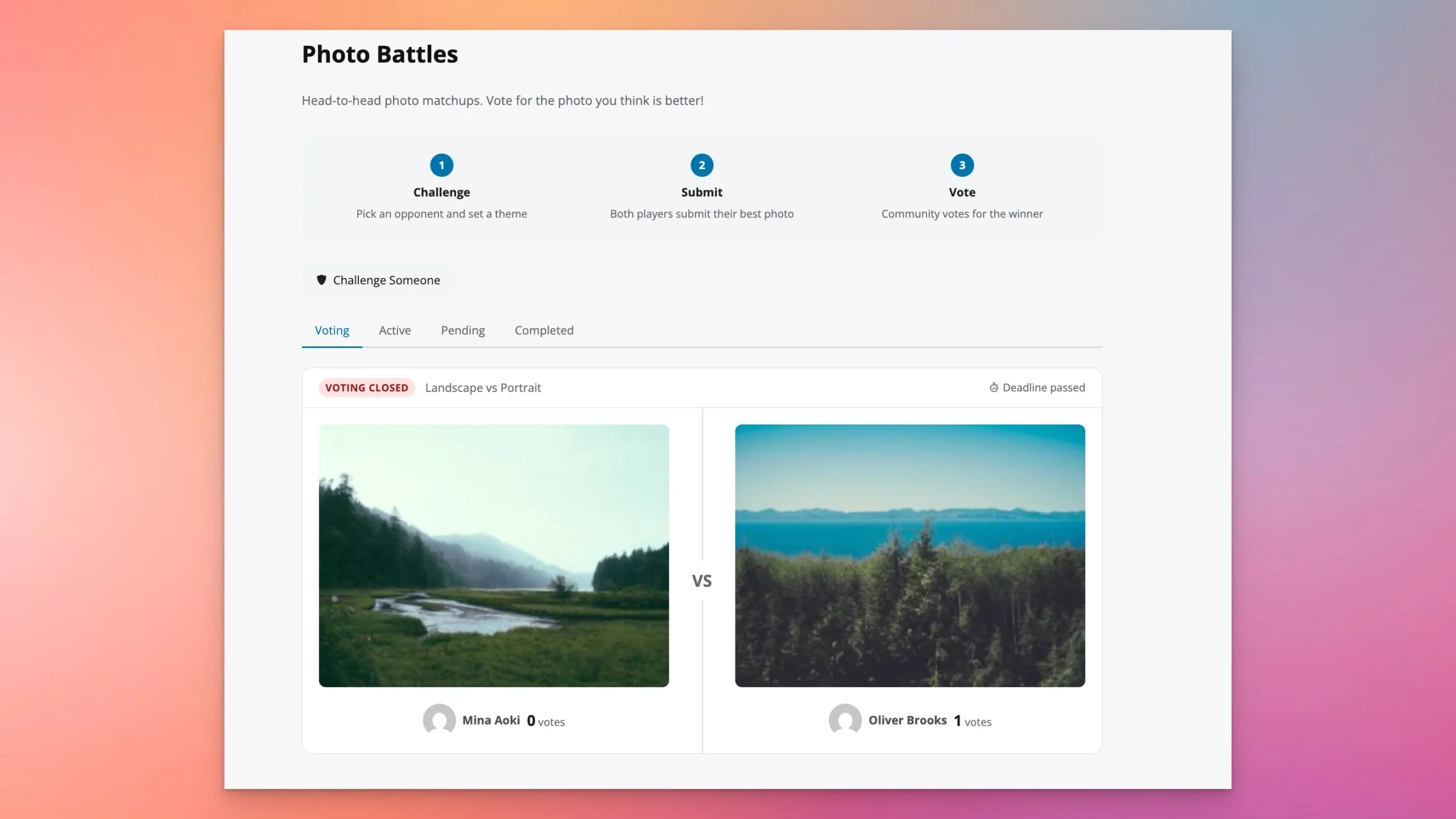
Battles create social buzz that challenges cannot. When two members go head-to-head, their followers rally behind them. Battles get shared, discussed, and followed in a way that open-entry challenges do not. The personal stakes are higher.
Battles also work as a discovery tool. When a relatively unknown member challenges and beats a popular one, the community notices. It creates storylines and rivalries that keep people engaged between contests.
Best for: Head-to-head rivalry, social buzz, and giving members a way to directly compete with specific people they admire or want to challenge.
Tournaments
Tournaments are multi-round bracket elimination competitions. You set the bracket size, 8, 16, or 32 participants, and the system manages the rounds. Each round is a 1v1 battle, and winners advance to the next round until a champion is crowned.

Tournaments are your big events. They run over days or weeks, creating sustained engagement as the bracket narrows. Members follow the bracket, predict outcomes, and rally behind their favorites. The tension builds naturally as rounds progress.
The bracket format is inherently shareable. Members screenshot and share their bracket position, upcoming matchups, and wins. Each round creates its own wave of activity.
Best for: Major events, seasonal championships, milestone celebrations, and anytime you want to create a multi-week engagement event that builds to a climax.
Step-by-Step: Running Your First Photo Challenge
Here is exactly how to set up and run a photo challenge from scratch. This walkthrough assumes you are starting fresh.
Step 1: Install WPMediaVerse
Install the free WPMediaVerse plugin from the Wbcom Designs store or WordPress.org. The free version gives you all the core media features: uploads, albums, reactions, follows, explore feed, AI moderation, six privacy levels, and 12 Gutenberg blocks. No BuddyPress required, it works standalone.
Then install WPMediaVerse Pro (from $69/year) to unlock the competitions module along with five layout modes, cloud storage, HLS video streaming, and auto-captions.
Step 2: Navigate to the Compete Section
Once Pro is active, you will see a Compete section in your WPMediaVerse dashboard. This is the central hub for all three competition types: Challenges, Battles, and Tournaments.
Step 3: Create a New Challenge
Click “Create Challenge” and fill in the details. Give it a clear theme name like “Golden Hour Photography.” Write a short description explaining what you are looking for. Set the deadline, one week is a good starting point for your first challenge. Add any specific rules (one entry per person, original photos only, minimum resolution).
Step 4: Announce to Your Community
A challenge only works if people know about it. Share the announcement through your community’s activity feed, send an email to your members, and post on your social media channels. Include the theme, deadline, and a direct link to the challenge page.
Step 5: Members Submit Entries
Members submit their entries directly from the frontend. No admin panel access needed. They upload their photo, add a title and description, and submit. The entry goes through your moderation settings (including AI moderation if enabled) before appearing in the challenge gallery.
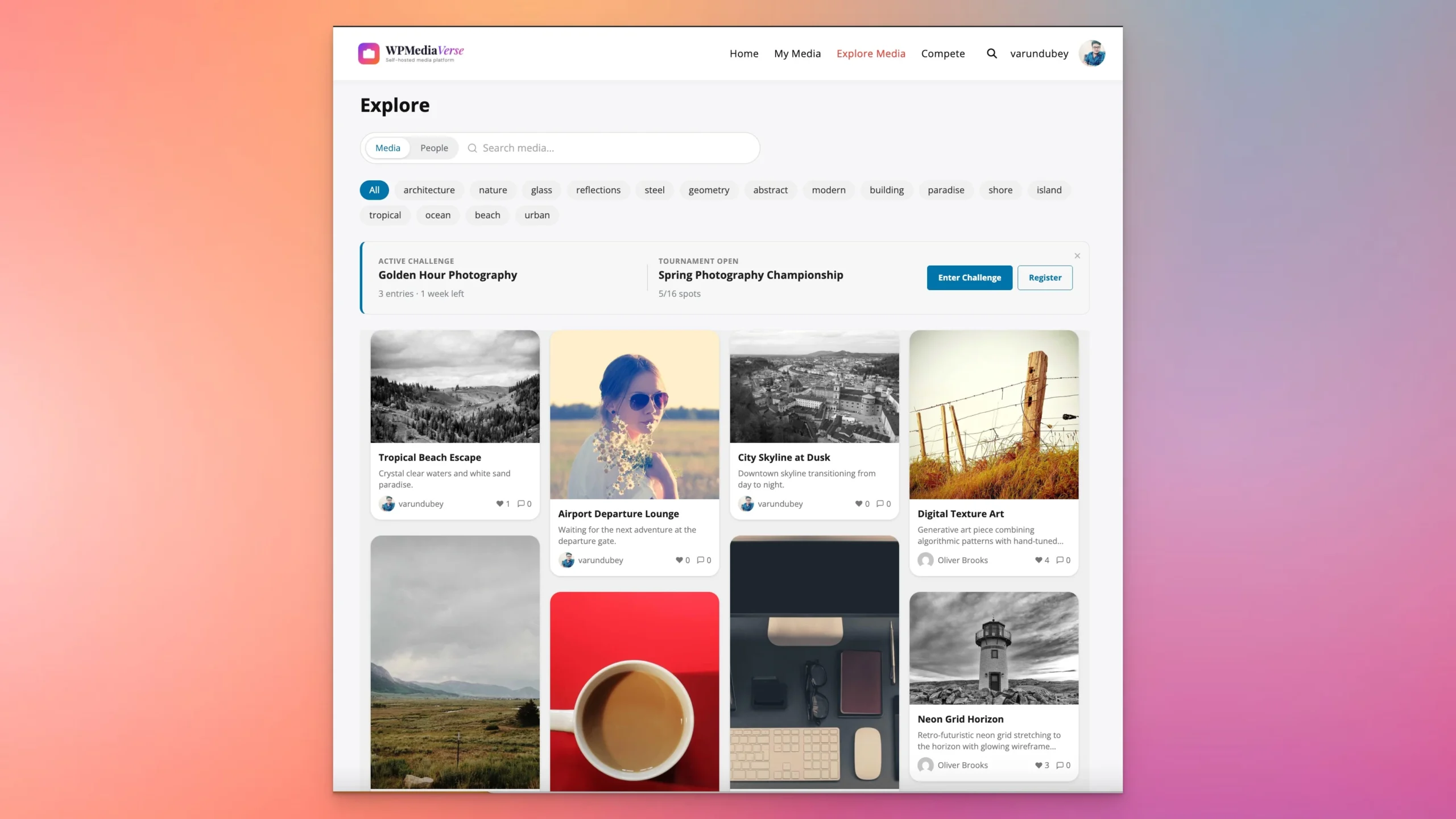
Step 6: Community Engages With Entries
As entries come in, the community browses the challenge gallery, reacts to photos using six emoji types, and leaves comments. This is where the engagement multiplier kicks in, every entry generates reactions and discussions from the broader community.
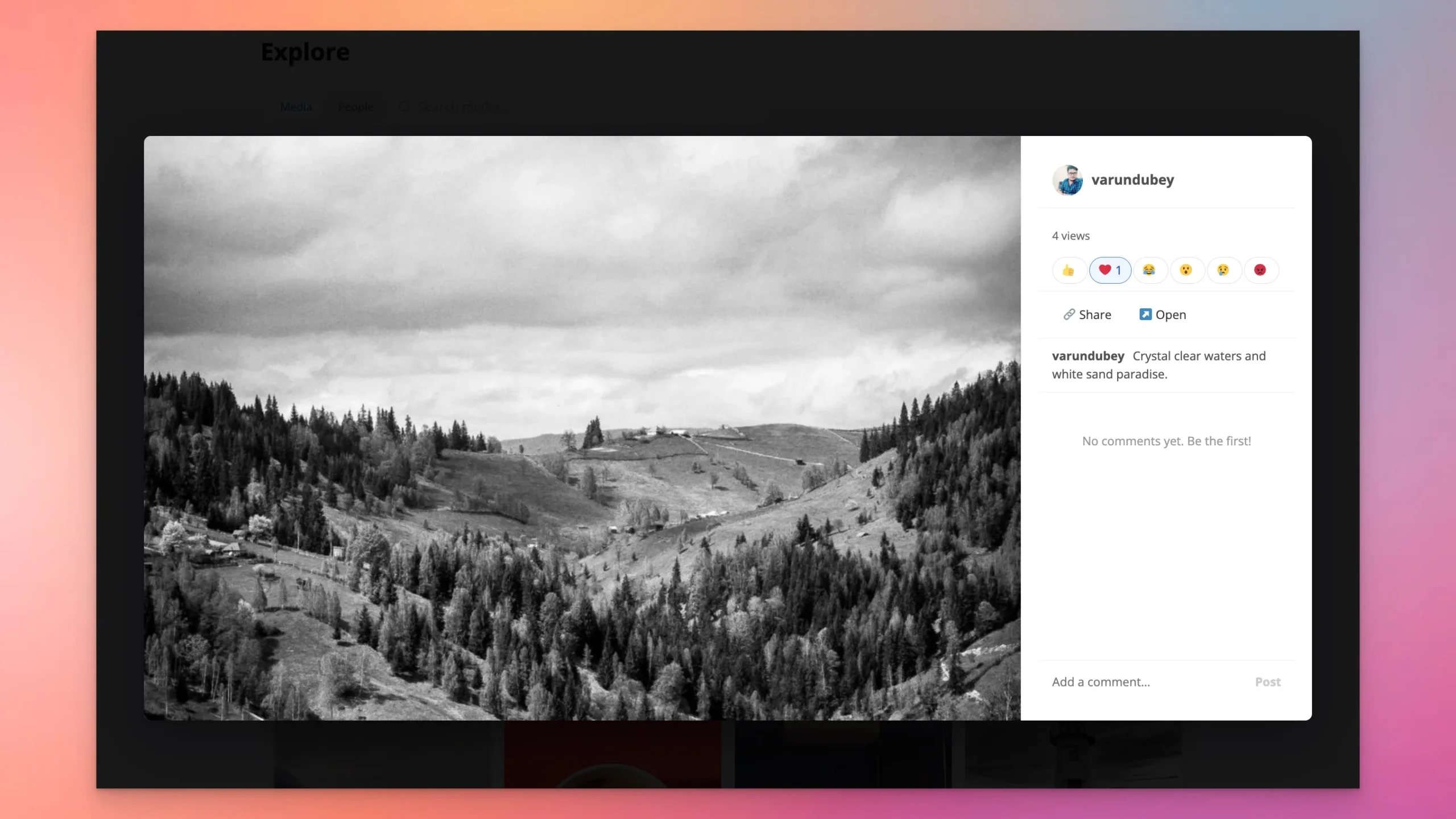
Step 7: Challenge Closes at Deadline
When the deadline hits, the challenge closes automatically. No manual intervention needed. Action Scheduler handles the deadline processing asynchronously so there is no performance impact on your site.
Step 8: Review Results and Start the Next Challenge
Review the results, announce the winner through your community channels, and celebrate their work. Then start your next challenge. The key to long-term engagement is consistency, a weekly or biweekly rhythm works well for most communities.
Contest Ideas That Work
Running out of contest themes is a common concern. Here are over 20 proven contest ideas organized by community type, with recommended formats and durations.
Photography Communities
| Theme | Duration | Best Format |
|---|---|---|
| Golden Hour | 1 week | Challenge |
| Black and White Only | 1 week | Challenge |
| Macro World | 2 weeks | Challenge |
| Street Life | 1 week | Challenge |
| Landscape Photographer of the Month | 1 month | Tournament (16) |
| Portrait Masters | 2 weeks | Tournament (8) |
| One Lens Challenge | 1 week | Challenge |
Creative Communities
| Theme | Duration | Best Format |
|---|---|---|
| Best Logo Design | 2 weeks | Challenge |
| Color Palette Challenge | 1 week | Battle |
| Typography Art | 2 weeks | Challenge |
| Flat Design Showdown | 1 week | Battle |
| Illustration Battle Royale | 1 month | Tournament (16) |
General Communities
| Theme | Duration | Best Format |
|---|---|---|
| Pet Photos | 1 week | Challenge |
| Food Photography | 1 week | Challenge |
| My Workspace | 1 week | Challenge |
| Before and After | 2 weeks | Battle |
| Travel Moments | 2 weeks | Challenge |
| Sunrise vs Sunset | 1 week | Battle |
Seasonal Themes
| Theme | Duration | Best Format |
|---|---|---|
| Spring Blooms | 2 weeks | Challenge |
| Summer Vibes | 1 month | Tournament (32) |
| Autumn Colors | 2 weeks | Challenge |
| Winter Wonderland | 2 weeks | Challenge |
| Holiday Spirit | 1 month | Tournament (16) |
Pro tip: Start with weekly challenges to build the habit. Once your community is used to the rhythm, introduce a monthly tournament as a bigger event. Use battles as spontaneous additions that members can initiate themselves.
A good cadence for a photography community: one weekly challenge (runs Monday to Sunday), one monthly tournament (runs the first week of each month with 16 participants), and battles available anytime for members who want to challenge someone directly. This gives you four to five active contests per month with minimal admin effort.
Rotate between easy themes (Pet Photos, Food Photography) and technically demanding ones (Long Exposure, Infrared, Intentional Camera Movement). Easy themes get more entries and wider participation. Difficult themes get fewer entries but higher quality and more discussion in the comments.
Gamification: Points, Streaks, and Boosts
Photo contests on their own drive engagement. Pair them with WPMediaVerse’s gamification engine and you get a self-reinforcing loop that keeps members active long after any single contest ends.
How the Points System Works
WPMediaVerse Pro tracks 14 distinct actions that earn points. These include uploading media, reacting to others’ content, leaving comments, entering contests, winning competitions, and voting in battles. Every meaningful action on the site is rewarded.
Points accumulate on each member’s profile and feed into a community leaderboard. Members can see where they rank relative to others, which creates a persistent motivation to stay active beyond individual contests.
Streaks and Boosts
Streaks reward consecutive daily activity with point multipliers. A member who logs in and participates five days in a row earns more per action than someone who shows up once a week. This directly incentivizes the daily check-in habit that makes communities thrive.
Boosts are temporary point bonuses for specific actions. You might activate a boost that doubles points for contest entries during the first 24 hours of a new challenge, driving a wave of early submissions.
The Feedback Loop
Here is why gamification matters for contests specifically: a member enters a challenge, earns points for submitting, earns more points when others react to their entry, sees themselves climb the leaderboard, and enters the next challenge to keep climbing. The contest is the hook, but the points system is the engine that converts one-time participants into regulars.
Leaderboards also create a second layer of competition beyond individual contests. Even members who do not win a specific challenge can still be the top-ranked member for the month based on overall activity.
Monetizing Photo Contests
Photo contests are not just engagement tools. With the right structure, they become a revenue stream for your community.
Membership Tiers
The most straightforward approach: free members can browse entries and vote, but entering contests requires a paid membership. Price this at $5-15 per month depending on your audience. Voting access keeps free members engaged and gives them a reason to upgrade when they see contests they want to enter.
Per-User Quotas
A softer approach than a hard paywall. Free members get 3 contest entries per month, while paid members get unlimited entries. This lets free members experience contests without feeling locked out, while heavy users naturally convert to paid.
Premium Tournaments
Run special tournaments with entry fees using WooCommerce integration. A $10 entry fee for a seasonal championship with a cash prize or photography gear as the reward creates a premium event that dedicated photographers will pay for.
Sponsored Prizes
Photography brands, camera companies, editing software makers, print services, are always looking for exposure in photography communities. Offer contest sponsorship packages where brands provide prizes in exchange for logo placement, challenge naming rights, and social media mentions.
Print-on-Demand
Winning photos can be offered as prints through a WooCommerce plus Printful integration. The community votes for their favorites, winners get their work sold as prints, and you take a percentage. This works especially well for landscape and fine art photography communities.
Combining Revenue Streams
The strongest monetization strategy combines multiple approaches. Offer a free tier with voting access and limited contest entries. Charge $9/month for unlimited entries and access to premium tournaments. Partner with a camera brand for quarterly sponsored championships. Sell winning prints year-round.
A community of 500 active members with a 10% paid conversion rate and a $9/month plan generates roughly $5,400 per year from memberships alone, before sponsorship deals, entry fees, or print sales. Contests are the feature that justifies the membership price and keeps paying members renewing.
Technical Details for Developers
If you are integrating WPMediaVerse competitions into a custom theme or building on top of the competition features, here is what you need to know.
Competition data is stored in custom database tables, not wp_posts. This means competition queries do not interfere with your main post queries and scale independently. WPMediaVerse uses 21 custom tables total across all its features.
The REST API includes competition endpoints as part of the 114 total routes the plugin exposes. You can create, read, update, and manage competitions programmatically. Voting uses the same reaction system as regular media (six emoji types), so the UI is consistent for members.
Results are calculated server-side, not client-side. Vote tallies, bracket advancement, and winner determination all happen on the server to prevent manipulation. Action Scheduler handles deadline processing asynchronously, so challenge closings and round advancement do not block page loads.
Webhook events fire on key competition events: contest creation, new entry submission, and contest completion. Use these to trigger notifications, update external systems, or sync contest data with third-party platforms.
For theme developers, competition galleries and brackets render using standard WordPress template overrides. You can customize the look of challenge galleries, battle matchup cards, and tournament brackets to match your theme without touching plugin files.
Frequently Asked Questions
Can I run photo contests without BuddyPress?
Yes. WPMediaVerse works standalone on any WordPress installation. You do not need BuddyPress, BuddyBoss, or any other community plugin. Install WPMediaVerse, activate Pro, and you have a full competition system ready to go.
Updated August 2026: this guide now covers BuddyNext.
If you’re building a full community around your photo contests rather than just a media gallery, BuddyNext, a free, standalone Community OS for WordPress, auto-detects WPMediaVerse and adds media counts and profile media grids to the member directory, so contest entries surface where the rest of your community activity lives.
Can members enter contests from mobile?
Yes. The entire competition interface, browsing challenges, uploading entries, voting in battles, following tournament brackets, is fully responsive. Members can enter and participate from any device.
How does voting work?
Community members vote using the reaction system. In Photo Battles and Tournament rounds, votes determine the winner. Vote counts are visible so members can see how matchups are going. In Challenges, reactions and engagement metrics determine the most popular entries.
Can I moderate contest entries before they appear?
Yes. All uploads go through your moderation settings. WPMediaVerse includes AI-powered moderation that scans uploads automatically. You can also set manual review for contest entries if you want an admin to approve each one before it appears in the challenge gallery.
What if I only want Challenges and not Battles or Tournaments?
Each competition type is independent. You can enable only Challenges and ignore Battles and Tournaments entirely. Or run Challenges and Battles but skip Tournaments. Use whichever formats fit your community.
Get Started
The fastest way to see photo competitions in action is the live sandbox. No account needed, no installation required, just click and explore.
- Try the sandbox: Launch WPMediaVerse Demo
- Free plugin: Download WPMediaVerse (includes all core media features)
- Pro license: WPMediaVerse Pro (from $69/year, adds competitions, layouts, cloud storage, and more)
Related Reading
Related reading