
7 min read
5 Best WooCommerce Cart Messages Plugins


Cart messages are the notices a shopper sees on the cart and checkout pages: how much more to spend for free shipping, a time-limited offer, or a note about a product in the basket. They are small, but they sit at the point where shoppers decide whether to finish the purchase.
Baymard Institute’s list of cart abandonment studies puts the average documented abandonment rate at 70.22% across 50 studies, and its top reason is extra costs being too high, cited by 40% of shoppers who were not just browsing. A clear message about shipping or fees is one way to address that, so the five plugins below are worth comparing. Source: Baymard Institute cart abandonment rate statistics.
Last updated: 13 November 2026
Quick answer
The best WooCommerce cart messages plugins are Cart Notices by SkyVerge, Dynamic Cart & Checkout Notices by Addify, YITH WooCommerce Cart Messages, Cart Notices for WooCommerce by BeRocket and Dynamic Cart Messages by SaffireTech. BeRocket’s and SaffireTech’s plugins have free versions on WordPress.org, while the others are paid.

Table of Contents
- WooCommerce Dynamic Cart & Checkout Notices
- YITH WooCommerce Cart Messages
- Cart Notices by SkyVerge
- Cart Notices for WooCommerce by BeRocket
- Dynamic Cart Messages for WooCommerce by SaffireTech
What is the WooCommerce Cart Messages Plugin?
The WooCommerce Cart Messages Plugin is an extension designed to enhance the functionality of WooCommerce, a popular e-commerce platform built on WordPress. This plugin allows online store owners to display customizable messages to users as they interact with their shopping carts. These messages serve various purposes, including informing users about promotional offers, providing updates on item availability, suggesting related products, and encouraging users to complete their purchases.
With the WooCommerce Cart Messages Plugin, store owners can effectively communicate with customers at critical points in the buying process, helping to increase conversions, reduce cart abandonment rates, and ultimately drive revenue.
Comparison of WooCommerce cart messages plugins
Prices below are the ones shown on each vendor’s page when I opened it. The WooCommerce marketplace pages localize by country and showed Indian rupees, so convert to your own currency and expect taxes at checkout.
| Plugin | Best for | Price or free status |
|---|---|---|
| Dynamic Cart & Checkout Notices (Addify) | Notices on product, shop, cart and checkout pages | 1-year plan ₹4,698 on the Woo marketplace page |
| YITH WooCommerce Cart Messages | Messages with deadlines on cart and checkout | Premium only; price not checked (vendor site blocked my check) |
| Cart Notices (SkyVerge) | Free-shipping threshold and cart-total notices | 1-year plan ₹4,698 on the Woo marketplace page |
| Cart Notices for WooCommerce (BeRocket) | Notices by cart price, product, category, referrer | Free on WordPress.org, 2,000+ active installs |
| Dynamic Cart Messages for WooCommerce (SaffireTech) | Simple spend or quantity nudges | Free on WordPress.org, 100+ active installs; Pro adds countdown timers |
List of WooCommerce Cart Messages Plugins
WooCommerce has more than 7 million active installs on WordPress.org, so there is no shortage of cart tooling. These five focus specifically on notices and messages.
1. WooCommerce Dynamic Cart & Checkout Notices

WooCommerce Dynamic Cart & Checkout Notices, built by Addify and sold on the WooCommerce marketplace, lets merchants create multiple notices for product, shop, cart and checkout pages. Triggers include cart quantity, cart amount, products or categories in or out of the cart, user roles and country.
Key Features
- Show notices on the cart, checkout, product or shop pages.
- Trigger notices by cart quantity, cart amount, products, categories, user roles or country.
- Use predefined variables to personalize messages.
- Add call-to-action buttons and start and end dates.
- Choose from five display styles, including WooCommerce info, message and error styles.
Pricing
The marketplace page lists a 1-year plan at ₹4,698 and a 2-year plan at ₹7,516.80 after a 20% discount, in Indian rupees. Compatibility is listed as tested with WooCommerce 11.3.
2. YITH WooCommerce Cart Messages
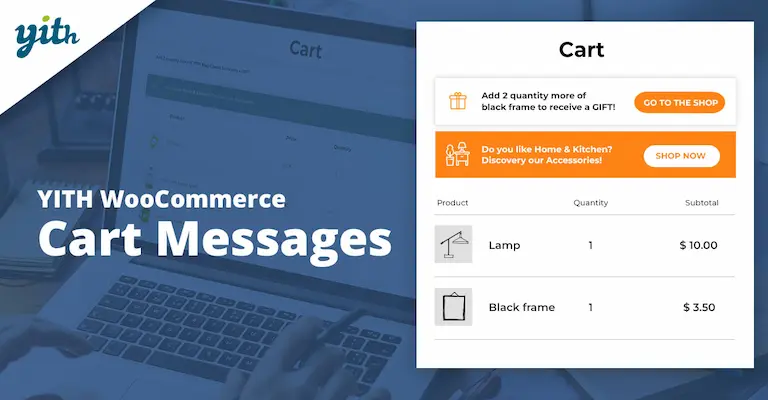
The YITH WooCommerce Cart Messages plugin offers personalized messages during the cart and checkout process, with advanced targeting options and scheduling. The free version on WordPress.org has been closed since December 2021, so this is a premium-only product.
Key Features
- Display messages on both “Cart” and “Checkout” pages
- Set deadlines for each message
- Customize message display conditions
- Show messages on product pages and the “Shop” page for enhanced user engagement.
Pricing
YITH’s site blocked my automated check, so confirm the current price and WooCommerce compatibility on the product page before you buy.
Also Read: Best WordPress Shopping Cart Plugins
3. Cart Notices by SkyVerge
Cart Notices by SkyVerge displays dynamic messages on the cart and checkout pages. It is a useful way to promote offers and nudge shoppers toward a free-shipping threshold.

Key Features
- Five notice types: current order amount, deadline, referer, products in cart and categories in cart.
- Add messages anywhere shortcodes work.
- Dynamic notices can show variables such as the amount still needed for free shipping.
- Add a call-to-action button or URL.
Pricing
The marketplace page lists a 1-year plan at ₹4,698 and a 2-year plan at ₹7,516.80 after a 20% discount, in Indian rupees. The latest version listed is 1.16.6, tested with WordPress 7.1.3 and WooCommerce 11.2.0, with a 3.6 rating from 9 reviews.
One reviewer reported in September 2026 that notices on the Cart and Checkout blocks stayed static until a full page reload, and the vendor replied that it had passed the issue to its development team. Test it on your own checkout before you rely on it.
4. Cart Notices for WooCommerce by BeRocket

Cart Notices for WooCommerce by BeRocket shows notices on the cart page based on cart contents, cart total, date and time, and the customer’s referrer. WordPress.org lists version 3.8, tested up to WordPress 7.1.4, with 2,000+ active installs.
Key Features
- Built-in WYSIWYG editor for creating visually appealing notices.
- Time-sensitive notices with deadline functionality.
- Notices triggered by the required cart price, with a progress bar for maximum-price notices.
- Conditions based on products, quantities, categories, attributes and referrer.
- Shortcode and widget support, so notices can appear elsewhere on the site.
Pricing- Free on WordPress.org. The page links to a BeRocket product page and the changelog mentions a premium edition, but I could not confirm its price.

5. Dynamic Cart Messages for WooCommerce by SaffireTech
Dynamic Cart Messages for WooCommerce, by SaffireTech, shows personalized messages on the cart page that encourage customers to add more items or spend more. It is a smaller plugin, with 100+ active installs, version 3.1.2 from September 2026 and testing up to WordPress 7.1.4.
Key Features
- Three rule types: simple, price-based and quantity-based.
- Target a single product, a category or the whole store.
- Show how much more a customer needs to add to hit a threshold.
- Display messages on cart, checkout and product pages, with expiry dates and call-to-action links.
Pricing
Free on WordPress.org. The Pro version adds prioritized message sequencing, countdown timers, more design options and scheduled campaigns, but its price was not shown on the page I opened.
The Importance of WooCommerce Cart Messages Plugins
WooCommerce Cart Messages plugins give stores a way to display customized messages and notices throughout the shopping journey. Native WYSIWYG editors, time-sensitive notices and triggers based on cart contents such as price, specific products or product categories let a store deliver targeted messaging.
Whether it’s encouraging upsells, promoting special offers, or providing important information, these plugins help stores communicate with shoppers at the right moment. Pair them with a related feature such as a save cart for later plugin, and keep an eye on the notices your theme and other plugins already show, as covered in managing admin notices.
Frequently asked questions
What is a WooCommerce cart message?
It is a notice shown on the cart or checkout page, such as how much more a customer must spend for free shipping or a countdown on an offer. These plugins let you set the rule, the text and the pages where it appears.
Are there free WooCommerce cart message plugins?
Yes. Cart Notices for WooCommerce by BeRocket and Dynamic Cart Messages for WooCommerce by SaffireTech are both free on WordPress.org. Cart Notices by SkyVerge and Dynamic Cart & Checkout Notices are paid, and YITH’s is premium only.
Do cart messages work with the Cart and Checkout blocks?
It depends on the plugin. A September 2026 review of Cart Notices by SkyVerge reports static notices on the blocks until reload, so test on your own store. Check each vendor’s compatibility notes before you buy.
Can a cart message reduce abandoned carts?
It can address one cause. Baymard’s list gives extra costs as the top reason shoppers abandon a cart, at 40% of those not just browsing, so showing shipping or fee information early helps. Results depend on your store.
Why did the YITH free plugin disappear?
WordPress.org shows YITH WooCommerce Cart Messages as closed since 7 December 2021 at the author’s request. Only the premium version is offered by YITH.
Interesting Reads:
How To Manage Your WordPress Website Admin Notices?
Custom Email Options Plugin for WordPress Websites
Related reading