

Do you want to change the language of your WordPress website? WordPress offers many powerful translation plugins that help you create multilingual content with ease. These plugins allow you to translate posts, pages, categories, tags, menus, and other parts of your website into any language you prefer.
Most translation plugins support both manual and automatic translation. You can translate content yourself for better accuracy or let the plugin handle machine translation to save time. Many plugins also support RTL (Right to Left) languages such as Arabic and Hebrew.
The best part is that these multilingual plugins are beginner-friendly. You don’t need technical skills to use them. Plus, many core features are available for free, making it easy to start building a multilingual WordPress site.

Why Use WordPress Translation Plugins?
- Create multilingual content quickly
- Translate posts, pages, menus, categories, and more
- Choose between manual or automatic translations
- Support for RTL languages
- Easy to set up and beginner-friendly
- No coding needed
- Many plugins offer free basic features
Top WordPress Translation Plugin are listed
In this article, we will cover the 17 best WordPress translation plugins you can use this year. These tools help you turn your site into a multilingual platform and reach a global audience with ease.
1. ConveyThis Translation Plugin

ConveyThis is one of the most convenient ways to translate your WordPress website. It is currently the most translated plugin in the WordPress directory, with more than 38 language contributions. The plugin is simple to install and supports over 100+ languages out of the box.
ConveyThis automatically translates your entire site using machine translation. It also adds a language switcher button so visitors can choose their preferred language. Within minutes, you can set up a fully working, SEO-friendly multilingual website.
Paid plans start at €4 a month for one language and up to 10,000 words. Try Now
Key Features
- Automatic machine translation for fast setup
- SEO-optimized for multilingual sites
- Simple dashboard to review and manage all translations
- Two editing options:
- Side-by-side text editor
- Visual editor that lets you edit translations directly on your website
- Powerful Glossary tool to control how specific words are translated
- SEO-friendly output with:
- Hreflang tags
- Multilingual sitemaps
- Rank Math SEO integration to translate meta titles and descriptions
Also Read: How to Add Coupon Codes in LearnDash to Offer Discounts on Course Prices
2. Weglot WordPress Translation Plugin

Weglot is one of the highest-rated WordPress translation plugins available today. It’s easy to install and takes only a few minutes to set up. You don’t need coding skills or developers to get started. Once you activate the plugin, your website becomes multilingual almost instantly.
Weglot translates all your content automatically, so you don’t have to translate every string manually. It offers a free plan for websites with up to 2,000 words, while paid plans start at €9.90 per month. You can also try the plugin with a 10-day free trial.
Key Features
- Automatic and human translation options
- Supports 100+ languages
- Fully compatible with all WordPress themes and plugins, including WooCommerce
- Front-end language switcher added with no coding
- One simple dashboard to manage all translations
- In-context editor to update translations in a live preview
- Follows Google’s multilingual SEO practices
- Translated URLs
- Metadata translation
- Hreflang tags
What Does SEO Mean for Translated Content?
3. WPML WordPress Translation Plugin

WPML is one of the most popular and powerful translation plugins for WordPress. It gives you a complete solution to turn your website into a fully multilingual platform. You can translate pages, posts, custom post types, taxonomies, menus, and even theme text.
WPML works smoothly with any theme or plugin that follows the WordPress API. It is a paid plugin and includes one year of premium support. You can also connect directly with professional translation services and hire experts to translate your content.
Covert your site into a multilingual one using WPML Plugin
Key Highlights
- Translate all parts of your site
- Works with almost every WordPress theme
- Includes an advanced translation management system
- Ideal for multilingual blogs, business sites, and eCommerce stores
Key Features
One Installation, Multiple Languages
- Use a single WordPress installation to manage many languages
- Organize languages in:
- Subdirectories
- Subdomains
- Completely separate domains
Powerful Translation Management
- Email notifications for translators
- A dedicated translation management dashboard
- Jobs queue for better workflow
- Side-by-side translation editor for easy manual edits
Multilingual eCommerce Support
(Available in the Multilingual CMS plan)
- Works perfectly with WooCommerce using WooCommerce Multilingual
- Helps translate all store elements
- Builds fully translated product pages and checkout flows
Translate Themes and Plugins
- Translate plugin text, theme strings, and admin screen content
- Use the String Translation interface to manage everything in one place
Professional Translation Services
- Connect directly with top translation agencies
- Send content for translation from the WPML dashboard
- Completed translations return automatically to your site
4. Polylang

Polylang is one of the most popular free WordPress translation plugins that allows you to create a fully multilingual website with ease. You can add as many languages as you want, including RTL (right-to-left) scripts. Polylang automatically downloads and updates WordPress language packs, making the setup quick and smooth.
With Polylang, you can translate posts, pages, media, categories, tags, menus, widgets, and much more. It integrates seamlessly with the WordPress Block Editor (Gutenberg), allowing you to create multilingual content directly within the modern editing experience.
For WooCommerce stores, a separate addon is required to make Polylang compatible. A premium version is also available for advanced features. If you want professional or automatic translation services, you can install the Lingotek Translation addon for easy integration.
Installation Instructions
Follow these steps to install and set up Polylang on your WordPress site:
- Deactivate any previously installed multilingual plugins before activating Polylang.
- Install and activate Polylang from the Plugins menu in your WordPress dashboard.
- Navigate to Languages → Languages and add the languages you want your site to support.
- Add the Language Switcher widget to your header, footer, or sidebar so visitors can change languages easily.
- Ensure your theme supports translation (.mo files). Polylang will automatically download available translation files for compatible themes and plugins.
- If your theme isn’t internationalized, refer to the WordPress Theme Handbook or contact the theme developer to update it.
Also Read: How To Add Facebook like Check-ins Feature into Community Website?
5. qTranslate X

qTranslate X is another effective and free WordPress translation plugin, known for its simplicity and usefulness—similar to Polylang and WPML. It provides an easy approach to creating multilingual content without complicating your workflow.
One of its standout features is the ability for users to switch languages while editing posts. This allows you to work on the same content in multiple languages simultaneously, making it extremely convenient for bilingual or small multilingual websites.
qTranslate X also supports a growing library of third-party add-ons, most of which are free. These extensions help integrate qTranslate X with various platforms and plugins, expanding its flexibility across WordPress environments.
To manage dynamic content, the plugin adds language-switching buttons to relevant admin editing pages. When a language button is pressed, all multilingual fields instantly switch to the selected language—right in your browser—without needing to send additional server requests. This makes the editing experience faster and smoother.
6. Goo Translate Widget

Another simple way to add Google Translate to your WordPress website is by using the Goo Translate Widget plugin. This lightweight and user-friendly plugin lets you integrate Google’s automatic translation feature without any technical hassle. Once installed, you can easily add its widget to your sidebar or any widget-ready area, choose your preferred language settings, and save—your multilingual setup is ready in minutes.
The plugin requires no manual translation or coding, making it ideal for beginners or anyone who wants a quick translation solution. If you’re looking for a straightforward method to expand your website’s language accessibility, this widget is a great option. We hope this list helps you find the right translation plugin for your WordPress site.
Features
- Add the power of Google automatic translations using a lightweight widget
- Track translation traffic effortlessly through Google Analytics
- No manual translation required
- No programming skills needed
- No shortcodes required; works sitewide
- Lightweight and optimized, ensuring no performance impact
7. Gtranslate – Google Translate

Gtranslate is another popular and free Google Translate plugin for WordPress. It lets you add a simple, user-friendly language switcher powered by Google Translate to instantly translate your web pages. The free version offers basic on-the-fly translation, while the paid plans unlock full multilingual SEO support, which can help increase your global traffic and sales.
GTranslate is a budget-friendly multilingual solution that blends automatic and human translations. It hides the default Google Translate toolbar and gives you cleaner translation popups. You also get the option to open translated pages in a new browser tab.
Free Features
- Instant translation for posts, pages, categories, tags, menus, widgets, themes, and plugins
- Multiple styles for the language switcher:
Dropdown, Flags, Flags with dropdown, Nice dropdown with flags, Flags with language names, Flags with codes, Language names, Language codes, Globe icon, Popup - Floating language selector
- Language bar with flags inside the menu
- WooCommerce shop translation
Paid Features
- Multilingual SEO with full search engine indexing
- Neural machine translations with high-quality, human-like accuracy
- Increased global traffic and improved AdSense revenue
- SEO-friendly translated URLs (SEF URLs)
- Fully compatible with Yoast SEO
- Advanced WooCommerce translation support
Also Read: How to Add GIFs in BuddyPress Activity Posts & Messages
8. MultilingualPress

Multilingual Press allows you to connect multiple sites as language alternatives in a Multisite installation. This plugin lets you connect an unlimited amount of sites in a multisite with each other.
Set the main language for each site, create relationships (connections), and start writing. You get a new field now to create a linked post on all the connected sites automatically. They are accessible via the post/page editor screen – you can switch back and forth to translate them.
Features
- Set up unlimited site relationships in the site manager.
- Language Manager with 174 editable languages.
- Edit all translations for a post or page from the original post editor without the need to switch sites.
- Show a list of links for all translations on each page in a flexible widget.
- Translate posts, pages, and taxonomy terms like categories or tags.
- Add translation links to any nav menu.
- No lock-in: After deactivation, all sites will still work.
- SEO-friendly URLs and permalinks.
9. Babble

Babble is a completely free, open-source, and fast WordPress language plugin. The plugin authors claim that this plugin works 20% faster and has 40% fewer queries than other plugins.
This plugin allows you to run your website in as many languages as you want in any script or any direction. You can download this plugin from the Github repository for free.
It is fully compatible with the core and required you to handle all the translation by yourself.
10. TranslatePress

Another free plugin available in the WordPress repo, TranslatePress gives you a better way to translate your site directly from the front-end using a user-friendly interface. It allows you to easily translate the entire page at once including output from shortcodes, forms, and page builders. Moreover, it is also fully compatible with WooCommerce.
Free Features:
- Live preview of your translated pages, as you edit your translations.
- Ability to translate dynamic strings (gettext) added by WordPress, plugins, and themes.
- Native Gutenberg support
- Support for both manual and automatic translation (via Google Translate)
Paid Features:
This plugin provides amazing add ons for extended functionality. These include:
- Allows you to add an unlimited number of translation languages
- Allows you to translate meta information (like page title, description, URL slug, image alt tag, Twitter and Facebook Social Graph
- Allow existing users to translate the site without admin permission
- Make translation visible only to a particular user role.
11. WooCommerce Multilingual

This plugin allows you to run a multilingual e-commerce site using WooCommerce and WPML translation. You can translate all WooCommerce products such as simple, variable, grouped, and external. It also provides easy translation management for products, categories, and attributes.
Free Features:
- Compatible with popular WooCommerce add ons
- Keeps the same language through the checkout process
- Sends emails to clients and admins in their language
- Enables running a single WooCommerce store with multiple currencies
- Allows inventory tracking without breaking products into languages.
Also Read: Add Location Check-ins to BuddyPress
12. WP Multilang

WP Multilang is a fully-featured plugin to translate your site pages into different languages. It allows you to translate post types, taxonomies, meta fields, options, text fields in multimedia files, menus, titles, and text fields in widgets.
Features:
- Compatible with REST
- Support multisite
- Separate menu items, posts, terms, widgets, and comments per language
- Many filters for dynamic applying translation settings
- No limits to languages or possibilities
- Support WordPress in sub-folder
- Compatible with all the popular plugins including WooCommerce, BuddyPress, Gutenberg, Yoast SEO, and more.
13. Google Website Translator

Google Website Translator plugin allows you to translate your site into 100+ languages with the help of Google’s automatic translation service. It is easy to set up with simple settings.
Features:
- It’s the fastest as it doesn’t load any external file;
- All the settings are stored in only one record in the database
- It includes all the options of the original Google Website Translator
- Import/Export settings to easily transfer configurations
- Use it as a widget and as a shortcode.
14. Lingotek Translation

The Lingotek Translation plugin offers a simple and convenient cloud-based translation and localization for the WordPress website. This plugin works in conjunction with the Polylang plugin and offers three types of translation services. These are free machine translation, community translation, and Lingotek’s professional translation services.
Features:
- Faster Translation Times
- Real-time Monitoring
- Eliminate the Copy/Paste Method of Translating
- Use as many languages as you want
- Custom post types, custom taxonomies, sticky posts and post formats, RSS feeds, and all default WordPress widgets are supported.
15. Multilanguage by BestWebSoft

Multilanguage by BestWebSoft plugin allows you to first create your pages, categories, and tags as they are and then assign languages to each piece of content. This plugin supports 80 languages. You can also add more languages if you wish as well as select a default language.
Free Features:
- Change display order in the language switcher
- Multiple language switcher layouts
- Translate Open Graph meta tags
- Translation-ready admin dashboard
- Add Hreflang links to a section
Pro Features:
- Translate custom Post types, Taxonomies and Custom Fields
- Compatible with Elementor Page Builder
- Change language slug position in the website URL
- Display/hide widgets for different languages
- Add a short language slug to the URL
Also Read: Step-by-Step Guide to Adding Status Updates in BuddyPress
16. WPGlobus

Translate pages, posts, categories, tags, menus, and widgets manually with the help of the WPGlobus plugin. It comes with a frontend language switcher and also provides an option to change the language from the backend.
Free Features with free add-ons:
- Allow setting featured images separately for each language.
- Enable selective translation of the wp_options table strings
- Enable WPGlobus on certain themes that use WPBakery’s Builder
- Add multilingual editing capabilities to the visual editor widget.
Premium features with paid add-ons
- Add multilingual capabilities to WooCommerce-based online stores.
- Add URL fine-tuning, publishing status per translation, multilingual Yoast SEO analysis, and more
- Multilingual widget logic: show and hide widgets depending on the current language
- Display different header images per language. Show images depending on the settings in the Customizer
- Show or hide menu items depending on the current language.
17. Loco Translate
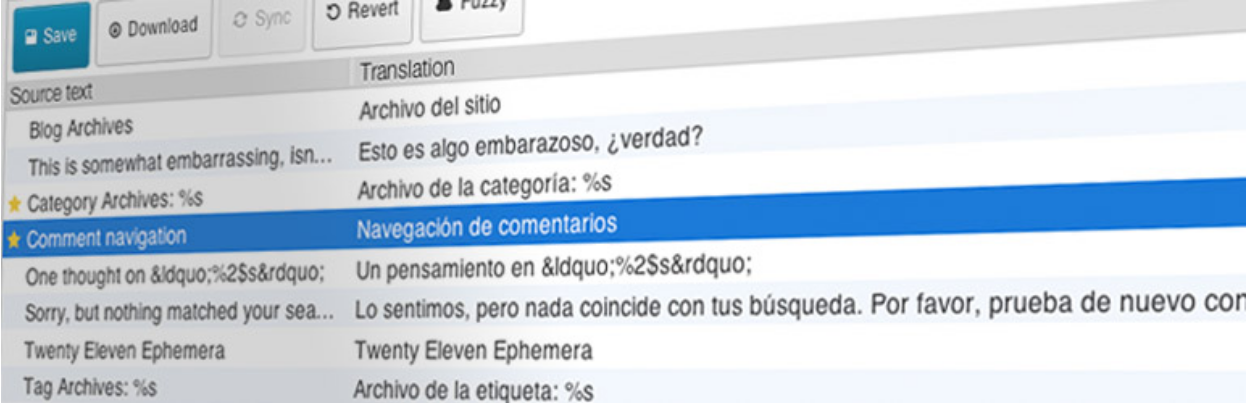
Loco Translate allows you to modify WordPress translation files in your browser and integrates with automatic translation services. It also gives developers with Gettext/localization options, such as string extraction and template generation.
Features
- Within the WordPress admin, there is a built-in translation editor.
- In your theme or plugin, it directly creates and changes language files.
- Translatable strings are extracted from your source code.
- PO features such as comments, references, and plural forms are supported.
- Clickable source code references in the PO source view
- Custom translations can be saved in a password-protected language directory.
- WordPress locale codes are built-in.
Also Reads: Best WordPress Hosting Services
18. xili-language

xili-language allows a multilingual website to automatically select a theme language based on the language of the current post or page. The behavior of the theme may be completely customized using options, hooks, and api. All set for CMS developers and designers.
Features
- The xii-language plugin allows you to choose a theme language based on the language of the displayed post, series of posts, page, or article.
- A very readable interface with a list of titles to assist you in writing, editing, and translating articles.
- The current user can choose the language of his dashboard to assist with authoring.
- xiii-language selects the multilingual. mo files in the theme’s folder on the fly.
- xii-language specifies the language of posts, pages, and custom posts using a custom taxonomy.
- The xii-language plugin works on either a mono WordPress installation or a single site within a multisite system.

Final Thoughts on Top Multilingual Plugins For WordPress.
So, this is our updated list of the top multilingual plugins for WordPress in 2025. The WordPress ecosystem offers countless translation tools, and each one brings something unique to the table whether you want automatic translations, manual control, or full multilingual SEO support. We’ll continue updating this list as new and innovative plugins emerge, so you always have access to the most reliable options for building a multilingual website.
Related Post
Free Gutenberg-Ready WordPress Blog Theme
