

Multistep checkout, also known as multi-page or multi-stage checkout, is a process commonly employed in e-commerce websites to streamline the user experience when making a purchase. Instead of presenting all the necessary information and actions on a single page, the checkout process is divided into multiple steps or pages, each focusing on a specific aspect of the transaction. This approach aims to simplify the process, reduce cart abandonment, and enhance user satisfaction.

Table of Contents
- Multi-Step Checkout for WooCommerce
- YITH WooCommerce Multi-step Checkout
- Multistep Checkout for WooCommerce by ThemeHigh
- Multi-Step Checkout for WooCommerce by SilkyPress
- CheckoutWC
What is the WooCommerce Multistep Checkout Plugin
These plugins aim to improve the default WooCommerce checkout process by breaking it down into multiple steps or pages, which can enhance user experience, reduce cart abandonment rates, and potentially increase conversion rates. They typically offer customization options, support for various payment gateways, compatibility with WooCommerce themes and other plugins, and sometimes additional features like custom fields or progress indicators.
It’s essential to evaluate these plugins based on your specific needs, such as customization options, ease of use, compatibility with your theme and other plugins, and support.
How to Set Up a WooCommerce Multistep Checkout Plugin
Setting up a multistep checkout plugin for your WooCommerce store is easier than you might think. Whether you’re aiming for a simple step-by-step form or a dynamic Shopify-style checkout flow, follow these basic steps to get started:
Step 1: Choose the Right Plugin
Start by selecting a plugin that fits your specific needs. Consider:
- Your budget (free vs. premium)
- Required features (e.g., guest checkout, custom step labels)
- Design preferences and layout compatibility
- Integration with existing WooCommerce themes and plugins
Refer to the comparison table below for a quick overview.
Step 2: Install and Activate the Plugin
Once you’ve chosen a plugin:
- Go to your WordPress dashboard.
- Navigate to Plugins > Add New.
- Upload the plugin’s ZIP file or search for it (if it’s in the WordPress plugin repository).
- Click Install Now, then Activate.
Step 3: Configure Checkout Steps
After activation:
- Visit the plugin’s settings panel (usually under WooCommerce > Settings or a dedicated tab).
- Enable or customize the steps such as:
- Login
- Billing Information
- Shipping Details
- Order Review
- Payment Method
Most plugins allow drag-and-drop reordering, step labeling, and form field management.
Step 4: Customize the Appearance
To match your brand aesthetics:
- Choose between layout styles (tabbed, accordion, horizontal steps, etc.).
- Adjust colours, fonts, icons, and button text.
- Upload custom step icons (if supported by the plugin).
Step 5: Test the Checkout Flow
Before going live:
- Perform multiple test checkouts.
- Try different user types (guest, logged-in customer).
- Ensure responsiveness on mobile and tablet devices.
- Verify payment gateways work correctly through each step.
Step 6: Monitor & Optimise
After deployment:
- Use analytics to track cart abandonment and completion rates.
- A/B test different layouts or button placements.
- Collect customer feedback to refine the flow.
Once you’ve completed the setup, you’re ready to deliver a streamlined, user-friendly checkout experience that encourages conversions and customer satisfaction.
Popular WooCommerce multistep checkout plugins
These plugins help streamline the checkout process by breaking it into easy, manageable steps, enhancing user experience, and reducing cart abandonment. Plugins like YITH WooCommerce Multi-step Checkout, Multi-Step Checkout for WooCommerce, and WooCommerce Checkout Manager are trusted options to boost conversions.
1. Multi-Step Checkout for WooCommerce
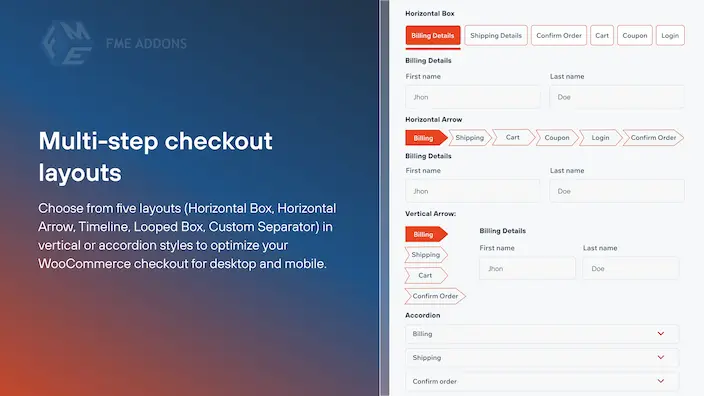
The Multi-Step Checkout for WooCommerce plugin enhances the checkout experience by organizing the process into clear and manageable steps. It simplifies the default WooCommerce checkout page by breaking it down into sections such as billing and shipping details, order review, and more.
Key Features
- Easily add new steps to your checkout form.
- Choose from 14 different layouts to streamline the checkout process.
- Ensure a seamless checkout experience on mobile devices.
- Include login and coupon forms directly within the checkout steps.
- Customize the checkout process by combining or splitting steps.
- Personalize the Next and Previous buttons for better user navigation.
- Enhance visual appeal by uploading icons for each checkout step.
Pricing
Price: $49 charged annually
Buy Now Hire WooCommerce Experts
2. YITH WooCommerce Multi-step Checkout

YITH WooCommerce Multi-step Checkout is a plugin that divides the WooCommerce checkout process into clear steps, improving user experience and reducing cart abandonment. It simplifies the checkout form, reduces overwhelm, and increases efficiency. With customization options and seamless integration with WooCommerce, it’s a user-friendly solution for streamlining the checkout process and boosting conversions.
Key Features
- Split the checkout into steps (Login, Billing, Shipping, Order Info, Payment)
- Customize transition speed
- Edit button labels
- Customize step dividers
- Show/hide the “Back to Cart” button
- Enable customer login
- Allow guest checkout
Pricing
- Price: $69.99 per year
- Duration: 1 year of updates and support
- Guarantee: 30-day money-back guarantee
Buy Now Hire WooCommerce Experts
3. Multistep Checkout for WooCommerce by ThemeHigh
The Multistep Checkout for WooCommerce plugin offers an effective solution for simplifying the checkout process and enhancing the user experience on e-commerce websites. With its customizable features and segmentation of the checkout flow, the plugin aims to streamline the process and improve conversion rates for online stores.

Key Features
- Segmentation of checkout into login, billing, shipping, and order details steps.
- Customization for checkout form details like colors and tab positioning.
- Ability to collect accurate customer information for efficient order processing.
Pricing
Price: $39 /year for a single site
4. Multi-Step Checkout for WooCommerce by SilkyPress
The Multi-Step Checkout for WooCommerce plugin enhances user experience and boosts conversion rates by breaking down the checkout process into multiple steps. This segmentation simplifies the process for customers, reducing overwhelm and making it easier to complete purchases. Developed using WooCommerce standard templates, the plugin ensures compatibility with the majority of WordPress themes.

Key Features
- Enjoy a modern and visually appealing checkout experience.
- Seamlessly access and navigate the checkout process on mobile devices.
- The layout adapts to various screen sizes for optimal viewing on different devices.
- Easily adjust the main color to match your theme’s aesthetic.
- Inherit the design of forms and buttons from your existing theme for a cohesive look.
Pricing
Free
Also Read: User Registration vs RegistrationMagic vs Simple User Registration: Best Registration Plugin
5. CheckoutWC
CheckoutWC is a game-changing plugin for WooCommerce that revolutionizes the checkout experience for online stores. By replacing the default WooCommerce checkout page with a sleek and intuitive design reminiscent of Shopify’s cart and checkout pages, CheckoutWC aims to address the shortcomings of the traditional WooCommerce checkout process.

Key Features
- Tailor the checkout process to match your brand’s identity with customizable templates.
- Easily view and manage items in your cart without leaving the checkout page.
- Speed up the checkout process with convenient express checkout buttons.
- Increase sales with strategically placed order bumps that encourage additional purchases during checkout.
Pricing
$149 per year
Comparison Table of the Best WooCommerce Multistep Checkout Plugins
| Plugin Name | Key Features | Pricing |
|---|---|---|
| Multi-Step Checkout for WooCommerce | 14 layouts, custom buttons, mobile-friendly, login/coupon forms, icons for steps | $49/year |
| YITH WooCommerce Multi-step Checkout | Step-wise flow (login, billing, payment), guest checkout, custom labels & dividers | $69.99/year |
| Multistep Checkout for WooCommerce by ThemeHigh | Segmented steps, form colour and layout customization, improved UX | $39/year |
| Multi-Step Checkout by SilkyPress | Mobile-responsive, adapts to theme design, easy colour adjustments | Free |
| CheckoutWC | Shopify-style design, express buttons, order bumps, built-in cart view | $149/year |

Checkout Made Easy
WooCommerce multistep checkout plugins offer a transformative solution to enhance the user experience and streamline the checkout process for online stores. By breaking down the checkout journey into manageable steps, these plugins mitigate user overwhelm, reduce cart abandonment rates, and ultimately boost conversions.
With features such as customizable templates, built-in side carts, express checkout buttons, and order bumps, these plugins empower store owners to create a seamless and efficient checkout experience that drives sales and fosters customer satisfaction. Whether you’re looking to improve your checkout flow, increase sales, or reduce cart abandonment, investing in a WooCommerce multistep checkout plugin can significantly elevate your e-commerce business.
Interesting Reads:
How To Create a Multi-Step Form In WordPress?
5 Best WooCommerce Checkout Plugins
7 Best Practices to Enhance the Checkout Process of Your eCommerce
