

The membership site model has quickly emerged as one of the most effective ways to generate recurring revenue online. From digital courses and coaching programs to exclusive content platforms, more and more businesses are turning to WordPress to manage their memberships and subscriptions. However, creating a seamless membership system involves more than just restricting content. It requires automation, flexibility, and reliable payment management to ensure a smooth user experience. This is where MemberMouse Review becomes essential, as it highlights how this powerful WordPress membership plugin can simplify and optimize your operations.
Moreover, MemberMouse is designed to automate billing, protect premium content, and deliver personalized member experiences, effectively transforming a standard WordPress site into a fully functional subscription platform. Unlike basic membership tools, it goes beyond simple access control—it enables you to manage users efficiently, track performance in real time, and even increase revenue with smart upsells and engagement features.
Whether you are launching a small subscription site or scaling a large community, this MemberMouse Review provides a comprehensive overview of its features, pricing, and real-world performance. By exploring this plugin in detail, you’ll gain the insights needed to determine if it’s the right solution for growing your membership business in 2025 and beyond.

What Is MemberMouse?
MemberMouse is a powerful WordPress membership plugin designed to help website owners create, manage, and scale subscription-based businesses with ease. Launched to simplify membership management, it provides everything you need to sell memberships, protect content, and automate billing—all from your WordPress dashboard.
At its core, MemberMouse acts as both a membership and customer management system. It enables you to define multiple membership levels, restrict content access, manage recurring payments, and even deliver personalized member experiences. What makes it unique is its ability to combine flexibility with automation—helping businesses focus more on content and growth, rather than manual operations.
MemberMouse supports multiple payment gateways such as Stripe, PayPal, and Authorize.Net, making it easy to accept one-time or recurring payments securely. It also integrates with leading email marketing platforms like Mailchimp and ConvertKit, allowing seamless communication and retention campaigns.
Ideal for content creators, educators, coaches, and online communities, MemberMouse is built for scalability. Whether you’re offering online courses, digital downloads, or premium memberships, it provides built-in tools for upselling, coupon management, and detailed analytics.
In short, MemberMouse is more than a membership plugin—it’s a complete membership business toolkit that empowers WordPress users to turn their websites into profitable, automated platforms.
Why Use MemberMouse for WordPress?
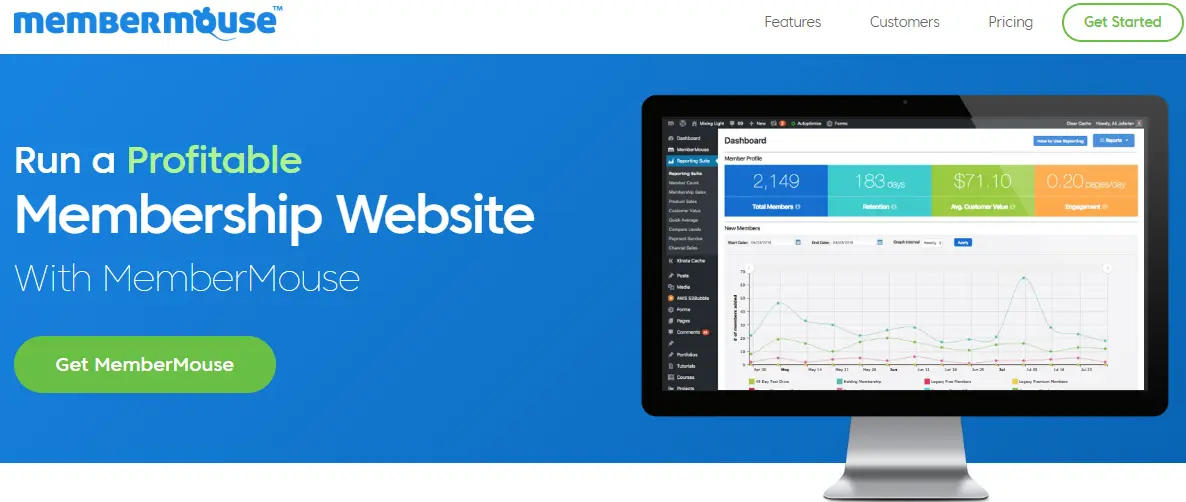
Running a membership site can be challenging—managing payments, protecting content, and maintaining user engagement often require multiple tools. MemberMouse eliminates that complexity by offering an all-in-one solution designed specifically for WordPress. It combines automation, scalability, and flexibility, making it a preferred choice for businesses that want to grow recurring revenue with minimal hassle.
With MemberMouse, you can easily create membership tiers, restrict content, and automate billing cycles—all from your WordPress dashboard. Its powerful SmartTags allow for dynamic content delivery, enabling you to personalize messages and upsells for each member. Unlike many plugins that require third-party integrations for essential features, MemberMouse includes built-in tools for subscription management, customer retention, and reporting.
It’s also built for performance and reliability. Whether you have 100 or 100,000 members, MemberMouse ensures your site runs smoothly without overloading your server. Add to that its integration with popular tools like PayPal, Stripe, and Mailchimp, and you get a seamless ecosystem that supports your entire membership workflow.
Key Features of MemberMouse
MemberMouse is packed with features designed to help WordPress site owners manage memberships, automate payments, and protect content efficiently. These features make it one of the most powerful membership plugins available in 2025, suitable for both small and large-scale websites.
1. Automated Member Management
MemberMouse automates subscription management, billing, and member communication, reducing manual effort significantly. You can create tiered membership levels, track member activity, and handle cancellations or upgrades effortlessly. Automated emails notify members about renewals, expired subscriptions, or failed payments, ensuring smooth member engagement.
2. Content Protection & SmartTags
With SmartTags, you can control exactly who sees your content. Restrict posts, pages, categories, or products based on membership levels. SmartTags also allow you to personalize content and messaging, making it easier to upsell or provide exclusive offers to specific members.
3. Flexible Billing & Payments
MemberMouse supports multiple payment gateways, including PayPal, Stripe, and Authorize.Net. You can configure one-time payments, recurring subscriptions, trial periods, and pro-rata billing. This flexibility ensures that your membership site can accommodate different business models.
4. Content Dripping & Access Control
Deliver content over time using dripping schedules, keeping members engaged and encouraging long-term subscriptions. You can also restrict access to premium downloads, digital products, or community features for specific membership tiers.
5. Built-In Affiliate & Upsell System
MemberMouse includes a built-in affiliate program, allowing you to reward partners for driving new subscriptions. Additionally, you can create upsell and cross-sell offers during checkout, increasing revenue per member without relying on third-party tools.
6. Reporting & Analytics
Track sales, subscriptions, member churn, and engagement with detailed analytics. MemberMouse provides actionable insights that help you optimize pricing, promotions, and content strategy.
7. Integration & Developer-Friendly Tools
MemberMouse integrates seamlessly with email marketing platforms, CRMs, and LMS tools. Advanced users can also leverage APIs and hooks for custom functionality, giving developers flexibility to extend the plugin according to unique business needs.
How to Set Up MemberMouse on Your WordPress Site (Step-by-Step Guide)
Setting up MemberMouse is straightforward, even for beginners. By following this step-by-step guide, you can protect content, manage memberships, and monetize your WordPress site efficiently.
Step 1: Install and Activate MemberMouse
Begin by logging into your WordPress dashboard:
- Go to Plugins → Add New.
- Search for “MemberMouse” and click Install Now.
- Once installed, select Activate.
The MemberMouse menu will appear in your dashboard for further configuration.
Step 2: Configure General Settings
Open the MemberMouse plugin and configure essential settings:
- Set your site currency and default options.
- Integrate your payment gateways such as PayPal or Stripe.
- Customize login, registration, and redirection settings to align with your branding.
Step 3: Create Membership Levels
Define your membership structure for better content control:
- Create tiered levels like Free, Basic, and Premium.
- Assign access permissions for each level.
- Configure recurring payments and trial periods for premium memberships.
Step 4: Protect Content
Use MemberMouse to secure your premium content:
- Select posts, pages, or categories to restrict.
- Apply SmartTags to display personalized content for different membership levels.
- Enable content dripping to gradually release premium material to members.
Step 5: Customize Registration and Profile Pages
Enhance the user experience by editing forms and profiles:
- Brand registration forms, login pages, and member profiles.
- Add custom fields or set up redirects after login to improve onboarding.
Step 6: Test Your Setup
Before going live, create a test account to verify:
- Membership restrictions and payment processing.
- Content access and SmartTag functionality.
- Email notifications, password resets, and redirect rules.
By following these steps, MemberMouse ensures a secure, automated, and efficient membership setup. The plugin’s flexibility allows you to manage subscriptions, restrict content, and scale your site with minimal effort.
MemberMouse Pricing Explained
Understanding the pricing structure is essential when evaluating whether MemberMouse is the right membership plugin for your WordPress site. MemberMouse offers tiered pricing plans to accommodate different business sizes and needs, making it flexible for both small startups and growing enterprises.
1. Builder Plan
The Builder Plan is ideal for beginners or small websites just starting with memberships. Key features include:
- Up to 1,000 members
- Core membership management tools
- Basic content protection and SmartTags
- Access to the MemberMouse dashboard and reporting tools
- Integration with major payment gateways like PayPal and Stripe
This plan allows you to test the plugin’s core functionality and start generating recurring revenue without a significant upfront investment.
2. Advanced Plan
The Advanced Plan is suitable for growing membership sites requiring more robust features. It includes everything in the Builder Plan, plus:
- Up to 5,000 members
- Advanced automation for subscription management
- Built-in upsell and cross-sell tools
- Content dripping capabilities for structured content delivery
- Affiliate program management
This plan is ideal for creators, educators, and small businesses who want to scale their membership site efficiently.
3. Premium Plan
The Premium Plan is designed for medium to large-scale membership sites. Features include:
- Up to 20,000 members
- Advanced analytics and reporting tools
- Enhanced customer management
- Multi-tiered membership capabilities
- Full access to all MemberMouse integrations
This plan is perfect for businesses looking to maximize revenue and streamline membership operations without limitations.
4. Professional Plan
The Professional Plan caters to enterprise-level websites and agencies managing multiple client sites. It includes unlimited members, priority support, and all advanced features.
Pros and Cons of MemberMouse
Evaluating both the strengths and limitations of MemberMouse helps you make an informed decision for your WordPress membership site. Here’s a detailed look at the pros and cons:
Pros
-
Comprehensive Membership Management: MemberMouse allows you to create tiered membership levels, automate billing, and manage member access effortlessly. Its SmartTags and content restriction features provide granular control over what members can see.
-
Automated Billing & Subscription Handling: With built-in integration for PayPal, Stripe, and Authorize.Net, MemberMouse automates recurring payments, trial periods, and failed payment notifications, reducing administrative overhead.
-
Content Dripping & Upsells: Deliver content gradually to keep members engaged while offering upsell and cross-sell opportunities during checkout, maximizing revenue without additional tools.
-
Detailed Analytics and Reporting: Track member growth, churn, revenue, and engagement with in-depth reports, empowering data-driven decisions to optimize your membership strategy.
-
Built-In Affiliate Program: MemberMouse includes an affiliate system to reward partners and drive new subscriptions, helping you expand your audience organically.
-
Scalability: Whether you have 100 members or 20,000, MemberMouse scales seamlessly, making it suitable for small blogs, e-learning sites, or large membership platforms.
Cons
-
Higher Cost for Small Sites: Compared to free or basic membership plugins, MemberMouse’s pricing may be a hurdle for small or hobbyist websites.
-
Learning Curve: While feature-rich, beginners may need time to understand the dashboard, SmartTags, and automation settings fully.
-
No Free Version: MemberMouse does not offer a free plan, which means testing the plugin requires purchasing a plan upfront.
MemberMouse vs. Other Membership Plugins
When selecting a WordPress membership plugin, it is crucial to understand how MemberMouse compares to other popular options such as s2Member, MemberPress, and Paid Memberships Pro. Each plugin comes with its own set of features, pricing models, and levels of flexibility. Therefore, carefully evaluating these differences ensures you choose the solution that best fits your site’s specific needs.
1. MemberMouse vs. s2Member
s2Member is a free, lightweight plugin offering core membership functionality, making it appealing for beginners or small websites. However, it lacks built-in automation for recurring billing, detailed analytics, and affiliate management. In contrast, MemberMouse provides advanced automation, SmartTags, and comprehensive reporting, making it a superior choice for membership sites that aim to scale. While s2Member may be cost-effective, MemberMouse delivers significantly more value for growing businesses, especially those seeking to save time and reduce manual management tasks.
2. MemberMouse vs. MemberPress
MemberPress is another widely used plugin known for its ease of use and robust content restriction capabilities. It supports payment gateways like PayPal and Stripe and allows content dripping. However, it does not include a built-in affiliate system or advanced upsell options. By comparison, MemberMouse stands out with automated upsells, SmartTags for dynamic content, and integrated affiliate management, making it an ideal choice for businesses looking to increase revenue streams without relying on multiple plugins.
3. MemberMouse vs. Paid Memberships Pro
Paid Memberships Pro is highly customizable and free for small sites, with premium add-ons for extended functionality. It allows flexible membership levels, payment integrations, and content restriction. Nevertheless, it lacks the built-in automation and detailed analytics offered by MemberMouse. With MemberMouse, site owners benefit from automation, performance tracking, and scalability, enabling them to focus on growing their business rather than managing repetitive operational tasks.
Why Choose MemberMouse?
The primary advantage of MemberMouse lies in its all-in-one functionality. From automated billing and subscription management to SmartTags, content dripping, and analytics, it significantly reduces the need for third-party tools. Moreover, its scalability ensures your site can grow from a small blog to a large membership platform seamlessly, without requiring major structural changes.
Who Should Use MemberMouse?
MemberMouse is designed for WordPress users who want to build professional, scalable membership sites without relying on multiple plugins or manual processes. Its features cater to businesses and creators aiming to monetize content, automate subscriptions, and manage members efficiently.
1. Online Course Creators and Educators
If you offer digital courses, tutorials, or coaching programs, MemberMouse allows you to restrict content, drip lessons, and manage student subscriptions easily. Its reporting tools help track engagement and retention, ensuring learners stay on track.
2. Digital Product Sellers and Subscription Businesses
For entrepreneurs selling premium content, software, or membership-based services, MemberMouse automates recurring payments, trial periods, and billing notifications. Its built-in upsells and affiliate management enable you to maximize revenue with minimal effort.
3. Bloggers and Community Managers
Bloggers and website owners who want to provide exclusive content or premium communities benefit from MemberMouse’s flexible membership tiers and SmartTags. You can personalize member experiences and incentivize engagement through automated campaigns.
4. Medium to Large-Scale Businesses
MemberMouse is ideal for sites expecting growth. Whether you have hundreds or tens of thousands of members, it scales seamlessly while maintaining performance and reliability. Advanced analytics allow you to make informed business decisions.
Tips to Get the Most Out of MemberMouse
MemberMouse offers powerful tools for managing memberships, subscriptions, and premium content on WordPress. To fully leverage its features and maximize your website’s potential, follow these practical tips:
1. Utilize SmartTags Effectively
SmartTags allow you to personalize content and messages for different membership levels. Use them to display exclusive offers, upsells, or custom notifications based on a member’s subscription tier. This improves engagement and boosts conversions.
2. Automate Emails and Notifications
MemberMouse can automatically send renewal reminders, failed payment notifications, and welcome emails. Customize these messages to match your branding and tone, ensuring a professional experience while reducing manual work.
3. Implement Content Dripping
Gradually releasing content keeps members engaged and encourages long-term subscriptions. Schedule lessons, downloads, or premium posts strategically to maintain interest and reduce churn.
4. Optimize Checkout and Upsells
Use MemberMouse’s built-in upsell features to offer premium products or higher-tier subscriptions during checkout. Test different offers to identify the most effective combinations for increasing revenue per member.
5. Track Analytics and Reports
Monitor member activity, revenue, and churn using MemberMouse’s detailed analytics. Use this data to refine pricing, adjust membership tiers, and improve content offerings.
6. Integrate With Email and Marketing Tools
Connect MemberMouse with Mailchimp, ConvertKit, or other CRM tools to automate marketing campaigns, segment members, and nurture leads more efficiently.
7. Test Everything Before Going Live
Always create a test member account to verify content restrictions, payment processing, and email notifications. Ensuring a seamless experience prevents member frustration and supports long-term retention.

Build and Scale Membership Sites with MemberMouse
Managing a membership site can be complex, but MemberMouse simplifies the process by combining automation, content protection, and revenue optimization in one powerful WordPress plugin. From automated billing and subscription management to SmartTags and detailed analytics, it provides the tools you need to grow and scale your membership site efficiently.
This MemberMouse Review highlights how the plugin suits a wide range of users—from online course creators and digital product sellers to bloggers and medium-to-large businesses. Its flexibility allows you to create tiered memberships, drip content, personalize member experiences, and maximize revenue through upsells and affiliates.
By automating tedious tasks like payment processing, email notifications, and content access control, MemberMouse lets you focus on creating valuable content and engaging your members. Its scalability ensures that your site can grow from hundreds to tens of thousands of members without compromising performance.
In essence, MemberMouse is more than just a membership plugin—it’s a complete membership business toolkit. For WordPress site owners looking to protect content, automate workflows, and increase recurring revenue, this plugin offers a reliable, professional, and scalable solution that delivers results consistently.
FAQs About MemberMouse
1. What payment gateways does MemberMouse support?
MemberMouse supports popular payment gateways, including PayPal, Stripe, and Authorize.Net, allowing both one-time and recurring payments securely.
2. Can I use MemberMouse on multiple WordPress sites?
Yes, depending on the plan you choose, MemberMouse allows usage on multiple sites. Higher-tier plans are ideal for agencies or businesses managing several membership websites.
3. Does MemberMouse support content dripping?
Absolutely. MemberMouse allows you to drip content over time, keeping members engaged and encouraging long-term subscriptions. You can schedule posts, lessons, or downloads for specific membership levels.
4. Is MemberMouse compatible with email marketing tools?
Yes, it integrates seamlessly with platforms like Mailchimp, ConvertKit, and ActiveCampaign, allowing automated member communication and marketing campaigns.
5. Does MemberMouse offer a free trial or demo?
MemberMouse does not offer a free plan, but you can request a demo or review detailed documentation and tutorials before purchasing a plan.
6. Can I create tiered membership levels with MemberMouse?
Yes, you can define multiple membership levels, assign access permissions, and configure pricing or recurring subscription plans for each level.
Interesting Reads:
s2Member Review: Features, Pricing & Setup Explained (2025 Guide)
Top Paid Membership Plugins WordPress 2025
MemberPress Review 2025: Is It Still the Best WordPress Membership Plugin?
