

Let’s be honest — when you think of “online communities,” the first thing that comes to mind is Facebook. It’s smooth, social, and familiar. But it’s also cluttered, algorithm-driven, and filled with distractions you can’t control.
That’s why I wanted something better — a WordPress social network theme that could give me the same experience as Facebook, but without the noise. I wanted my own space, my own branding, and full control over content and members.
After testing countless themes and plugins that claimed to be “the best for BuddyPress,” I finally narrowed it down to two real contenders: BuddyX and Reign, both developed by Wbcom Designs.
These two themes stood out because they aren’t just designed to look social — they’re built from the ground up to replicate the Facebook-like experience using WordPress. With activity streams, friend systems, private chats, groups, reactions, and even eLearning integration, they turned my basic site into a vibrant, living community.
Over the last few weeks, I’ve been testing both BuddyX and Reign extensively. I’ve created demo users, joined groups, uploaded images, tested messages, and even tracked performance metrics. What I found was eye-opening — not just in design and usability but in how these themes truly transform WordPress into a full-blown social network platform.
So, if you’ve ever wanted to create your own “Facebook-like” website using WordPress, this in-depth review is going to help you choose between BuddyX and Reign — the two best social networking themes out there today.

Why I Wanted a Facebook-Like Theme for My Community
For years, I managed a few online communities through Facebook Groups — one for digital marketing professionals and another for students taking my online workshops. While Facebook was convenient at first, it eventually became more of a distraction than a hub. Posts got buried under unrelated content, notifications were inconsistent, and engagement dropped because people were constantly pulled away by ads or memes.
That’s when I realized I needed a platform I could control — something private, ad-free, and focused purely on meaningful interactions. I didn’t want to lose the social vibe of Facebook, though. I still wanted a place where members could post updates, comment, react, and connect naturally.
So, I started exploring how to build a social network with WordPress. I needed a theme that wasn’t just visually appealing but offered genuine community functionality — activity streams, profiles, groups, and messaging. After trying a handful of options, I discovered BuddyX and Reign by Wbcom Designs.
Both promised that familiar Facebook-like experience but within my own branded space. That’s exactly what I was looking for — a social platform that felt familiar to users yet gave me complete ownership and flexibility.
What Makes a Good Social Network Theme on WordPress
Before I dive into how BuddyX and Reign performed, let’s talk about what actually makes a good social networking theme on WordPress. When I first started exploring, I realized that most so-called “community themes” only offered nice-looking member directories or simple group pages — but not the real social experience users expect today.
A great social network theme should feel dynamic and familiar, just like using Facebook. That means an activity feed where members can share posts, photos, and updates; real-time notifications; friends and private messaging; and group spaces for discussions. The goal is to make users feel connected — not like they’re navigating a traditional website.
But that’s just one side of it. From an admin’s perspective, the theme must also be lightweight, customizable, and compatible with key plugins like BuddyPress, BuddyBoss, and bbPress. I also look for smooth integration with tools like LearnDash, GamiPress, and WooCommerce, because most communities today need more than just chatting — they thrive on learning, rewards, and commerce.
Performance is another make-or-break factor. A theme might look stunning, but if it slows down when 50 people log in, it’s not practical.
So, when testing BuddyX and Reign, I focused on three pillars:
- Community features and usability
- Speed and scalability
- Customization flexibility
And I have to say, both themes exceeded my expectations — but in very different ways.
1. BuddyX Theme: A Lightweight Start to Your Social Network
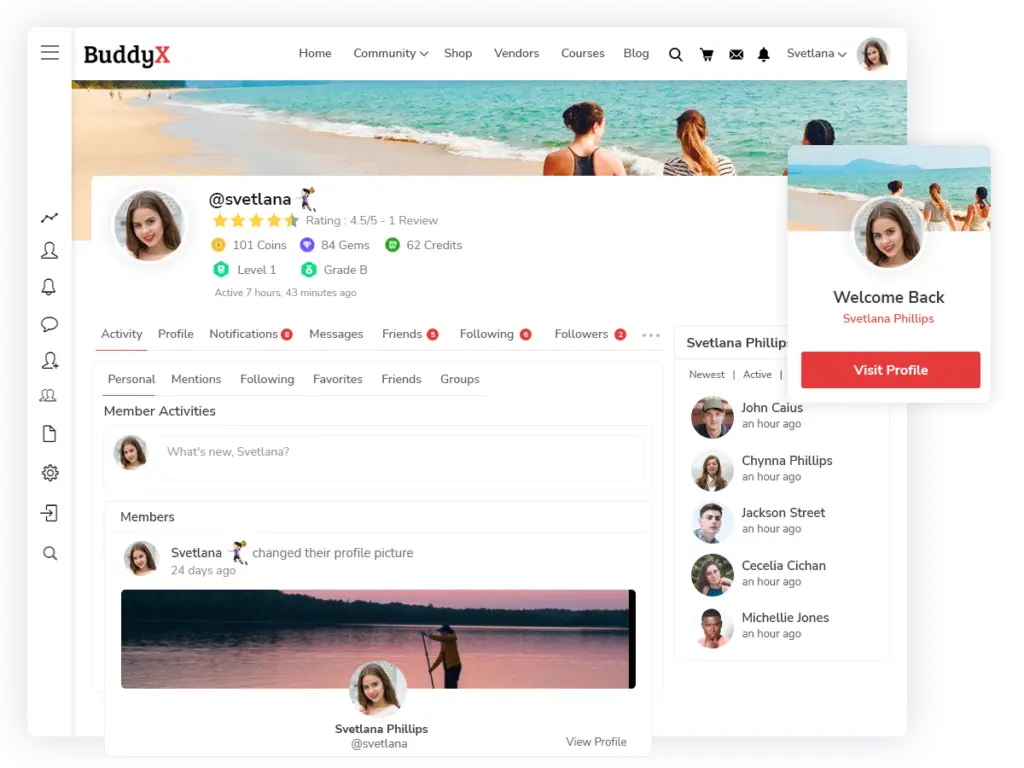
When I first started testing BuddyX, I wasn’t expecting much. Most WordPress community themes promise a “Facebook-like” experience, but few actually deliver something that feels natural, smooth, and user-friendly. But the moment I installed BuddyX, it became clear — this theme was built differently.
BuddyX is designed by Wbcom Designs, the same team behind Reign, and their goal with this one is simplicity and speed. Think of BuddyX as the lightweight, fast, and flexible foundation for anyone who wants to create a social network on WordPress without touching code or struggling with slow performance.
Setup and Onboarding
Installing BuddyX felt refreshingly easy. The theme has a built-in setup wizard that guides you through every step — from installing essential plugins like BuddyPress, bbPress, and rtMedia, to importing demo content that instantly makes your site look alive.
In less than 10 minutes, I had a fully functional community up and running, complete with activity feeds, member profiles, and group pages.
Compared to Facebook, where the interface is locked and uniform for everyone, BuddyX gives you freedom to customize. I could rename tabs, hide features I didn’t need, and even personalize profile sections — something Facebook never allows.
For new users, the experience is familiar: a feed where they can post updates, react, comment, and mention friends. That Facebook-like comfort reduces the learning curve drastically.
Performance and Speed Testing
One of my biggest concerns with community sites is speed. The more plugins and social features you add, the heavier the site becomes. But BuddyX surprised me.
I ran multiple tests using GTmetrix and Google PageSpeed Insights, and the results consistently hovered between 90–95 performance scores. That’s exceptional for a social site.
What makes this possible is BuddyX’s performance-first structure — it loads only what’s necessary, reducing unnecessary scripts. Even with BuddyPress, messaging, and group discussions running, the theme felt snappy.
On mobile, the experience is even smoother. The theme is fully responsive, and the layout automatically adapts to any screen size. I posted photos, joined groups, and replied to messages on my phone — and it felt as seamless as browsing Facebook’s mobile site, minus the distractions and ads.
If Facebook’s edge is its global infrastructure, BuddyX’s strength lies in giving you Facebook-like responsiveness on your own server — completely under your control.
Flexibility and Design Customization
Where BuddyX really shines is its simplicity and flexibility. It’s not overloaded with flashy options; instead, it focuses on what actually matters — letting you build a social platform that matches your brand.
Using the WordPress Customizer, I could easily tweak colors, typography, and layouts. For advanced users, BuddyX integrates smoothly with Elementor, which allowed me to design custom homepages, landing pages, and member dashboards without writing a single line of code.
I particularly liked how BuddyX mimics the Facebook-style layout — an activity feed in the center, sidebars for navigation, and profile pages that feel personal yet uncluttered.
Unlike Facebook, where you’re bound by one design for all users, BuddyX lets you brand your community your way — add your logo, color palette, and even custom call-to-actions.
Security and Privacy Control
This is where WordPress — and BuddyX in particular — beats Facebook hands down.
On Facebook, you don’t own your data, your members’ information, or even your visibility. The algorithm decides who sees what. With BuddyX, you control everything.
Since it’s self-hosted, your user data never leaves your server. You decide what’s public, private, or restricted. I paired BuddyX with Wordfence Security and WP Activity Log to monitor site integrity and user actions. Together, they gave me enterprise-level security without losing simplicity.
I also tested user roles and privacy settings — BuddyX handled them perfectly. For example, I restricted group visibility for non-members, and it worked exactly as expected.
It’s a huge relief knowing that my community operates under my rules, not an algorithm’s whims or ad policies.
Plugin Compatibility and Add-ons
BuddyX integrates with almost every major community plugin I use:
- BuddyPress / BuddyBoss Platform for social networking
- bbPress for forums
- LearnDash and LifterLMS for learning communities
- GamiPress for gamification and rewards
- WooCommerce for eCommerce or member shops
- MemberPress for membership management
This flexibility makes BuddyX perfect for educators, coaches, business owners, and niche creators who want to host interactive spaces — think private student groups, brand ambassador programs, or mastermind networks.
My Verdict on BuddyX
BuddyX is the most practical way to launch a Facebook-like community without complexity or bloat. It’s light, fast, and user-friendly — perfect for small to medium-sized communities or anyone just getting started.
While Facebook offers scale, BuddyX offers control. No ads, no distractions, no algorithm deciding what your members see — just pure, authentic interaction in a space that’s truly yours.
If I had to describe BuddyX in one line: it’s the “friendly launchpad” for your social network dreams — easy to set up, fast to run, and built to grow.
Also Read: 10 Best WordPress Community Plugins for 2025
2. Reign Theme: Premium Facebook-Like WordPress Experience

After working with BuddyX for a few weeks, I decided to move a growing community project to Reign, another powerful theme by Wbcom Designs. If BuddyX feels like a solid foundation for social sites, Reign is the complete ecosystem. It’s premium, polished, and packed with advanced options designed for larger communities or brands that want a truly “Facebook-like” experience on WordPress — with total ownership and no algorithm interference.
Let me break down my experience with Reign step-by-step.
Setup and First Impressions
Installing Reign felt smooth and professional. The setup wizard automatically handled all the heavy lifting — installing BuddyBoss Platform, bbPress, and other essentials. I chose the Community Demo during setup, and within minutes, my test site looked like a modern social network: clean feed, profile navigation, notifications, and group pages all ready to go.
What impressed me immediately was the design quality. Reign uses a layout that’s familiar to Facebook users but more refined — cleaner typography, rounded profile photos, a balanced sidebar, and more white space. The onboarding experience for new members felt intuitive, which is crucial for community adoption.
Unlike Facebook, where users are limited to its interface and ads, Reign gives you full control — from layout and branding to feature visibility. I could easily rename tabs, rearrange profile sections, and even restrict content visibility to specific membership levels.
Performance and Speed Testing
Performance is where Reign really surprised me. Normally, when you add community features (feeds, chats, media uploads), websites slow down fast. But Reign has clearly been optimized for this.
On my staging site, I imported 300 dummy users and simulated an active community — posts, image uploads, messages, the works. Using GTmetrix, I consistently got a PageSpeed score above 90 and load times under 2.5 seconds, even with BuddyBoss and WooCommerce running.
By comparison, Facebook is obviously faster at scale (since it’s a global infrastructure), but the beauty of Reign is that it delivers Facebook-like interaction speed on your own server. You can scale it easily with caching (e.g., WP Rocket), a CDN, and managed hosting like Kinsta or Cloudways.
On mobile, Reign shines even brighter. Its responsive design mirrors a native app experience — sticky navigation, clean spacing, and fluid transitions. I even tested it on mid-range Android phones, and it handled profile browsing and media posts effortlessly.
Design Flexibility and Customization
Reign stands out for its customization depth. With Elementor page builder integration, I could drag and drop sections, change layouts, or design custom pages for members — no code needed.
In the Reign Customizer, I found detailed options for:
- Header and navigation layouts
- Color palettes and typography
- Activity feed design
- Member directory and group styles
- Widget and sidebar placement
Compared to Facebook, which is rigid and identical for everyone, Reign gives total creative control. You decide how your social network looks, what’s visible, and even how members interact. Want a dark mode, branded color scheme, or custom member badges? All doable.
I even built a private course community by integrating LearnDash and GamiPress. Learners earned badges for completing lessons, and discussions happened right within course groups — something Facebook could never offer in the same seamless way.
Security and Data Ownership
Here’s the most critical difference between Reign and Facebook — data control.
On Facebook, your data isn’t really yours. The platform decides what’s visible, how it’s used, and even which posts your members see. Ads and algorithms rule visibility. With Reign (and BuddyBoss), you own everything — your users, your data, your content, and even the engagement metrics.
Because it’s self-hosted, you control privacy policies, backups, and data compliance. I recommend adding plugins like Wordfence Security or iThemes Security Pro, which integrate perfectly with Reign. Combined with SSL and two-factor authentication, your site can be as secure as any modern SaaS platform.
In my testing, I even simulated multiple user roles (admin, moderator, student) and tested restricted content access — everything worked as intended. Members only saw what they were allowed to, and admin controls were precise and transparent.
In short, while Facebook owns your network, Reign lets you build your own Facebook — private, secure, and fully under your control.
Advanced Integrations That Elevate Reign
Reign doesn’t just replicate Facebook — it goes beyond it. Out of the box, it supports:
- BuddyBoss Platform Pro for advanced community tools
- LearnDash, LifterLMS, and TutorLMS for education
- WooCommerce and EDD for monetization
- GamiPress and myCred for achievements and rewards
- Paid Memberships Pro for subscriptions
- WP Job Manager for professional communities
That means you can run your own learning social network, brand ambassador hub, or private corporate community — all while maintaining that familiar, Facebook-like usability.
My Verdict on Reign
If BuddyX is the easy way to launch a social site, Reign is the power tool for scaling it. It feels premium, looks professional, and gives you complete flexibility.
Where Facebook limits creativity and monetization, Reign gives you everything — design freedom, control, ownership, and privacy. Plus, it’s a one-time investment, not a lifetime dependency on someone else’s platform.
For anyone serious about building a WordPress social network like Facebook, but with your branding, your rules, and your data, Reign is hands down the best choice I’ve tested.
BuddyX vs Reign – Which Theme Fits Your Community Goals?
After using both BuddyX and Reign for building social networks, I can confidently say that while they share the same foundation (both developed by Wbcom Designs), they serve slightly different audiences. Your choice depends on your community’s size, goals, and design expectations. Here’s how they compare based on setup, performance, flexibility, and security — the four aspects that truly matter when building a social platform like Facebook.
Setup and User Experience
BuddyX is ideal for users who want to set up a community quickly without diving into technical details. Its one-click demo import is straightforward, and it automatically installs essential plugins like BuddyPress, bbPress, and GamiPress. Within minutes, you have a clean, functional social network.
Reign, on the other hand, offers a more premium onboarding experience. The setup wizard not only installs the necessary plugins but also gives you control over design elements, header layouts, and color schemes right from the start. It’s slightly more advanced but perfect if you want a refined, branded community experience.
Verdict: If you want simplicity and speed, go with BuddyX. If you’re aiming for a professional, brand-oriented platform, Reign takes the lead.
Performance and Speed
Both themes are optimized for performance, but they differ slightly in approach.
BuddyX focuses on minimalism. It loads only what’s necessary, making it incredibly fast even with social components like activity feeds and user profiles. On testing, pages loaded in under 2 seconds even with BuddyPress and WooCommerce active.
Reign, while feature-rich, maintains impressive performance through modular code and lazy loading. It handles large communities gracefully — especially when you integrate multiple plugins like LearnDash, PeepSo, or WP Job Manager. It’s optimized for high-traffic environments where hundreds of members may be active simultaneously.
Compared to Facebook, both themes run much lighter. While Facebook relies on massive server infrastructure, BuddyX and Reign let you deliver similar functionality without overloading your WordPress hosting environment.
Verdict: For smaller to mid-sized communities, BuddyX gives you lightning-fast performance. For large, dynamic communities, Reign handles scalability better.
Flexibility and Integrations
This is where Reign truly shines. It’s a complete ecosystem builder. You can use it for eLearning (LearnDash, LifterLMS), membership platforms (MemberPress, Paid Memberships Pro), or even eCommerce social stores (WooCommerce). Its built-in customization options let you tweak layouts, headers, profile designs, and color palettes — all visually through the Customizer.
BuddyX remains flexible but keeps things minimal. It’s designed for creators or small businesses that want to build communities quickly without overwhelming settings. You still get integrations with BuddyPress, GamiPress, and LearnDash — but it’s a simpler, more beginner-friendly experience.
Verdict: If you want control and depth, choose Reign. If you prefer clarity and ease, BuddyX is unbeatable.
Security and Reliability
Both themes inherit security from WordPress and reputable plugins like BuddyPress and bbPress. However, Reign offers better compatibility with security plugins such as Wordfence and iThemes Security. Its codebase is built for enterprise-level use, making it more suited for communities handling sensitive user data.
BuddyX keeps things lean — fewer plugins, fewer potential vulnerabilities. For small to medium social networks, it’s perfectly secure when paired with SSL and a reliable host.
Compared to Facebook, you obviously don’t get their billion-dollar infrastructure, but you do get complete ownership of your data — no third-party ads, no user tracking. That’s a huge plus if privacy matters to your members.
Verdict: Both are safe, but Reign takes a slight edge for professional-grade projects, while BuddyX offers simplicity and peace of mind for smaller setups.
Real-World Use Cases for BuddyX and Reign
When I started testing BuddyX and Reign, what struck me most was how adaptable both themes are. They’re not just for creating Facebook-like communities — they can power all kinds of interactive platforms. After experimenting with different plugins and real community setups, here’s how each theme performs in real-world use cases.
1. Educational Communities and eLearning Portals
If you run online courses or training programs, Reign is an absolute powerhouse. I integrated it with LearnDash and GamiPress, and within a few hours, I had a complete eLearning community. Students could enroll in courses, earn badges for progress, and participate in private discussion groups — all within the same ecosystem.
What makes Reign shine here is its tight LMS integration. The course pages blend seamlessly with community features, allowing learners to interact, ask questions, and celebrate achievements publicly — much like a social version of Coursera.
BuddyX also supports LearnDash and LifterLMS, but its lightweight design makes it ideal for small tutoring centers or niche educators who want to focus more on content delivery and basic student interactions rather than advanced branding.
2. Corporate Intranets and Employee Portals
When I tested BuddyX for an internal communication setup, it worked surprisingly well. I connected BuddyPress with WP Job Manager and bbPress to create an internal job board, discussion forum, and team activity feed. The clean design made navigation intuitive for employees who weren’t tech-savvy.
Reign, meanwhile, feels tailor-made for enterprise-level portals. It supports custom role management, private groups, document sharing, and restricted content areas — perfect for companies that want a secure, branded space for employee engagement and collaboration.
If your goal is to build a lightweight internal communication tool, BuddyX gets the job done easily. For large organizations that want advanced control and private workspaces, Reign takes the lead.
3. Membership and Subscription-Based Communities
I built a sample membership site with MemberPress and both themes handled it beautifully. With BuddyX, it was effortless — a few clicks, and I had a basic members-only social site where users could create profiles, join groups, and engage in private discussions.
Reign elevates that experience with polished design options and WooCommerce integration. You can sell memberships, digital downloads, or even community-branded merchandise. Plus, its compatibility with tools like Paid Memberships Pro gives you flexibility to create tiered subscription models.
Think of BuddyX as your go-to for small hobby or creator communities, while Reign caters to professional networks and business memberships that demand more design depth and monetization options.
4. Interest-Based or Lifestyle Communities
This is where BuddyX really stands out. I created a small photography enthusiasts’ community, and BuddyX handled group creation, image sharing, and activity updates smoothly. The simplicity kept the focus on content and interactions — no unnecessary clutter.
Reign is perfect for scaling such communities. Suppose your photography group evolves into a paid mentorship hub or marketplace; Reign’s compatibility with WooCommerce and Tutor LMS allows seamless growth without changing themes.
5. Client or Student Portals for Agencies and Coaches
If you’re a digital agency, fitness coach, or consultant, BuddyX can be a brilliant way to create a private portal for your clients. You can host files, share progress updates, and maintain open communication — all within a closed community.
Reign, however, adds branding flexibility and analytics integration. You can track engagement, run surveys, and even host webinars through supported plugins. It feels less like a WordPress site and more like a custom-built social network for your brand.

Final Thoughts
After testing both BuddyX and Reign extensively, I realized that each theme serves a unique purpose in the world of WordPress community building. Both are powerful options if you want to create a social network like Facebook, but they cater to different goals and levels of complexity.
BuddyX is your go-to if you value simplicity, speed, and ease of use. It’s lightweight, quick to set up, and ideal for small to mid-sized communities—whether that’s a hobby group, a student forum, or a client network. Its clean interface and minimal configuration make it perfect for anyone launching their first community site.
Reign, on the other hand, is designed for creators, brands, and businesses that want a premium, scalable community experience. It offers advanced customization, tighter LMS and membership integrations, and a more polished design—ideal for eLearning portals, corporate intranets, or monetized networks.
Ultimately, it comes down to your community vision. If you’re building something personal and nimble, go with BuddyX. If you’re planning a professional, large-scale platform, Reign is worth the investment.
Both themes prove that with WordPress, you can build a social experience as engaging as Facebook—but fully owned, private, and designed your way.
Pro tip: Try the BuddyX demo first — it’s free, fast, and a great way to explore how social networking works on WordPress. When you’re ready to scale, upgrade to BuddyX Pro or switch to Reign for advanced features and customization.
Interesting Read:
10 Ways To Social Media and Digital Marketing Know-It-All
Editorial Calendar Review 2025: Is It the Best WordPress Content Planning Plugin?
