

In the competitive world of eCommerce, providing a seamless and efficient checkout process is crucial for maximizing sales and minimizing cart abandonment. Customers expect a fast, hassle-free experience when purchasing online, and any friction during the checkout process can lead to lost sales.
Enter the WooCommerce Fast Cart Plugin, a powerful tool designed to streamline the checkout process and enhance the user experience on WooCommerce-powered online stores. This plugin aims to reduce the steps required for customers to complete their purchases, thereby improving conversion rates and boosting customer satisfaction.
In this review, we will explore the features and benefits of the WooCommerce Fast Cart Plugin, provide a step-by-step guide on how to install and configure it, and offer insights into its usability and effectiveness. Whether you’re a seasoned eCommerce professional or just starting with WooCommerce, this review will help you understand how the WooCommerce Fast Cart Plugin can optimize your online store’s checkout process and drive more sales.

What is WooCommerce Fast Cart Plugin?
The WooCommerce Fast Cart Plugin is a robust tool specifically designed to streamline the checkout process for WooCommerce stores. Its primary purpose is to simplify and expedite the purchase experience for customers, reducing the steps required to complete a transaction and thereby decreasing cart abandonment rates.
Key Features and Benefits
One-Click Checkout
- Enables customers to complete their purchase with just a single click, bypassing the traditional multi-step checkout process.
Ajax-Powered Cart Updates
- Provides real-time updates to the cart without requiring page reloads, ensuring a smoother and faster user experience.
Mini Cart and Floating Cart Options
- Offers a compact mini cart or floating cart that customers can access from any page, making it easier to view and modify their cart contents.
Customizable Design
- Allows store owners to customize the cart’s appearance to match their brand, ensuring a consistent look and feel across the site.
Integrated Payment Gateways
- Seamlessly integrates with popular payment gateways, enabling quick and secure transactions.
Responsive Design
- Optimized for mobile devices, ensuring that the fast cart functionality works smoothly on smartphones and tablets.
Enhanced User Experience
- Improves the overall shopping experience by reducing friction and making it easier for customers to complete their purchases quickly.
Also Read: Best Ways To Reduce Shopping Cart Abandonment In WordPress
Importance of Reducing Cart Abandonment and Improving Conversion Rates
Cart abandonment is a significant issue in eCommerce, with studies showing that the average cart abandonment rate hovers around 70%. Common reasons for abandonment include a complicated checkout process, unexpected costs, and slow website performance.
By implementing the WooCommerce Fast Cart Plugin, store owners can address these issues head-on:
- Streamlined Checkout Process: Simplifying the checkout process reduces the likelihood of customers abandoning their carts due to frustration or time constraints.
- Faster Transactions: Reducing the number of steps and eliminating page reloads speeds up the purchasing process, keeping customers engaged.
- Improved User Experience: Enhancing the overall shopping experience can lead to higher customer satisfaction and repeat purchases.
Ultimately, the WooCommerce Fast Cart Plugin aims to improve conversion rates by providing a faster, more efficient checkout process, which is crucial for maximizing revenue and building a loyal customer base.
Also Read: 5 Best WooCommerce Save Cart For Later Plugins 2024
Features and Benefits of WooCommerce Fast Cart Plugin
Detailed Breakdown of the Plugin’s Features
Streamlined Checkout Process
- One-Click Checkout: Allows customers to complete their purchase with a single click, eliminating the multi-step checkout process.
- Ajax-Powered Cart Updates: Provides real-time updates to the cart without requiring page reloads, ensuring a smooth and fast user experience.
Customization Options
- Customizable Design: Store owners can tailor the cart’s appearance to match their brand, including colors, fonts, and layout.
- Mini Cart and Floating Cart Options: Choose between a compact mini cart or a floating cart that is accessible from any page, enhancing flexibility and usability.
Responsive Design
- Mobile Optimization: The plugin is designed to work seamlessly on smartphones and tablets, ensuring a smooth experience for mobile shoppers.
- Cross-Browser Compatibility: Works well across different browsers, providing a consistent experience for all users.
Enhanced User Experience
- Integrated Payment Gateways: Compatible with popular payment gateways, allowing for quick and secure transactions.
- Easy Cart Management: Customers can easily add, remove, or modify items in their cart, improving the overall shopping experience.
Reduction in Cart Abandonment
- Faster Transactions: By reducing the steps required to complete a purchase, the plugin helps to keep customers engaged and less likely to abandon their carts.
- Clear Pricing Information: Displaying all costs upfront helps reduce unexpected surprises that often lead to cart abandonment.
Explanation of the Benefits of Using the Plugin for Your WooCommerce Store
Increased Conversion Rates
- By simplifying the checkout process and making it faster, the WooCommerce Fast Cart Plugin helps convert more visitors into paying customers.
Improved Customer Satisfaction
- A seamless and efficient checkout experience enhances customer satisfaction, leading to repeat purchases and positive reviews.
Brand Consistency
- The ability to customize the cart ensures that the look and feel of the cart align with the rest of your store, creating a cohesive brand experience.
Higher Engagement
- Features like real-time cart updates and easy access to the cart from any page keep customers engaged and reduce frustration.
Reduced Cart Abandonment
- By addressing common pain points in the checkout process, the plugin helps reduce the incidence of cart abandonment, thereby increasing overall sales.
Time and Cost Efficiency
- The streamlined checkout process not only saves time for customers but also reduces the operational costs associated with managing abandoned carts and processing incomplete orders.
In summary, the WooCommerce Fast Cart Plugin offers a range of features designed to enhance the checkout process, improve user experience, and boost conversion rates. By integrating this plugin into your WooCommerce store, you can provide a better shopping experience for your customers and achieve better business results.
Step-by-Step Guide to Install WooCommerce Fast Cart Plugin
Step 1: Purchase and Download the Plugin

- Where to Purchase the Plugin
- Visit the official WooCommerce marketplace or the plugin developer’s website to purchase the WooCommerce Fast Cart Plugin.
- Add the plugin to your cart and proceed to checkout.
- Complete the payment process.
- Download the Plugin Zip File
- After the purchase, you will receive a download link for the plugin.
- Click on the download link to save the plugin zip file to your computer.
Step 2: Install the Plugin

- Log in to Your WordPress Dashboard
- Open your web browser and go to your WordPress login page.
- Enter your username and password to log in.
- Navigate to the Plugins Page
- In the WordPress dashboard, go to Plugins > Add New.
- Upload the Plugin Zip File
- Click on the Upload Plugin button at the top of the page.
- Click on the Choose File button and select the WooCommerce Fast Cart Plugin zip file you downloaded.
- Click Install Now to upload and install the plugin.
Step 3: Activate the Plugin
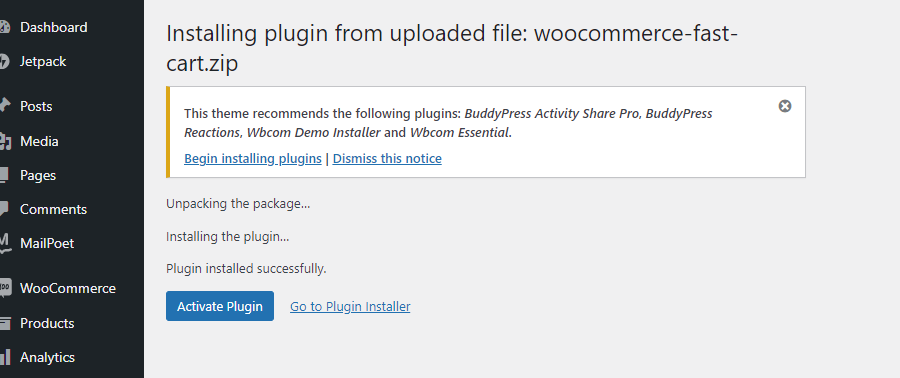
- Activate the Plugin
- Once the plugin is installed, you will see an Activate Plugin button. Click on it to activate the WooCommerce Fast Cart Plugin.
Step 4: Configure the Plugin Settings

- Navigate to the Settings Page
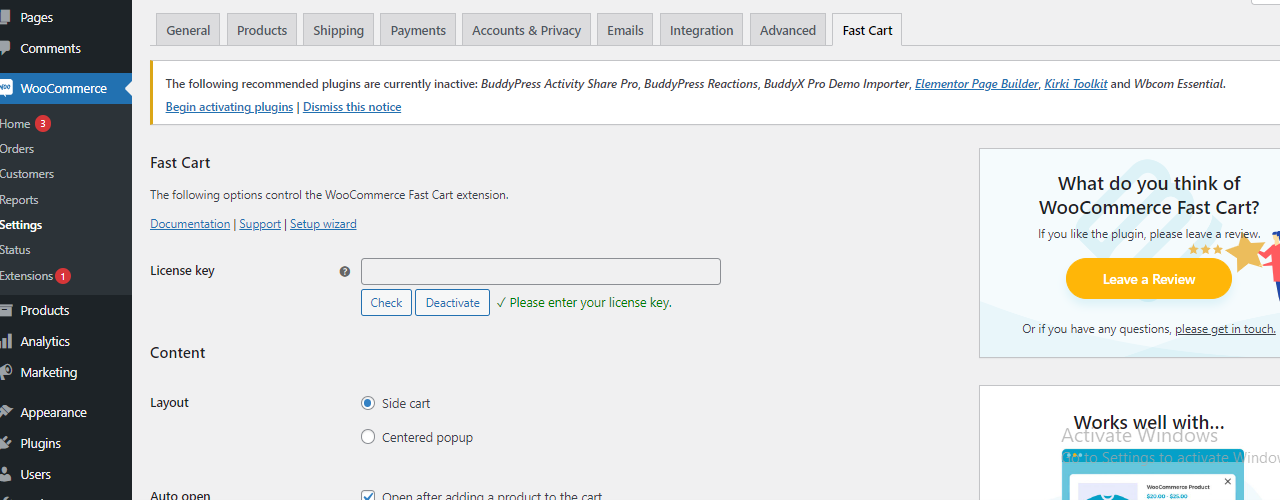
- In the WordPress dashboard, go to WooCommerce > Settings.
- Click on the Fast Cart tab to access the plugin settings.
- Configure Various Settings and Customization Options
- General Settings: Adjust the basic settings such as enabling or disabling the fast cart, setting the cart behavior, etc.
- Appearance: Customize the design of the cart to match your store’s theme, including colors, fonts, and layout options.
- Advanced Settings: Configure advanced options like Ajax updates, mobile display settings, and integration with other plugins.
- Save and Apply Changes
After configuring the settings, scroll down and click the Save Changes button to apply your configurations.
Test the fast cart functionality on your website to ensure everything is working correctly.
By following these steps, you can easily install and configure the WooCommerce Fast Cart Plugin to enhance your store’s checkout process and improve the overall shopping experience for your customers.
How to Use WooCommerce Fast Cart Plugin
Step 1: Enable Fast Cart on Your Products
- Log in to Your WordPress Dashboard
- Open your web browser and go to your WordPress login page.
- Enter your username and password to log in.
- Navigate to Products
- In the WordPress dashboard, go to Products > All Products.
- Edit a Product
- Select the product you want to enable the fast cart option for and click Edit.
- Enable Fast Cart
- Scroll down to the product data section.
- Look for the Fast Cart option (this may be under a tab like Advanced or a new Fast Cart tab).
- Check the box to enable the fast cart for this product.
- Click Update to save changes.
Step 2: Customize the Cart and Checkout Experience
- Access Customization Options
- In the WordPress dashboard, go to WooCommerce > Settings.
- Click on the Fast Cart tab.
- Adjust Design Elements
- Colors: Set the colors for the cart background, buttons, and text to match your store’s theme.
- Fonts: Choose the fonts that align with your store’s branding.
- Buttons: Customize the shape, size, and color of the buttons.
- Preview and Publish Changes
- As you make adjustments, use the preview option to see how the changes look.
- Once satisfied with the customizations, click Save Changes to publish.
Step 3: Monitor and Optimize
- Using WooCommerce Analytics
- In the WordPress dashboard, go to WooCommerce > Analytics.
Key Metrics to Track
- Cart Abandonment Rate: Track how often users abandon their carts.
- Conversion Rate: Measure the percentage of visitors who complete a purchase.
- Average Order Value: Monitor the average amount spent per order.
- Customer Feedback: Collect and analyze feedback related to the checkout process.
Also Read: Best WordPress Shopping Cart Plugins 2024
Tips for Continuous Improvement
- A/B Testing: Test different configurations of the fast cart to see what performs best.
- User Feedback: Regularly gather feedback from customers about their checkout experience.
- Update and Optimize: Continuously refine your settings and design elements based on performance data and feedback.
- Stay Updated: Ensure the plugin is always updated to the latest version for optimal performance and new features.
By following these steps, you can effectively use the WooCommerce Fast Cart Plugin to enhance the user experience, reduce cart abandonment, and boost your store’s conversion rates.
Also Read: How to create and use Shipping Coupons in WooCommerce
Pros and Cons of WooCommerce Fast Cart Plugin
Pros
User-friendly Interface
- The plugin offers an intuitive and easy-to-navigate interface, making it accessible for users of all technical levels.
Improves Conversion Rates
- By streamlining the checkout process, the plugin helps reduce cart abandonment, leading to higher conversion rates.
Highly Customizable
- Offers a wide range of customization options, allowing you to tailor the cart and checkout experience to match your brand.
Responsive Design
- Ensures that the cart and checkout process works smoothly across all devices, providing a seamless shopping experience for users on mobile, tablet, and desktop.
Cons
- Cost Considerations for Small Businesses
- The cost of the plugin might be a concern for smaller businesses with limited budgets.
- Potential Compatibility Issues
- There may be compatibility issues with certain themes and plugins, which could require additional troubleshooting or support.
Overall, the WooCommerce Fast Cart Plugin offers a robust solution for enhancing the checkout experience, but it’s important to consider the potential costs and compatibility challenges before implementation.

Conclusion
In conclusion, the WooCommerce Fast Cart Plugin is an effective tool for enhancing the checkout process, reducing cart abandonment, and improving conversion rates. Its user-friendly interface, extensive customization options, and responsive design make it a valuable addition to any WooCommerce store. While cost and potential compatibility issues may be considerations for some, the overall benefits of streamlined checkout and increased conversions make it a worthwhile investment.
We encourage you to try the plugin and observe its impact on your store’s performance. If you have any questions or need further assistance, please feel free to ask in the comments.
Interesting Reads:
What Sets UX Apart from UI? Key Distinctions Defining Digital Design
