

Creating and selling online courses is now one of the most effective ways to earn money and share knowledge in 2025. In this WP Courseware Review, we break down how this WordPress LMS plugin helps educators, trainers, and businesses build professional courses without technical challenges.
With more than 50% of learners preferring structured, interactive online courses, choosing the right LMS plugin matters. WP Courseware stands out because it combines ease of use with strong course-building tools. It allows you to create lessons, track students, add quizzes, and sell courses—all from your WordPress dashboard.
This review covers WP Courseware’s features, pricing, setup process, comparisons with other LMS plugins, and more. By the end, you’ll know exactly whether WP Courseware is the right solution for your online learning platform.

What Is WP Courseware?
WP Courseware is a WordPress LMS plugin that enables users to create, manage, and sell online courses directly from their WordPress sites. Unlike basic WordPress setups that require multiple plugins for courses, quizzes, and student management, WP Courseware provides an all-in-one solution for educators, trainers, and businesses looking to deliver professional learning experiences.
At its core, WP Courseware offers a drag-and-drop course builder, allowing you to organize courses into modules and lessons effortlessly. It also supports quizzes, surveys, and assignments to track student performance, ensuring learners stay engaged and achieve their goals. With content dripping, you can release lessons gradually, maintaining student interest and improving retention rates.
Key Highlights
- Drag-and-drop course builder
- Quizzes, surveys, and assignments
- Content dripping
- Certificates
- E-commerce & membership integrations
- Student progress tracking
- Automated email notifications
It turns a basic WordPress site into a complete learning platform—perfect for solo educators, coaches, trainers, and online schools.
Also Read: 5 Game-Changing Strategies for Scaling Your Education Business in 2025
Why Choose WP Courseware?
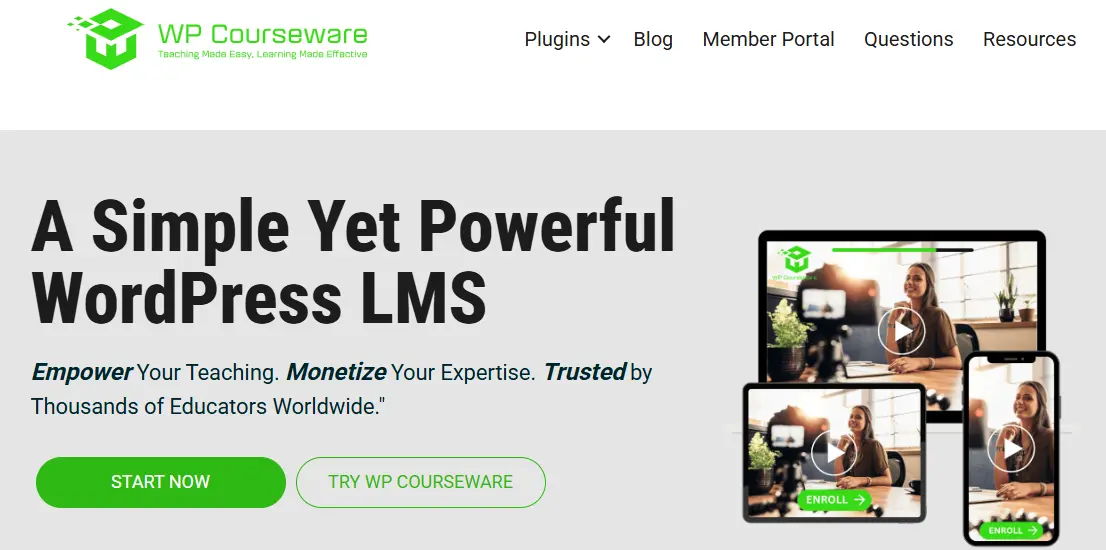
Choosing the right LMS plugin for your WordPress site is crucial for creating a seamless learning experience, and WP Courseware offers several advantages that make it a top choice. First and foremost, it simplifies course creation with a drag-and-drop builder, allowing educators and trainers to structure lessons and modules without any coding knowledge. This ease of use saves time and reduces the technical barrier for beginners.
1. Easy Course Creation
The drag-and-drop builder helps you organize modules and lessons quickly. No coding required.
2. Better Student Engagement
Quizzes, surveys, and assignments make learning interactive and help track student understanding.
3. Content Dripping
Release lessons gradually to improve learning and encourage consistent progress.
4. Strong Integrations
Works smoothly with:
- WooCommerce
- Easy Digital Downloads
- MemberPress
- Paid Memberships Pro
This makes selling and managing courses easier.
5. Scalable
Whether you’re offering one course or running a full training academy, WP Courseware can grow with you.
Also Read: 5 Reasons Why iGaming Website Owners Should Change Their Designs From Time to Time
Key Features of WP Courseware
WP Courseware is packed with features that make it one of the most reliable WordPress LMS plugins available. These features not only simplify course creation but also enhance student engagement, course management, and monetization options. Here’s a detailed look at what makes WP Courseware stand out:
1. Drag-and-Drop Course Builder
The intuitive drag-and-drop builder allows you to create courses, modules, and lessons effortlessly. You can reorder lessons, add multimedia content, and organize course materials without needing any coding knowledge. This visual approach simplifies course management and accelerates content creation.
2. Quizzes and Surveys
WP Courseware includes a variety of quiz and survey options to assess learner comprehension and gather feedback. Multiple-choice, true/false, and open-ended quizzes help instructors evaluate student progress. Surveys provide insights into course effectiveness, enabling improvements over time.
3. Content Dripping
The plugin allows you to release course content gradually, which keeps learners engaged and encourages consistent participation. Scheduled lesson delivery can improve completion rates and ensures students absorb information at a manageable pace.
4. Certificates and Achievements
WP Courseware enables you to award certificates upon course completion, providing learners with tangible recognition. This feature motivates students and adds credibility to your courses.
5. Integration with Membership and E-Commerce Plugins
Seamless integration with popular platforms like WooCommerce, Easy Digital Downloads, and MemberPress allows you to monetize courses easily. You can sell individual courses, set up subscription plans, or restrict premium content to members only.
6. Student Management and Analytics
WP Courseware provides a robust student management system, allowing instructors to track enrollments, progress, and performance. Detailed analytics help identify student engagement trends, making it easier to adjust course content and improve learning outcomes.
7. Flexible Lesson and Module Options
You can add multimedia elements like videos, audio, PDFs, and slides to lessons, creating a rich learning environment. Modules and lessons can be customized, reordered, and reused across different courses, saving time and effort.
8. Email Notifications
Automated email notifications for enrollments, lesson completion, and reminders keep students informed and engaged. This feature reduces manual communication and enhances the overall learning experience.
With these comprehensive features, WP Courseware provides everything educators need to create professional, engaging, and profitable online courses directly within WordPress. Its combination of flexibility, automation, and user-friendliness makes it a top choice for both beginners and advanced course creators.
How to Set Up WP Courseware on Your WordPress Site
Setting up WP Courseware on your WordPress website is quick and beginner-friendly. Whether you’re an educator, trainer, or entrepreneur, this step-by-step guide will walk you through how to install, configure, and launch your online courses with ease.
Step 1: Install and Activate WP Courseware
Start by installing the plugin directly from your WordPress dashboard:
- Go to Plugins → Add New
- Search for “WP Courseware”
- Click Install Now → then Activate
Once activated, a new WP Courseware tab will appear in your dashboard, allowing you to begin course setup.
Step 2: Create Courses, Modules, and Lessons
After activation, head to the WP Courseware panel and click Create New Course.
- Enter a course title and description
- Add modules to organize your lessons
- Within each module, create individual lessons
The drag-and-drop builder makes it easy to rearrange modules and lessons for the perfect learning flow.
Also Read: 5 types of HTML codes every WordPress beginner should know
Step 3: Add Lesson Content
Each lesson can include multiple types of content to engage students:
- Text, images, and videos for clarity
- PDFs, slides, or downloadable materials for added value
- Optional lesson prerequisites to control progression
This flexibility lets you design interactive and structured courses that keep learners engaged.
Step 4: Set Up Quizzes and Assessments
To test your students’ understanding, WP Courseware includes built-in quizzes and surveys.
- Create custom quiz questions and assign them to lessons or modules
- Define grading systems and passing thresholds
- Enable instant feedback to help learners improve
These assessments make your courses more interactive and results-driven.
Step 5: Manage Student Registration and Access
WP Courseware integrates seamlessly with membership plugins like MemberPress and WooCommerce. You can:
- Control who can access specific courses
- Set course permissions for enrolled users
- Create custom registration pages for sign-ups
This ensures only registered students can view your course materials.
Step 6: Automate Emails and Notifications
Keep your learners engaged by setting up automatic notifications for:
- Course enrollment confirmations
- Lesson completions
- New content releases
Automation ensures consistent communication without manual effort.
Step 7: Test Before Launching
Before going live, always test your course:
- Create a test student account
- Check lesson access, quiz functionality, and email delivery
A smooth test run guarantees your students enjoy a seamless learning experience.
By following these steps, WP Courseware helps you design, manage, and sell online courses efficiently. Its drag-and-drop builder, automation tools, and integrations make it a top choice for anyone looking to create professional e-learning platforms on WordPress.
Pricing of WP Courseware
WP Courseware offers flexible pricing plans designed to suit different types of users, from individual educators to larger organizations. Here’s a breakdown of the available plans:
1. Teacher Plan
- Cost: $129 per year
- Sites: Use on 2 WordPress sites
- Features: Full access to the drag-and-drop course builder, quizzes, content dripping, certificates, and email notifications
- Support: One year of premium support and updates
2. Professor Plan
- Cost: $149 per year
- Sites: Use on 10 WordPress sites
- Features: All Teacher Plan features, plus priority support and unlimited courses and modules
- Ideal For: Educators or small businesses managing multiple sites
Additional Notes
- All plans include access to drag-and-drop course builder, quizzes, surveys, content dripping, and certificates
- Integrates with WooCommerce, Easy Digital Downloads, and popular membership plugins
- One-time upgrades and lifetime licenses may occasionally be available during promotions
Overall, WP Courseware offers a value-for-money solution for creating and managing online courses, with scalable pricing options based on your site requirements.
Pros and Cons of WP Courseware
WP Courseware is a powerful WordPress LMS plugin, but like any tool, it has its advantages and some limitations. Understanding both sides will help you decide if it’s the right fit for your online courses.
Pros
-
User-Friendly Interface: The drag-and-drop course builder makes creating courses simple, even for beginners, without requiring coding knowledge.
-
Flexible Course Structure: You can organize courses into modules and lessons, reorder content easily, and set prerequisites for a structured learning experience.
-
Quizzes and Assessments: Built-in quizzes and surveys allow instructors to track student progress and evaluate comprehension effectively.
-
Content Dripping: Schedule lessons to release gradually, keeping students engaged and improving course completion rates.
-
Certificates and Achievements: Automatically award certificates upon course completion, adding credibility and motivating learners.
-
Seamless Integrations: Works well with membership plugins and e-commerce platforms like WooCommerce and Easy Digital Downloads for monetizing courses.
-
Scalability: Suitable for solo educators as well as large organizations managing multiple courses and student groups.
-
Automated Notifications: Keep students informed and engaged with automatic emails for enrollments, lesson completions, and reminders.
Cons
-
Limited Advanced Customization: While flexible, WP Courseware may not offer the same deep design customization as some other LMS plugins.
-
No Free Version: Unlike some competitors, it does not have a free plan, though a demo and documentation are available.
-
Add-On Dependency for Some Features: Certain integrations or advanced marketing features may require additional plugins or third-party tools.
In summary, WP Courseware provides a robust and user-friendly LMS solution for WordPress. Its intuitive interface, automation, and scalability make it ideal for educators and businesses, though those seeking extensive design customization may need additional tools.
WP Courseware vs Other LMS Plugins
Choosing the right LMS plugin for your WordPress site is crucial, especially if you want to create engaging, professional online courses. WP Courseware is a strong contender, but how does it compare to other popular LMS plugins like LearnDash, LifterLMS, and Tutor LMS?
1. WP Courseware vs LearnDash
LearnDash is one of the most widely used LMS plugins, known for its advanced features and enterprise-level capabilities. It offers drip content, quizzes, assignments, and certificate management, similar to WP Courseware. However, LearnDash often comes with a steeper learning curve and slightly higher pricing. WP Courseware, in contrast, emphasizes ease of use with a drag-and-drop builder, making it ideal for beginners or small-to-medium course creators who want to launch quickly without extensive setup.
2. WP Courseware vs LifterLMS
LifterLMS provides a robust platform with membership, gamification, and e-commerce integrations. It offers a free core version, which can be appealing for those on a budget, but many essential features require premium add-ons. WP Courseware offers most of its key functionality out-of-the-box, including quizzes, surveys, and content dripping, which can reduce the need for additional plugins and simplify site management.
3. WP Courseware vs Tutor LMS
Tutor LMS is a flexible plugin with a modern interface and extensive customization options. While it offers similar course-building and assessment features, some users find its interface slightly more complex. WP Courseware stands out for its intuitive workflow, making it easier for educators to create courses quickly and manage students efficiently.
Why Choose WP Courseware?
The primary advantage of WP Courseware lies in its balance of usability and functionality. While other LMS plugins may offer more advanced customization or gamification options, WP Courseware ensures that course creation, student management, and monetization are straightforward. Its drag-and-drop builder, integration with membership and e-commerce plugins, content dripping, and automated notifications make it an ideal choice for educators who want efficiency without sacrificing essential LMS features.
Overall, WP Courseware is particularly well-suited for solo educators, small businesses, and training organizations seeking a reliable and scalable LMS plugin. Its simplicity, combined with powerful features, ensures a smooth experience for both instructors and students, allowing you to focus on delivering high-quality learning rather than managing complex systems.
Also Read: 6 Surprising Ways Efficient Financial Management Can Transform Your Business
Who Should Use WP Courseware?
WP Courseware is a versatile LMS plugin that caters to a wide range of users, from individual educators to large organizations. Its intuitive design and powerful features make it suitable for anyone looking to build and manage online courses on WordPress efficiently.
1. Individual Educators and Trainers
For teachers, coaches, and subject-matter experts, WP Courseware provides an easy-to-use platform to create professional courses without coding knowledge. The drag-and-drop builder, quizzes, and content dripping features allow instructors to deliver structured learning experiences, while automated email notifications help maintain student engagement.
2. Small Businesses and Entrepreneurs
Entrepreneurs offering training programs, workshops, or certification courses can benefit from WP Courseware’s e-commerce and membership integrations. Selling courses, managing subscriptions, and protecting premium content becomes seamless, making it an ideal choice for monetizing online learning initiatives.
3. Training Organizations and Institutions
Schools, colleges, and professional training organizations can use WP Courseware to manage multiple courses, track student progress, and deliver certificates. Its scalability allows institutions to expand their online offerings without overhauling their WordPress setup.
4. Online Coaches and Course Creators
For creators looking to build multiple courses and run subscription-based programs, WP Courseware offers a reliable system for automation and content management. Features like quizzes, certificates, and content dripping help improve learner engagement and course completion rates.
Tips to Get the Most Out of WP Courseware
WP Courseware is a powerful LMS plugin, but to maximize its potential, it’s important to follow best practices and leverage its features strategically. Here are some tips to help you get the most out of WP Courseware:
1. Plan Your Courses Before Building
Before diving into the plugin, outline your course structure, modules, and lessons. Planning ahead ensures a logical flow, helps you identify quizzes and assignments, and saves time during course creation.
2. Use the Drag-and-Drop Builder Efficiently
Take full advantage of WP Courseware’s drag-and-drop course builder to organize modules and lessons quickly. You can reorder content, add multimedia, and update lessons without disrupting the course structure.
3. Leverage Quizzes and Assessments
Incorporate quizzes, surveys, and assignments to engage learners and track their progress. Use different question types and passing thresholds to reinforce learning and encourage active participation.
4. Implement Content Dripping
Release lessons gradually using the content dripping feature. This keeps students engaged over time and prevents overwhelm, increasing course completion rates.
5. Integrate With Membership and E-Commerce Plugins
If you’re selling courses, connect WP Courseware with WooCommerce, Easy Digital Downloads, or membership plugins. This allows you to monetize your courses effectively, manage subscriptions, and restrict access to premium content.
6. Customize Email Notifications
Set up automated emails to notify students about enrollments, lesson completion, and upcoming content. Personalized emails improve engagement and maintain communication without manual effort.
7. Monitor Student Progress
Regularly check analytics and progress reports to identify trends, improve content, and address struggling learners. Data-driven decisions enhance both course quality and student satisfaction.
Also Read: 7 Proven Tips for Successful E-commerce SEO

Build and Sell Courses with WP Courseware
WP Courseware offers a comprehensive solution for creating, managing, and selling online courses directly from WordPress. Its intuitive drag-and-drop builder, content dripping, quizzes, and certificate features make it easy for educators and businesses to deliver professional learning experiences without the need for coding knowledge.
The plugin’s seamless integration with membership and e-commerce tools such as WooCommerce and Easy Digital Downloads allows you to monetize courses efficiently. You can create subscription plans, restrict premium content, and automate student communication, ensuring a smooth learning journey. Additionally, WP Courseware’s reporting and analytics tools help track student progress, evaluate course effectiveness, and make data-driven improvements.
In this WP Courseware Review, we’ve seen that the plugin balances usability and powerful features, making it suitable for solo educators, small businesses, and large training organizations alike. Whether your goal is to offer a single course or build a full-scale online academy, WP Courseware provides the flexibility, automation, and scalability needed to grow your e-learning platform.
FAQs About WP Courseware
1. Is WP Courseware suitable for beginners?
Yes. WP Courseware is user-friendly, with an intuitive drag-and-drop builder and straightforward course setup. Beginners can create professional online courses without any coding experience.
2. Can I sell courses with WP Courseware?
Absolutely. WP Courseware integrates seamlessly with WooCommerce, Easy Digital Downloads, and membership plugins, enabling you to monetize courses, set subscription plans, and restrict premium content.
3. Does WP Courseware support content dripping?
Yes. You can schedule lessons to release gradually over time, keeping students engaged and improving course completion rates.
4. Can I track student progress?
WP Courseware provides robust analytics to monitor enrollments, lesson completions, quiz results, and overall student progress, helping you improve course content and engagement.
5. Does WP Courseware offer certificates?
Yes. You can automatically award certificates to students upon course completion, providing recognition and motivation for learners.
6. How many sites can I use WP Courseware on?
WP Courseware offers multiple pricing plans that allow usage on 2, 10, or 25 sites depending on the plan, making it scalable for individual educators and organizations.
Interesting Reads:
UsersWP Review: WordPress User Profile Plugin Set Up
MemberMouse Review 2025: Is It the Best WordPress Membership Plugin?
