

Coupons are one of the most effective strategies for boosting sales, engaging customers, and increasing brand loyalty in an online store. According to recent research, 85% of online shoppers actively seek discounts before making a purchase. However, the effectiveness of a coupon is not just in the discount it offers-it also depends on how you style and display coupons on WooCommerce so that customers notice and use them.
By default, WooCommerce provides a basic coupon system, but it lacks advanced styling options and flexible display settings. The Smart Coupons for WooCommerce plugin changes that. With this plugin, you can style and display coupons on WooCommerce pages professionally, automate their distribution, and create an engaging shopping experience for your customers.
In this comprehensive guide, we’ll cover everything you need to know-why coupon styling matters, how to set up the plugin, advanced customization options, best practices, and strategies to maximize your coupon campaigns.

Why Styling and Displaying Coupons Matter
Most store owners underestimate the importance of coupon presentation. Here’s why it’s critical:
- Visibility Drives Engagement: A coupon that blends into the page design is easily overlooked. Highlighting it with color, labels, or banners makes it noticeable.
- Increased Conversions: Studies show that visually appealing coupons are more likely to be used, which directly impacts sales.
- Better Customer Experience: Customers appreciate clear and easy-to-use discounts. A well-styled coupon reduces confusion and enhances trust.
- Marketing Flexibility: Styled coupons allow for seasonal promotions, flash sales, and targeted campaigns, giving your store a professional edge.
By combining these factors, your WooCommerce store can not only attract more buyers but also improve repeat purchases.
About Smart Coupons for WooCommerce Plugin
The Smart Coupons for WooCommerce plugin is one of the most reliable tools for creating, styling, and managing coupons in WooCommerce. Unlike the default coupon system, which offers limited options, Smart Coupons lets you design attractive, branded coupons and display them strategically across your store. With more than 200,000 active installations, it’s trusted by store owners who want to maximize conversions through effective promotions.
Key Features
The plugin comes with a wide range of features that make coupon management simple yet powerful:
- Custom Styling Options: Change colors, fonts, and layouts to align coupons with your store’s branding.
- Flexible Display Rules: Show coupons on product pages, cart pages, checkout pages, or even in emails.
- Automatic Coupon Application: Apply coupons to customer carts without requiring manual entry.
- Conditional Logic: Display coupons based on purchase history, cart value, products, or customer roles.
- Coupon Banners & Popups: Highlight offers using eye-catching banners or popup notifications.
- Email Integration: Send personalized coupons via email to boost engagement.
- Usage Restrictions: Control coupon validity with expiry dates, usage limits, and product/category restrictions.
Why It’s the Best Choice
The Smart Coupons plugin is the best choice for WooCommerce store owners because it combines ease of use with advanced functionality. It eliminates the need for coding, integrates seamlessly with WooCommerce, and offers both free and premium options to suit different business needs. Whether you’re running a small store or a large online shop, it gives you the flexibility to style and display coupons on WooCommerce in a way that increases visibility, boosts conversions, and builds customer loyalty.
Setting Up Smart Coupons for WooCommerce
Managing coupons in WooCommerce becomes much easier with the Smart Coupons for WooCommerce plugin. It allows you to design, style, and display coupons effectively without complex coding. Here’s how you can set it up step by step.
Step 1: Install and Activate the Plugin
To begin, install the plugin by uploading the ZIP file:
- Download the Smart Coupons for WooCommerce
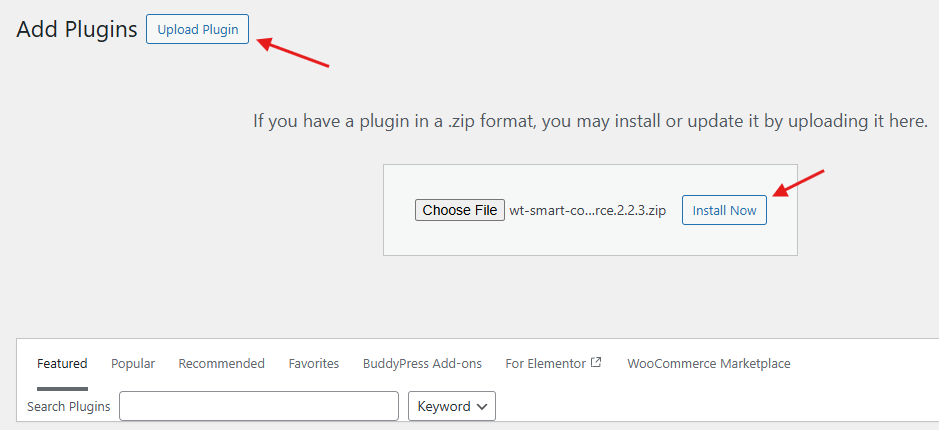
- Go to your WordPress Dashboard → Plugins → Add New → Upload Plugin.
- Click Choose File, select the downloaded ZIP file, and click Install Now.

- Once installed, click Activate Plugin to enable it.
Step 2: Access Plugin Settings
Once activated, head to WooCommerce → Smart Coupons.
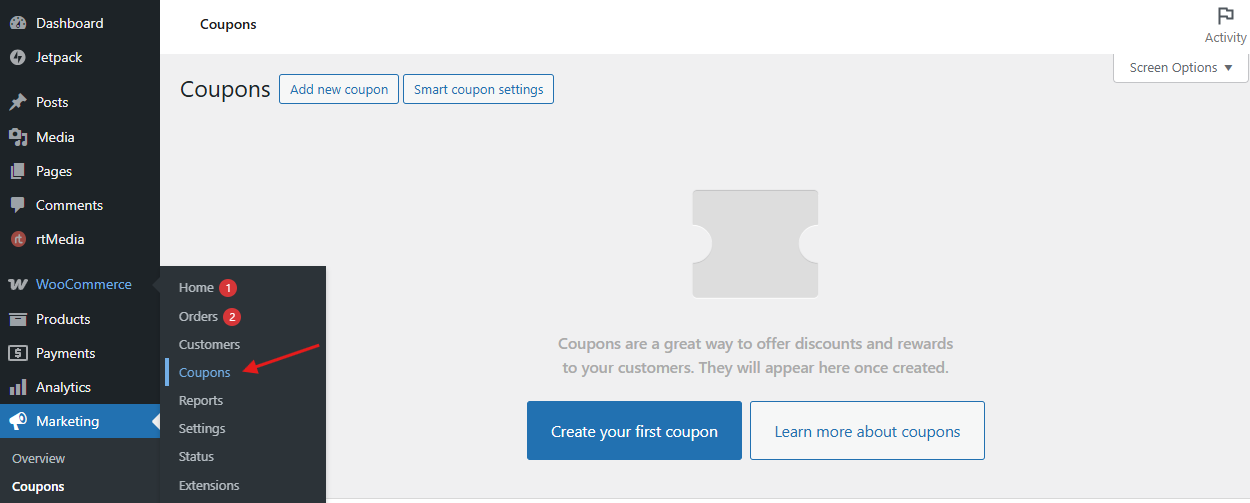 This section lets you configure key options, including general settings, display preferences, and styling features to match your store’s branding.
Step 3: Create a New Coupon
When you’re ready to design a coupon:
- Click Add New Coupon.
- Enter a coupon code and description.
- Choose the discount type-percentage, fixed cart, fixed product, or free shipping.
- Set usage restrictions, limits, and expiry dates.


Step 4: Style Your Coupon
This is where you can make your coupon stand out:
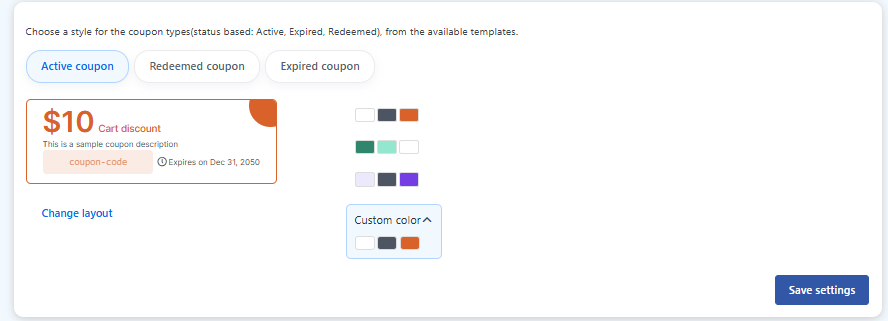
- Adjust colors, fonts, and labels.

- Use contrasting colors and short, clear messages like “10% OFF Today.”
- Decide where to display coupons on product pages, cart, or checkout.
Step 5: Test and Publish
Before rolling out the coupon:
- Preview it on both desktop and mobile.
- Place a test order to ensure the coupon applies correctly.
- Once everything looks good, save and enable the coupon for your customers.


By following these steps, you’ll be able to style and display coupons on WooCommerce with ease, making them both functional and visually appealing while boosting conversions.
Advanced Coupon Strategies
Here are some advanced strategies to maximize your coupon campaigns:
- Time-Limited Offers – Encourage urgency by adding expiration dates.
- Free Shipping Coupons – Offer shipping discounts to reduce cart abandonment.
- Tiered Discounts – Reward larger purchases with higher discounts.
- Referral Coupons – Provide coupons for customers who refer friends.
- Targeted Promotions – Use customer data to send personalized coupons.
Implementing these strategies ensures that your coupons not only look good but also drive sales effectively.
Advantages of Styling and Displaying Coupons
Offering discounts alone is not enough; the way coupons are presented can have a significant impact on customer engagement and sales. Using Smart Coupons to style and display coupons on WooCommerce offers several important advantages.
Enhanced Visibility: Well-designed coupons immediately grab customers’ attention. Instead of blending in with the standard WooCommerce layout, styled coupons stand out with clear colors, fonts, and positioning. This makes shoppers more likely to notice and use them.
Better Conversion Rates: Attractive and strategically placed coupons encourage purchases. When shoppers see an appealing discount on a product page, in the cart, or at checkout, it increases the chances that they will complete their purchase.
Customer Loyalty: Coupons that feel personalized or relevant create a sense of value. Offering timely or unique discounts can improve the shopping experience and encourage repeat visits, building long-term customer loyalty.
Reduced Cart Abandonment: Displaying coupons at key points, such as during checkout, gives shoppers an incentive to finalize their order. This reduces abandoned carts and ensures more completed transactions.
Professional Appearance: Styled coupons enhance the overall look of your store. A consistent, visually appealing coupon design strengthens your brand image, builds trust, and improves the perceived professionalism of your WooCommerce store.
Best Practices for Coupon Styling on WooCommerce
Styling and displaying coupons effectively can make a significant difference in customer engagement and sales. First, use contrasting colors to ensure your coupons stand out from the rest of your website. A bright or bold color can catch the customer’s eye and make them more likely to notice the offer.
Next, keep your messages clear and concise. Phrases like “10% OFF” or “Free Shipping” communicate the value instantly, leaving no room for confusion. Strategic placement is also key. Display coupons on high-traffic pages, such as product pages, the cart, or checkout, where customers are most likely to see them and act.
With more customers shopping on mobile devices, it’s crucial to test coupon display on smartphones and tablets. A responsive design ensures that your coupons look professional and function correctly, no matter the screen size.
Finally, use popups selectively. While pop-ups can draw attention, too many can frustrate users and interrupt the shopping experience. Balance visibility with user experience to encourage engagement without overwhelming your audience.
By following these practices, you can create coupons that not only attract attention but also drive conversions, improve customer loyalty, and maintain a polished, professional look for your WooCommerce store.

Elevate Your WooCommerce Store with Styled Coupons
Coupons are more than simple discounts-they’re a powerful way to boost conversions, engage customers, and strengthen your brand. With the Smart Coupons for WooCommerce plugin, you can style and display coupons effectively, automate their distribution, and create a seamless shopping experience.
From product pages to checkout, this plugin ensures your store presents professional, attention-grabbing coupons that encourage purchases. By implementing visually appealing and well-placed coupons, you can enhance customer engagement and drive sales.
For even greater results, get custom WooCommerce development solutions from Wbcom Designs to create personalized coupon campaigns that maximize conversions and deliver a tailored shopping experience for your customers.
Interesting Reads
How to Add Custom Product Options to WooCommerce Store
