

You can transform a blank WordPress site into a fully functional social network — complete with profiles, activity feeds, groups, and messaging — in less than 30 minutes. With the right tools, a clear setup plan, and just a few configuration steps, you can launch a community that includes user profiles, activity feeds, groups, private messaging, member directories, and much more.
Instead of being limited by social media algorithms or renting space on someone else’s platform, you can create a space that you own and control. Whether it’s for customers, students, employees, or hobbyists, a private online community gives you the power to shape interactions, boost engagement, and build long-term relationships around your brand or interest.
The best part is, you don’t need to be a coding expert to make it happen. Modern WordPress plugins like BuddyPress and community-focused themes are designed for beginners and professionals alike. With drag-and-drop customization, you can brand the network to your style, add gamification features like badges, or even monetize memberships — all from one dashboard.
Why use WordPress to build a social network?
WordPress gives you a rock-solid foundation — content, pages, SEO, and plugin support. But out of the box, it’s a publishing platform, not a community engine. That’s where the right plugin and theme step in.
When you combine WordPress with a community plugin, you get:
- Control over data (your users, posts, and content belong to you).
- Flexibility to integrate e-commerce, courses, or membership payments.
- A familiar admin interface that’s easy to manage.
- The ability to start small and scale with trusted tools.
In short: WordPress + a community plugin = the fastest, most adaptable way to build social network and community on WordPress.
The Toolkit: What You’ll Need
To set up a fully functional community site, make sure the following essentials are ready:
- A fresh WordPress installation (self-hosted is recommended)
- A community plugin (this guide uses BuddyPress)
- A community-ready theme (the Reign theme from Wbcom Designs — optional but makes styling effortless)
- Optional: a demo content importer (useful for staging and testing)
- Time: around 20–30 minutes for the initial setup
With the toolkit in place, it’s time to dive into the step-by-step process.
What is BuddyPress and Why It’s Perfect for Communities
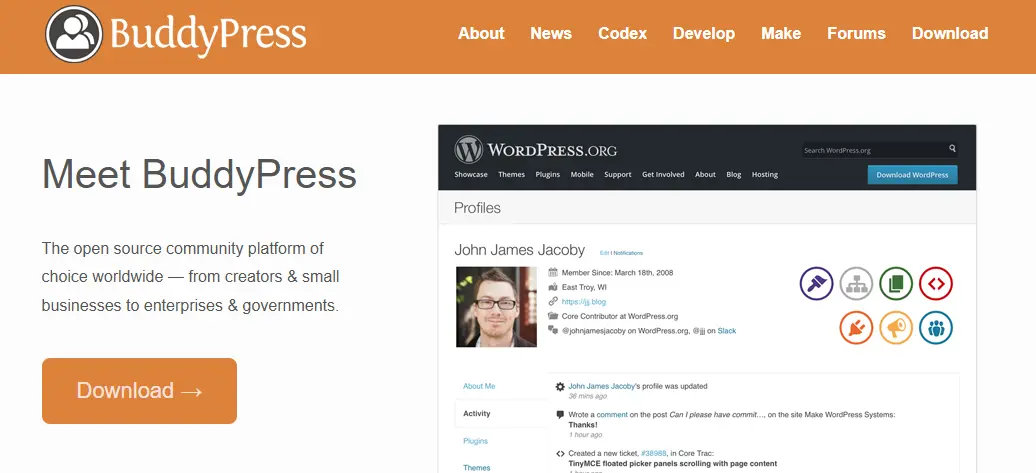
BuddyPress is a free WordPress plugin that transforms any website into a social networking platform. Instead of just publishing blog posts or static pages, it gives your site interactive, community-driven features that encourage members to connect, share, and engage.
It’s lightweight, extendable, and works seamlessly with other WordPress plugins like eLearning, eCommerce, and membership systems — making it one of the most versatile solutions for building an online community without starting from scratch.
1. User Profiles with Custom Fields
Every community starts with individual identity, and BuddyPress makes this possible through detailed member profiles. Each user can create a profile with custom fields such as bio, interests, skills, or contact details.
Administrators can design these fields to suit the community’s purpose — for example, hobbies for a fan club or professional details for a networking site. This personalization gives members a sense of ownership and makes it easier for people to connect over shared interests.
2. Activity Streams (News Feeds)
Just like Facebook or LinkedIn, BuddyPress includes dynamic activity streams where members can post updates, share thoughts, and interact with others. These feeds can be global (showing updates from across the community), personal (focusing on each member’s activity), or group-based.
Activity streams encourage ongoing participation, keep the site fresh with new content, and give members reasons to come back regularly.
Also Read: How To Create A Social Network Site Like LinkedIn On WordPress
3. Groups (Public, Private, Hidden)
Communities thrive when members can gather in smaller, interest-based spaces, and that’s exactly what BuddyPress groups provide. Public groups are open for anyone to join, private groups require invitations, and hidden groups offer a more discreet space where only invited members can see or participate.
This flexibility makes it easy to organize discussions around topics, projects, or classes — keeping engagement structured and relevant.
4. Private Messaging
Beyond public posts, BuddyPress also enables private, one-to-one communication between members. The built-in messaging system functions much like a simple email or chat platform within the community. This feature fosters stronger connections, supports collaboration, and makes the community feel more personal, since members can communicate privately without needing outside apps.
5. Friends and Connections
BuddyPress lets members form direct connections by sending and accepting friend requests. These “friendships” make it easier for people to build networks within the community, view each other’s activities, and stay updated on what their connections are doing. This system mirrors popular social platforms and adds a familiar, engaging way to strengthen bonds inside the community.
6. Real-Time Notifications
To keep members engaged and informed, BuddyPress includes a real-time notification system. Members receive alerts whenever someone comments on their activity, sends a message, accepts a friend request, or invites them to a group. These notifications ensure no interaction goes unnoticed, keeping members active and involved in the conversations that matter to them.
Types of Communities You Can Create (and Which One Fits You)
BuddyPress is highly flexible, which means it can power many different types of online communities. Whether you’re running a school, a business, or a niche hobby site, BuddyPress can be configured to support your unique goals. Here are the most popular types of communities you can build:
1. Educational Communities

Online learning becomes far more engaging when students have a space to connect. With BuddyPress, you can create course forums, study groups, and peer-to-peer support channels. Students can build detailed profiles, join class-specific groups, and share resources with each other.
When integrated with learning management systems like LearnDash or LifterLMS, BuddyPress adds a social layer to the coursework, making education collaborative instead of isolated. This type of setup is perfect for schools, coaching centers, or online academies that want to encourage interaction beyond the lessons.
2. Professional / Networking Communities
For professionals, networking is everything — and BuddyPress makes it easy to create an online hub where members can showcase skills, join industry groups, and explore opportunities. Member profiles can highlight qualifications and experience, while groups can focus on specific industries, roles, or career goals.
Features like job posting boards and mentorship programs can also be layered in, turning the site into a professional resource center. Think of it as a LinkedIn-style network but customized for your niche or organization.
3. Customer Communities
Customer loyalty grows stronger when people feel heard, supported, and part of a brand’s journey. A customer community powered by BuddyPress can include product support forums, spaces for feature requests, and even dedicated areas for user-generated content.
Members can share experiences, offer solutions to peers, and help shape the brand with direct feedback. This not only improves customer satisfaction but also builds a sense of advocacy, turning regular buyers into brand ambassadors.
4. Niche Hobby Groups
Hobbies and passions thrive in group settings, and BuddyPress is a natural fit for building tight-knit communities around them. Whether it’s a photography club, a cooking forum, a gaming guild, or a local hiking meetup, BuddyPress provides the tools for enthusiasts to gather, share tips, and celebrate their interests.
The ability to create groups, share media, and engage in discussions keeps the community lively and highly interactive — exactly what hobbyists crave.
5. E-Commerce Social Marketplaces
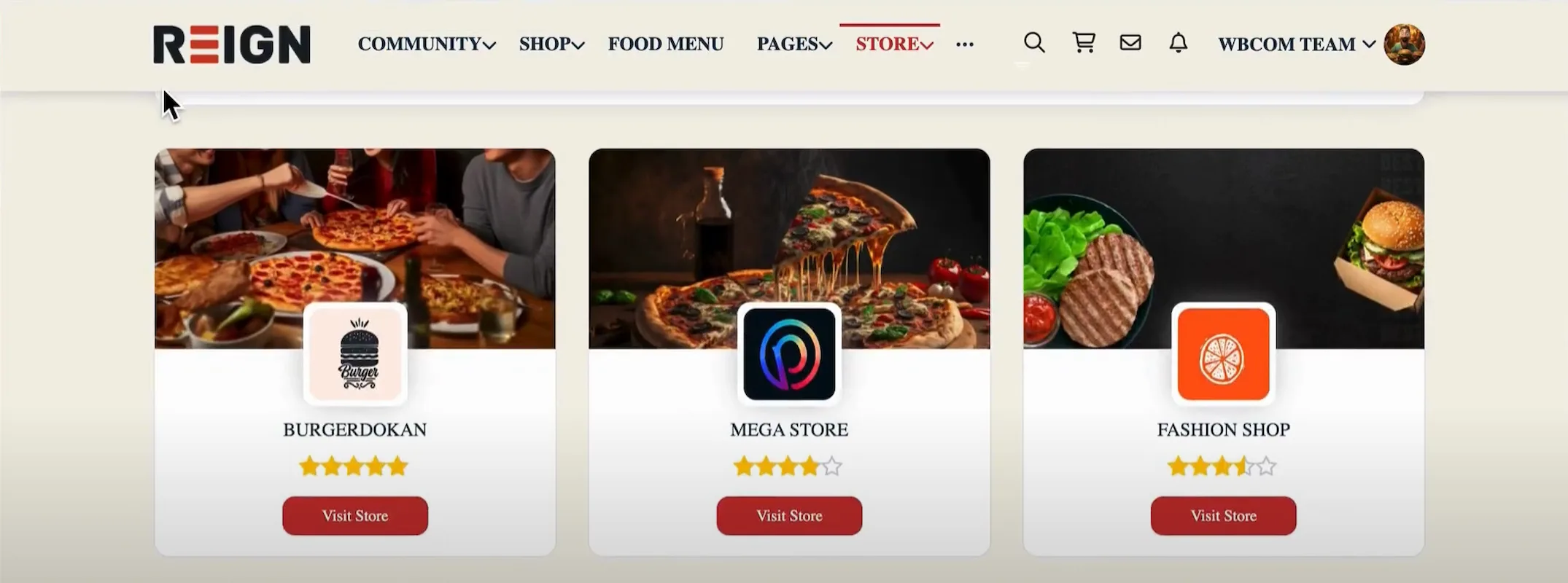
When selling products online, trust and engagement are essential. BuddyPress can be paired with e-commerce plugins like WooCommerce to create social-driven marketplaces. Buyers and sellers can have their own profiles, vendor-specific groups, and spaces for community reviews.
The social layer builds confidence in the platform, creates stronger customer-vendor relationships, and generates the kind of social proof that drives more sales. It’s like combining the functionality of a marketplace with the interactivity of a social network.
Membership / Premium Content Sites
For content creators and educators who monetize their work, BuddyPress can be the backbone of a membership site. You can create gated groups, premium forums, and exclusive content areas accessible only to paying members.
This setup not only creates a sense of exclusivity but also increases perceived value, since members gain access to both content and community. Whether it’s for business coaching, exclusive training, or premium networking, this model is a powerful way to blend content and community engagement.
Real-World Examples of BuddyPress in Action
The real power of BuddyPress shows when you see it in action. Different organizations — from tutoring platforms to coaching programs to professional associations — have used it to build thriving communities. Here are three standout examples that highlight just how flexible it can be.
Case Study 1: LatinHire – Global Tutoring Platform

LatinHire connects English tutors with students across Latin America, but it doesn’t stop there. With BuddyPress, the platform has grown into a professional hub where hundreds of certified tutors from around the world share experiences, swap teaching tips, and support one another.
Tutor profiles, testimonials, and discussion spaces create a true sense of community — not just a directory of service providers. It’s a strong example of how BuddyPress can bring a global education network to life.
Case Study 2: Team RJ – Coaching for Young People
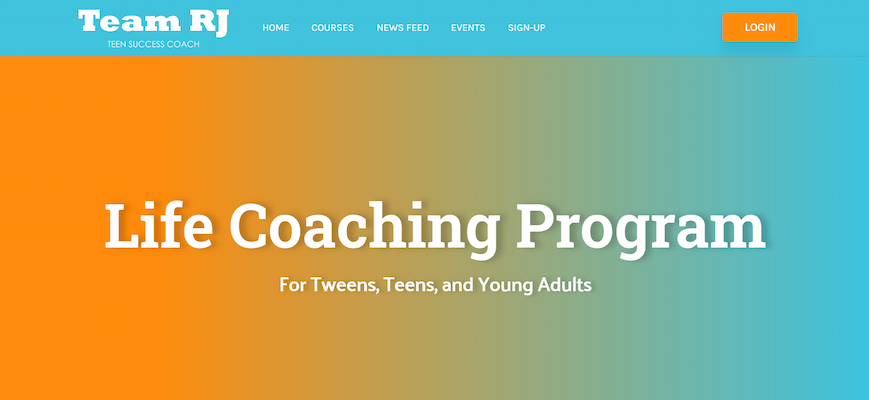
Team RJ, created by Dr. RJ Jackson, takes youth coaching to the next level by blending personal development with interactive learning. Using BuddyPress, the program combines online courses, group discussions, live coaching sessions, and member connections in one space.
Young people aren’t just learning from Dr. RJ — they’re building friendships, finding mentors, and supporting each other along the way. It’s proof that BuddyPress isn’t just about building networks; it’s about creating environments where growth and relationships go hand in hand.
Case Study 3: AIHM Members – Professional Healthcare Association
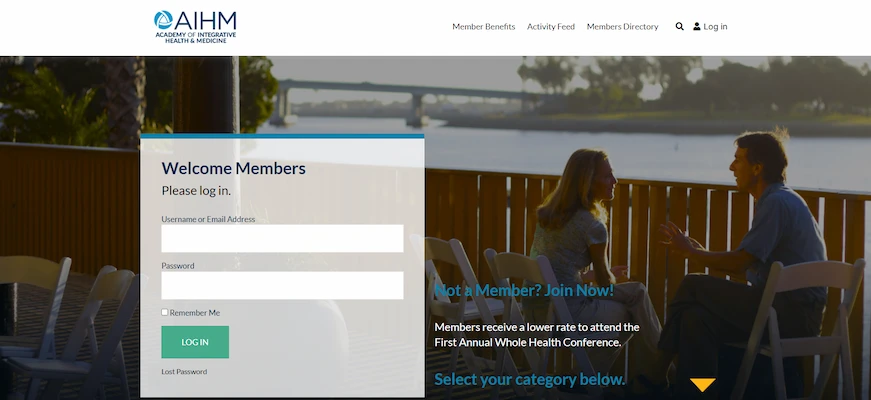
The American Institute of Health Management (AIHM) uses BuddyPress to power its exclusive membership portal for healthcare professionals. Members gain access to resources, reduced rates for major conferences, and networking opportunities with peers across the industry.
Features like a member directory, event tools, and restricted content keep the experience valuable and professional. This is BuddyPress at its best — turning a website into a premium space where professionals can learn, connect, and advance their careers.
What These Communities Teach Us
Three very different industries — global tutoring, youth coaching, and healthcare leadership — but all thriving on the same foundation. These examples show that whether you’re building an educational platform, a coaching community, or a professional membership site, BuddyPress has the flexibility to make it happen. If your goal is to create a space where people connect, learn, and grow, this toolkit gives you the structure to bring that vision to life.
Step-by-step: Install BuddyPress and get your community live
Below is a practical walkthrough to launch the essential community features.
Step 1 — Install the BuddyPress plugin

- From your WordPress dashboard, go to Plugins → Add New.
- Search for BuddyPress. (It’s free and widely used.)
- Click Install Now, then Activate.
- If you prefer a manual install (e.g., custom build), use the Upload Plugin option and upload the ZIP file.
Step 2 — Complete the BuddyPress Setup Wizard

After activating BuddyPress, you’ll be taken to the setup wizard where you can decide which components to enable. These options are essentially the building blocks of your social network, and the choices you make here will shape how members interact with one another.
1. Extended Profiles
This feature lets you design custom profile fields so members can share more than just a username. Want to highlight locations, skills, or interests? Extended Profiles make that possible, giving your community a more personal and engaging touch.
2. Activity Streams
The activity stream is where everything comes together — posts, comments, and updates are displayed in one central feed. It’s the heartbeat of your network and keeps members actively involved. Without this, you won’t really have a social community.
3. User Groups
Groups allow members to gather around specific topics, projects, or interests. Whether public, private, or hidden, they create smaller spaces where conversations feel more focused and meaningful.
4. Private Messaging
Sometimes members need to connect directly. Private messaging enables one-on-one conversations without leaving the platform, making it easy to build stronger relationships and collaborate in a more personal way.
5. Friend Connections
This component adds the social element by allowing members to connect. Friend connections make it simple to keep track of what’s happening in your circle and encourage ongoing interaction.
6. Notifications
Notifications keep members engaged by letting them know when something important happens — a new message, a friend request, or a group activity. These timely updates help bring people back to the community.
Recommendation: For most communities, enabling all of these components is the best starting point. You can always switch off the ones you don’t need later, but having them all activated gives members a complete social experience from the beginning.
Step 3 — Enable User Registration

For your BuddyPress community to grow, new members need a way to sign up. By default, WordPress requires you to explicitly allow user registration. Without this step, the BuddyPress Register and Activate pages will not function.
To enable registration:
- Go to Settings → General in your WordPress dashboard.
- Scroll down to the Membership option.
- Check the box labeled “Anyone can register.”
Once enabled, WordPress will accept new user signups, and BuddyPress will manage them through its own registration and activation system. This small but essential setting ensures that visitors can create accounts and fully participate in your community.
Quick Configuration Tips: Settings That Matter
Before diving into design, it’s important to fine-tune the BuddyPress settings. These adjustments ensure your community is both functional and engaging — key steps if your goal is to build a social network and community on WordPress that members love to use.
Head to Settings → BuddyPress in your WordPress dashboard, and review the following options:
1. Community Visibility
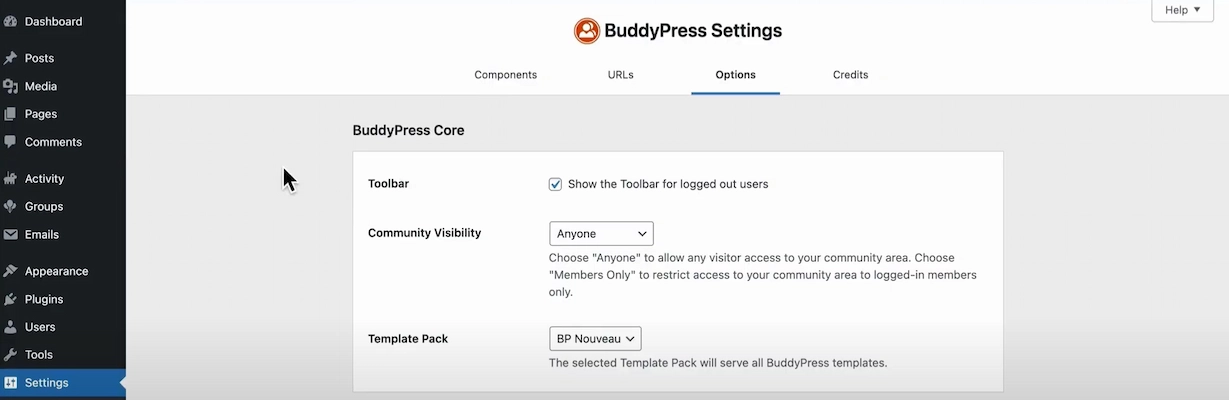
Set this to “Anyone.” Allowing visitors to preview activity creates curiosity and encourages them to sign up. If you’re aiming for a private community, you can always switch to “Members Only” later.
2. Template Pack
Keep this set to BP Nouveau. This is BuddyPress’s modern, responsive design framework that works seamlessly with most themes, including the Reign theme.
3. Profile Photo & Cover Images
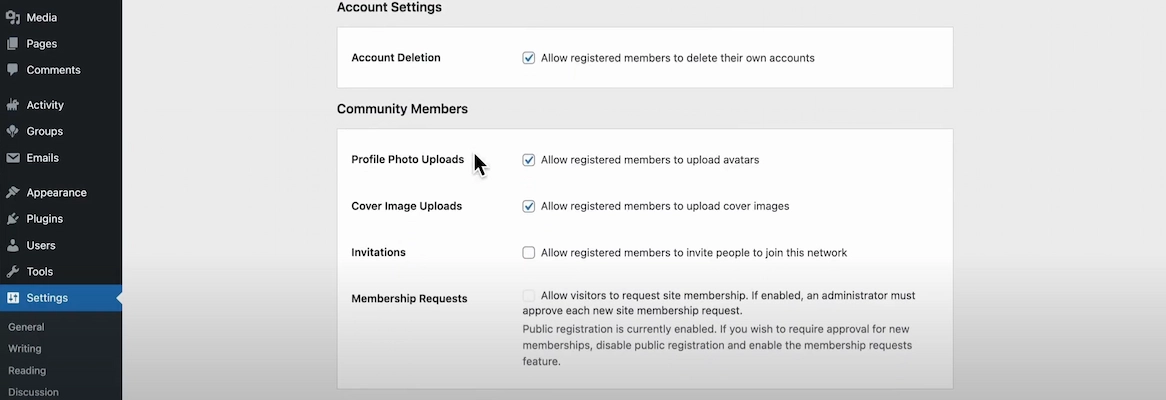
Enable uploads for both profile pictures and cover images. Visual identity plays a major role in user engagement — communities feel more personal and authentic when members can represent themselves.
4. Group Creation
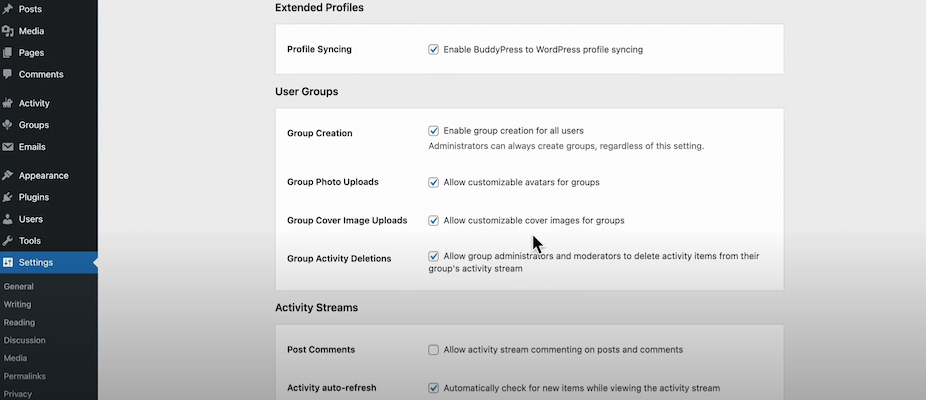
Allow members to create groups. This feature supports organic growth, as users form spaces around shared interests, projects, or activities. Enabling group photo and cover uploads adds even more personality to each group.
5. Activity Auto Refresh
Turn this option on to give your activity feed a “live” feeling. Members will see new posts and comments appear in real time, which keeps the community dynamic and interactive.
6. Account Options
Enable the option for members to delete their own accounts. This simple setting builds trust, aligns with privacy best practices, and demonstrates transparency.
Small UX Details that Make a Big Impact
Features like cover images, profile photos, group customization, and activity auto-refresh might seem minor, but they significantly enhance user experience. These details keep members engaged and returning, which is essential for any thriving online community.
Step 4 — Make It Beautiful: Choose the Right Theme and Demo Import
Reign Theme Installation
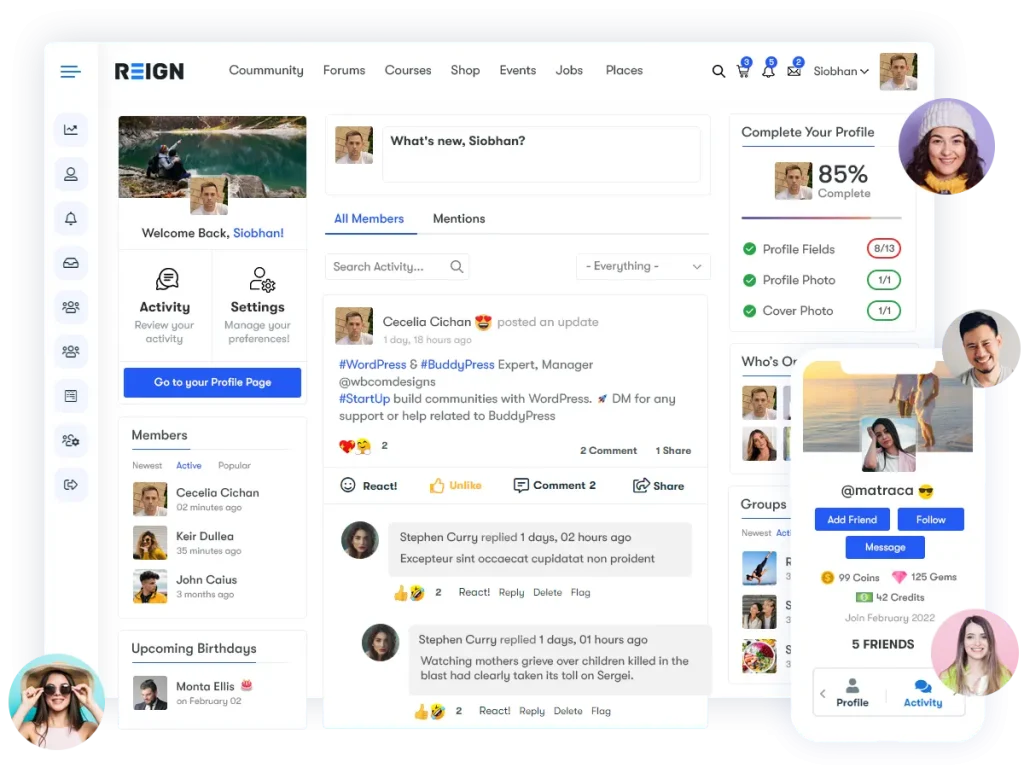
- Purchase and download the Reign theme from Wbcom Designs. After purchase, you’ll receive the theme files in a ZIP format.
- Upload via WordPress Admin. Go to Appearance → Themes → Add New → Upload Theme, and upload the ZIP file directly (do not unzip).
- Install and Activate. Click Install Now and then Activate. The transformation is immediate — your WordPress site now has a professional, modern layout tailored for community building.
Demo Import Process
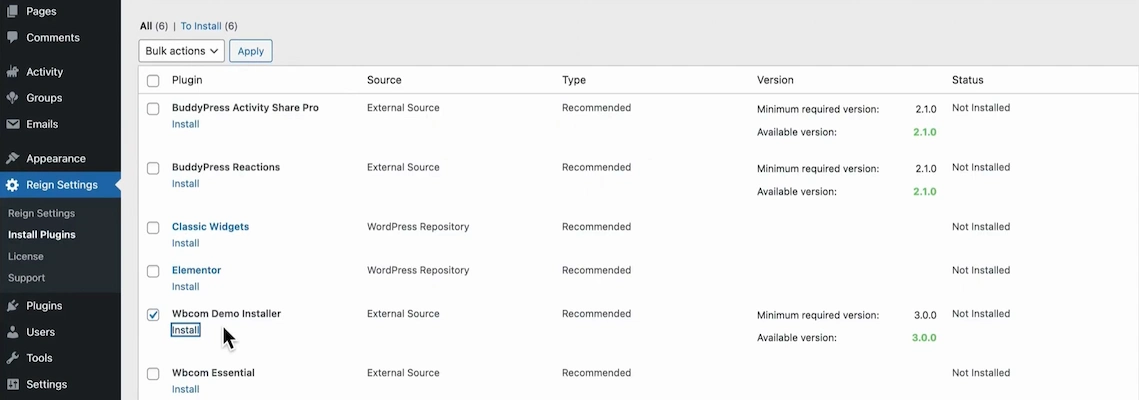
To speed up setup, Reign includes a demo importer. This tool allows you to load a fully functional sample community with pre-designed pages, groups, profiles, and activity feeds.
- Install the Demo Importer Plugin. Reign may recommend a companion demo importer plugin — install and activate it.
- Choose Your Demo. Options include:
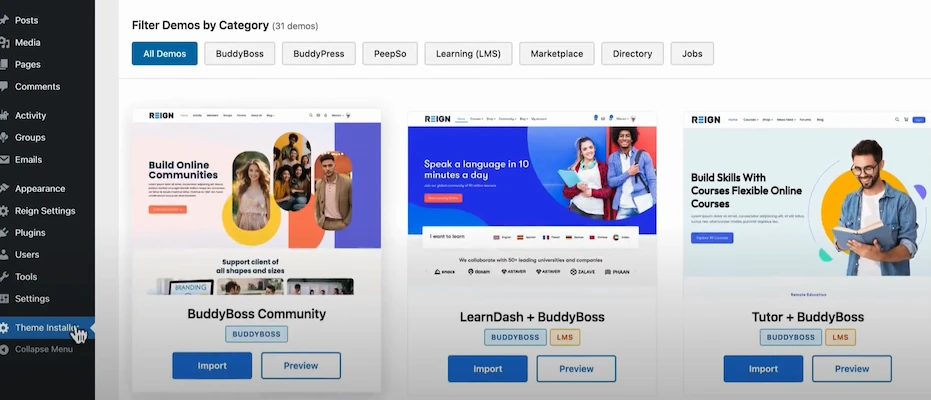
- Community Demo – Ideal for general social networks. This setup showcases the full range of BuddyPress features, from profiles and groups to activity feeds and messaging. It’s the best starting point if your goal is to build social network and community on WordPress for broad engagement.
- Learning Demo – Perfect for educational platforms. It integrates smoothly with LMS plugins like LearnDash or LifterLMS, creating a social learning environment. Students can join course groups, share resources, and collaborate beyond the classroom.
- Business Demo – Great for professional networking communities. Designed for associations, alumni networks, or industry-specific hubs, it supports member directories, job postings, and event pages. It helps professionals connect, exchange ideas, and grow their networks.
- Marketplace Demo – Tailored for e-commerce and social marketplaces. Vendors and customers each get profiles, while groups and activity feeds support product discussions and reviews. This adds a community-driven layer to traditional e-commerce, encouraging trust and repeat sales.
Import the Demo. Select your demo, install required plugins, and run the importer. The process will create sample pages, activity posts, groups, and member profiles. Within minutes, your blank WordPress site looks like a functioning community.
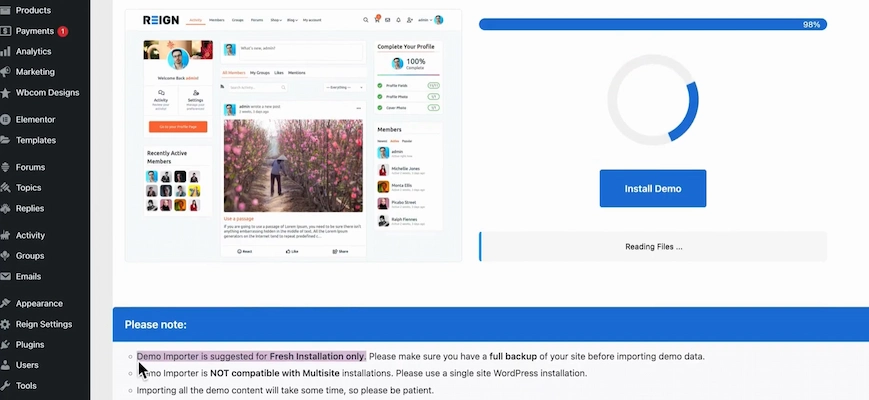
Important Tip: Demo import is recommended for fresh WordPress installations or staging sites. If you are working on a live site, avoid importing demo content directly into production to prevent overwriting existing data.
With the theme installed and demo content imported, you now have a visually appealing, fully structured foundation. The next step is to fine-tune the design and branding so the community reflects your unique identity.
Build for Engagement: Design Decisions That Matter
Creating a thriving community requires more than just enabling features. The overall design, onboarding flow, and user experience are what determine whether members participate actively or abandon the platform. Here are several proven design and content strategies to boost engagement when you build social network and community on WordPress:
1. Highlight Featured Members
Showcasing members on the main activity page adds authenticity and encourages others to get involved. When people see real profiles featured prominently, it signals an active, welcoming community where contributions are noticed and valued.
2. Create Starter Groups
Instead of leaving members to figure things out on their own, provide starter groups such as Introductions, Local Chapters, or a Help Center. These groups give new users an easy entry point, lower the barrier to participation, and spark initial conversations that set the tone for future engagement.
3. Use Clear Profile Fields
Custom profile fields like location, skills, and interests make it easy for members to find others with shared backgrounds or goals. This discovery process drives connections and builds a stronger sense of belonging, which is critical for long-term retention.
4. Promote Onboarding
An intentional onboarding process helps members feel guided rather than lost. A welcome message, step-by-step tutorial posts, or even a dedicated “Getting Started” group can help new users understand how to navigate the platform and quickly feel comfortable contributing.
5. Enable Notifications
Real-time notifications keep members aware of new activity — whether it’s a reply to their comment, a friend request, or a group invitation. These alerts act as gentle reminders that pull members back into the community, reinforcing daily engagement.
6. Add Moderation Controls and Guidelines
Healthy communities don’t happen by accident. Establish clear community guidelines and equip moderators with tools to enforce them. This helps prevent spam, manage conflict, and create a safe, respectful environment where members feel comfortable participating.
Integrations: Make Your Community Do More
One of WordPress’s greatest strengths is its vast ecosystem of plugins. Once BuddyPress is installed, you can extend your community beyond social networking and transform it into a full-featured platform. The following integrations demonstrate how you can scale from a simple social layer into something far more powerful:
1. LearnDash / LifterLMS
Pairing BuddyPress with a learning management system like LearnDash or LifterLMS turns your community into a social learning hub. Courses become interactive spaces where students can join groups, discuss lessons, and collaborate with peers. This creates a richer, more engaging eLearning experience than traditional one-way teaching.
2. WooCommerce / Dokan
For communities with a commercial element, WooCommerce and multi-vendor add-ons like Dokan bring marketplace functionality directly into your network. Sellers can manage their own profiles and shops, while buyers engage through reviews and discussions. This integration fosters trust, adds a social layer to transactions, and creates repeat business opportunities.
3. Membership Plugins
By connecting BuddyPress with membership solutions such as Paid Memberships Pro, Restrict Content Pro, or MemberPress, you can monetize your community. These plugins allow you to create gated content, premium groups, or tiered membership levels. The result is a sustainable revenue model while offering exclusive value to paying members.
4. Forum Plugins (bbPress)
Although BuddyPress supports groups and activity feeds, bbPress adds structured forums with threaded replies and topic-based discussions. This makes it easier to organize long-form conversations, FAQs, and knowledge bases. Combining BuddyPress with bbPress gives members both real-time interaction and structured community archives.
5. SEO and Caching Tools
Community-driven sites can grow quickly, so performance and discoverability matter. Pairing BuddyPress with SEO plugins (like Rank Math or Yoast SEO) ensures your community content ranks well in search engines. Meanwhile, caching tools such as WP Rocket or W3 Total Cache optimize speed, keeping the user experience smooth even as membership scales.
Together, these integrations transform BuddyPress from a standalone community plugin into the foundation of a complete digital platform. Whether you’re building courses, marketplaces, or professional hubs, WordPress makes it possible to build social network and community on WordPress that scales with your vision.
Monetization Strategies That Work for Communities
Building a community is rewarding, but it can also be a source of sustainable revenue when done thoughtfully. Here are several proven monetization strategies:
1. Paid Memberships with Tiers
Offer multiple membership levels, such as free, basic, and premium. Each tier provides different benefits, from general access to exclusive groups, resources, or networking opportunities. Tiered memberships give users flexibility while ensuring recurring revenue for the community owner.
2. Premium Groups or Courses Behind a Paywall
Some spaces should feel exclusive. Lock premium groups or online courses behind a paywall so only paying members can access them. This works especially well for professional training, coaching, or niche knowledge communities where specialized content is the primary value.
3. Vendor Booths or Listing Fees in a Marketplace Community
If your community includes e-commerce or networking elements, monetize by charging vendors for booth spaces, directory listings, or promotional opportunities. This is common in niche marketplaces where businesses want visibility within a trusted community.
4. Sponsored Community Content
Brands are often eager to reach engaged, niche audiences. Allow carefully selected sponsored posts, branded groups, or featured content within the community. Done authentically, this adds value for members while providing a steady income.
5. Events and Paid Workshops
Host online or offline events, webinars, or workshops directly within your community. Members can purchase tickets or gain access through premium memberships. This approach generates revenue while strengthening member connections through shared experiences.
6. Focus on Value Exchange
Successful monetization relies on delivering genuine value. Members are willing to pay for access to expertise, career opportunities, or exclusive resources. By aligning monetization with community needs, you create a sustainable model without sacrificing trust.
Moderation, Security, and Privacy Basics
A healthy community requires more than features and revenue models — it needs trust. Members will only engage if they feel safe, respected, and in control of their privacy. Here are the essential measures every community should implement:
1. Clear Community Guidelines and Reporting Tools
Establish rules for respectful behavior and make them visible to all members. Provide simple reporting tools so users can flag inappropriate content or behavior. Clear policies set expectations, while reporting features show members their concerns will be taken seriously.
2. Moderators and Group Admins
Assign moderators or empower group admins to oversee conversations. This ensures disputes are managed quickly, spam is removed, and the overall tone remains welcoming. Active moderation is key to maintaining a positive culture.
3. Spam Protection
Spam undermines trust and discourages participation. Use CAPTCHA during signups, moderation queues for new posts, and automated spam filters. These tools protect members from unwanted content while keeping the experience smooth.
4. Regular Backups and Secure Hosting
Technical stability is just as important as community culture. Perform regular site backups and choose a reliable hosting provider with strong security measures. This minimizes downtime and protects valuable community data.
5. Privacy Settings for Members
Allow members to control how much of their profile is visible. Options such as private profiles, restricted friend requests, or selective visibility of activity streams empower users to engage comfortably on their terms.
6. Prioritize Safety Early
Building trust should not be an afterthought. Communities that prioritize safety, privacy, and respect from the start are more likely to retain members for the long term. A safe space becomes a thriving space.
Common pitfalls and how to avoid them
- Launching with zero content — seed groups, profiles, and starter posts, so the first visitors aren’t met with emptiness.
- Overloading features at launch — start with core features first (profiles, activity, groups), add extras as engagement grows.
- Ignoring mobile — many users come from phones; pick a responsive theme and test on devices.
- Neglecting moderation — set up moderators and clear rules before problems bloom.
- Bad onboarding — a confusing signup process kills conversion; keep registration simple and welcoming.
Planning and a little content go a long way.

Launch fast, iterate, and scale
Building a social network doesn’t need to be complicated. With WordPress and BuddyPress, you can build a social network and community on WordPress quickly, iterate based on member feedback, and add commerce or learning features when you’re ready.
If you want to skip the configuration work, themes like Rain from Wbcom Designs and demo importers make the process fast and professional. And if you prefer hands-on help, Wbcom Designs offers theme integrations and setup services tailored for BuddyPress communities.
Ready to get started? Choose your hosting, install WordPress, and follow the steps above — in around 20–30 minutes, you’ll have a working community foundation. From there, grow, refine, and make it yours.
Interesting reads:
