

If you’ve ever built or managed a digital product, whether it’s a WordPress plugin, a SaaS platform, an eCommerce store, or a membership community, you already know how chaotic things can get without a clear plan. Ideas pile up. Feature requests keep coming in. Deadlines shift. Users expect updates. The team wants clarity.
That’s where a Product Management Roadmap steps in. Think of it as the friendly GPS that guides your product’s journey. It shows where you are, where you’re going, and how you’ll get there.
Today, with WordPress powering over 40 per cent of the internet, having a clear product strategy isn’t optional; it’s essential. Whether you’re running a simple website or a full-scale digital platform, a roadmap gives direction, structure, and momentum.

What Exactly Is a Product Management Roadmap
A Product Management Roadmap is a simple visual plan that outlines what you’re building, why you’re building it, and when you expect to deliver it.
But here’s the fun part:
- It’s not a stiff corporate document.
- It’s the GPS for your product vision.
It helps your team answer:
- What features matter most right now
- What can wait
- What are customers asking for
- What’s launching next month
- What’s still being discussed
Without a roadmap, your product strategy looks like a drawer full of sticky notes, chaotic, confusing, and impossible to track.
With a roadmap, everything suddenly becomes clear:
- Teams communicate better
- Users know what’s coming
- Development becomes more efficient
- You reduce wasted time and resources
In short: It’s the single most important tool for aligning goals, progress, and expectations.
The Core Elements of an Effective Product Management Roadmap
A roadmap doesn’t have to be complicated. It just needs the right ingredients.
1. Vision and Goals
This is your big picture.
- What do you want your product to become
- Who is it for
- What problems will it solve in the long run
Your vision guides every future decision, big or small.
2. Feature Ideas and Feedback
The best feature ideas rarely come from internal teams alone.
Users offer:
- Questions
- Pain points
- Suggestions
- Creative ideas you may never have considered
A great roadmap collects and organises them all.
3. Prioritisation
Not every idea gets built immediately, and that’s okay.
Learn to differentiate:
- Urgent, must be done now
- Important, essential, but not immediate
- Nice to have, valuable but low impact
Good prioritisation reduces development waste and improves release quality.
4. Timelines and Release Cycles
Timelines don’t mean fixed deadlines.
They simply communicate direction:
- What’s coming soon
- What’s planned later
- What’s still under review
Being transparent with timelines helps manage user expectations.
5. Status Tracking
Every feature goes through stages:
- Planned
- In progress
- Completed
This helps teams stay aligned and keeps the roadmap clean and predictable.
6. Communication and Engagement
Roadmaps shouldn’t be locked in a private folder.
A public-friendly roadmap:
- Builds trust
- Reduces support questions
- Shows users you’re listening
- Encourages participation
Great products grow through community, not secrecy.
How Product Roadmaps Improve WordPress Website Growth
1. WordPress Websites Evolve Constantly
Themes change. Plugins update. New features are added. User expectations shift.
Without a roadmap, updates feel random. With one, they become strategic.
2. Why WordPress Roadmaps Are Essential for Modern Websites
A roadmap provides:
- Structure
- Direction
- Alignment
Agencies, developers, and teams stay in sync. You reduce risks, prevent errors, and maintain smoother workflows.
3. WordPress Roadmaps Support Long-Term Vision
Perfect for:
- LMS platforms
- Membership communities
- SaaS dashboards
- Information-heavy websites
A roadmap helps you schedule:
- Version updates
- Security improvements
- UX or UI enhancements
- New features
Your website becomes future-ready instead of reaction-driven.
Common Use Cases of WordPress Roadmaps
1. SaaS Product Development
A roadmap helps track:
- Major features
- User requested updates
- Bug fixes
- Performance improvements
2. Agency Project Timelines
Perfect for aligning:
- Clients
- Designers
- Developers
- Project managers
It reduces back and forth and sets clear delivery expectations.
3. WordPress Plugin or Theme Development
Track:
- Version releases
- New features
- Compatibility updates
- Core changes
4. Business Goal Tracking
Even non-technical teams benefit.
Track:
- Quarterly goals
- Annual projects
- Team responsibilities
Stakeholders stay informed without constant meetings.
If you’re building or preparing to launch your own plugin, this step-by-step guide to launching your plugin will help you understand the essential stages before your roadmap goes live.
How to Build a Product Management Roadmap for Your WordPress Site
Step 1: Understand Your Audience and Their Needs
Use:
- Surveys
- Feedback forms
- Support queries
- Behaviour analytics
Your users’ problems should guide your priorities.
Step 2: Collect and Organise Feature Ideas
Gather input from:
- Team brainstorming
- Customer feedback
- Sales conversations
- Support tickets
Sort them into categories for clarity.
Step 3: Prioritise Features Using a Clear Framework
Use popular methods like:
- RICE Reach, Impact, Confidence, Effort
- MoSCoW Must, Should, Could, Won’t
- Value Effort Matrix
This ensures fairness, logic, and transparency.
Step 4: Assign Status and Timelines
Decide what’s:
- Planned
- Under review
- In progress
- Completed
Communicate estimates clearly.
Step 5: Make Your Roadmap Public Whenever Possible
Benefits:
- More transparency
- Trusted relationships
- Fewer “When will this launch” emails
A public roadmap increases credibility instantly.
Step 6: Update Your Roadmap Regularly
A roadmap is a living document. Review and update weekly or monthly, depending on team speed.
Why WordPress Sites Need Interactive Roadmaps
1. Static Roadmaps Are Outdated
PDFs, images, and spreadsheets become outdated in a week. Interactive roadmaps update instantly.
2. Users Expect Real-Time Updates
Modern users want to know:
- What you’re building
- What’s delayed
- What’s launching next
Real-time progress builds excitement.
3. Feature Voting Improves Prioritisation
Let users vote. Build what they want most. This reduces the guesswork dramatically.
4. Engagement Boosts Product Loyalty
When users feel heard, they stick around longer.
5. Transparency Builds Trust
A transparent roadmap equals a trustworthy brand.
Now that we understand why interactive roadmaps matter, the next question is: how do you actually implement one on WordPress? That’s where dedicated roadmap tools come into play.
The Easiest Way to Add an Interactive Roadmap to WordPress
You could create a custom roadmap system entirely from scratch. But honestly, why spend weeks engineering something that already exists, works seamlessly, and integrates beautifully with WordPress
This is where dedicated tools come in. WordPress now offers powerful plugins that let you launch interactive roadmaps in minutes instead of months.
Transform your entire development workflow with Product Roadmap, the most capable and intuitive roadmap plugin built specifically for WordPress. It helps you share your product vision, collect user votes, track progress, and build the features your community truly cares about. Instead of guessing what to create next, you get a clear, user-driven direction, right inside your dashboard.
Free Version, What You Get
If you’re just getting started with building a public roadmap or want a simple way to collect feedback from your users, the Free Version gives you everything you need to launch quickly. It includes essential tools like voting, suggestions, organised categories, progress tracking, and a clean public roadmap layout, making it perfect for small teams, freelancers, or creators who want clarity without complexity.
1. Setup Wizard
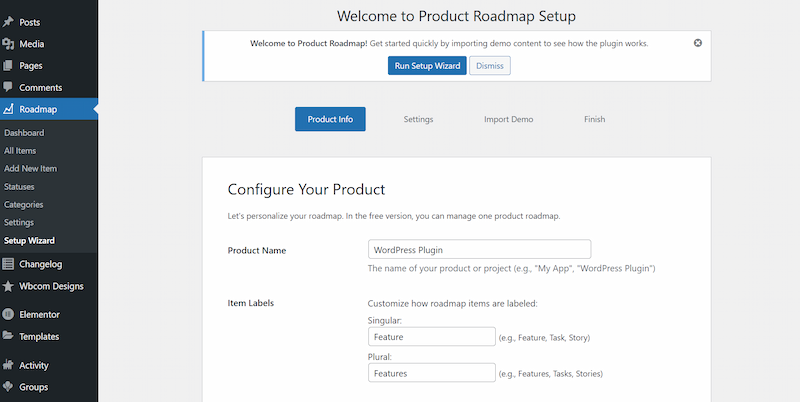
Launch your roadmap with a simple step-by-step setup process. Even beginners can configure everything in minutes. No technical skills or complex settings required.
2. User Voting
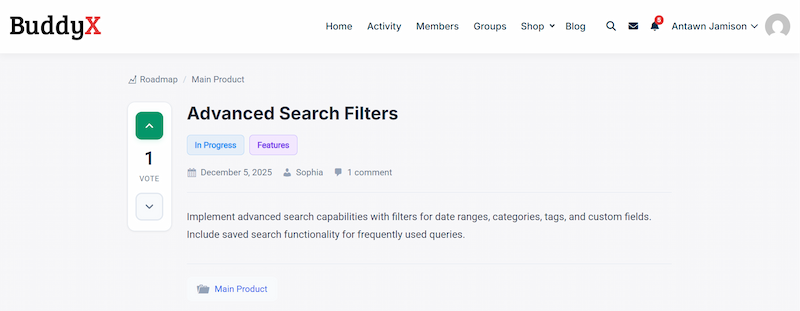
Allow users to vote on the features they care about most. Their input helps you prioritise smarter and align development with real demand. It’s a simple way to let your community guide the direction of your product.
3. Demo Content
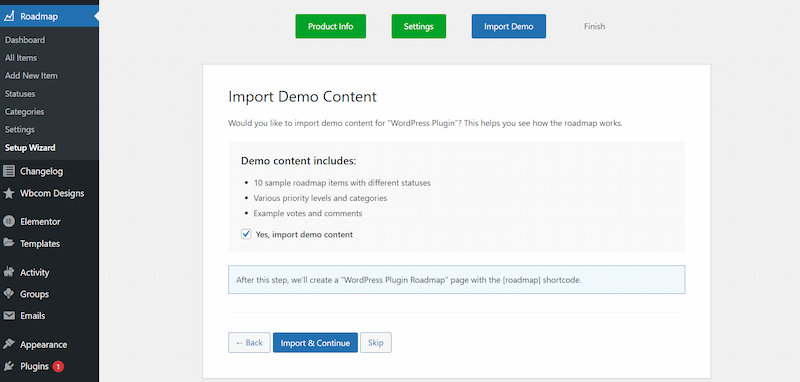
Instantly load sample roadmap items to understand how everything works. Demo content helps you experiment, customise, and go live faster. It’s the perfect starting point for beginners.
4. Organised Categories
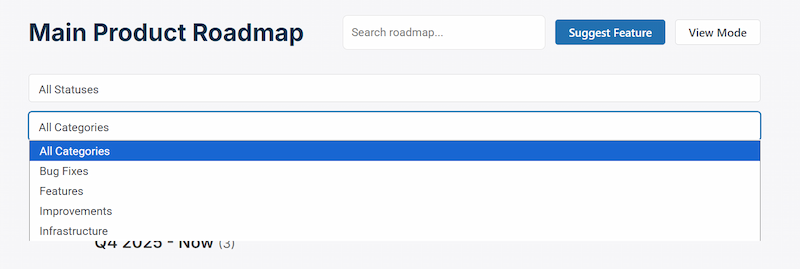
Group similar ideas and features into neat categories for easier browsing. Whether you’re managing dozens or hundreds of items, organisation keeps everything accessible. Users can quickly find what matters most to them.
5. User Suggestions
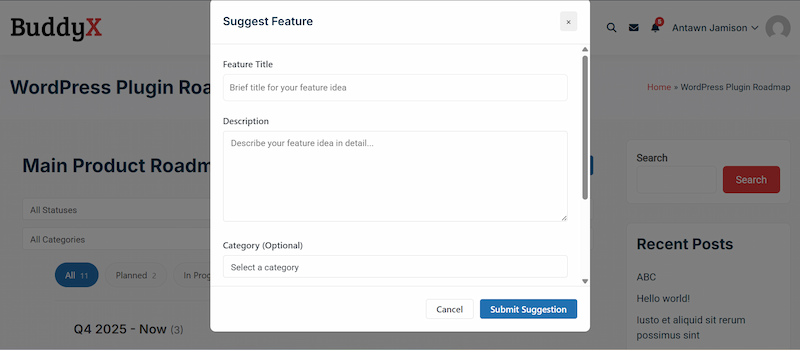
Collect feature ideas directly from your audience inside WordPress. Their feedback becomes a valuable source of inspiration and guidance. It also strengthens the feeling that users are part of the product’s evolution.
6. Comment System
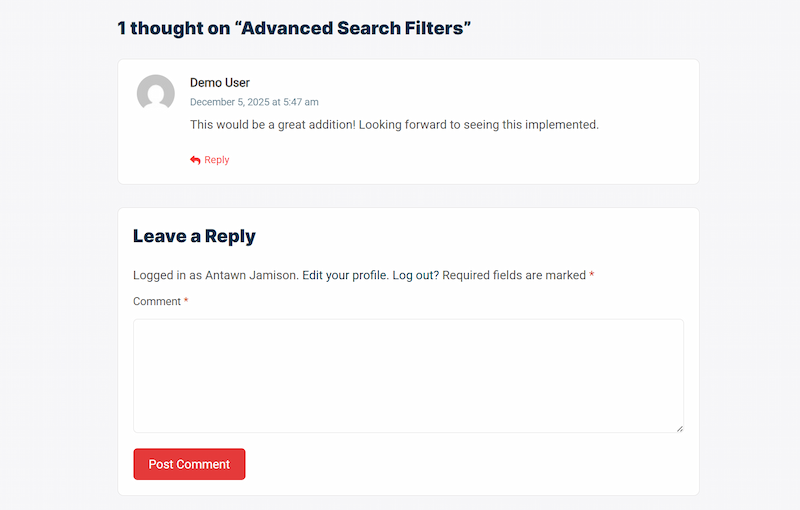
Enable discussions on individual roadmap items to gather insights and clarify expectations. Comments enable users to share their opinions, ask questions, and contribute to informed decision-making. It creates a community-driven development space.
7. Public Roadmap Display

Show your upcoming plans in a clean, visual format that’s easy for users to explore. A public roadmap builds trust by keeping your audience informed about what’s coming next. It turns your development process into an open, collaborative journey.
8. Progress Tracking
Track every feature as it moves from idea to planning, development, and completion. This clear workflow helps users understand what’s actively being worked on. It also keeps teams aligned and reduces repetitive status questions.
9. Custom Labels
Add personalised labels, such as ‘feature’, ‘task’, or ‘enhancement’, to organise your roadmap. Labels make it easier to understand the purpose of each item at a glance. They also help teams prioritise more efficiently.
10. Product Branding
Name and brand your roadmap to match your product identity. This creates a more professional, cohesive experience for users. A customised roadmap feels polished and trustworthy.
11. Quick Shortcode Setup

Insert your roadmap anywhere on your site using a simple shortcode. Whether on a page, post, or dashboard, it integrates instantly. No coding or advanced configuration needed.
12. Mobile-Friendly Design
Your roadmap looks great on all devices, from desktops to phones. The responsive layout makes browsing smooth and intuitive. Users can check updates anytime, anywhere.
Pro Version, Scale Your Feedback With Advanced Features
For teams that need more power, the Pro Version expands your roadmap with advanced features like multiple product support, visual timelines, smart filters, and deeper priority controls. It gives you clearer insights, better organisation, and a more professional workflow, perfect for growing SaaS platforms, agencies, and WordPress product developers.
1. Multiple Products
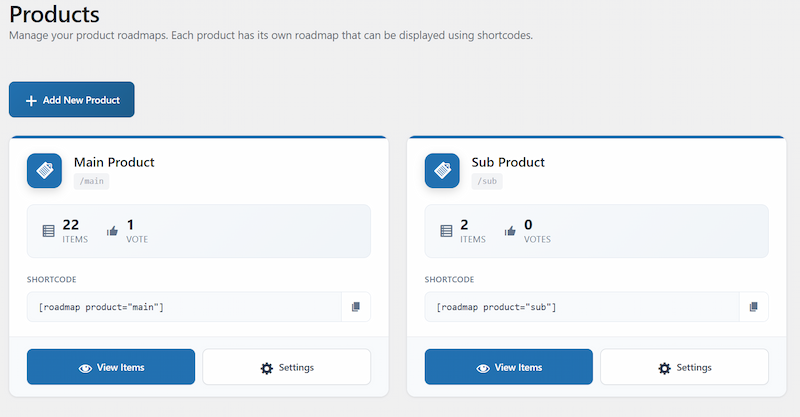
Manage separate roadmaps for different products or projects from one dashboard. This keeps everything organised and prevents overlap between teams. Perfect for businesses handling multiple offerings at once.
2. Individual Product Settings
Each product gets its own customised roadmap settings, labels, and workflow. This flexibility ensures every roadmap reflects that product’s unique needs and priorities. It gives teams full control without affecting other projects.
3. Visual Timeline
Display expected release dates using a clean, visual timeline. Users can instantly see what’s coming next and when to expect major updates. It adds clarity and transparency to your long-term roadmap.
4. Smart Filters
Users can filter roadmap items by status, category, or priority to find what they need quickly. This makes browsing easier, especially when your roadmap grows large. It improves user experience and saves time.
5. Priority Management
Highlight which features or tasks are most important. This helps users understand your focus areas and helps teams stay aligned on what matters most. It also supports more strategic planning and resource allocation.
6. Data Export
Export user votes, feedback, and roadmap data for deeper analysis. This gives your team valuable insights into what users truly want. It also supports reporting, decision-making, and product strategy planning.
7. Admin Notifications
Receive instant alerts when new votes, comments, or suggestions come in. This keeps your team aware of user activity and helps you respond faster. It ensures nothing important is overlooked.
8. Custom Branding
Match your roadmap’s appearance with your website or product identity. Custom colours, labels, and visuals create a polished, cohesive experience. It reinforces your brand and builds user trust.
Why Product Roadmaps Improve Customer Satisfaction and Reduce Workload
A roadmap isn’t just a planning tool; it’s a powerful way to build stronger relationships with your users. When people can vote on features and share suggestions, they feel genuinely heard and emotionally connected to your product. It also ensures you’re building what users actually want, eliminating guesswork and reducing wasted development time.
By openly sharing what’s planned and what’s in progress, you create a sense of transparency that builds trust and keeps your audience confident in your direction. A public roadmap even cuts down on repetitive support tickets because users can already see when certain features are coming.
Ultimately, this clarity and communication boost retention, helping users stay engaged for the long term because they can see exactly where your product is headed.
Common Mistakes to Avoid When Creating a Product Management Roadmap
- Not updating it regularly
- Overpromising timelines
- Making the roadmap too complex
- Ignoring user feedback
- Keeping it private when it should be public
Avoid these traps, and your roadmap becomes a powerful asset.
Final Step-by-Step Checklist for Building Your Roadmap in WordPress
Here’s your quick start summary:
- Define goals
- Gather feature ideas
- Organise categories
- Prioritise using a method MoSCoW, RICE, etc.
- Assign statuses
- Publish your roadmap
- Enable voting and suggestions
- Update weekly or monthly
Pin this beside your desk; it’s gold.

Your WordPress Product Management Roadmap Starts Today
A well-crafted Product Management Roadmap isn’t just a planning document; it’s the heartbeat of your digital product. It keeps you organised, keeps your users informed, and helps you build features that truly matter.
You don’t need complex systems or expensive tools. You just need clarity, consistency, and the right roadmap tool in place.
So take the first step today. Start planning. Start prioritising. Start listening to your users.
Because at the end of the day, A great product isn’t built in secret, it’s built with your users.
Interesting Reads
What is Contextual Link Building? A Complete Guide for 2026
How Does Gamification in Online Communities Increase Participation?
What Are Forum Backlinks? A Complete Guide for Beginners 2026
