

Website performance is more critical than ever in 2025, as it directly impacts user experience, engagement, and search engine rankings. Slow-loading WordPress sites frustrate visitors, increase bounce rates, and can even cost revenue. Optimizing your site goes beyond basic caching—it involves controlling scripts, styles, and unnecessary assets that weigh down pages. This is where Asset CleanUp comes in. In this Asset CleanUp Review, we’ll explore how this powerful WordPress performance plugin helps site owners unload unused CSS and JavaScript, streamline front-end code, and boost load times without compromising functionality.
Asset CleanUp offers page-specific control over scripts and styles, ensuring that only the necessary assets are loaded for each page. By reducing render-blocking resources, it improves Core Web Vitals and overall website responsiveness. Unlike many caching plugins that focus solely on storing pages, Asset CleanUp tackles the root cause of front-end bloat, making it an essential tool for both small blogs and high-traffic sites.
Whether you manage a personal blog, e-commerce store, or membership platform, understanding how Asset CleanUp works can help you make informed decisions about WordPress optimization. In this review, we’ll cover its setup, features, pricing, pros and cons, and real-world performance to determine if it’s the right solution for 2025.

What is Asset CleanUp?
Asset CleanUp is a powerful WordPress performance plugin designed to improve website speed by unloading unnecessary CSS and JavaScript files. Unlike traditional caching plugins that focus primarily on storing static pages, Asset CleanUp targets front-end optimization, reducing page weight and improving load times. By selectively disabling unused scripts and styles on a per-page or site-wide basis, it ensures that only the essential assets are loaded for each page, enhancing user experience and Core Web Vitals.
The plugin works seamlessly with most themes, page builders, and caching solutions, making it versatile for both beginners and advanced users. Key functionalities include identifying and unloading unused assets, minifying and combining CSS/JS files, controlling plugin scripts on specific pages, and integrating with Google Fonts and other third-party libraries.
Asset CleanUp is particularly beneficial for sites with multiple plugins, complex layouts, or heavy themes, as these often load unnecessary assets that slow down pages. By reducing render-blocking resources, the plugin not only improves speed but also supports better search engine rankings, lower bounce rates, and a smoother browsing experience.
Why Use Asset CleanUp?
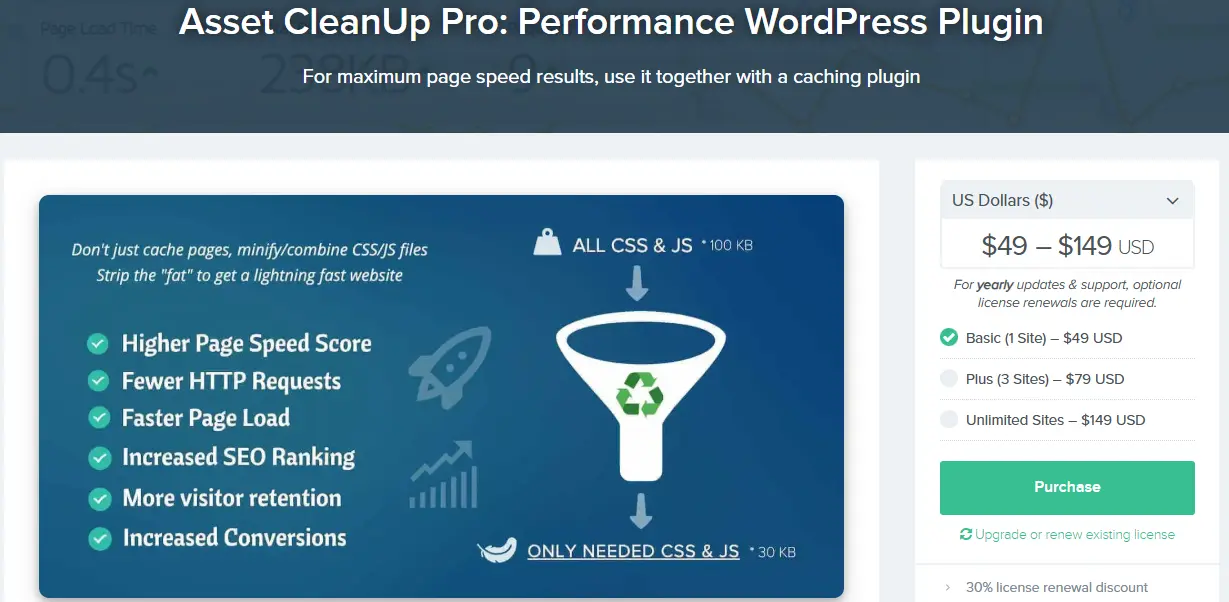
Website speed is a critical factor for user experience, conversions, and SEO rankings. Many WordPress sites load unnecessary CSS and JavaScript files, especially when multiple plugins or complex themes are used. Asset CleanUp addresses this problem by giving you granular control over which assets are loaded on each page. By unloading unneeded scripts and styles, the plugin significantly reduces page weight, speeds up load times, and enhances Core Web Vitals.
Using Asset CleanUp also improves overall site performance by reducing render-blocking resources. This ensures that visitors see content faster, leading to lower bounce rates and higher engagement. The plugin is particularly valuable for sites with e-commerce stores, membership platforms, or heavy page builders, where every millisecond of load time impacts user satisfaction and conversions.
Additionally, Asset CleanUp complements caching and image optimization plugins by focusing on front-end efficiency rather than static page storage. Its features, such as selective script unloading, minification, and deferred loading, help create a leaner, faster WordPress site without compromising functionality.
Key Features of Asset CleanUp
Asset CleanUp is a powerful WordPress plugin designed to optimize website performance by giving you full control over the assets loaded on each page. Its robust features make it a must-have for users seeking faster load times, improved Core Web Vitals, and better overall site efficiency.
1. Selective Script & Style Loading
One of the standout features of Asset CleanUp is its ability to unload unnecessary CSS and JavaScript files on specific pages or posts. This selective approach ensures that only the scripts required for a page are loaded, reducing page weight and improving load times. It is especially useful for sites using multiple plugins or heavy themes.
2. Minification & Combination
The plugin allows you to minify CSS and JavaScript files, removing unnecessary spaces, line breaks, and comments to reduce file size. You can also combine multiple files into a single request, which decreases the number of HTTP requests, further improving page speed.
3. Deferred & Async Loading
Asset CleanUp enables deferred and asynchronous loading for scripts, ensuring that non-critical assets do not block the initial rendering of your website. This reduces render-blocking resources, helping pages load faster for users and search engines.
4. Automatic & Manual Optimization
You can choose to unload assets manually on each page or let the plugin automatically detect unnecessary files. Automatic mode identifies scripts that are not required for a particular page, streamlining optimization for beginners and advanced users alike.
5. Integration with Popular Plugins & Themes
Asset CleanUp is compatible with most WordPress plugins, page builders, and themes. Whether you use WooCommerce, Elementor, or Gutenberg, the plugin allows you to fine-tune asset loading without breaking functionality.
6. Custom CSS & JavaScript Handling
You can manage inline CSS and JavaScript, optimizing critical CSS and deferring non-essential scripts. This level of control ensures a leaner front-end and smoother user experience.
7. Performance Reports & Metrics
Asset CleanUp provides performance insights, helping you monitor the impact of optimizations. You can track reductions in file size, HTTP requests, and page load times, ensuring measurable improvements in website speed.
How to Set Up Asset CleanUp (Step-by-Step Guide)
Setting up Asset CleanUp is simple and beginner-friendly. The plugin integrates smoothly with WordPress, enabling you to optimize asset loading without any coding knowledge. By selectively managing CSS and JavaScript files, you can improve page speed, reduce render-blocking assets, and enhance user experience. Follow these steps to get started:
Step 1: Install and Activate the Plugin
- Navigate to Plugins → Add New in your WordPress dashboard.
- Search for Asset CleanUp: Page Speed Booster.
- Click Install Now, then Activate.
After activation, a new Asset CleanUp menu appears in your dashboard for quick access to settings and tools.
Step 2: Configure Global Settings
Go to Asset CleanUp → Settings and configure global optimization options:
- Enable CSS/JS minification, combination, and defer/async loading.
- Choose whether to unload plugin and theme assets automatically or manually.
Step 3: Optimize Individual Pages or Posts
For more granular control:
- Edit the page or post you want to optimize.
- Scroll down to the Asset CleanUp meta box.
- Review all loaded CSS and JavaScript files, and select unnecessary ones to unload for that specific page.
- Defer or asynchronously load scripts where possible to enhance rendering speed.
Step 4: Handle Critical CSS and Custom Scripts
- Add inline critical CSS for above-the-fold content.
- Defer non-critical JavaScript and test page functionality to ensure nothing breaks.
Step 5: Test and Monitor Performance
- Save your changes and preview your site.
- Use performance tools like Google PageSpeed Insights or GTmetrix to check improvements in load times.
- Adjust settings as needed for maximum performance gains.
By following these steps, Asset CleanUp helps your WordPress site load only essential scripts and styles, ensuring faster pages, reduced render-blocking, and an optimized user experience.
Asset CleanUp Pricing in 2025
One of the key advantages of Asset CleanUp is its flexible pricing, making it accessible to a wide range of WordPress users. Whether you run a small blog or a high-traffic e-commerce site, the plugin offers options to suit different needs.
1. Free Core Plugin
- Available on WordPress.org.
- Includes essential features like unloading CSS/JS per page, basic minification, and manual optimization of scripts.
- Ideal for bloggers, small websites, and those testing performance optimization for the first time.
2. Pro Version
- Asset CleanUp Pro starts at $49/year for a single site.
- Adds advanced features like automated plugin/script unloading, Google Fonts optimization, minification of inline CSS/JS, and priority support.
- Suitable for business websites, developers, and performance-focused WordPress sites that require advanced optimization tools.
3. Multiple Site Licenses
- The Pro plan offers packages for 5, 10, or unlimited sites, with pricing increasing accordingly.
- Perfect for agencies or developers managing multiple client sites.
Value Comparison
- Compared to other performance plugins like Perfmatters or WP Rocket, Asset CleanUp Pro provides a lightweight, code-level optimization at a competitive price.
- Its mix of free and premium features allows users to scale optimization efforts based on their site’s needs.
Pros and Cons of Asset CleanUp in 2025
Pros
-
Granular Control Over Scripts and Styles: Asset CleanUp allows users to selectively unload unnecessary CSS and JavaScript on a per-page or site-wide basis. This targeted approach reduces page weight, improves load times, and optimizes Core Web Vitals without affecting functionality.
-
Lightweight and Performance-Focused: Unlike some bulky optimization plugins, Asset CleanUp focuses solely on front-end code management. Its minimal footprint ensures that the plugin itself does not add extra load to your website.
-
Advanced Features in Pro Version: Pro users benefit from features like automated plugin/script unloading, Google Fonts optimization, minification of inline CSS/JS, and the ability to control plugin loading based on user roles. These options give developers full control over optimization.
-
Compatibility: Asset CleanUp works seamlessly with most caching plugins, page builders, and CDNs. This makes it a flexible choice for both beginners and developers managing complex WordPress sites.
-
Cost-Effective: With a free version for basic optimization and a reasonably priced Pro plan starting at $49/year, Asset CleanUp is an affordable solution compared to other premium performance plugins.
Cons
-
Learning Curve: Beginners may find granular script and style management slightly complex, as improper unloading can break site functionality if not handled carefully.
-
Limited Free Features: The free version is useful but lacks advanced automation features, requiring manual intervention for maximum optimization.
-
No Built-in Caching or Image Optimization: Asset CleanUp focuses on front-end optimization only, so it must be used alongside caching plugins and image optimization tools for complete site speed improvements.
-
Pro Version Pricing for Multiple Sites: While affordable for single-site use, managing multiple sites may require higher-tier licenses, which could increase costs for agencies or developers.
Asset CleanUp vs Competitors
When it comes to WordPress performance optimization, several plugins offer solutions to speed up websites, but each approaches the task differently. Asset CleanUp stands out due to its precise control over front-end assets, but how does it compare to other popular plugins in 2025?
1. Asset CleanUp vs Perfmatters
Perfmatters is a premium plugin that also focuses on front-end optimization by disabling unused scripts, managing emojis, embeds, and reducing bloat. Both plugins provide granular script management, but Perfmatters comes with additional features like WooCommerce optimization, DNS prefetching, and database cleanup. Asset CleanUp, on the other hand, excels in selective unloading of CSS/JS per page or post, giving developers highly targeted control. For users who want to fine-tune every script, Asset CleanUp often offers more precise per-page management.
2. Asset CleanUp vs WP Rocket
WP Rocket is primarily a caching plugin with additional optimization features like minification, lazy loading, and database cleanup. While WP Rocket improves overall speed through caching and server-side optimizations, it does not provide the same granular control over individual scripts and styles that Asset CleanUp does. Asset CleanUp is best used alongside caching plugins like WP Rocket for a layered performance boost.
3. Asset CleanUp vs LiteSpeed Cache
LiteSpeed Cache focuses on server-level caching and performance enhancements for sites hosted on LiteSpeed servers. It includes image optimization, database cleaning, and page caching. While extremely powerful, LiteSpeed Cache is less flexible when it comes to selectively disabling specific CSS/JS files on individual pages. Asset CleanUp complements LiteSpeed Cache by targeting front-end code management that server-level caching cannot handle.
4. Asset CleanUp vs Autoptimize
Autoptimize primarily focuses on aggregating, minifying, and deferring scripts, styles, and HTML. While it improves load times by reducing file size and render-blocking resources, it does not allow selective unloading of scripts on specific pages. Asset CleanUp gives users that level of control, making it ideal for websites with complex themes or multiple plugins where certain scripts are only needed on specific pages.
Who Should Use Asset CleanUp in 2025?
Asset CleanUp is a powerful WordPress performance plugin designed for users who want precise control over their website’s front-end assets. It is particularly beneficial for the following groups:
1. Bloggers and Content Creators
For bloggers managing multiple posts and pages, Asset CleanUp allows selective unloading of scripts and styles on pages where they aren’t needed. This reduces unnecessary bloat, improves page speed, and enhances user experience without affecting content functionality.
2. E-commerce Store Owners
Online stores often load numerous scripts and styles due to plugins, product pages, and checkout processes. Asset CleanUp helps WooCommerce and other e-commerce sites reduce page load times by disabling scripts on pages where they aren’t required, boosting conversion rates and reducing bounce rates.
3. Developers and Web Agencies
Developers managing multiple client sites can benefit from Asset CleanUp’s granular control over assets. It allows them to fine-tune performance on a per-page basis, troubleshoot conflicts, and ensure optimized websites without relying solely on caching solutions.
4. Medium to Large Websites
Websites with extensive content, membership platforms, or high-traffic portals can greatly improve performance by reducing unnecessary CSS/JS. Asset CleanUp ensures faster load times, better Core Web Vitals, and improved search engine rankings.
5. Beginners Seeking Efficiency
Even users with limited technical knowledge can use Asset CleanUp’s intuitive interface to unload unused assets. The plugin’s simplicity ensures that beginners can achieve noticeable speed improvements without complex configurations.

Your Next Steps with Asset CleanUp
Asset CleanUp is a powerful WordPress performance plugin that gives you granular control over scripts and styles, helping you reduce page bloat, improve load times, and boost Core Web Vitals. By selectively unloading unused assets on specific pages or posts, you can ensure your site runs lean and efficiently, especially if you rely on multiple plugins or complex themes.
For site owners considering Asset CleanUp in 2025, the first step is to install the plugin and explore its free features, such as script management, CSS/JS minification, and page-specific asset unloading. Monitoring page speed and performance metrics before and after optimization will give you a clear understanding of its impact.
If your website demands advanced optimization, consider upgrading to Asset CleanUp Pro. The premium version offers features like automatic plugin management, advanced minification, critical CSS, and premium support, which can further streamline performance improvements.
Complement Asset CleanUp with other optimization tools, such as caching plugins, image optimization solutions, and a reliable CDN, to create a multi-layered strategy that maximizes speed and user experience.
Ultimately, whether you run a small blog, e-commerce store, or high-traffic membership site, Asset CleanUp provides the tools to optimize front-end performance efficiently. Start with the basics, measure results, and scale up your optimization efforts to ensure your WordPress site remains fast, responsive, and ready for 2025 and beyond.
FAQs
1. What is Asset CleanUp and how does it improve WordPress performance?
Asset CleanUp is a WordPress performance plugin that lets you selectively unload unused CSS and JavaScript files on specific pages. This reduces page bloat, improves load times, and enhances Core Web Vitals.
2. Is Asset CleanUp suitable for beginners?
Yes, the free version is user-friendly for beginners. It provides basic asset management tools, while advanced features are available in the Pro version for developers or power users.
3. Can Asset CleanUp be used with other caching plugins?
Absolutely. Asset CleanUp works seamlessly alongside caching plugins, CDNs, and image optimization tools, providing a layered approach to improving website speed.
4. What are the main differences between the free and Pro versions?
The free version includes page-specific asset unloading, CSS/JS minification, and basic script management. The Pro version adds features like automatic plugin management, advanced minification, critical CSS, and premium support.
5. Will Asset CleanUp break my website if I unload assets?
If used carefully, it won’t break your site. The plugin provides an interface to test and manage scripts individually, allowing you to selectively unload only unnecessary assets.
6. Is Asset CleanUp compatible with all WordPress themes and plugins?
Asset CleanUp is compatible with most themes and plugins. However, testing is recommended, especially for complex setups, to ensure essential scripts are not accidentally unloaded.
Interesting Reads:
CleanTalk Anti-Spam Review 2025: Is It the Best Spam Protection Plugin for WordPress?
A Comprehensive Guide to Cleaning Up Your WordPress Uploads Folder
The Events Calendar Review 2025: Is It the Best WordPress Event Plugin?
