

Online communities are no longer optional—they’re essential for businesses, educators, and creators looking to build lasting relationships with their audiences. With the right WordPress Social Community Plugins and Themes, you can transform a standard website into a hub where people connect, share knowledge, and collaborate.
Recent studies show that more than 76% of internet users participate in some form of online community. Platforms that nurture interaction often experience twice the engagement and retention compared to traditional websites. Whether it’s a learning hub, a professional network, or a niche membership site, the strength of a community lies in its ability to bring people together in one place.
This is where WordPress shines. Powering over 43% of all websites, WordPress offers unmatched flexibility with an ecosystem of plugins and themes built for community building. From activity streams and private messaging to groups, forums, events, and gamification, these tools make it possible to create a feature-rich, customized online community that grows with your needs.
In this guide, we’ll walk through the best WordPress Social Community Plugins and Themes for 2025, comparing their features, use cases, and strengths. You’ll learn how solutions like BuddyPress, BuddyBoss, and PeepSo differ, why themes such as Reign, BuddyX Pro, and Kleo stand out, and how to combine them effectively.
By the end, you’ll know exactly which tools are worth your investment—and how to leverage them to build a community that encourages participation, fosters loyalty, and delivers long-term value for your brand.

What is a WordPress Social Community?
A WordPress social community is a digital space built on WordPress where people can connect, share ideas, and interact through features similar to popular social networks. Unlike a static website, a community-driven site encourages two-way communication—members don’t just consume content, they actively participate in discussions, join groups, and build relationships.
At its core, a social community website is designed to create engagement and belonging. For example, an educational community may include student forums, private groups for classes, and direct messaging between learners and instructors. Meanwhile, a business-focused community might allow members to network, share resources, and attend virtual events.
When built with WordPress Social Community Plugins and Themes, these platforms become incredibly versatile. You can add features such as:
- User profiles with custom fields
- Activity feeds where members post updates and share media
- Groups or circles for smaller conversations
- Private messaging and notifications for better communication
- Forums and discussion boards for topic-based interactions
- Gamification elements like badges, points, and achievements
- Events and meetups integrated directly into the platform
Because WordPress is open-source, you’re not limited to a fixed design or a pre-defined feature set. You can start with a community plugin like BuddyPress or PeepSo and then extend it with add-ons for gamification, e-learning, or monetization. Pair it with a responsive WordPress community theme like Reign, BuddyX Pro, or BuddyBoss Theme, and you have a professional-looking platform ready to scale.
In short, a WordPress social community is more than just a website—it’s an interactive ecosystem where members create value for one another. With the right mix of plugins and themes, you can transform WordPress into a full-fledged social network, a niche membership platform, or even a branded learning community.
Why Build a Social Community with WordPress?
Building an online community is no longer optional for brands, educators, and creators—it has become a strategic way to boost engagement, foster loyalty, and create long-term value. While many third-party online community platforms like Mighty Networks, Circle, or Facebook Groups exist, they often limit your control, customization, and scalability. This is where WordPress shines.
1. Full Ownership and Control
When you build with WordPress Social Community Plugins and Themes, you own your platform entirely. Unlike closed networks, there are no restrictions on branding, member data, or monetization options. You decide how members interact, what features are available, and how the community grows.
2. Flexibility Through Plugins and Themes
WordPress offers thousands of social networking plugins, membership tools, and community engagement solutions that let you design the platform you need. Want user profiles, activity streams, and forums? Use BuddyPress or BuddyBoss. Looking for advanced membership features? Integrate MemberPress or Ultimate Member. Need e-learning or gamification? Add LearnDash, GamiPress, or myCred. With the right WordPress community themes, you can design a sleek, mobile-responsive experience without coding.
3. Cost-Effective Compared to SaaS Solutions
Third-party platforms often charge monthly fees per user, which can quickly add up as your community grows. With WordPress, you pay for hosting, premium plugins, and a theme—but you can scale without hidden costs. This makes it one of the most affordable solutions for membership sites and social networking platforms.
4. Seamless Integrations with Popular Tools
A WordPress community doesn’t exist in isolation. You can integrate it with WooCommerce for marketplaces, Zoom or BuddyBoss App for live events, and marketing tools like Mailchimp or HubSpot for automated engagement. These integrations turn your site into an all-in-one social networking solution.
5. Scalability and Future-Proofing
Whether you’re starting with 100 members or planning for 100,000, WordPress scales effortlessly. You can add caching plugins, CDN services, and dedicated community hosting to ensure fast performance. Plus, with constant plugin and theme updates, WordPress keeps up with the latest trends in social networking and community engagement.
6. Monetization Opportunities
A community can be more than just a space for interaction—it can be a revenue stream. With tools like Paid Memberships Pro, Restrict Content Pro, or WooCommerce Subscriptions, you can offer premium memberships, gated content, or even sell digital products directly within your community.
In short, WordPress provides the ownership, flexibility, and scalability you need to create a thriving online network. With the right WordPress Social Community Plugins and Themes, you can design a platform tailored to your goals, whether that’s fostering learning, building memberships, or creating a niche social network.
How Does WordPress Power Social Communities?
WordPress is much more than a blogging platform—it’s a powerful ecosystem capable of supporting fully interactive online community platforms. What makes it effective is the way plugins and themes work together to transform a basic website into a feature-rich social network, membership hub, or collaborative learning space.
1. Plugins Add Functionality
At the heart of every WordPress social community are plugins. These social networking plugins provide essential features such as:
- User registration and profiles (with customizable fields)
- Activity streams and status updates similar to Facebook timelines
- Groups and sub-groups for niche interests or project teams
- Private messaging, friend connections, and notifications
- Discussion forums and Q&A boards
- Gamification tools like points, badges, and achievements
For example, BuddyPress adds the foundation for social networking, while BuddyBoss extends it with advanced features and app support. Similarly, PeepSo provides a modern interface with add-ons for video uploads, reactions, and community moderation.
2. Themes Shape the User Experience
While plugins power the features, WordPress community themes determine the design and layout. A well-coded theme like Reign, BuddyX Pro, or Kleo ensures that your community looks professional, loads quickly, and adapts beautifully on mobile devices.
Themes also come with pre-built templates for profiles, activity feeds, and group pages, which saves time during setup. Moreover, they allow deep customization so your community aligns with your brand’s style and goals.
3. Integration with Membership and E-Learning Tools
Communities often need more than just conversations. They thrive when combined with membership sites, e-learning platforms, and marketplaces. WordPress makes this possible by integrating with:
- MemberPress or Ultimate Member for membership management
- LearnDash or LifterLMS for online learning communities
- WooCommerce for selling products and subscriptions
- GamiPress or myCred for engagement and gamification
This modular approach means you can design a community tailored specifically to your audience—whether that’s students, professionals, or hobbyists.
4. Scalability Through Hosting and Performance Tools
A growing community needs strong performance. WordPress allows you to scale with community-focused hosting providers, CDN services, and caching plugins. This ensures your site remains fast and reliable, even with thousands of members interacting at once.
5. Extending Communities with Add-Ons
What makes WordPress unbeatable is its ecosystem of extensions. Need event management? Use The Events Calendar. Want live streaming? Integrate Zoom or Vimeo plugins. Looking for multilingual support? Add TranslatePress or WPML. These add-ons turn your community into a complete social networking solution without the restrictions of closed platforms.
Best WordPress Social Community Plugins (2025 Edition)
1. BuddyPress: The Foundation of WordPress Social Communities
BuddyPress is one of the most established WordPress social networking plugins and remains a go-to solution for building online communities. Developed by the team behind WordPress itself, it is open-source, free, and highly extensible. This makes it a popular choice for anyone looking to transform a standard WordPress site into a fully functional social community platform.
Key Features
BuddyPress provides a wide range of features out of the box, including:
- User Profiles: Members can create detailed profiles with custom fields, allowing for personalization.
- Activity Streams: A Facebook-style news feed where users can post updates, like, and comment.
- Private Messaging: One-to-one messaging between members, encouraging direct communication.
- Groups: Public or private groups that allow members to connect around shared interests.
- Friend Connections: Members can send friend requests and build personal networks.
- Notifications: Real-time updates keep users informed of interactions.
- Extensibility: Hundreds of third-party add-ons extend BuddyPress with features such as forums, media sharing, and gamification.
Why Choose BuddyPress?
BuddyPress stands out because it is:
- Free and Open Source: Ideal for startups or small communities that want to minimize costs.
- Highly Customizable: Works with most WordPress themes and supports numerous extensions.
- Community Supported: Backed by a large developer and user community, ensuring continuous improvements.
- Flexible: Can be used for professional networks, membership sites, online learning, or niche communities.
Pros
- Cost-effective (free core plugin).
- Rich feature set for building basic to advanced communities.
- Integrates with popular plugins like bbPress, LearnDash, and WooCommerce.
- Supported by community-driven add-ons for extended functionality.
- Compatible with most WordPress community themes such as Reign, BuddyX Pro, and Kleo.
Cons
- Out-of-the-box design looks basic; often requires a theme or customization for modern UI.
- Can feel overwhelming for beginners due to multiple configuration options.
- Some advanced features require third-party add-ons, which may add to costs.
- Larger communities may require optimization for performance and hosting upgrades.
Ideal Use Cases
- Educational Communities: Combine BuddyPress with LearnDash or LifterLMS to create interactive e-learning platforms.
- Professional Networks: Build niche LinkedIn-style communities with groups and forums.
- Membership Sites: Integrate BuddyPress with MemberPress or Paid Memberships Pro for subscription-based communities.
- Hobby and Niche Groups: Perfect for small to mid-sized interest-based communities that want to grow organically.
Pricing
BuddyPress is completely free. However, additional costs may arise if you invest in premium themes or third-party add-ons for features like advanced gamification, media sharing, or design enhancements.
BuddyPress continues to be one of the most reliable and flexible WordPress community solutions, especially for beginners and small-to-medium projects. With its free access, robust ecosystem, and strong community support, it remains a top choice for those wanting to explore WordPress Social Community Plugins and Themes without heavy upfront investment.
2. BuddyBoss Platform: A Premium Solution for WordPress Social Communities

The BuddyBoss Platform is a premium community-building solution that takes the foundation of BuddyPress and extends it with advanced features, modern design, and native mobile app support. Unlike BuddyPress, which requires multiple add-ons for advanced functionality, BuddyBoss provides an all-in-one package for building professional-grade WordPress social networking platforms.
It is particularly popular among businesses, educators, and membership site owners who want to create scalable and engaging online communities with minimal technical hassle.
Key Features
BuddyBoss comes packed with features that go beyond what BuddyPress offers:
- Modern User Profiles: Beautifully designed member profiles with cover photos, avatars, and customizable fields.
- Advanced Activity Feeds: Real-time activity streams with likes, comments, mentions, and media uploads.
- Private Messaging & Group Chats: Direct messaging plus group conversations to enhance member interaction.
- Groups & Forums: Create public, private, or hidden groups with built-in forum discussions powered by bbPress.
- Event Management: Add-ons allow members to create and join events directly within the community.
- Gamification: Seamless integration with tools like GamiPress for badges, points, and leaderboards.
- E-Learning Integrations: Deep integration with LearnDash and LifterLMS, making it the top choice for online learning communities.
- Mobile App Support: BuddyBoss App (sold separately) allows you to launch a fully branded mobile app for iOS and Android.
Why Choose BuddyBoss?
BuddyBoss is designed for those who want a professional, ready-to-launch community without piecing together multiple plugins. It is:
- All-in-One: Eliminates the need to purchase dozens of separate add-ons.
- User-Friendly: Comes with a clean, intuitive interface that members and administrators find easy to use.
- Mobile-Ready: Native mobile app solution gives communities the edge in engagement and retention.
- Enterprise-Level: Suitable for large-scale membership sites, e-learning platforms, and business networks.
Pros
- Complete solution with built-in advanced features.
- Modern and responsive design out of the box.
- Reliable support and regular updates from the BuddyBoss team.
- Seamless integrations with WooCommerce, LearnDash, GamiPress, and popular marketing tools.
- Mobile app support for boosting accessibility and engagement.
Cons
- Premium pricing may be costly for small communities.
- Learning curve can be steeper due to its comprehensive feature set.
- Dependent on BuddyBoss updates and ecosystem, limiting flexibility compared to purely open-source solutions.
Ideal Use Cases
- Online Learning Communities: Combine BuddyBoss with LearnDash to create a branded learning platform with courses, groups, and student engagement.
- Professional Membership Networks: Monetize content and build thriving subscription-based communities.
- Corporate or Business Communities: Internal communication networks, employee training hubs, or customer communities.
- Large-Scale Social Platforms: For entrepreneurs who want to launch niche social networks with high engagement.
Pricing
The BuddyBoss Platform itself is free, but to unlock its full power, most site owners pair it with the BuddyBoss Theme and premium integrations. Pricing typically starts at around $228 per year for a single-site license, with higher plans for agencies and multiple sites. The BuddyBoss App is an additional premium product, with setup fees and ongoing costs.
BuddyBoss offers one of the most comprehensive solutions in the world of WordPress Social Community Plugins and Themes. It bridges the gap between open-source flexibility and premium reliability, making it the ideal choice for anyone serious about building a feature-rich, scalable online community.
3. PeepSo: A Modern Alternative to BuddyPress
PeepSo is a powerful and modern WordPress social networking plugin designed to provide a Facebook-like experience directly within WordPress. Unlike BuddyPress, which relies heavily on third-party extensions, PeepSo offers a wide range of features in its core plugin and premium add-ons. Its intuitive interface, regular updates, and extensive ecosystem make it a favorite among site owners who want to build sleek and interactive online community platforms.
Key Features
PeepSo delivers many features out of the box, with the option to extend functionality through premium add-ons:
- User Profiles: Members get customizable profiles with avatars, cover images, and personal information fields.
- Activity Streams: Real-time feeds with status updates, comments, and reactions similar to popular social media sites.
- Friend Connections: Add, accept, and manage friends to build personal networks.
- Private Messaging: Direct member-to-member communication, including group chats with add-ons.
- Community Groups: Public, closed, or secret groups for niche discussions.
- Media Sharing: Upload photos, videos, and documents directly into the community feed.
- Reactions and Emojis: Enhanced engagement options beyond simple likes.
- Monetization Tools: Integration with WooCommerce, Paid Memberships Pro, and LearnDash for memberships and e-learning.
- Moderation Features: Advanced tools for community admins to manage members, filter content, and maintain healthy interactions.
Why Choose PeepSo?
PeepSo stands out because it combines the simplicity of a plug-and-play solution with the flexibility of WordPress. It is:
- User-Centric: Clean, social-media-style design makes it easy for members to adapt quickly.
- Feature-Rich: Offers many built-in features that usually require third-party plugins in other solutions.
- Scalable: Works well for small groups and large membership networks.
- Well-Supported: Actively developed with regular updates, ensuring long-term stability.
Pros
- Intuitive, modern design without needing heavy customization.
- Includes advanced social networking features like reactions, media uploads, and live notifications.
- Wide range of add-ons for e-learning, monetization, and gamification.
- Built-in moderation tools for maintaining a safe environment.
- Strong integrations with WooCommerce, LearnDash, and other community engagement tools.
Cons
- Core plugin is free, but most advanced features require paid add-ons.
- Can become expensive if multiple premium add-ons are needed.
- Smaller ecosystem compared to BuddyPress or BuddyBoss.
- Some users may find it less flexible than BuddyPress for deep customization.
Ideal Use Cases
- Social Media-Like Communities: Perfect for creating Facebook-style platforms with activity feeds, groups, and reactions.
- Educational Networks: Combine PeepSo with LearnDash or LifterLMS to build interactive e-learning platforms.
- Membership Communities: Pair with Paid Memberships Pro or WooCommerce Subscriptions to monetize content.
- Hobby and Lifestyle Groups: Great for small-to-medium interest-based networks that need modern social interaction features.
Pricing
The PeepSo core plugin is free, but advanced functionality is unlocked through premium bundles. Pricing starts at approximately $199 per year for the basic bundle and scales up depending on the number of add-ons and sites.
PeepSo is one of the most modern WordPress social community plugins, offering a polished design and an engaging user experience right out of the box. For those who want to build a Facebook-like community on WordPress without relying on too many third-party extensions, PeepSo provides a reliable and user-friendly solution.
4. Ultimate Member: Flexible Membership and Community Plugin
Ultimate Member is one of the most popular WordPress membership and social community plugins. It focuses on creating user-friendly registration, profile management, and community interaction features. Unlike BuddyPress or PeepSo, which emphasize social networking, Ultimate Member strikes a balance between membership functionality and community engagement, making it a versatile choice for businesses, educators, and organizations.
With more than 200,000 active installations, Ultimate Member is a proven solution for anyone looking to build membership sites, online communities, or social networks without heavy technical work.
Key Features
Ultimate Member provides a strong feature set for building communities and membership platforms:
- User Registration & Login: Customizable registration and login forms with role-based options.
- User Profiles: Clean, customizable profiles with avatar uploads and detailed user fields.
- Member Directories: Display searchable directories of community members with sorting and filtering.
- Access Controls: Restrict access to certain pages, posts, or content based on user roles.
- Front-End Account Management: Members can manage their profiles, passwords, and preferences from the front end.
- Extensions for Extra Features: Premium add-ons add private messaging, groups, real-time notifications, WooCommerce integration, and social login.
- Moderation Tools: Admins can approve, block, or restrict members easily.
Why Choose Ultimate Member?
Ultimate Member is designed for flexibility. While its free version covers the basics, the premium extensions allow site owners to create a community that blends membership management and social networking features.
It’s a strong option if you want:
- A membership-driven community with role-based content access.
- Lightweight social features like private messaging and groups without going as far as BuddyBoss or PeepSo.
- A scalable solution that integrates with WooCommerce, forums, and learning management systems.
Pros
- Free core plugin is packed with essential features.
- Highly customizable user registration and profile management.
- Role-based access control for membership sites.
- Premium extensions allow modular growth—buy only the features you need.
- Integrates well with WooCommerce, Mailchimp, and bbPress.
Cons
- Many advanced community features require paid extensions.
- Out-of-the-box design is basic—benefits from pairing with a strong WordPress community theme.
- Less focused on social networking compared to BuddyBoss or PeepSo.
- Can become costly when multiple extensions are needed.
Ideal Use Cases
- Membership Websites: Gate premium content or courses for specific roles.
- Professional Directories: Build searchable directories for associations, organizations, or clubs.
- Community Portals: Add lightweight community features like messaging and groups for members.
- Niche Networks: Create small-to-medium online communities with role-based interaction.
Pricing
The core Ultimate Member plugin is free. Premium extensions can be purchased individually, starting at around $25 per extension, or as part of the Extension Pass at about $249 per year, which includes all add-ons.
Ultimate Member bridges the gap between membership management and community engagement. While it doesn’t provide the full social networking experience of BuddyBoss or PeepSo, its flexibility, scalability, and strong role-based access controls make it one of the most valuable WordPress Social Community Plugins and Themes for membership-driven websites.
5. MemberPress: A Powerful Membership and Community Builder
MemberPress is one of the leading WordPress membership plugins, trusted by businesses, educators, and creators who want to monetize their websites with memberships, subscriptions, and gated content. While it isn’t a “social networking plugin” like BuddyPress or PeepSo, it plays a critical role in building membership-driven communities when paired with community plugins or themes.
With its robust access controls, payment integrations, and automation tools, MemberPress is considered a gold standard for managing memberships inside WordPress. Many successful online learning platforms, coaching sites, and membership communities rely on it as the backbone of their monetization strategy.
Key Features
MemberPress offers an extensive range of features that support community-driven websites:
- Content Restriction: Easily protect posts, pages, or entire categories, and grant access based on membership levels.
- Membership Management: Create unlimited membership tiers with flexible pricing options.
- Subscription Billing: Supports recurring payments, trials, and installment plans with Stripe, PayPal, and Authorize.net.
- Course Builder: Built-in integration with its Courses add-on lets you create structured e-learning communities.
- Community Integrations: Works seamlessly with BuddyBoss, BuddyPress, and bbPress to add social networking features.
- Drip Content: Schedule when members can access content, keeping them engaged over time.
- Coupons & Promotions: Built-in tools to create discount codes and special offers.
- Automated Emails: Engage members with notifications, renewal reminders, and marketing campaigns.
Why Choose MemberPress?
MemberPress excels in membership management and monetization, which are crucial for building sustainable communities. It is particularly effective for:
- Businesses and creators who want to sell premium memberships.
- Educators looking to integrate courses and communities.
- Community builders who want to combine social networking plugins with strong payment systems.
Unlike many free plugins, MemberPress is a premium tool designed for scalability and professional use.
Pros
- Reliable and feature-rich membership management system.
- Flexible pricing and subscription models.
- Deep integrations with community plugins (BuddyBoss, BuddyPress, bbPress).
- Built-in course builder makes it great for e-learning communities.
- Excellent support and documentation for setup and growth.
Cons
- Premium-only; no free version is available.
- Can feel heavy for small communities that don’t need advanced monetization.
- Requires pairing with a WordPress community theme or plugin for social features.
- Higher price point compared to alternatives like Ultimate Member or Paid Memberships Pro.
Ideal Use Cases
- E-Learning Communities: Pair MemberPress with LearnDash or the built-in course builder and BuddyBoss for interactive learning platforms.
- Membership-Driven Networks: Create exclusive communities where members pay to access forums, groups, or premium content.
- Professional Associations: Manage member tiers, collect recurring fees, and provide gated resources.
- Coaching & Content Creators: Sell premium video, podcasts, or guides through subscription-based models.
Pricing
MemberPress is a premium-only plugin. Pricing starts at around $179 per year for the Basic plan, with Plus and Pro plans offering more integrations, advanced features, and unlimited memberships.
MemberPress is not a stand-alone community builder but an essential part of the puzzle when it comes to WordPress Social Community Plugins and Themes. By combining it with BuddyBoss, BuddyPress, or bbPress, you can create a powerful community platform that not only connects people but also generates sustainable revenue.
6. Paid Memberships Pro: Flexible Membership Management for WordPress Communities
Paid Memberships Pro (PMPro) is one of the most trusted WordPress membership plugins, designed to give complete control over membership levels, subscriptions, and access to premium content. While it doesn’t offer built-in social networking features like BuddyPress or PeepSo, it integrates seamlessly with them, making it a strong backbone for membership-driven communities.
With over 100,000 active installations, PMPro is popular among educators, associations, businesses, and creators who want flexible pricing models and robust access control. It is especially well-suited for subscription-based communities, professional networks, and e-learning platforms.
Key Features
Paid Memberships Pro provides all the core tools needed to manage memberships and integrate with WordPress community solutions:
- Unlimited Membership Levels: Create multiple tiers of membership with unique pricing and access rules.
- Flexible Billing Options: Supports recurring subscriptions, free trials, and one-time payments.
- Content Restriction: Protect posts, pages, categories, videos, or downloads based on membership level.
- Community Integrations: Works with BuddyBoss, BuddyPress, bbPress, and LearnDash for building engaging social and e-learning communities.
- Reports & Analytics: Track member activity, revenue, and signups with detailed reports.
- Email Notifications: Automated emails for confirmations, renewals, and failed payments.
- Discount Codes: Built-in tools for promotions and special offers.
- Add-Ons Library: Over 80 free and premium add-ons for extra functionality, including WooCommerce, Mailchimp, and Stripe integrations.
Why Choose Paid Memberships Pro?
PMPro is all about flexibility and scalability. It’s a great choice if you need fine-grained control over access rules, billing cycles, and integrations. Unlike some membership plugins that lock advanced features behind higher-priced tiers, PMPro provides most of its functionality—even in the free version.
For community builders, PMPro integrates smoothly with WordPress Social Community Plugins and Themes, making it easy to monetize social features, restrict access to private groups, or create premium discussion forums.
Pros
- Free core plugin with extensive functionality.
- Supports unlimited membership levels and custom pricing.
- Large library of free and premium add-ons.
- Strong integration with BuddyBoss, BuddyPress, bbPress, and LearnDash.
- Excellent documentation and developer-friendly design.
Cons
- Advanced features often require premium add-ons.
- Interface can feel less polished compared to MemberPress.
- Setup may be complex for beginners due to the wide customisation options.
- Add-ons and support plans can increase costs for larger projects.
Ideal Use Cases
- Subscription-Based Communities: Charge members for access to exclusive forums, groups, or networks.
- E-Learning Platforms: Combine PMPro with LearnDash or LifterLMS to gate courses and create premium student communities.
- Professional Associations: Manage tiered memberships, renewals, and member-only resources.
- Content Monetisation: Sell access to premium articles, videos, or downloads.
Pricing
The core plugin is free, making PMPro one of the most cost-effective membership solutions for WordPress. However, access to premium add-ons and priority support is available through the Plus plan ($247/year) or Builder plan ($397/year).
Paid Memberships Pro is one of the most flexible and scalable options among WordPress Social Community Plugins and Themes. Its free core offering makes it accessible to beginners, while its advanced add-ons and integrations make it powerful enough for enterprise-level communities. For anyone looking to blend membership management with social networking, PMPro is a top contender.
7. Restrict Content Pro: Simple and Powerful Membership Management
Restrict Content Pro (RCP) is a premium WordPress membership plugin built for businesses, educators, and creators who want to manage subscriptions and gate exclusive content with ease. Unlike all-in-one community platforms, RCP specializes in access control, membership levels, and payment management. When paired with BuddyBoss, BuddyPress, or bbPress, it becomes a solid backbone for membership-driven social communities.
Developed by the same team behind Easy Digital Downloads, RCP is known for its developer-friendly code, clean design, and straightforward membership management system.
Key Features
Restrict Content Pro offers everything you need to manage memberships inside WordPress:
- Unlimited Membership Levels: Create free, trial, or premium membership tiers with flexible access rules.
- Content Restriction: Limit access to posts, pages, downloads, or entire sections of your site.
- Payment Integrations: Built-in support for Stripe, PayPal, Braintree, and Authorize.net.
- Discount Codes: Offer coupons and promotions to attract new members.
- Member Management Dashboard: Admins can view, add, and manage members with ease.
- Reports & Analytics: Track earnings, subscriptions, and growth with detailed reporting tools.
- Add-Ons for Extended Features: Includes integrations for WooCommerce, BuddyBoss, LearnDash, and email marketing tools.
- Developer Friendly: Clean code and hooks for customization, making it popular among developers building custom membership platforms.
Why Choose Restrict Content Pro?
RCP is ideal for those who want a lightweight but powerful membership solution. It avoids the bloat of some all-in-one tools and focuses instead on doing one thing well—managing memberships and restricting content.
When combined with WordPress Social Community Plugins and Themes, RCP enables creators to:
- Gate community features behind membership tiers.
- Monetize forums, groups, or private learning spaces.
- Provide flexible subscription options for growing communities.
Pros
- Clean, lightweight, and easy to use.
- Supports unlimited membership tiers and flexible billing.
- Strong integrations with community and e-learning plugins.
- Developer-friendly for building custom community workflows.
- Backed by a reputable team with a history of quality plugins.
Cons
- No free version; premium-only plugin.
- Lacks built-in community features—requires integration with BuddyBoss, BuddyPress, or forums.
- Smaller ecosystem of add-ons compared to Paid Memberships Pro.
- Out-of-the-box design is basic and benefits from pairing with a community theme.
Ideal Use Cases
- Professional Membership Sites: Gate premium resources, courses, or downloads.
- Community Networks: Combine with BuddyBoss or BuddyPress to restrict forums and groups to paid members.
- Educational Platforms: Pair with LearnDash or LifterLMS to manage student access to classes and private communities.
- Content Creators: Monetize premium videos, guides, or podcasts with flexible subscription plans.
Pricing
Restrict Content Pro is a premium plugin only. Pricing starts at $99 per year for a single site license and scales up with Professional and Ultimate plans, which include advanced add-ons and lifetime updates.
Restrict Content Pro is a streamlined yet powerful solution for membership management in WordPress. While it doesn’t provide built-in social networking tools, its strength lies in content control and monetization. For site owners who want a reliable way to manage subscriptions while leveraging WordPress Social Community Plugins and Themes, RCP is a smart choice.
8. bbPress: Lightweight Forum Solution for WordPress Communities
bbPress is the official forum plugin for WordPress, developed by the same team behind WordPress and BuddyPress. It is lightweight, flexible, and integrates seamlessly into WordPress websites without slowing them down. While it doesn’t offer the flashy design or extensive features of modern community platforms, bbPress excels at providing simple and reliable discussion forums.
For community builders, bbPress is often used alongside BuddyPress or BuddyBoss, where BuddyPress handles social networking features and bbPress adds structured forum discussions. This makes it ideal for sites that need both social interaction and topic-based conversations.
Key Features
bbPress offers all the core features needed to run a traditional forum:
- Discussion Forums: Create unlimited forums, sub-forums, and discussion threads.
- Topic Management: Members can start topics, reply, and engage in threaded discussions.
- User Roles & Permissions: Customizable roles (keymaster, moderator, participant) for forum management.
- Integration with BuddyPress/BuddyBoss: Connects activity streams, groups, and user profiles with forum activity.
- Shortcodes & Widgets: Easily embed forums, topics, or replies into pages or widgets.
- Performance-Oriented: Lightweight codebase designed to run smoothly on most WordPress setups.
Why Choose bbPress?
bbPress is ideal if you want to add discussion forums to your WordPress community without bloating your website. Unlike some standalone forum platforms (like phpBB or vBulletin), bbPress is designed to work natively with WordPress, making it easy to manage from the same dashboard.
When paired with BuddyBoss or BuddyPress, bbPress brings structured discussions into social communities—perfect for education platforms, membership sites, or niche networks.
Pros
- Free, open-source, and actively maintained.
- Lightweight and integrates seamlessly with WordPress.
- Simple setup and easy management for administrators.
- Strong synergy with BuddyPress and BuddyBoss for community-building.
- Large number of third-party extensions for customization.
Cons
- Out-of-the-box design is basic; requires a WordPress community theme for modern UI.
- Limited features compared to dedicated forum platforms.
- Requires additional plugins for advanced functionality (attachments, private forums, polls).
- Best suited for structured discussions, not full social networking.
Ideal Use Cases
- Educational Communities: Add class-specific or subject-specific forums for student discussions.
- Membership Sites: Offer premium forums restricted to paying members via MemberPress or Paid Memberships Pro.
- Niche Communities: Perfect for hobby groups, support forums, or industry-specific networks.
- Hybrid Communities: Combine with BuddyPress or BuddyBoss for a social + forum community experience.
Pricing
bbPress is completely free and available in the WordPress plugin repository. Costs only arise when pairing it with premium themes or add-ons for extra features.
bbPress remains one of the most reliable forum plugins for WordPress, particularly when combined with other WordPress Social Community Plugins and Themes. Its lightweight nature, integration with BuddyPress/BuddyBoss, and ease of setup make it a go-to choice for anyone who wants to add structured, discussion-based interaction to their community website.
9. wpForo: A Modern Forum Plugin for WordPress Communities
wpForo Forum is a powerful, feature-rich WordPress forum plugin that provides a more modern experience compared to the lightweight bbPress. It is designed to offer a complete community discussion solution with multiple layouts, advanced features, and built-in SEO optimization.
For site owners who want structured, forum-based conversations without relying heavily on external add-ons, wpForo offers a more comprehensive package right out of the box. It integrates well with WordPress Social Community Plugins and Themes, making it a strong choice for websites that require professional discussion boards.
Key Features
wpForo includes a wide range of built-in features that make it stand out from simpler forum tools:
- Multiple Forum Layouts: Choose from Extended, Simplified, Q&A, or Threaded forum designs.
- Advanced User Profiles: Built-in profiles with avatars, post statistics, and reputation systems.
- Reputation & Voting: Users can upvote/downvote posts, creating a reputation-driven community.
- Private Messaging: Built-in system for private conversations.
- SEO Optimization: Schema markup, optimized URLs, and caching support for better search rankings.
- Topic & Post Management: Moderation tools for admins and moderators.
- Built-in Widgets & Shortcodes: Easily embed forums, user lists, and stats across your site.
- Monetization Add-Ons: Integrations for paid memberships and ad placements.
- Mobile-Friendly Design: Fully responsive layouts for smartphones and tablets.
Why Choose wpForo?
Unlike bbPress, which relies heavily on third-party plugins for extended functionality, wpForo provides many advanced features out of the box. It’s ideal for communities that want a more modern and feature-rich forum experience without piecing together multiple add-ons.
Pros
- Free core plugin with a wide range of features.
- Multiple forum layouts to suit different communities (discussion board, Q&A site, support forum).
- Built-in reputation and voting system to boost engagement.
- Strong SEO optimization compared to other forum plugins.
- Active development and a supportive community.
Cons
- Advanced features like private messaging, ad management, and additional SEO tools require paid add-ons.
- Learning curve may be steeper compared to bbPress.
- Smaller ecosystem of third-party themes compared to BuddyBoss or BuddyPress.
- Heavier plugin compared to lightweight forum tools.
Ideal Use Cases
- Support Communities: Create Q&A-style forums for customer support or product discussions.
- Knowledge-Sharing Networks: Build niche forums where users can share expertise and vote on helpful answers.
- Professional Communities: Combine wpForo with membership plugins like Paid Memberships Pro to monetize access.
- Educational Forums: Add subject-specific discussion spaces for students, with reputation systems to encourage participation.
Pricing
The core wpForo plugin is free, but premium add-ons are available for features such as advanced SEO, private messaging, and ad management. Individual add-ons start around $20–$35 each, or you can purchase bundle packages.
wpForo is a robust choice for anyone who wants a modern, feature-rich discussion forum within WordPress. While bbPress offers simplicity, wpForo delivers more community engagement tools, reputation systems, and built-in layouts—making it an excellent option for businesses, educators, and niche networks looking to build interactive forums.
10. ProfileGrid: Membership and Community Plugin for WordPress
ProfileGrid is a versatile WordPress social community plugin that combines user profiles, membership management, and community features in a single package. Unlike plugins that focus solely on memberships or forums, ProfileGrid blends social networking, group creation, and content restriction—making it a powerful all-in-one solution for building interactive communities.
It is particularly well-suited for site owners who want a plugin that covers user profiles, groups, private messaging, and memberships without needing to install multiple separate tools.
Key Features
ProfileGrid comes with a strong set of features to support community-driven websites:
- User Profiles: Customizable profiles with tabs, avatars, and bio fields.
- Groups & Communities: Create public, private, or hidden groups with dedicated activity streams.
- Membership Management: Role-based access control with gated content for different membership levels.
- Private Messaging: Built-in messaging system for direct communication between members.
- Friend Connections: Members can connect and form networks similar to social platforms.
- Blogging by Members: Users can submit posts or articles directly from the front end.
- WooCommerce Integration: Add store features to your community for e-commerce.
- bbPress & Forum Integration: Combine with forums for extended discussions.
- Social Login: Allow members to register via Facebook, Google, or Twitter.
- Extensions for More Features: Premium extensions add features like Stripe payments, Mailchimp integration, and advanced privacy controls.
Why Choose ProfileGrid?
ProfileGrid’s biggest strength is its hybrid nature. It’s not just a membership tool or just a community plugin—it gives you both. This makes it highly appealing if you want to launch a membership-driven social network without piecing together BuddyPress, MemberPress, and other tools.
It works well for small-to-medium communities, online clubs, or niche groups that need social interaction + membership management in one solution.
Pros
- All-in-one membership + community solution.
- Built-in private messaging and group functionality.
- Social login support reduces friction for new members.
- Strong integration with WooCommerce for store + community sites.
- Modular growth with premium extensions.
Cons
- Advanced features locked behind premium extensions.
- Design may require customization or pairing with a WordPress community theme for a modern look.
- Less flexible for large-scale communities compared to BuddyBoss or PeepSo.
- Smaller ecosystem and third-party developer support compared to BuddyPress.
Ideal Use Cases
- Membership Communities: Perfect for gated networks where users need access to exclusive content or groups.
- Hobby and Interest-Based Communities: Small-to-medium niche communities with groups and member interaction.
- E-Commerce + Communities: Combine WooCommerce and ProfileGrid for store-driven communities.
- Content Creator Networks: Enable members to blog and share content within the platform.
Pricing
ProfileGrid offers a free core plugin, which is sufficient for smaller communities. Premium extensions can be purchased individually starting at about $19 each, or as part of a premium membership bundle starting at $79 per year.
ProfileGrid is an excellent option for site owners who want membership management and social networking features in one plugin. While not as expansive as BuddyBoss or PeepSo, it strikes a good balance for communities that don’t need the complexity of larger ecosystems. When paired with the right WordPress Social Community Themes, it becomes a cost-effective and engaging solution for membership-driven online platforms.
11. UserPro: User Profiles and Community Plugin for WordPress
UserPro is a premium WordPress social community plugin that specializes in creating attractive user profiles, login/registration systems, and community-driven features. It’s designed to give site owners the ability to build membership sites, online communities, and professional directories without needing multiple plugins.
With more than 20,000 users, UserPro has earned its reputation as one of the leading solutions for front-end user management and profile customization in WordPress.
Key Features
UserPro comes with a robust set of tools tailored for building membership and community websites:
- User Profiles: Fully customizable profile layouts with cover images, avatars, and profile tabs.
- Front-End Registration & Login: Sleek registration and login forms with custom fields and social login support.
- Member Directory: Display searchable and filterable member directories with profile links.
- Private Messaging: Built-in system for user-to-user messaging.
- Social Connections: Members can follow, connect, or befriend others.
- Content Restriction: Restrict posts, pages, or downloads based on membership rules.
- Badges & Achievements: Award badges to users for milestones or activity.
- Integration Options: Works with WooCommerce, Mailchimp, and bbPress.
- Moderation Tools: Admins can approve or block users, ensuring community quality.
Why Choose UserPro?
UserPro is attractive to site owners who want stylish user profiles and front-end user management out of the box. Unlike BuddyPress, which requires a theme for a modern look, UserPro includes ready-to-use profile templates that look polished from the start.
It’s also versatile—whether you’re building a membership site, online directory, or social networking community, UserPro provides the key tools without requiring heavy customisation.
Pros
- Premium design with visually appealing profiles.
- Front-end user management reduces dependency on the WordPress admin.
- Strong member directory and search tools.
- Built-in messaging, social login, and badges for engagement.
- Works well with WooCommerce, bbPress, and Mailchimp.
Cons
- No free version; premium-only plugin.
- Smaller ecosystem compared to BuddyPress or Ultimate Member.
- Not as feature-rich as BuddyBoss or PeepSo for large-scale communities.
- Updates and support may feel slower compared to larger community solutions.
Ideal Use Cases
- Membership Websites: Build gated communities with attractive profiles and directories.
- Professional Directories: Perfect for associations, clubs, or organisations showcasing members.
- Small-to-Medium Communities: Ideal for networks that need profiles, messaging, and directories without extra complexity.
- Hybrid Sites: Combine with WooCommerce or bbPress for store + forum + community websites.
Pricing
UserPro is a premium-only plugin available on CodeCanyon. Pricing starts at around $39 for a regular license, making it more affordable than some competitors. Add-ons and extensions may require additional costs.
UserPro is best for site owners who want a visually appealing, easy-to-use membership and community solution. While it doesn’t rival BuddyBoss or PeepSo for large-scale communities, it delivers strong profile management, member directories, and private messaging—all packaged in a polished design that looks professional out of the box.
12. GamiPress: Gamification for WordPress Communities
GamiPress is a free yet powerful WordPress gamification plugin that allows site owners to add points, badges, achievements, and rewards to their websites. While not a stand-alone social community solution, it integrates perfectly with BuddyPress, BuddyBoss, PeepSo, LearnDash, LifterLMS, WooCommerce, and other tools—making it a must-have for increasing user engagement and interaction.
Gamification is a proven strategy to motivate members. Studies show that gamified communities can experience up to 48% higher engagement compared to non-gamified platforms. With GamiPress, you can design reward systems that encourage participation, learning, and loyalty.
Key Features
GamiPress offers a wide set of gamification tools:
- Points System: Award points for specific actions such as posting, commenting, logging in, or completing a course.
- Achievements: Create custom achievements (e.g., first post, completing a profile, joining a group).
- Ranks & Levels: Define ranks or levels that users can climb as they engage more.
- Badges & Certificates: Reward users with visual badges or certificates for milestones.
- Triggers & Events: Configure rewards for specific activities, such as joining a forum, submitting a comment, or purchasing a product.
- Integrations: Works seamlessly with BuddyPress, BuddyBoss, PeepSo, bbPress, LearnDash, WooCommerce, and MemberPress.
- Extensibility: Hundreds of free and premium add-ons for advanced reward systems, leaderboards, and progress tracking.
- Notifications: Real-time pop-ups to inform users of new achievements or rewards.
Why Choose GamiPress?
Communities thrive when members feel motivated to participate. GamiPress transforms a community from a passive network into an interactive ecosystem. It is:
- Flexible: Suitable for e-learning, memberships, social communities, or e-commerce.
- Engagement-Oriented: Encourages repeat visits and member loyalty.
- Developer-Friendly: Open-source with extensive documentation and hooks for customisation.
- Cost-Effective: Core plugin is free, making it easy to start without major investment.
Pros
- Free core plugin with robust features.
- Wide integrations with community, LMS, and e-commerce plugins.
- Increases engagement, retention, and member satisfaction.
- Highly customizable points, ranks, and achievement systems.
- Scalable for small communities or large networks.
Cons
- Advanced features often require paid add-ons.
- It can become complex to configure if you want deep gamification systems.
- Requires thoughtful design—too much gamification can overwhelm members.
- Performance optimisation may be needed for large communities with heavy activity.
Ideal Use Cases
- E-Learning Platforms: Pair with LearnDash or LifterLMS to award students for completing lessons, quizzes, or milestones.
- Social Communities: Use with BuddyBoss, BuddyPress, or PeepSo to reward posting, messaging, or group participation.
- Membership Sites: Incentivise premium members with ranks and rewards for engagement.
- E-Commerce Stores: Integrate with WooCommerce to award points for purchases and reviews.
Pricing
The core GamiPress plugin is free on WordPress.org. Premium add-ons are available individually (typically $29–$49 each), or you can buy bundles for larger setups.
GamiPress is one of the most effective ways to supercharge engagement in WordPress communities. By combining it with WordPress Social Community Plugins and Themes, you can turn a basic community into a vibrant, gamified experience where members stay active, motivated, and loyal.
13. myCred: Points and Rewards System for WordPress Communities
myCred is a flexible WordPress points management plugin that allows site owners to create points, rewards, and loyalty systems for their communities. While GamiPress focuses broadly on achievements and badges, myCred specialises in virtual currencies, points management, and monetisation options.
With over 20,000 active installs, myCred is a trusted choice for WordPress Social Community Plugins and Themes that need gamification, loyalty programs, or reward-based engagement systems. It’s especially popular in membership sites, forums, e-learning communities, and WooCommerce stores.
Key Features
myCred provides a robust set of features designed for flexible reward systems:
- Points System: Award or deduct points for actions such as posting, commenting, logging in, or completing tasks.
- Ranks and Badges: Encourage competition and achievement by assigning ranks or visual badges.
- Virtual Wallets: Allow users to store points in digital wallets for tracking and spending.
- Points-as-Currency: Members can redeem points for products, discounts, or premium access.
- WooCommerce Integration: Award points for purchases or allow members to pay with points.
- Community Integrations: Works with BuddyPress, BuddyBoss, PeepSo, and bbPress for rewarding community interactions.
- E-Learning Integrations: Compatible with LearnDash, LifterLMS, and Tutor LMS for awarding points for course completion.
- Premium Add-ons: Advanced banking systems, lotteries, badges, leaderboards, and more.
Why Choose myCred?
myCred is more than just gamification—it’s a virtual currency system for WordPress. Communities can use it to:
- Incentivise engagement (posting, commenting, joining groups).
- Reward loyalty with points that act like real value.
- Monetise activities (selling access, exchanging points for products).
- Add depth to memberships, forums, and e-learning experiences.
This makes it ideal for site owners who want a gamified community with real-world value tied to user activity.
Pros
- Free core plugin with powerful point management tools.
- Supports virtual currencies and points redemption.
- Works seamlessly with WooCommerce, BuddyBoss, BuddyPress, and LMS plugins.
- Extensive premium add-ons for advanced functionality.
- Flexible enough for small communities or large-scale membership sites.
Cons
- Out-of-the-box setup can feel complex for beginners.
- Most advanced features require paid add-ons.
- Requires thoughtful design to prevent “point farming” or abuse.
- UI design is not as polished as GamiPress by default.
Ideal Use Cases
- E-Learning Platforms: Award students points for completing courses, quizzes, or participation.
- Membership Communities: Offer premium perks or gated content unlocked with points.
- E-Commerce Stores: Use points as discounts, loyalty rewards, or even a store currency.
- Social Networks: Reward engagement (posts, likes, group participation) inside BuddyBoss or PeepSo.
- Gaming Communities: Create a virtual economy with ranks, badges, and digital wallets.
Pricing
The core myCred plugin is free on WordPress.org. Premium add-ons are available individually (around $29–$49 each), or as part of bundles, which can scale up depending on the community’s needs.
myCred is a highly flexible gamification and points management system for WordPress. While GamiPress excels at achievements and badges, myCred stands out for its ability to act as a virtual currency in communities, making it an excellent companion to WordPress Social Community Plugins and Themes for engagement, loyalty, and monetization.
14. WP Symposium Pro: A BuddyPress Alternative for Social Communities
WP Symposium Pro is a lesser-known but dedicated WordPress social networking plugin. It was originally developed as an alternative to BuddyPress, offering a modular design where site owners could enable only the features they needed. While not as widely used today as BuddyBoss or PeepSo, WP Symposium Pro still appeals to those who want a straightforward, lightweight community solution.
Key Features
WP Symposium Pro includes essential community-building features:
- User Profiles: Customizable profiles with avatars and personal details.
- Activity Wall: A timeline-style feed where users can post updates, photos, and comments.
- Friends & Connections: Members can connect, follow, and interact.
- Groups & Forums: Public or private groups with dedicated discussion boards.
- Private Messaging: Direct member-to-member communication.
- Notifications System: Alerts for new messages, friend requests, or group activity.
- Events Calendar: Members can create and join events.
- Add-Ons: Premium extensions expand functionality (e.g., file sharing, galleries).
Why Choose WP Symposium Pro?
WP Symposium Pro is often chosen by site owners who want a simpler setup than BuddyPress, without relying on a large number of third-party add-ons. It’s lightweight, modular, and customizable, making it suitable for smaller communities that don’t need enterprise-level features.
Pros
- Lightweight and modular (use only the features you need).
- Simpler learning curve than BuddyPress.
- Integrated features like groups, forums, and events.
- Offers an alternative to larger, more complex plugins.
Cons
- Smaller community and ecosystem compared to BuddyPress or PeepSo.
- Limited third-party extensions and integrations.
- Design feels outdated compared to modern community themes.
- Not as actively developed or supported as bigger players.
Ideal Use Cases
- Small Communities: Hobby groups or clubs that need profiles, groups, and messaging.
- Event-Based Communities: Local networks that rely on events and small-scale interactions.
- Low-Budget Sites: Communities that want a free or affordable BuddyPress alternative.
Pricing
WP Symposium Pro offers a free core plugin, with premium add-ons available individually or as bundles. Prices are generally lower than major competitors.
WP Symposium Pro may not rival BuddyBoss or PeepSo in popularity, but it still provides a reliable, lightweight alternative for building WordPress social communities. For smaller projects, clubs, or low-budget networks, it’s a viable option within the landscape of WordPress Social Community Plugins and Themes.
15. Asgaros Forum: A Lightweight Forum Plugin for WordPress
Asgaros Forum is a simple and lightweight WordPress forum plugin designed for users who want to add a discussion board to their website without the complexity of larger solutions like bbPress or wpForo. It is built for speed and ease of use, making it ideal for small-to-medium communities, support forums, and niche groups.
Unlike bbPress, which acts as a framework requiring extensions, Asgaros Forum comes with essential features built-in, so you can launch a forum quickly with minimal setup.
Key Features
Asgaros Forum offers the most important tools for running a discussion-based community:
- Discussion Boards: Create multiple forums and subforums for structured conversations.
- User Management: Members can register, post, and edit their content.
- User Profiles & Member Lists: Basic profiles with activity tracking.
- Simple Moderation: Assign moderators, ban users, and manage posts easily.
- Statistics & Reporting: Track forum activity, users, and posts.
- SEO-Friendly: Generates clean URLs and integrates with SEO plugins.
- File Uploads: Users can attach files to posts.
- Widgets & Shortcodes: Embed forum activity, statistics, or recent posts anywhere on the site.
- Multisite Support: Works across WordPress multisite networks.
Why Choose Asgaros Forum?
Asgaros Forum is best for site owners who want a straightforward forum without extra complexity. It is:
- Lightweight: Won’t slow down your site, even with many posts.
- Beginner-Friendly: Quick setup with minimal configuration.
- Self-Contained: Includes built-in features that bbPress would require add-ons for.
- Flexible: Can be used alongside WordPress Social Community Plugins and Themes like BuddyBoss or Ultimate Member for hybrid setups.
Pros
- Free and open-source.
- Lightweight and fast compared to other forum plugins.
- Easy to set up, making it ideal for beginners.
- Built-in moderation and statistics tools.
- Works well in smaller or niche communities.
Cons
- Limited customisation compared to WPForo or bbPress with extensions.
- Basic design may require CSS tweaks or pairing with a community theme.
- Not ideal for large-scale communities with thousands of members.
- Smaller development ecosystem than bbPress.
Ideal Use Cases
- Support Forums: Provide customer or member support with a simple Q&A-style forum.
- Small Hobby Communities: Clubs, associations, or niche groups with discussion needs.
- Membership Add-On: Combine with plugins like Ultimate Member or Paid Memberships Pro for gated discussions.
- Internal Networks: Use within organisations for employee discussions and knowledge sharing.
Pricing
Asgaros Forum is completely free and available in the WordPress plugin repository. There are no premium add-ons, making it one of the most cost-effective forum solutions.
Asgaros Forum is a practical choice for those who want a no-frills, lightweight discussion forum within WordPress. While it doesn’t compete with wpForo or BuddyBoss in terms of advanced features, it excels at simplicity, speed, and ease of use, making it a solid option within the space of WordPress Social Community Plugins and Themes.
16. The Events Calendar: Event Management for WordPress Communities
The Events Calendar, developed by StellarWP, is the most popular WordPress event management plugin. With over 1 million active installations, it’s widely trusted by businesses, educators, nonprofits, and community managers. While not a social plugin by itself, it integrates seamlessly with WordPress Social Community Plugins and Themes like BuddyBoss, BuddyPress, and PeepSo to bring events and meetups into online communities.
Events are a natural extension of communities—whether it’s webinars, online classes, local meetups, or virtual networking sessions. The Events Calendar makes scheduling, displaying, and managing them straightforward.
Key Features
The free version of The Events Calendar covers the essentials, with premium add-ons unlocking advanced capabilities:
- Event Listings: Create and manage events with details like title, description, time, location, and organizer.
- Calendar Views: Display events in list, day, month, or map views.
- Recurring Events: Premium feature that allows repeating events (e.g., weekly classes, monthly meetups).
- Event Search & Filtering: Members can filter events by category, date, or location.
- Google Maps Integration: Display event locations directly on a map.
- RSVP & Ticketing: With add-ons, allow users to RSVP or buy tickets (via Event Tickets or WooCommerce).
- Virtual Events Support: Add Zoom and live streaming links to events.
- Community Submissions: Premium add-on lets members create and submit their own events.
- Mobile-Friendly: Fully responsive calendars and event pages.
Why Choose The Events Calendar?
Communities thrive on shared experiences, and events help bring members together. The Events Calendar is:
- Versatile: Works for both in-person and virtual communities.
- Scalable: Handles small groups and large organizations with hundreds of events.
- Integration-Friendly: Pairs well with BuddyBoss, LearnDash, and WooCommerce.
- Reliable: Backed by a trusted development team with consistent updates.
Pros
- Free core plugin with powerful features.
- User-friendly interface for admins and members.
- Wide range of premium add-ons for ticketing, recurring events, and community submissions.
- Great for both online and offline community events.
- Active support and strong ecosystem.
Cons
- Some of the most useful features (recurring events, RSVP, community submissions) require paid add-ons.
- Can be resource-intensive on large websites.
- Styling may require customization to match certain community themes.
Ideal Use Cases
- Educational Communities: Schedule webinars, online classes, or student meetups.
- Membership Networks: Organize premium events for paid members.
- Local Communities: Promote local events, workshops, or conferences.
- Business Networks: Host professional networking sessions, Q&A events, or training workshops.
Pricing
The core plugin is free, while premium add-ons (like Events Calendar Pro, Event Tickets, and Community Events) range from $99–$399 per year, depending on functionality.
The Events Calendar is one of the best ways to add event management to WordPress communities. When paired with WordPress Social Community Plugins and Themes, it transforms static communities into dynamic networks where members connect through live and virtual events.
17. WP Event Manager: Lightweight Event Management for WordPress
WP Event Manager is a flexible and lightweight event management plugin for WordPress. With more than 20,000 active installations, it is often compared to The Events Calendar but praised for its simplicity, speed, and scalability.
This plugin is ideal for community websites that want to manage events without bloating their site. It integrates well with WordPress Social Community Plugins and Themes like BuddyBoss, BuddyPress, and Ultimate Member, making it easy to combine events with community interaction.
Key Features
The core plugin is free and covers essential event management features, with premium add-ons providing advanced functionality:
- Frontend Event Submissions: Let community members submit and manage their own events.
- Event Listings: Clean, responsive listings with categories, filters, and search options.
- Event Widgets & Shortcodes: Display events in sidebars or embed them in pages.
- Event Filters: Search by keyword, location, category, or date.
- Recurring Events: Add-on feature for repeating schedules.
- Ticketing & Registration: Paid add-ons enable RSVP, paid tickets, and attendee management.
- Virtual Events Support: Add links for Zoom, Google Meet, or other streaming platforms.
- Google Maps Integration: Display event locations with maps.
- Multilingual Support: Works with WPML and Polylang for global communities.
Why Choose WP Event Manager?
WP Event Manager is designed to be lightweight yet scalable. It’s perfect for communities that don’t need overly complex setups but want the option to grow with add-ons. Compared to The Events Calendar, it’s:
- Simpler: Faster setup, less overhead.
- More Modular: Add only the features you need through extensions.
- Community-Friendly: Strong focus on user submissions and front-end event management.
Pros
- Free core plugin with essential event features.
- Lightweight and fast compared to some heavier event plugins.
- Modular design—add only the features you need.
- Great for community-driven event submissions.
- Strong compatibility with BuddyBoss, BuddyPress, and WooCommerce.
Cons
- Many advanced features (recurring events, ticketing, RSVP) require paid add-ons.
- Fewer built-in templates compared to The Events Calendar.
- Smaller ecosystem, though steadily growing.
- Requires styling tweaks to fully match some WordPress community themes.
Ideal Use Cases
- Small-to-Medium Communities: Perfect for hobby groups, clubs, or local meetups.
- Educational Platforms: Manage webinars, student sessions, or workshops.
- Membership Sites: Allow members to post events to exclusive communities.
- Business Communities: Host professional events, conferences, or training programs.
Pricing
The core WP Event Manager plugin is free. Premium add-ons (such as Recurring Events, WooCommerce Tickets, and Registrations) start at around $39 each or can be bundled together in packages.
WP Event Manager is an excellent option for site owners who want a lightweight, flexible, and community-focused event plugin. When integrated with WordPress Social Community Plugins and Themes, it empowers members to not only connect but also organize and participate in events that strengthen the community experience.
18. EventPrime: Modern Event Management for WordPress
EventPrime is a modern WordPress event management plugin designed to make event creation and participation simple, visual, and user-friendly. Unlike older event plugins, EventPrime focuses on intuitive interfaces, interactive event calendars, and community-driven event management.
It works well as a stand-alone solution but integrates seamlessly with WordPress Social Community Plugins and Themes like BuddyBoss, BuddyPress, and Ultimate Member, making it suitable for communities that need interactive event systems alongside social networking features.
Key Features
EventPrime offers a rich set of event management tools, many of which feel more modern compared to traditional event plugins:
- Frontend Event Submissions: Allow members to create and manage their own events.
- Visual Event Calendar: Interactive, drag-and-drop calendar for scheduling events.
- Event Types & Venues: Define event categories, venues, performers, and organizers.
- Booking & Tickets: Integrated ticketing and booking system with multiple ticket types.
- RSVP Management: Track attendees and manage reservations.
- Recurring Events: Schedule repeating events with flexible settings.
- Virtual Event Support: Add Zoom, Google Meet, or webinar links directly to events.
- WooCommerce Integration: Sell tickets using WooCommerce.
- Analytics & Reports: Track event attendance, revenue, and performance.
- Mobile-Responsive: Fully optimized for smartphones and tablets.
Why Choose EventPrime?
EventPrime is designed for communities that want a modern, interactive, and highly visual event system. It’s:
- Community-Oriented: Strong front-end tools for member event submissions.
- All-in-One: Includes ticketing, bookings, RSVPs, and analytics.
- Modern UI: Sleek design out of the box, works well with community themes.
- Flexible: Supports online and offline events, paid or free.
Pros
- Intuitive, modern interface for both admins and members.
- Strong ticketing and booking system built in.
- Visual calendar makes event scheduling easier.
- Frontend event submissions encourage member participation.
- Works well with WooCommerce, BuddyBoss, and membership plugins.
Cons
- Newer plugin with a smaller ecosystem than The Events Calendar.
- Some advanced features require premium versions.
- Less community adoption compared to older event plugins.
- May need styling tweaks for perfect integration with all WordPress community themes.
Ideal Use Cases
- Modern Membership Communities: Let members create and attend their own events.
- Educational Platforms: Schedule workshops, webinars, or live Q&A sessions.
- Business Networks: Manage conferences, corporate events, or networking sessions.
- Creative Communities: Showcase performances, art events, or community projects.
Pricing
EventPrime offers a free core plugin. Premium add-ons and packages are available, starting from around $69 per year, depending on features.
EventPrime is a strong choice for communities that want a modern event management experience with interactive calendars, front-end submissions, and integrated ticketing. Combined with WordPress Social Community Plugins and Themes, it can transform a static community into an active hub of events and activities.
Also Read: 42 Ways to Extend BuddyPress Features and Make Your Community More Interactive
Best WordPress Social Community Themes (2025 Edition)
1. BuddyX Pro: A Modern WordPress Theme for Social Communities
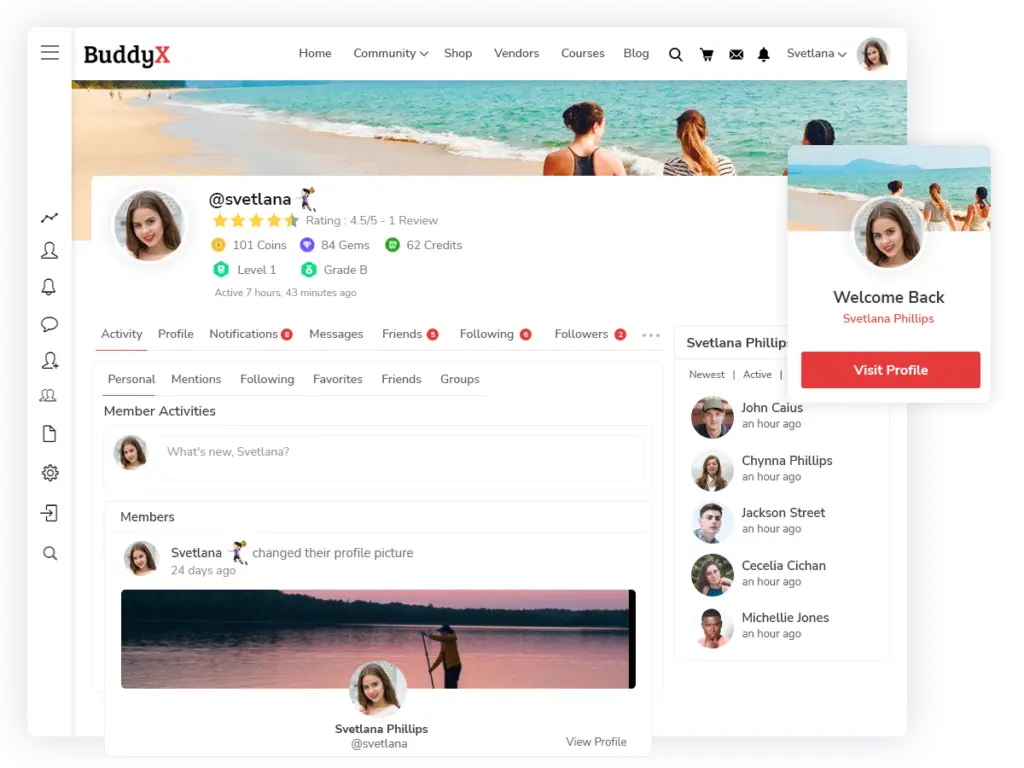
BuddyX Pro, developed by Wbcom Designs, is a premium WordPress social community theme designed specifically for BuddyPress, BuddyBoss, and other popular community plugins. It provides a clean, modern, and mobile-first design tailored for online communities, membership sites, and e-learning platforms.
Unlike multipurpose themes that need heavy customisation, BuddyX Pro is built from the ground up for communities—making it one of the most reliable options for site owners who want professional, ready-to-use layouts for social networking, groups, forums, and memberships.
Key Features
BuddyX Pro offers features optimised for WordPress Social Community Plugins and Themes:
- BuddyPress & BuddyBoss Integration: Fully compatible with both platforms for social networking.
- Community Layouts: Pre-designed templates for activity feeds, groups, and member profiles.
- E-Learning Ready: Works seamlessly with LearnDash, Tutor LMS, and LifterLMS.
- Membership Compatibility: Integrates with MemberPress, Paid Memberships Pro, and Ultimate Member.
- WooCommerce Support: Built-in compatibility for community marketplaces and online stores.
- Events Integration: Compatible with The Events Calendar and WP Event Manager.
- Gamification Support: Works with GamiPress and myCred for engagement.
- Mobile-First Design: Fully responsive with a mobile-friendly layout.
- Performance Optimised: Lightweight, SEO-friendly, and optimised for fast loading.
- Customisation Options: Easily customise colours, typography, and layouts without coding.
Why Choose BuddyX Pro?
BuddyX Pro is crafted for site owners who want to launch communities quickly without coding. Its strength lies in:
- Specialisation: Unlike multipurpose themes, it focuses exclusively on social networking and community building.
- Ease of Use: Pre-built demos make setup quick and straightforward.
- Integrations: Works smoothly with all major WordPress social community plugins.
- Flexibility: Suitable for social networks, e-learning sites, membership platforms, or hybrid communities.
Pros
- Purpose-built for communities, not a generic theme.
- Deep integration with BuddyPress, BuddyBoss, and LMS plugins.
- Optimized for mobile and modern user experience.
- Regular updates and strong support from Wbcom Designs.
- Works well with gamification, events, and WooCommerce add-ons.
Cons
- Premium-only (no free version available).
- Requires plugins (BuddyPress, BuddyBoss, LMS tools) to unlock full potential.
- Best suited for communities—less flexibility for non-community websites.
Ideal Use Cases
- Online Learning Communities: Combine BuddyX Pro with LearnDash or Tutor LMS for interactive student platforms.
- Membership Sites: Integrate with MemberPress or Paid Memberships Pro for gated communities.
- Business & Professional Networks: Create LinkedIn-style networking platforms.
- Social Clubs & Hobby Groups: Build vibrant communities around shared interests.
Pricing
BuddyX Pro is a premium theme, available through Wbcom Designs. Pricing typically starts at $59 per year, with higher plans for agencies or lifetime access.
BuddyX Pro is one of the best choices among WordPress Social Community Themes, especially if you’re using BuddyPress, BuddyBoss, or LMS plugins. With its modern design, deep integrations, and mobile-friendly layouts, it provides everything needed to create a thriving online community.
2. Reign Theme: A Versatile WordPress Community Theme

Reign Theme, created by Wbcom Designs, is a multipurpose yet community-focused WordPress theme built to integrate seamlessly with BuddyPress, BuddyBoss, and popular membership & LMS plugins. It’s designed for flexibility, making it a great choice for building social communities, e-learning platforms, and membership sites.
Unlike BuddyX Pro, which is streamlined for social networking, Reign offers multiple demos and layouts, giving site owners more design freedom while still being community-centric.
Key Features
Reign comes packed with tools that support WordPress Social Community Plugins and Themes:
- BuddyPress & BuddyBoss Ready: Fully compatible for creating social networking features.
- Pre-Built Demos: Multiple demos for communities, memberships, e-learning, and business networks.
- Advanced Profile & Group Layouts: Customizable templates for user profiles, groups, and activity feeds.
- LMS Integrations: Works with LearnDash, Tutor LMS, and LifterLMS for online learning communities.
- Membership Plugin Support: Integrates with MemberPress, Paid Memberships Pro, Restrict Content Pro, and Ultimate Member.
- WooCommerce Integration: Build marketplaces or stores directly inside your community.
- Event Management Ready: Works with The Events Calendar and WP Event Manager.
- Customisation Options: Live customizer for colours, typography, and layouts.
- Responsive Design: Optimised for mobile and tablet experiences.
- Performance & SEO Optimised: Lightweight coding ensures speed and search visibility.
Why Choose Reign Theme?
Reign stands out because of its versatility. Whether you’re building a social network, an e-learning hub, or a professional membership site, Reign adapts easily. It’s especially useful for:
- Site owners who want multiple layout choices.
- Communities that mix social networking with e-learning.
- Membership sites that need monetisation features and gated content.
Pros
- Highly versatile with multiple demo options.
- Deep integrations with BuddyPress, BuddyBoss, and LMS plugins.
- Supports popular membership and monetisation tools.
- Professional layouts for profiles, groups, and directories.
- Actively developed and supported by Wbcom Designs.
Cons
- Premium-only (no free version).
- It may feel heavier than BuddyX Pro for small projects.
- Requires plugin pairings (BuddyPress, LMS, or membership plugins) for full functionality.
Ideal Use Cases
- E-Learning Communities: Combine Reign with LearnDash or Tutor LMS to create learning-focused social platforms.
- Membership Sites: Build subscription-based communities with MemberPress or Paid Memberships Pro.
- Business Networks: Create LinkedIn-style networking communities with professional profiles and groups.
- Hybrid Communities: For platforms that combine forums, memberships, events, and e-commerce.
Pricing
Reign Theme is a premium product available from Wbcom Designs. Pricing generally starts at $69 per year, with lifetime access available for higher tiers.
Reign Theme is one of the most versatile and professional WordPress Social Community Themes. With its ready-to-use demos, flexible layouts, and wide plugin integrations, it’s a powerful option for anyone who wants to create multi-functional, community-driven websites.
3. BuddyBoss Theme: The Flagship Theme for WordPress Communities
The BuddyBoss Theme is the official premium theme built to complement the BuddyBoss Platform. Together, they form one of the most complete solutions for creating WordPress-based social networks, membership sites, and e-learning platforms.
Unlike general-purpose themes, the BuddyBoss Theme is purpose-built for communities. It offers a sleek, modern design that’s deeply integrated with BuddyBoss features, as well as membership and LMS plugins like MemberPress, Paid Memberships Pro, LearnDash, and LifterLMS.
For anyone serious about building a large-scale community with WordPress, the BuddyBoss Theme is often considered the gold standard.
Key Features
The BuddyBoss Theme provides a polished user experience with advanced integrations:
- Seamless BuddyBoss Platform Integration: Out-of-the-box compatibility for profiles, groups, messaging, and forums.
- Modern Community Layouts: Professionally designed templates for activity feeds, groups, and member directories.
- E-Learning Ready: Deep integration with LearnDash and LifterLMS for online learning communities.
- Membership Compatibility: Works with MemberPress, Paid Memberships Pro, and Restrict Content Pro.
- Gamification Support: Compatible with GamiPress and myCred for rewarding engagement.
- Events & Meetups: Supports event plugins like The Events Calendar and WP Event Manager.
- Mobile Responsiveness: Fully responsive design optimized for all devices.
- Custom Branding Options: Customize logos, colors, typography, and layouts to match your brand.
- BuddyBoss App Integration: Works seamlessly with the BuddyBoss App, allowing you to launch a branded mobile app.
- Performance & SEO Optimized: Designed to handle large communities with speed and scalability.
Why Choose BuddyBoss Theme?
The BuddyBoss Theme is the go-to choice for anyone who wants a professional, enterprise-ready community platform. It’s:
- All-in-One: No need to worry about third-party compatibility issues.
- Polished & Modern: Offers a premium look and feel right out of the box.
- Future-Proof: Works seamlessly with the BuddyBoss App for mobile-first communities.
- Scalable: Built to handle thousands of users, making it ideal for large communities.
Pros
- Complete community solution when paired with the BuddyBoss Platform.
- Modern, responsive, and professional design.
- Deep integrations with LMS, membership, and gamification plugins.
- Strong support and documentation from the BuddyBoss team.
- Mobile app compatibility for extended community engagement.
Cons
- Premium-only; no free version.
- Relatively expensive compared to other community themes.
- Best performance is tied to the BuddyBoss ecosystem, limiting flexibility for those wanting full open-source setups.
- Can feel heavy for smaller projects that don’t need enterprise-level features.
Ideal Use Cases
- E-Learning Platforms: Combine with LearnDash for a full LMS + community solution.
- Large Membership Sites: Monetize content and create premium social networks.
- Professional Communities: Build business or niche networks similar to LinkedIn.
- Mobile-First Communities: Use with the BuddyBoss App for branded mobile experiences.
Pricing
The BuddyBoss Theme is sold as part of the BuddyBoss package, typically priced at around $228 per year for one site. Higher pricing tiers are available for multiple-site licenses.
The BuddyBoss Theme is one of the strongest contenders in the WordPress Social Community Themes category. With its sleek design, tight integration with BuddyBoss Platform, and mobile app support, it’s an ideal choice for businesses, educators, and entrepreneurs who want to launch professional, scalable online communities.
4. Kleo Theme: A Multipurpose WordPress Community Theme
Kleo Theme is a highly popular WordPress multipurpose theme that comes with dedicated support for BuddyPress, BuddyBoss, and membership plugins. With over 20,000 sales on ThemeForest, Kleo has become a go-to option for site owners who want a flexible theme that works for communities, memberships, e-learning, and business websites.
Unlike niche themes that focus exclusively on communities, Kleo is multi-purpose, meaning it can also be used for corporate websites, portfolios, or blogs. This versatility makes it an appealing option for businesses or creators who want a community site plus other functionality in one theme.
Key Features
Kleo is packed with features tailored for community websites and beyond:
- BuddyPress & BuddyBoss Integration: Pre-built demos for social networking sites.
- Multiple Demos & Layouts: Importable demos for communities, memberships, blogs, and corporate sites.
- Membership Plugin Support: Compatible with Paid Memberships Pro, MemberPress, and Ultimate Member.
- Community Features: Profile pages, member directories, and activity feeds styled for BuddyPress.
- WooCommerce Ready: Built-in shop layouts for community marketplaces.
- Visual Page Builder: Includes WPBakery Page Builder for drag-and-drop customisation.
- LMS Integration: Works with LearnDash and Sensei LMS for e-learning communities.
- Events Support: Compatible with The Events Calendar for community events.
- Customization Options: Advanced theme panel for colors, typography, and layout control.
- Mobile-Friendly Design: Fully responsive and retina-ready.
Why Choose Kleo?
Kleo is one of the few themes that blends multipurpose design with strong community support. It’s ideal if you want a theme that can do more than just host a social network. For example, you can build a corporate website with an integrated community portal, or an e-learning site with social networking features.
Pros
- Multipurpose theme with dedicated BuddyPress/BuddyBoss support.
- A large number of demos for different website types.
- Active development and updates for over a decade.
- Includes WPBakery Page Builder for easy customisation.
- Flexible enough for communities, businesses, blogs, and more.
Cons
- Relies on WPBakery, which is less modern compared to Elementor.
- Multipurpose design may feel heavier than niche community themes like BuddyX Pro.
- Some community-specific features require BuddyPress/BuddyBoss plugins.
- Requires careful setup to avoid bloated performance.
Ideal Use Cases
- Community + Business Sites: Companies that want a main website plus an integrated community.
- Membership Platforms: Combine with Paid Memberships Pro or MemberPress for paid access.
- E-Learning Communities: Use with LearnDash to build education-focused platforms.
- Creative & Lifestyle Communities: Niche groups or hobby communities with styled profiles and activity feeds.
Pricing
Kleo is available exclusively on ThemeForest, priced at around $59 (one-time fee), which includes lifetime updates and six months of support (extendable).
Kleo Theme is one of the best multipurpose WordPress Social Community Themes. Its flexibility, demos, and integrations make it a solid choice for anyone who wants a community site that also doubles as a business, blog, or e-learning platform.
5. Gwangi Theme: A Social Networking and Membership Theme for WordPress
Gwangi Theme, developed by Themosaurus, is a WordPress social community theme built specifically for BuddyPress and BuddyBoss. Unlike multipurpose themes like Kleo, Gwangi is laser-focused on social networking, dating platforms, and membership communities.
It comes with modern demos, strong integrations, and customizable layouts that make it easy to create communities where members can connect, interact, and even form relationships. This makes Gwangi especially popular for niche communities, dating sites, and membership-driven platforms.
Key Features
Gwangi provides all the tools needed for community-based websites:
- BuddyPress & BuddyBoss Integration: Deep compatibility for profiles, groups, activity feeds, and messaging.
- Membership Support: Works with Paid Memberships Pro and other membership plugins.
- Pre-Built Demos: Importable demos for dating sites, social networks, and niche communities.
- Profile Matching & Search: Advanced member directory with filters for matchmaking and networking.
- E-Learning Compatibility: Supports LearnDash and LifterLMS for educational communities.
- WooCommerce Ready: Add store or marketplace functionality.
- Events & Forums: Compatible with bbPress and The Events Calendar for discussions and events.
- Page Builder Support: Built for Elementor, allowing easy drag-and-drop customisation.
- Mobile-Responsive: Optimised layouts for mobile users, critical for social and dating communities.
- Customisation Options: Flexible settings for branding, typography, and layouts.
Why Choose Gwangi?
Gwangi stands out for its community-first focus, especially in the niches of dating and matchmaking. While it works for general communities, its advanced member search and filtering features make it ideal for networking and relationship-building platforms.
Pros
- Specifically designed for communities, dating, and memberships.
- Ready-to-use demos for fast setup.
- Advanced profile and member search features.
- Strong integrations with membership, LMS, and e-commerce plugins.
- Elementor support for modern customisation.
Cons
- Premium-only; no free version.
- Niche-focused — may be overkill for small communities or blogs.
- Requires BuddyPress/BuddyBoss for full functionality.
- Some dating-specific features may not be useful for non-dating communities.
Ideal Use Cases
- Dating Websites: Use advanced member search and profile matching features.
- Social Communities: Build general-purpose social networks with groups and forums.
- Membership Platforms: Monetise with Paid Memberships Pro or MemberPress.
- E-Learning Communities: Combine with LMS plugins for student interaction and networking.
- Professional Networking Sites: Create LinkedIn-style niche networks.
Pricing
Gwangi is available on ThemeForest at around $69 (one-time fee), which includes lifetime updates and six months of support (extendable).
Gwangi Theme is one of the best niche-focused WordPress Social Community Themes, particularly for dating and networking platforms. With its BuddyPress/BuddyBoss integration, member directories, and profile matching tools, it provides everything needed to create a thriving interactive community.
6. Aardvark Theme: A Community-First WordPress Theme
Aardvark Theme, developed by GhostPool, is a premium WordPress community theme built primarily for BuddyPress, BuddyBoss, and membership plugins. Unlike many multipurpose themes, Aardvark is community-first, designed specifically for social networking, membership platforms, and e-learning sites.
It comes packed with over 200 theme options, making it highly customizable without requiring coding skills. With a strong focus on memberships, courses, and gamified communities, Aardvark is popular among creators, educators, and entrepreneurs who want a professional, all-in-one solution.
Key Features
Aardvark offers extensive tools for community and membership platforms:
- BuddyPress & BuddyBoss Integration: Full support for profiles, groups, and messaging.
- Membership Support: Works with Paid Memberships Pro, MemberPress, and Restrict Content Pro.
- LMS Integrations: Compatible with LearnDash, LifterLMS, Sensei LMS, and Tutor LMS.
- WooCommerce Ready: Supports stores and marketplaces within your community.
- Pre-Built Demos: Importable demos for social networks, e-learning platforms, and membership sites.
- Gamification Support: Compatible with GamiPress and myCred for badges and points.
- SEO & Performance Optimised: Designed for speed and search engine visibility.
- Drag-and-Drop Page Builder: Comes with WPBakery Page Builder for easy customisation.
- Events Support: Works with The Events Calendar for community event listings.
- Blogging & Content Features: Includes multiple post formats, layouts, and blog options.
Why Choose Aardvark?
Aardvark is one of the most comprehensive community themes available. Its strength lies in versatility—it works equally well for social communities, e-learning hubs, membership sites, and even online marketplaces. Unlike some themes that require multiple plugins to achieve these functions, Aardvark provides out-of-the-box layouts and options for each.
Pros
- Community-first design, built for BuddyPress/BuddyBoss.
- Wide compatibility with membership, LMS, and gamification plugins.
- Multiple demos for quick setup across different use cases.
- 200+ customisation options without coding.
- Regular updates and solid documentation.
Cons
- Premium-only; no free version.
- Relies on WPBakery instead of Elementor, which some users find limiting.
- It can feel overwhelming due to its many customisation options.
- Heavier compared to lighter themes like BuddyX Pro.
Ideal Use Cases
- E-Learning Communities: Perfect for online schools or training platforms with courses + student networking.
- Membership Sites: Subscription-driven communities with gated content.
- Professional Networks: Create LinkedIn-style networks with advanced profile features.
- Niche Social Communities: Build hobby or lifestyle communities with engagement features.
- Hybrid Platforms: Combine forums, memberships, e-learning, and e-commerce.
Pricing
Aardvark is available exclusively on ThemeForest, priced at around $65 (one-time fee), which includes lifetime updates and six months of support (extendable).
Aardvark Theme is one of the most versatile and feature-rich WordPress Social Community Themes. With its strong BuddyPress/BuddyBoss integration, LMS support, and membership-ready features, it’s a go-to choice for building professional, large-scale communities.
7. Olympus Theme: A Stylish BuddyPress and BuddyBoss Community Theme
Olympus Theme, developed by Crumina, is a premium WordPress social community theme built to work seamlessly with BuddyPress, BuddyBoss, and bbPress. Unlike multipurpose themes, Olympus is designed specifically for online communities, forums, and social networking platforms, offering a sleek, modern look that feels similar to mainstream social media sites.
It is especially popular for hobby communities, lifestyle networks, and creative social platforms, where design plays an important role in user engagement.
Key Features
Olympus comes with features tailored to community building:
- BuddyPress & BuddyBoss Support: Fully compatible for user profiles, groups, and messaging.
- Modern UI/UX: Clean, social media-inspired design for feeds, groups, and directories.
- bbPress Integration: Built-in forum support for structured discussions.
- WooCommerce Ready: Add e-commerce functionality for community marketplaces.
- Pre-Built Demos: Quick-start demos for social communities and forums.
- Elementor Compatibility: Drag-and-drop customisation using Elementor page builder.
- Blogging Options: Multiple layouts for blogs and content publishing.
- Mobile-Responsive Design: Optimised for smartphones and tablets.
- Theme Customizer: Options for colours, typography, and layouts without coding.
Why Choose Olympus Theme?
Olympus stands out because of its modern and engaging design, making it perfect for site owners who want their community to feel like a polished, professional social network. It’s also lightweight compared to larger, multipurpose themes, which helps with performance.
Pros
- Stylish, social media-inspired design out of the box.
- Deep BuddyPress and BuddyBoss integration.
- Elementor supports easy customisation.
- Built-in bbPress compatibility for forums.
- Affordable compared to some premium community themes.
Cons
- Premium-only; no free version.
- Smaller ecosystem and support community compared to BuddyBoss or Reign.
- Lacks built-in LMS-focused features (requires additional plugins).
- Less flexible for large-scale enterprise communities.
Ideal Use Cases
- Hobby Communities: Lifestyle groups, fan clubs, and creative communities.
- Small-to-Medium Social Networks: Communities that want a modern design without over-complexity.
- Forum-Based Platforms: Combine with bbPress for discussion boards.
- Content + Community Sites: Bloggers who want to add social networking to their websites.
Pricing
Olympus Theme is sold on ThemeForest, typically priced at $69 (one-time fee), which includes lifetime updates and six months of support (extendable).
Olympus Theme is one of the most stylish options among WordPress Social Community Themes, perfect for communities that want a modern, social-media-like design without needing the complexity of enterprise-level solutions.
8. Socialise Theme: A Community-Driven WordPress Theme for BuddyPress
Socialise Theme, created by GhostPool, is a premium WordPress social community theme built specifically for BuddyPress and bbPress. Unlike multipurpose themes, Socialise focuses heavily on social networking, forums, and community interaction, making it an excellent choice for anyone looking to create an online hub for members to connect and engage.
It’s one of the earlier dedicated BuddyPress themes that has stayed relevant thanks to its modern layouts, community-focused features, and strong compatibility with third-party plugins.
Key Features
Socialise provides everything you need to build a community-oriented website:
- BuddyPress Integration: Full support for profiles, groups, activity feeds, and messaging.
- bbPress Compatibility: Pre-styled forums for structured discussions.
- Multiple Layout Options: Grid, list, and masonry layouts for posts and communities.
- Event Support: Compatible with The Events Calendar for community events.
- WooCommerce Ready: Add e-commerce functionality with pre-designed shop layouts.
- Visual Composer Support: Includes WPBakery Page Builder for customisation.
- Ajax Filtering & Search: Quick search and filtering for posts and members.
- Mobile-Responsive: Optimised for mobile and tablet experiences.
- Custom Widgets: Built-in widgets for activity, members, and groups.
Why Choose Socialize Theme?
Socialize Theme is built with community engagement at its core. It’s a great option if you want to create a forum-heavy or activity-driven website with BuddyPress and bbPress. Its layouts are designed to keep users engaged, with easy navigation between feeds, groups, and forums.
Pros
- Purpose-built for communities, not a generic theme.
- Strong BuddyPress and bbPress integration.
- Includes multiple layouts and customisation options.
- Built-in Ajax search and filtering improve usability.
- Good balance between community features and design flexibility.
Cons
- Premium-only; no free version.
- Uses WPBakery Page Builder instead of Elementor.
- Smaller design ecosystem compared to newer themes like Reign or BuddyX Pro.
- Requires plugins (BuddyPress, bbPress, events) for full functionality.
Ideal Use Cases
- Forum Communities: Perfect for discussion-heavy platforms with bbPress.
- Activity-Focused Networks: Social communities where feeds, groups, and messaging are central.
- Membership Platforms: Combine with Paid Memberships Pro or MemberPress to monetize access.
- Hybrid Communities: Sites combining forums, events, and social interaction.
Pricing
Socialize Theme is available on ThemeForest, priced at about $59 (one-time fee), including lifetime updates and six months of support (extendable).
Socialize Theme is one of the most community-focused WordPress Social Community Themes, especially well-suited for forum-heavy networks and activity-driven platforms. It remains a reliable choice for anyone who wants to build a dynamic, BuddyPress-powered social community.
9. Astra Theme: A Multipurpose Theme Adaptable for WordPress Communities

Astra Theme, developed by Brainstorm Force, is one of the most widely used WordPress multipurpose themes, with over 1 million active installations. While it isn’t built exclusively for communities like BuddyX Pro, Reign, or BuddyBoss Theme, Astra’s lightweight design, speed optimization, and plugin compatibility make it a strong foundation for WordPress social community websites.
By pairing Astra with BuddyPress, BuddyBoss, or membership plugins, site owners can transform it into a fully functional community-driven platform.
Key Features
Astra’s flexibility makes it a reliable option for various community setups:
- BuddyPress & BuddyBoss Compatibility: Works with both platforms for social networking functionality.
- Lightweight Performance: Loads in under 0.5 seconds with minimal resources.
- Pre-Built Starter Templates: Importable demos for faster setup (community-ready templates available via third parties).
- WooCommerce Integration: Perfect for communities with marketplaces or membership stores.
- LMS Support: Seamlessly integrates with LearnDash, LifterLMS, and Tutor LMS for e-learning communities.
- Page Builder Compatibility: Works with Elementor, Beaver Builder, and Gutenberg for drag-and-drop customization.
- Advanced Customization: Colors, typography, layouts, and headers can be tweaked without coding.
- SEO Optimized: Schema markup and clean code for better rankings.
- Mobile-Friendly Design: Fully responsive with device-specific controls.
Why Choose Astra for Communities?
Astra is not a dedicated community theme, but it’s an excellent choice if you:
- Want a lightweight, fast, and flexible base theme.
- Plan to use BuddyPress or BuddyBoss for social networking features.
- Need strong integrations with LMS or membership plugins.
- Want a multi-purpose website (business + community + blog + store).
Pros
- Free version available with strong core features.
- Extremely lightweight and performance-focused.
- Flexible enough for communities, memberships, e-learning, or corporate sites.
- Works with all major page builders.
- Large ecosystem of add-ons and third-party templates.
Cons
- Not built specifically for communities—requires plugins for social features.
- Community-focused demos are limited compared to BuddyX Pro or Reign.
- Some advanced features (sticky headers, white labeling) require Astra Pro.
- Less “out-of-the-box” ready for communities compared to BuddyBoss Theme.
Ideal Use Cases
- Hybrid Websites: Businesses that want a corporate website plus a community portal.
- E-Learning Platforms: Combine Astra + LearnDash + BuddyBoss for education-driven communities.
- Membership Sites: Use Astra with MemberPress or Paid Memberships Pro to build gated networks.
- Small to Medium Communities: Perfect for site owners who prefer performance and flexibility over pre-built layouts.
Pricing
The Astra Theme is free, with the Astra Pro Add-on starting at $59 per year. Higher-tier plans (Essential or Growth Bundle) include premium starter templates and integrations.
Astra Theme is one of the most versatile WordPress themes and works as a lightweight, flexible foundation for social communities. While it doesn’t provide community features by itself, pairing it with BuddyPress, BuddyBoss, or membership plugins makes Astra a solid choice for anyone who values performance, flexibility, and scalability.
10. Divi Theme: A Popular Multipurpose Theme for WordPress Communities
Divi Theme, developed by Elegant Themes, is one of the most widely used WordPress multipurpose themes. While Divi is not built specifically for communities, its visual drag-and-drop builder, performance optimizations, and compatibility with BuddyPress and BuddyBoss make it a strong option for those who want a custom-designed social community platform.
With Divi, you get complete design flexibility while relying on community plugins to add networking, profiles, groups, and memberships.
Key Features
- BuddyPress & BuddyBoss Compatibility: Works with social plugins to enable community features.
- Divi Builder: Drag-and-drop page builder with hundreds of pre-built modules.
- Pre-Made Layouts: 2,000+ layouts for different industries, easily adaptable for community sites.
- WooCommerce Integration: Build stores or marketplaces inside your community.
- LMS Support: Works with LearnDash and LifterLMS for e-learning platforms.
- Customization Tools: Global styling, custom headers/footers, advanced typography.
- Mobile Optimization: Fully responsive layouts with device-specific controls.
- Performance Enhancements: Divi performance updates make it lighter and faster than older versions.
Why Choose Divi?
Divi is perfect if you want creative freedom. It doesn’t lock you into predefined layouts like BuddyX Pro or Reign. Instead, you get full visual customization. However, it does require more work to set up a community compared to a theme designed specifically for BuddyPress.
Pros
- Highly flexible with unlimited customization options.
- Drag-and-drop builder is beginner-friendly.
- Works well with BuddyPress, BuddyBoss, and LMS plugins.
- Huge template library.
- Strong support and regular updates from Elegant Themes.
Cons
- Not built specifically for communities—requires extra configuration.
- Can feel heavy if not optimized properly.
- Premium-only; no free version.
- May require third-party plugins for certain design elements.
Ideal Use Cases
- Hybrid Sites: Business + blog + community under one theme.
- Custom-Branded Communities: Perfect for agencies and brands that want unique designs.
- E-Learning Platforms: Pair with LearnDash for online courses and communities.
- Membership Communities: Combine with MemberPress or Paid Memberships Pro.
Pricing
Divi is available as part of an Elegant Themes membership, priced at $89 per year or $249 lifetime access.
Divi Theme is an excellent choice for those who want full creative control while building communities with BuddyPress or BuddyBoss. It’s not as community-ready out of the box as BuddyX or Reign, but it excels in design flexibility and scalability.
11. OceanWP: A Lightweight Multipurpose Theme for Communities
OceanWP is another popular WordPress multipurpose theme with a focus on performance and flexibility. Known for its lightweight design and deep WooCommerce integrations, OceanWP also supports BuddyPress, BuddyBoss, and membership plugins, making it a reliable choice for community-based websites.
It’s a great option for site owners who want a fast, responsive theme that works well with social plugins while still offering professional layouts for other types of websites.
Key Features
- BuddyPress & BuddyBoss Ready: Full support for profiles, groups, and activity feeds.
- Lightweight Performance: Fast loading and optimized for SEO.
- Starter Templates: Pre-built demos for various industries, adaptable for communities.
- WooCommerce Support: Deep integrations with advanced store features.
- LMS Integration: Compatible with LearnDash, Tutor LMS, and LifterLMS.
- Page Builder Compatibility: Works with Elementor, Beaver Builder, and Gutenberg.
- Responsive Design: Mobile-first layouts with customization options.
- Extensions: Premium extensions for popups, sticky headers, white labeling, and more.
Why Choose OceanWP?
OceanWP is perfect for those who prioritize speed, performance, and flexibility. It’s lighter than Divi and more focused on WooCommerce + community setups.
Pros
- Free version available with strong features.
- Lightweight and performance-friendly.
- Highly compatible with community and LMS plugins.
- WooCommerce-ready with advanced store features.
- Works with all major page builders.
Cons
- Community demos are limited compared to BuddyX or BuddyBoss.
- Many advanced features require the premium version.
- Not specifically designed for communities.
- Requires configuration for social networking sites.
Ideal Use Cases
- E-Commerce + Community: Perfect for communities with a built-in store.
- Small-to-Medium Communities: Lightweight setup for membership sites.
- Learning Platforms: Combine OceanWP with LMS plugins for e-learning.
- General Purpose Sites: Business websites with community sections.
Pricing
OceanWP is available as a free theme, with premium plans starting at $43 per year for one site and scaling up for agencies and bundles.
OceanWP is a strong option if you want a lightweight, flexible multipurpose theme that integrates well with BuddyPress, BuddyBoss, and membership plugins. While it’s not built specifically for social communities, it offers great performance and compatibility for community-driven websites.
12. GeneratePress: A Lightweight, Performance-Focused Theme for Communities
GeneratePress is a highly popular lightweight multipurpose WordPress theme, known for its speed, clean code, and flexibility. With over 500,000 active installs, it’s trusted by developers, agencies, and businesses who prioritize performance.
While GeneratePress is not a community theme by default, its compatibility with BuddyPress, BuddyBoss, membership plugins, and LMS tools makes it a reliable foundation for WordPress social communities.
Key Features
GeneratePress provides a performance-first approach while remaining flexible:
- BuddyPress & BuddyBoss Compatibility: Works seamlessly with social networking plugins.
- Lightweight Design: Less than 10 KB of resources, making it one of the fastest WordPress themes.
- Starter Sites: Importable site templates through the Site Library.
- WooCommerce Support: Deep integration for e-commerce and community marketplaces.
- LMS Integrations: Works with LearnDash, Tutor LMS, and LifterLMS.
- Page Builder Ready: Compatible with Elementor, Beaver Builder, and Gutenberg.
- Advanced Customization: Includes layout controls, typography, and color options.
- SEO Optimized: Schema markup and clean code for better search visibility.
- Accessibility Ready: Meets WCAG 2.0 standards for inclusive design.
Why Choose GeneratePress?
GeneratePress is a great option if your priority is speed and scalability. Communities with lots of members, forums, and activity streams can be resource-intensive—so starting with a lightweight theme ensures faster load times and smoother performance.
It’s especially well-suited for developers or site owners who want a clean foundation and plan to style their community site with BuddyBoss, BuddyPress, or page builders.
Pros
- Free version available with strong features.
- Extremely lightweight and fast.
- Compatible with BuddyPress, BuddyBoss, and LMS plugins.
- Developer-friendly with hooks and filters.
- Strong documentation and support.
Cons
- Not community-focused out of the box.
- Requires customization or pairing with BuddyBoss for advanced layouts.
- Limited pre-built demos compared to themes like Divi or Astra.
- Premium features are necessary for full flexibility.
Ideal Use Cases
- Large Communities: Scalable performance for sites with thousands of members.
- E-Learning Platforms: Lightweight base theme for LMS + community integrations.
- Membership Sites: Combine with Paid Memberships Pro or MemberPress for speed-optimized networks.
- Developer Projects: Perfect for agencies or developers building custom community sites.
Pricing
GeneratePress is available as a free theme, with the Premium Add-on starting at $59 per year or $249 for lifetime access.
GeneratePress is one of the best choices for site owners who want a lightweight, high-performance foundation for their communities. When paired with BuddyBoss or BuddyPress, it becomes a fast and reliable option for building scalable WordPress social community websites.
Step-by-Step Guide to Building a WordPress Community Website
Creating a thriving online community doesn’t have to be overwhelming. With the right WordPress Social Community Plugins and Themes, you can launch a professional community platform that fits your goals. Here’s a step-by-step guide to walk you through the process.
Step 1: Define the Purpose of Your Community
Before installing any plugin or theme, clarify what your community is about. Ask yourself:
-
Do you want a social networking site like Facebook?
-
Are you building an e-learning community for students?
-
Do you need a membership site with premium content?
-
Is it a forum-based community for discussions?
Clearly defining the purpose will help you choose the right tools and features later.
Step 2: Choose Reliable Hosting and Install WordPress
A community website requires solid hosting because user profiles, activity streams, and forums can be resource-heavy.
-
Go for managed WordPress hosting (like SiteGround, Kinsta, or WP Engine) for better performance.
-
Install WordPress using your hosting provider’s one-click installer.
Step 3: Select a Community Theme
Your theme determines how your community looks and feels. Popular WordPress Social Community Themes include:
-
BuddyX Pro – Modern and lightweight, perfect for BuddyPress and BuddyBoss.
-
Reign – Versatile for memberships, e-learning, and business communities.
-
BuddyBoss Theme – Premium, enterprise-ready, integrates with BuddyBoss Platform.
-
Kleo or Gwangi – Stylish options for multipurpose or niche communities.
-
Astra or GeneratePress – Lightweight foundations for performance-driven sites.
Choose a theme that fits your purpose, budget, and design preferences.
Step 4: Install Essential Community Plugins
Next, add functionality with WordPress Social Community Plugins:
-
BuddyBoss Platform or BuddyPress: For core social features (profiles, groups, activity feeds, messaging).
-
bbPress or wpForo: For forums and structured discussions.
-
MemberPress or Paid Memberships Pro: For membership management and monetization.
-
LearnDash or Tutor LMS: For e-learning communities.
-
The Events Calendar or WP Event Manager: For community events and meetups.
-
GamiPress or myCred: For gamification, points, and engagement rewards.
You can mix and match depending on your community type.
Step 5: Configure User Registration and Profiles
Enable easy onboarding so members can join quickly:
-
Use plugins like Ultimate Member or ProfileGrid for advanced registration fields.
-
Enable social login (Facebook, Google, Twitter) to reduce sign-up friction.
-
Customize user profiles with avatars, bios, and activity streams.
Step 6: Add Core Community Features
Once the basics are ready, add features that encourage interaction:
-
Groups & Forums: Let members form groups and start discussions.
-
Private Messaging: Enable one-to-one chats.
-
Activity Feeds: Keep members updated with real-time posts and comments.
-
Events: Allow event creation and RSVPs for online/offline gatherings.
-
Gamification: Add badges, ranks, and rewards for active members.
Step 7: Monetize Your Community (Optional)
If your goal includes revenue generation, set up monetization:
-
Create paid membership tiers with MemberPress or Paid Memberships Pro.
-
Sell online courses with LearnDash or LifterLMS.
-
Open a store with WooCommerce for community merchandise.
-
Offer premium events with The Events Calendar + Event Tickets.
Step 8: Optimize for Performance and Security
A growing community needs to be fast and secure:
-
Use caching plugins (e.g., WP Rocket or W3 Total Cache) to speed up load times.
-
Add a CDN (Content Delivery Network) like Cloudflare for global reach.
-
Secure your site with SSL and security plugins like Wordfence.
-
Regularly update plugins, themes, and WordPress core.
Step 9: Encourage Engagement and Growth
Building a community doesn’t end at launch. You’ll need to nurture engagement:
-
Use email marketing (Mailchimp, FluentCRM) to keep members updated.
-
Add gamification rewards to motivate activity.
-
Host regular events, challenges, or webinars.
-
Listen to feedback and evolve based on member needs.
Step 10: Scale Your Community
As your community grows:
-
Upgrade hosting to handle more members.
-
Add advanced features like mobile apps (BuddyBoss App).
-
Expand with multilingual support for international users.
-
Consider integrating analytics tools to measure member behavior and retention.
Following these steps, you can go from a blank WordPress install to a fully functional online community that is engaging, scalable, and monetizable — powered by the right WordPress Social Community Plugins and Themes.
Best Combinations of WordPress Social Community Plugins and Themes
Building a thriving online community isn’t just about choosing the right plugin or the right theme — it’s about selecting the best combination of tools that work together seamlessly. The right stack ensures you get the features you need, a professional design, smooth performance, and scalability as your community grows.
Below, we’ll explore the top pairings of plugins and themes for different types of community websites, followed by cost considerations and performance tips.
1. Social Networking Communities (Facebook/LinkedIn-Style)
-
Recommended Plugins: BuddyBoss Platform (or BuddyPress) + bbPress + GamiPress
-
Recommended Themes: BuddyBoss Theme, BuddyX Pro, or Gwangi
Why This Works:
-
The BuddyBoss Platform (or BuddyPress for open-source fans) provides profiles, groups, private messaging, and news feeds, which are the backbone of any social network.
-
bbPress handles structured discussions in forum-style communities.
-
GamiPress adds a layer of gamification with points, badges, and leaderboards, which motivates user participation.
-
Themes like BuddyBoss Theme and BuddyX Pro deliver sleek, responsive layouts tailored for social communities, while Gwangi is perfect for niche or lifestyle-oriented networks.
2. Membership-Driven Communities
-
Recommended Plugins: MemberPress or Paid Memberships Pro + BuddyBoss/BuddyPress
-
Recommended Themes: Reign Theme, Aardvark, or Astra (for flexibility)
Why This Works:
-
Membership plugins like MemberPress and PMPro manage subscriptions, role-based content access, and payment gateways.
-
Adding BuddyBoss or BuddyPress ensures members not only pay for access but also connect, interact, and collaborate inside the community.
-
Reign Theme and Aardvark shine because they’re designed for membership + community integrations, while Astra works well as a lightweight, customizable foundation for gated sites.
3. E-Learning Communities
-
Recommended Plugins: LearnDash (or Tutor LMS) + BuddyBoss/BuddyPress + GamiPress
-
Recommended Themes: BuddyBoss Theme, Reign, or Aardvark
Why This Works:
-
LearnDash (or Tutor LMS) provides professional course creation, quizzes, certificates, and drip content.
-
Pairing it with BuddyBoss/BuddyPress adds student interaction through groups, discussion forums, and peer-to-peer messaging.
-
GamiPress gamifies the learning process with points, badges, and ranks for completing courses.
-
BuddyBoss Theme offers tight LearnDash integration, while Reign and Aardvark include pre-designed LMS demos for quick setup.
4. Forum-Based Communities
-
Recommended Plugins: bbPress or wpForo + GamiPress/myCred
-
Recommended Themes: Socialize, Olympus, or Kleo
Why This Works:
-
bbPress and wpForo are lightweight forum solutions that enable structured discussions.
-
Pairing them with GamiPress or myCred ensures active participation by rewarding users for starting topics, posting replies, or engaging in debates.
-
Socialize is built specifically for BuddyPress + bbPress forums, while Olympus and Kleo offer sleek layouts for discussion-driven communities.
5. Niche Hobby or Lifestyle Communities
-
Recommended Plugins: Ultimate Member or ProfileGrid + bbPress + GamiPress
-
Recommended Themes: Gwangi, Olympus, or BuddyX Pro
Why This Works:
-
Ultimate Member and ProfileGrid are simpler membership/community plugins, perfect for smaller networks.
-
bbPress adds a structured forum element, while GamiPress enhances engagement.
-
Gwangi excels in niche dating/lifestyle networks, Olympus offers a stylish social-media-like UI, and BuddyX Pro provides scalability if the community later expands into e-learning or memberships.
6. E-Commerce + Community Sites
-
Recommended Plugins: WooCommerce + BuddyBoss/BuddyPress + myCred
-
Recommended Themes: Reign, Kleo, or OceanWP
Why This Works:
-
WooCommerce powers online stores or marketplaces.
-
With BuddyBoss/BuddyPress, members can not only buy products but also review, recommend, and discuss them within groups.
-
myCred integrates gamification with WooCommerce, rewarding purchases with points and loyalty rewards.
-
Reign and Kleo provide strong WooCommerce layouts with community integration, while OceanWP is a lightweight theme with advanced WooCommerce features.
7. Event-Driven Communities
-
Recommended Plugins: The Events Calendar or WP Event Manager + BuddyPress/BuddyBoss
-
Recommended Themes: BuddyX Pro, Reign, or Astra
Why This Works:
-
The Events Calendar and WP Event Manager allow communities to host, RSVP, and sell tickets for events.
-
BuddyBoss/BuddyPress ensure that events are integrated into the community with discussions, activity updates, and groups.
-
BuddyX Pro and Reign include event-friendly layouts, while Astra provides a lightweight base for event-heavy networks.
Cost Considerations: Free vs. Premium
The cost of building a WordPress community site can vary significantly based on your goals, scale, and the features you need. Some communities can run entirely on free tools, while others require premium plugins and themes for advanced functionality. Here’s a closer look at the three main tiers of investment.
1. Free Setup
- Plugins: BuddyPress + bbPress + Asgaros Forum
- Themes: Astra or OceanWP (free version)
Best For:
- Hobby communities, small clubs, or early-stage projects.
- Beginners who want to test WordPress community-building without financial risk.
What You Get:
- Core social features with BuddyPress (profiles, groups, messaging).
- Forum capabilities with bbPress or Asgaros Forum.
- Lightweight, free themes like Astra or OceanWP for basic customization.
Downsides:
- Limited design control and fewer customization options.
- No built-in monetization or LMS features.
- Community growth may hit performance and scalability limits quickly.
- DIY approach — requires more technical knowledge and plugin tinkering.
Estimated Cost: $0–$50/year (if you add a low-cost domain + shared hosting).
2. Mid-Range Setup
- Plugins: Paid Memberships Pro (PMPro) or MemberPress (basic plan) + wpForo
- Themes: Reign Theme (premium)
Best For:
- Small-to-medium communities that need monetization, gated content, or event management.
- Membership-driven networks or niche communities with recurring revenue models.
What You Get:
- Membership control with PMPro (or MemberPress), including subscription tiers and payment gateways.
- A modern, discussion-driven community with wpForo.
- Reign Theme, which comes with pre-built layouts optimized for social, membership, and e-learning communities.
Advantages:
- Professional design out of the box.
- Ability to charge for memberships, events, or premium content.
- More customization options compared to free themes.
Limitations:
- Still not as polished or all-in-one as premium BuddyBoss setups.
- Requires combining plugins for LMS or gamification.
Estimated Cost: $200–$300/year depending on the chosen membership plugin plan and add-ons.
3. Premium Setup
- Plugins: BuddyBoss Platform + BuddyBoss Theme + LearnDash + GamiPress
- Themes: BuddyBoss Theme (bundled with the platform)
Best For:
- Professional, large-scale communities with thousands of members.
- E-learning ecosystems with courses, gamification, and member networking.
- Businesses or brands that need a polished, scalable, and revenue-generating platform.
What You Get:
- All-in-one community and social networking features with BuddyBoss Platform.
- Professionally designed, responsive layouts with the BuddyBoss Theme.
- E-learning with LearnDash: courses, quizzes, certificates, and student progress tracking.
- Engagement tools with GamiPress: badges, points, leaderboards.
- Mobile app compatibility with the BuddyBoss App (optional extra).
Advantages:
- Enterprise-level features for serious community projects.
- Scalability for thousands of members without performance bottlenecks.
- Seamless integrations with WooCommerce, membership plugins, and LMS tools.
- Ongoing premium support and updates.
Limitations:
- Higher upfront and recurring costs.
- Requires careful hosting selection to maintain performance.
- Best suited for businesses, not casual projects.
Estimated Cost: $400–$700/year depending on add-ons and integrations (hosting not included).
Performance & Scalability Tips for WordPress Communities
Running a WordPress-powered community is exciting, but it also comes with technical challenges. Unlike a simple blog or portfolio site, a community website is dynamic and resource-intensive. Every profile update, private message, or group activity adds to the server load. Without the right setup, performance issues can discourage members and hinder growth.
To ensure your WordPress Social Community Plugins and Themes perform at their best as your network grows, follow these best practices:
1. Choose Lightweight, Optimized Themes
Themes built for performance load faster and scale better:
-
Examples: Astra, BuddyX Pro, GeneratePress.
-
Why It Matters: A bloated theme with unnecessary scripts or heavy design elements slows down page loads. Lightweight themes act as a strong foundation and leave room for your community plugins (BuddyPress, BuddyBoss, LMS, events, etc.) to run smoothly.
2. Use Caching Plugins to Reduce Server Load
Caching creates static versions of your pages and serves them faster:
-
Popular Options: WP Rocket (premium), W3 Total Cache (free), LiteSpeed Cache.
-
Why It Matters: Communities rely on dynamic content, but caching plugins reduce the strain by optimizing assets, compressing files, and minimizing database queries. This is especially critical as your member base grows.
3. Leverage a Content Delivery Network (CDN)
A CDN distributes your site’s content across global servers:
-
Examples: Cloudflare (free & pro plans), BunnyCDN, StackPath.
-
Why It Matters: If you have members worldwide, a CDN ensures images, videos, and scripts load quickly no matter where they are. This improves user experience and reduces server latency.
4. Invest in Quality Hosting
Your hosting choice can make or break your community’s performance:
-
Shared Hosting: Fine for small test communities, but not scalable.
-
Managed WordPress Hosting: SiteGround, Kinsta, or WP Engine provide optimized environments.
-
Dedicated/VPS Hosting: Required for large-scale communities with thousands of members.
-
Why It Matters: Community plugins like BuddyBoss, LearnDash, and WooCommerce generate constant database queries. Quality hosting ensures your server can handle spikes in activity without downtime.
5. Monitor and Limit Add-ons
Every add-on introduces more scripts and queries:
-
Good Practice: Install only what’s essential (e.g., gamification, events, LMS).
-
Why It Matters: Too many overlapping extensions (like multiple chat or event plugins) will slow down your site. Audit plugins regularly and remove those not being used.
6. Optimize Your Database
Communities generate a lot of database activity (user data, forum posts, activity streams):
-
Tools: WP-Optimize, Advanced Database Cleaner.
-
Why It Matters: Cleaning up old revisions, spam comments, and transient data improves performance and keeps your site lean.
7. Scale Gradually with Features
It’s tempting to add everything at once, but scaling step-by-step is smarter:
-
Start with core community features (profiles, groups, activity feeds).
-
Add forums, events, or gamification once you have steady engagement.
-
Introduce monetization and LMS features after validating your audience.
-
Why It Matters: Gradual scaling avoids overwhelming your server and keeps the experience smooth for members.
8. Regularly Test and Monitor Performance
Use monitoring tools to catch performance issues early:
-
Testing Tools: GTmetrix, Pingdom, Google PageSpeed Insights.
-
Why It Matters: Tracking load times, server response, and mobile performance helps you spot bottlenecks before they affect user experience.
Technical Enhancements for WordPress Communities
Building a community website is not just about choosing the right WordPress Social Community Plugins and Themes; it is also about ensuring that the technical foundation is strong enough to support growth. A well-optimized community can handle thousands of users, deliver fast experiences, and remain secure over time. Below are key technical enhancements every site owner should consider to ensure their community thrives.
1. Must-Have Plugins Beyond Community Features
While BuddyPress, BuddyBoss, and PeepSo provide the core community functionality, you also need supporting plugins to maintain performance, security, and usability.
-
SEO Plugins: Tools like Yoast SEO or Rank Math help you optimize content, member profiles, and community posts for better search visibility. This ensures new users can discover your platform organically.
-
Backup Solutions: UpdraftPlus or BlogVault provide reliable backups. Communities are data-heavy, and losing member information or activity streams could be devastating without proper backup systems.
-
Security Plugins: Wordfence and iThemes Security protect against brute force attacks, spam, and malicious logins. Communities attract spam registrations, so proactive defenses are essential.
-
Analytics Plugins: MonsterInsights or ExactMetrics integrate Google Analytics, allowing you to measure engagement, retention, and popular content.
These tools create a stable foundation that supports the community features delivered by WordPress Social Community Plugins and Themes.
2. Optimizing WordPress Databases for Communities
Community websites generate more database queries than typical blogs or business sites. Every message, forum reply, or profile update adds data. Without optimization, this can slow down performance.
-
Database Cleanup Tools: Plugins like WP-Optimize remove unnecessary revisions, spam comments, and transient data.
-
Indexing and Query Optimization: Advanced users may consider database indexing to speed up queries for large member directories.
-
Scheduled Maintenance: Regularly cleaning your database prevents bloat and ensures smoother community interactions.
Keeping your database lean helps BuddyPress, BuddyBoss, and other social plugins run efficiently even with thousands of users.
3. Best Hosting Options for Growing Communities
Hosting is one of the most critical decisions for scalability. Community websites are dynamic; unlike static sites, every page load involves database queries and user interactions.
-
Shared Hosting: Suitable for testing or small communities but not recommended for growth.
-
Managed WordPress Hosting: Platforms like SiteGround, Kinsta, or WP Engine provide optimized environments, caching, and dedicated resources.
-
VPS or Dedicated Hosting: As your community expands into tens of thousands of members, VPS or dedicated hosting ensures you have the processing power needed.
-
Cloud Hosting: Solutions like AWS or DigitalOcean offer scalability but require more technical expertise.
Choosing the right hosting ensures that WordPress Social Community Themes load quickly and that plugins can handle high traffic without downtime.
4. Scaling from 1,000 to 100,000 Members
Communities evolve over time, and the tools that work for 1,000 members may not be enough for 100,000. Planning for scalability early prevents disruptions.
-
Load Balancing: Distributing traffic across multiple servers ensures stability.
-
CDN Integration: Cloudflare or BunnyCDN ensures global members experience fast loading speeds.
-
Caching Layers: Beyond plugin caching, server-level caching improves response times.
-
Performance Audits: Regular testing with tools like GTmetrix identifies bottlenecks as your site grows.
Scaling is not just about technology; it is also about making smart decisions with plugins. Avoid installing unnecessary extensions, and stick to lightweight WordPress community plugins and themes to ensure efficiency.
5. Integrating Analytics to Track Engagement
Tracking community behavior is essential for long-term success. Analytics helps you understand what features keep users engaged and what areas need improvement.
-
Google Analytics: Track active users, session durations, and traffic sources.
-
Heatmaps: Tools like Hotjar show where members click most, helping optimize layouts.
-
Custom Event Tracking: Measure specific actions such as forum posts, group joins, or course completions.
With these insights, you can refine your strategy, add or remove features, and continuously improve the member experience.
Advanced Add-ons & Extensions for WordPress Communities
Once you’ve set up your community with the right plugins and themes, the next step is to enhance it with advanced add-ons and extensions. These tools provide specialized features such as social login, video support, advanced search, monetization, and gamification, making your community more engaging, interactive, and scalable.
Here’s a breakdown of the most valuable categories of extensions you can consider.
1. Social Login & Authentication Add-ons
Make it easier for users to join your community by allowing sign-ups through social accounts.
-
Nextend Social Login – Add one-click login with Facebook, Google, Twitter, and LinkedIn.
-
PeepSo Social Login (Pro) – For PeepSo-based communities.
-
MiniOrange Social Login – Supports 40+ social networks and SSO options.
Why It Matters: Reduces friction during registration, helping communities grow faster.
2. Media & Video Sharing Extensions
Communities thrive when members can share content. These add-ons make your site feel more like Facebook or Instagram.
-
rtMedia for BuddyPress/BuddyBoss – Enables photo, video, and audio uploads.
-
BP Attachments – Adds file-sharing options inside BuddyPress.
-
BuddyBoss Media Add-on – Native media support for BuddyBoss communities.
Why It Matters: Rich media content increases engagement and user retention.
3. Messaging, Chat, & Notifications Add-ons
Real-time communication is a must-have for vibrant communities.
-
CometChat – Adds real-time chat, group chat, and video calling.
-
Wise Chat Pro – Lightweight chat system for BuddyPress.
-
Better Notifications for WP – Advanced notifications system.
Why It Matters: Keeps users connected and encourages ongoing participation.
4. Gamification & Engagement Extensions
Reward active users with points, ranks, and badges.
-
GamiPress Add-ons – Leaderboards, progress maps, daily rewards.
-
myCred Add-ons – Points-as-currency, banking system, coupons.
-
BadgeOS for BuddyPress – Award badges and achievements.
Why It Matters: Gamification motivates members, boosts retention, and fosters healthy competition.
5. Advanced Search & Member Directories
Help users find like-minded members or content.
-
BP Profile Search – Advanced search for BuddyPress user profiles.
-
BuddyBoss Advanced Search Add-on – Refined search within communities.
-
GeoDirectory + BuddyPress – Adds location-based directories.
Why It Matters: Enhances user experience by making profiles, groups, and content easy to discover.
6. Monetization Add-ons
Turn your community into a revenue stream.
-
WooCommerce Subscriptions – Sell recurring subscriptions.
-
MemberPress Add-ons – Coupons, corporate memberships, affiliate integrations.
-
Paid Memberships Pro Add-ons – Discount codes, group accounts, PayPal/Stripe extensions.
-
LearnDash Add-ons – Certificates, advanced quizzes, course bundles.
Why It Matters: Monetization ensures your community is sustainable long term.
7. Events & Booking Extensions
Take your community offline or online with events.
-
The Events Calendar Pro – Recurring events, RSVP, and ticketing.
-
WP Event Manager Add-ons – Registrations, attendee management, and Zoom integration.
-
EventPrime Pro – Interactive calendars and advanced booking features.
Why It Matters: Events strengthen relationships, encourage collaboration, and boost loyalty.
8. Security & Moderation Extensions
Protect your community and keep it safe.
-
BuddyPress Moderation Tools – Let admins and moderators manage reports.
-
Shield Security – Advanced security plugin with activity monitoring.
-
Akismet Anti-Spam – Prevents spam in forums and activity feeds.
Why It Matters: Security and moderation are crucial for member trust.
9. Mobile App Extensions
Take your community mobile with app integrations.
-
BuddyBoss App – Launch a white-label mobile app for your community.
-
AppPresser – Convert your WordPress community into a mobile app.
-
MobiLoud – Turns WordPress websites into mobile apps.
Why It Matters: Mobile apps boost accessibility, engagement, and long-term growth.
How to Choose the Right Add-ons
When selecting extensions, consider:
- Your Community’s Goals: Do you need more engagement, monetization, or learning features?
- Scalability: Will the add-on perform well as your community grows?
- Compatibility: Ensure add-ons work smoothly with your chosen theme and plugins.
- Budget: Some advanced add-ons can add up quickly, so prioritize must-haves first.
The Future of WordPress Communities
The landscape of online communities is evolving rapidly, and WordPress continues to play a leading role in this transformation. As digital interactions grow deeper and more personalized, the demand for powerful, scalable, and engaging WordPress Social Community Plugins and Themes will only increase.
Here are the trends shaping the future of WordPress communities:
1. Mobile-First Communities
With over 60% of online traffic now coming from mobile devices, community platforms must be mobile-optimized. The future will bring tighter integration between WordPress communities and dedicated mobile apps.
-
BuddyBoss App and solutions like AppPresser will enable community owners to provide native mobile experiences.
-
Responsive design will shift from being an add-on feature to a core expectation.
2. AI-Powered Community Experiences
Artificial intelligence will enhance how communities operate:
-
Personalized Content Feeds: AI-driven recommendations for posts, courses, or events.
-
Automated Moderation: Tools that detect spam, abusive language, or inappropriate content in real time.
-
Chatbots & Virtual Assistants: AI-powered support for onboarding and community FAQs.
Plugins and add-ons will begin incorporating AI-driven engagement tools to help admins manage growing communities more efficiently.
3. Hybrid Communities: Social + Learning + Work
Communities will increasingly combine social networking, e-learning, and professional collaboration.
-
BuddyBoss + LearnDash setups will power educational ecosystems where members learn, discuss, and network in one place.
-
Membership plugins like MemberPress will evolve to support tiered learning + community + commerce models.
The future belongs to communities that serve multiple functions instead of just forums or social feeds.
4. Gamification and Web3 Integration
Gamification has already proven effective in boosting engagement, and its role will only expand.
-
Plugins like GamiPress and myCred will move toward advanced point systems, badges, and leaderboards.
-
Web3 tools may introduce blockchain-based tokens, NFTs, and rewards inside communities, enabling members to earn digital assets for their activity.
5. Monetization at Scale
Sustainable communities require revenue models. The future of WordPress communities will focus on diverse monetization options:
-
Membership tiers with exclusive perks.
-
Paid events and premium networking opportunities.
-
Course + community bundles.
-
Community marketplaces powered by WooCommerce integrations.
Themes like Reign and BuddyX Pro will continue optimizing for membership and e-commerce features to meet these needs.
6. Stronger Security and Privacy
As communities grow, data privacy and moderation will become critical. Future developments will focus on:
-
GDPR and global compliance built into community plugins.
-
Advanced moderation dashboards with AI support.
-
Features for user-controlled privacy in groups, profiles, and activities.
Trust will be a cornerstone of future community platforms.
7. Global and Multilingual Communities
Communities are no longer confined by geography. WordPress communities will increasingly need multilingual support:
-
Deeper integrations with translation plugins (WPML, Weglot, TranslatePress).
-
Real-time translation powered by AI and machine learning.
-
Cultural customization for user experiences across regions.
What This Means for Site Owners
The future of WordPress communities will be defined by:
- Flexibility: Choosing modular plugins and themes that scale with growth.
- Personalization: AI and gamification tailoring the member experience.
- Accessibility: Ensuring mobile-first, multilingual, and inclusive design.
- Sustainability: Monetization strategies that make communities thrive long-term.
By leveraging the right WordPress Social Community Plugins and Themes, site owners today can prepare for tomorrow’s opportunities—building communities that are not only active but also future-proof.

Your Path to a Thriving Online Community
Building an online community with WordPress is no longer a challenge reserved for developers. With the right mix of WordPress Social Community Plugins and Themes, anyone can transform a website into a place where people connect, share, and grow together.
The path you take depends on your vision. For small hobby groups, lightweight setups with free tools like BuddyPress and Astra are more than enough. For larger networks, pairing BuddyBoss, LearnDash, and Reign delivers the power to create a full-fledged platform with social networking, e-learning, and monetisation built in. Along the way, add-ons like GamiPress or The Events Calendar can keep your community engaged and evolving.
But remember — technology is only part of the equation. The real magic happens when your members feel connected and valued. Start simple, listen to your community, and expand as their needs grow. WordPress gives you the flexibility to scale at your own pace, ensuring your platform can adapt and thrive for years to come.
Your journey starts with a single step: choosing the right tools. Once you do, you’ll be well on your way to building a thriving online community that inspires engagement, learning, and collaboration.
Interesting Reads:
Yoast SEO Review 2025: Is It Still the Best WordPress SEO Plugin?
BuddyPress Review 2025: Is It Still the Best Plugin for Online Communities?
BuddyPress Demo Guide: Everything You Need to Build a Community on WordPress
