

Online directories have become a powerful tool for connecting businesses with customers. According to BrightLocal, 98% of consumers used the internet to find local businesses in 2024, and directories play a central role in that search journey. For WordPress users, this demand has created a need for reliable plugins that make building scalable directory websites easy. That’s where GeoDirectory comes in.
In this GeoDirectory Review 2025, we’ll explore whether it truly deserves the title of WordPress Best Directory Plugin. GeoDirectory has built a reputation as one of the most flexible and scalable directory plugins available, supporting millions of listings while still delivering fast performance. It caters to a variety of industries—from local business directories and travel guides to service-based platforms and classified sites.
But with several competitors in the WordPress ecosystem, the question remains: Does GeoDirectory still stand out in 2025? This review will cover everything from its features, pricing, and pros and cons, to practical tips and comparisons with alternatives—so you can decide if it’s the right solution for your directory project.

What is GeoDirectory?

GeoDirectory is a powerful WordPress directory plugin designed to help you build scalable, location-based
listing websites. Unlike basic directory tools, it can handle millions of listings across multiple locations, making it suitable for both small niche directories and large-scale platforms.
Launched by AyeCode Ltd, GeoDirectory integrates seamlessly with WordPress and popular page builders like Elementor, Gutenberg, and Divi, giving you full control over layout and design. Its flexibility allows you to create directories for local businesses, travel guides, classifieds, real estate, restaurants, or service providers.
At its core, GeoDirectory provides essential directory features such as advanced search and filtering, front-end listing submission, user reviews, and location management. For more advanced needs, premium add-ons unlock monetization options like paid listings, memberships, and advertising placements.
In short, GeoDirectory is built for anyone who wants to create a professional, customizable, and high-performing directory website on WordPress.
Why Choose GeoDirectory?
When building a directory website, scalability and flexibility are key. GeoDirectory stands out because it combines both, making it one of the most reliable options for WordPress users in 2025.
One of the main reasons to choose GeoDirectory is its ability to handle unlimited listings without slowing down your website. Whether you’re running a local business directory or a global multi-location platform, it’s designed to scale as your user base grows.
Another advantage is its location-based functionality, which integrates seamlessly with Google Maps. Users can search listings by city, neighborhood, or even radius, ensuring a smooth navigation experience. For admins, GeoDirectory offers detailed control over categories, reviews, and front-end submissions, allowing you to maintain quality while giving users freedom to contribute.
GeoDirectory is also highly customizable. With compatibility across page builders and WordPress themes, you can tailor the look and functionality of your directory to match your brand. Add-ons for paid listings, memberships, and advertising make it easy to monetize your platform effectively.
How to Get Started with GeoDirectory (Step-by-Step Guide)
Launching a directory website with GeoDirectory is straightforward, and when paired with the Reign GeoDirectory integration, you can achieve a polished, professional look with enhanced layouts and features. Here’s a step-by-step guide:
Step 1: Install WordPress and Choose a Theme
Begin by setting up your WordPress website with reliable hosting. For best results, install the Reign theme, which is fully compatible with GeoDirectory and tailored for directory-style websites.
Step 2: Install the GeoDirectory Plugin
- Go to your WordPress dashboard → Plugins → Add New.
- Search for GeoDirectory and install it.
- Activate the plugin. This adds essential directory functionality, including listings, categories, and location management.
Step 3: Activate Reign GeoDirectory
With Reign, you gain access to exclusive directory layouts and styling options. This integration provides:
- Pre-built templates for listing pages.
- Enhanced styling for search results and filters.
- Modern layouts for categories and grids.
- Optimized vendor and storefront presentation.
This ensures your directory looks attractive and user-friendly from day one.
Step 4: Configure Directory Settings
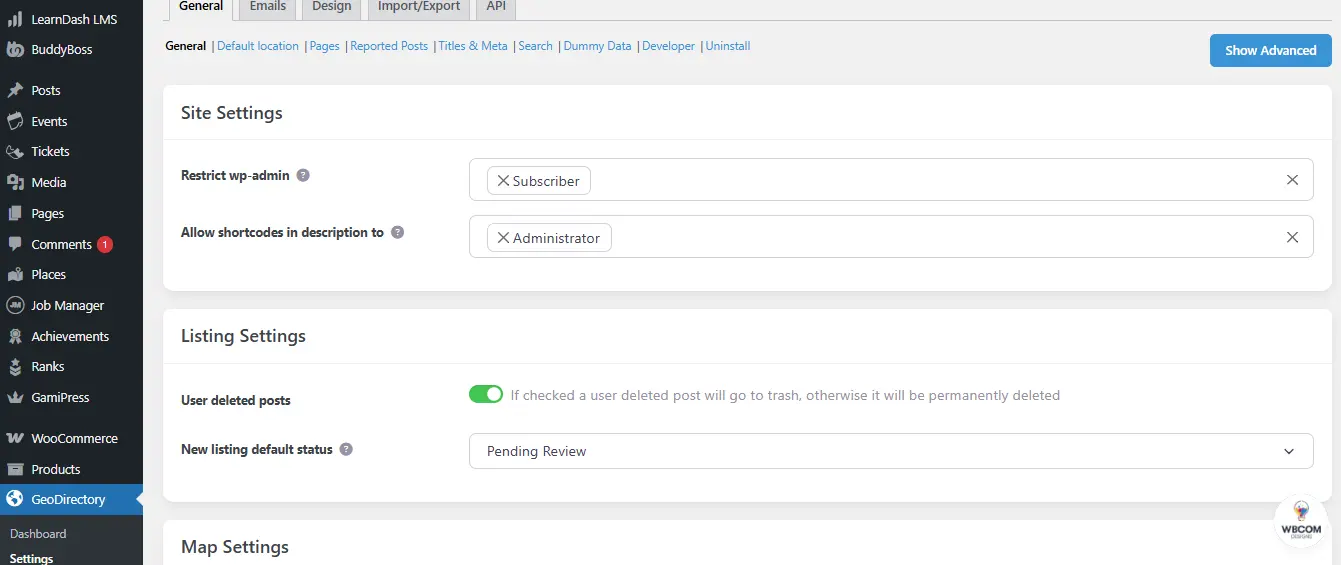
- Default location or locations.
- Categories such as restaurants, hotels, or shops.
- Submission rules, including free or paid submissions.
- Map and search preferences.
Step 5: Add Listings or Enable Front-End Submission
- As the admin, you can add sample listings to demonstrate the site’s functionality.
- Enable front-end submissions so users and businesses can publish their own listings.
Reign’s styling makes these forms look professional and intuitive.
Step 6: Monetize Your Directory
Expand revenue opportunities by enabling:
- Paid listings and featured placements.
- Membership plans for vendors.
- Advertising spaces across directory pages.
Step 7: Launch and Customize

Finally, customize your directory using Reign’s theme options and popular page builders like Elementor, Gutenberg, or Divi. Adjust layouts, colors, and widgets to fit your branding. Once satisfied, publish your site and begin promoting it to vendors and users.
Key Features of GeoDirectory in 2025
In 2025, GeoDirectory continues to be one of the most powerful directory plugins for WordPress, offering unmatched scalability and flexibility. Its feature set makes it suitable for both small niche directories and large-scale platforms with millions of listings.
1. Unlimited Listings and Scalability
GeoDirectory is optimized to handle millions of listings without affecting performance, making it ideal for directories that aim to grow over time.
2. Multi-Location Support
Create multi-city, multi-country, or global directories. Users can search by city, state, or radius, which is ideal for travel, real estate, and business directories.
3. Advanced Search and Filtering
Powerful search tools include custom fields, categories, tags, and location-based filters, combined with map-based navigation.
4. Google Maps and OpenStreetMap Integration
Interactive maps allow users to explore listings visually, while businesses can add precise locations.
5. Front-End Listing Submission
Users and vendors can submit listings from the front end, while admins control approvals to maintain quality.
6. Customizable Layouts and Page Builder Integration
Works seamlessly with Elementor, Gutenberg, Beaver Builder, and Divi for full design flexibility.
7. User Reviews and Ratings
Built-in review and rating systems help boost trust and guide user decisions.
8. Monetization Options
- Paid Listings – Charge for premium placements.
- Membership Plans – Subscription access for vendors.
- Advertising – Banner ads and sponsored listings.
9. Performance Optimized
Lightweight architecture and optimized databases ensure fast performance even under heavy traffic.
10. Theme and Plugin Compatibility
Compatible with most WordPress themes and integrates smoothly with WooCommerce, BuddyPress, and membership plugins.
GeoDirectory Pricing in 2025
One of the reasons many WordPress users consider GeoDirectory is its flexible pricing model. The plugin is available in a free version on the WordPress.org repository, which includes core directory features such as unlimited listings, categories, location management, and front-end submissions. This makes it an excellent starting point for individuals or businesses who want to experiment with directory websites.
For advanced features, GeoDirectory offers premium add-ons and membership plans. Add-ons cover functionality such as paid listings, reviews, multi-location support, events, pricing manager, and advanced search filters. These can be purchased individually or as part of a bundled plan.
In 2025, the membership pricing for GeoDirectory is structured as follows:
- Annual Membership – Around $229 per year, includes all premium add-ons and updates.
- Lifetime Membership – One-time payment of around $995, giving you lifetime access to all add-ons, support, and updates.
Compared to other directory plugins, GeoDirectory’s pricing offers excellent value because you only pay for the features you need. For serious directory builders, the all-in-one membership plan provides the best long-term investment.
Pros and Cons of GeoDirectory
Like any WordPress plugin, GeoDirectory has its strengths and weaknesses. Evaluating these pros and cons will help you decide if it’s truly the best WordPress directory plugin for your project in 2025.
Pros of GeoDirectory
- Unlimited Listings and Scalability – Optimized to handle millions of listings without performance issues.
- Multi-Location Support – Ideal for local, regional, or global directories with advanced location management.
- Advanced Search and Filtering – Helps users find exactly what they need with powerful filters and map integration.
- Front-End Listing Submission – Vendors and users can easily add their own listings.
- Monetization Ready – Premium add-ons enable paid listings, membership plans, and advertising.
- Customizable Layouts – Works seamlessly with Elementor, Gutenberg, and Divi for flexible design.
- Strong Integration – Compatible with WooCommerce, BuddyPress, membership plugins, and directory themes like Reign.
Cons of GeoDirectory
- Premium Features Require Add-Ons – The free version is limited, and advanced functionality requires add-ons or a membership plan.
- Learning Curve – Beginners may find setup and customization overwhelming at first.
- Basic Default Styling – While functional, the default design is minimal; add-ons like the Reign GeoDirectory Addon significantly improve the visual experience.
- Cost for Full Features – Although affordable compared to SaaS alternatives, accessing all features requires a paid membership.
Who Should Use GeoDirectory?
GeoDirectory is designed for anyone who wants to build a professional directory website on WordPress, whether for local businesses, niche industries, or global listings. Its flexibility makes it suitable for different types of users:
1. Local Business Owners
If you want to create a local business directory for restaurants, salons, service providers, or shops in your area, GeoDirectory offers all the tools you need, including maps, categories, and reviews.
2. Entrepreneurs and Startups
For those testing a directory-based business model, the free version provides a risk-free way to get started. As the project grows, you can scale with premium add-ons.
3. Agencies and Developers
Agencies building websites for clients will find GeoDirectory developer-friendly, thanks to its clean code, hooks, and compatibility with page builders like Elementor and Divi.
4. Community and Membership Sites
If you’re running a membership site or an online community, GeoDirectory integrates smoothly with BuddyPress and WooCommerce, making it easy to add directory functionality as part of your platform.
GeoDirectory vs Alternatives
When evaluating a directory plugin, it’s essential to compare GeoDirectory with other popular solutions. Many plugins offer basic directory functionality, but GeoDirectory distinguishes itself through its scalability, flexibility, and advanced location-based features. Here’s how it compares to leading alternatives:
GeoDirectory vs Business Directory Plugin
Features: Business Directory Plugin is simple and beginner-friendly, but lacks advanced capabilities such
as multi-location directories, map integration, and advanced filtering. GeoDirectory, on the
other hand, delivers robust search tools and scalability for larger projects.
Best For: Business Directory Plugin is ideal for small, single-location directories, while GeoDirectory is better suited for complex or multi-location platforms.
GeoDirectory vs Directory Pro
Features: Directory Pro provides attractive layouts and solid monetization options. However, its performance at scale is limited, making it less suitable for very large directories. GeoDirectory is optimized to handle millions of listings without affecting speed.
Best For: Directory Pro is a good choice for smaller projects, whereas GeoDirectory is designed for growing or enterprise-level directories.
GeoDirectory vs ListingPro (Theme-Based)
Features: ListingPro is a theme with built-in directory features, but it restricts customization since you’re locked into its design and structure. GeoDirectory, being a plugin, is more flexible and works with any WordPress theme or page builder.
Best For: ListingPro works for users who want a quick all-in-one theme solution, while GeoDirectory is better for those who want full freedom to customize and scale.
GeoDirectory vs SaaS Platforms (Yelp and Clutch Alternatives)
Features: SaaS platforms like Yelp or Clutch offer ready-to-use solutions but come with recurring fees, limited customization, and less control over data. GeoDirectory provides full ownership of your website, content, and user data.
Best For: SaaS platforms are suitable for quick setups, but if you want long-term control, flexibility, and scalability, GeoDirectory is the superior choice.
Tips to Grow a Directory Website with GeoDirectory
Building a directory website is just the first step. Growing it into a valuable resource for users and businesses requires the right strategies. Here are some practical tips to help you scale your site using GeoDirectory:
1. Start with a Niche Focus
Instead of creating a general directory, target a specific niche such as local restaurants, healthcare providers, or travel services. A focused directory is easier to market and attracts users searching for specialized information.
2. Optimize Listings for SEO
Each listing in your directory is an opportunity to rank in search engines. Encourage vendors to include detailed descriptions, relevant keywords, and images. GeoDirectory’s SEO-friendly structure helps maximize visibility in both local and global searches.
3. Offer Free Listings First
To attract vendors quickly, start with free basic listings. Once you build traffic and credibility, introduce premium options like featured placements or highlighted ads. This upsell model increases revenue without discouraging new users.
4. Promote User Engagement
Enable reviews, ratings, and favorites to encourage community interaction. The more user-generated content your site has, the more valuable it becomes to both visitors and businesses.
5. Leverage Social Media and Email Marketing
Promote new listings and categories on social media platforms. Pair this with an email newsletter highlighting popular or featured businesses to keep users engaged and returning.
6. Use WooCommerce and Membership Add-ons
Monetize your directory by offering membership plans, paid submissions, or subscription packages using GeoDirectory add-ons and WooCommerce integration. This helps create recurring income streams.

Is GeoDirectory Worth It for Your Directory Site?
After exploring its features, pricing, pros and cons, and comparisons, this GeoDirectory Review makes it clear that the plugin remains one of the most reliable and scalable options for building directory websites on WordPress. Its ability to handle unlimited listings, support multiple locations, and integrate seamlessly with page builders and popular plugins gives it a strong edge over many alternatives.
While the free version is a great starting point, serious directory owners will benefit most from the premium add-ons or membership plan, which unlock advanced monetization and customization options. The learning curve and add-on costs may be drawbacks, but for those who want full control and long-term scalability, these trade-offs are well worth it.
In short, GeoDirectory stands tall as the best directory plugin for entrepreneurs, developers, and businesses looking to launch professional, revenue-generating directory platforms. This GeoDirectory Review shows that it continues to deliver the flexibility and performance needed to succeed.
Frequently Asked Questions
1. Is GeoDirectory free to use?
Yes. GeoDirectory has a free version available on the WordPress plugin repository. It includes essential features like unlimited listings, categories, and basic location management.
2. What features are included in GeoDirectory Pro?
GeoDirectory Pro and premium add-ons unlock advanced features such as multi-location support, paid listings, events, reviews, custom fields, and enhanced search filters. These features are ideal for monetizing and scaling a directory website.
3. Can I monetize my directory with GeoDirectory?
Absolutely. With add-ons, you can charge for paid listings, memberships, featured ads, or subscriptions. This makes it easy to generate recurring revenue from your directory website.
4. Does GeoDirectory work with page builders?
Yes. GeoDirectory integrates smoothly with Elementor, Gutenberg, Beaver Builder, and Divi, giving you full control over your directory design.
5. Is GeoDirectory suitable for large directories?
Yes. GeoDirectory is built to handle millions of listings without slowing down. It uses an optimized database structure to maintain performance even for large-scale platforms.
6. Can I use GeoDirectory with any WordPress theme?
GeoDirectory is compatible with most WordPress themes. For the best experience, use a directory-optimized theme like Reign, which works seamlessly with the GeoDirectory addon for modern layouts and enhanced styling.
7. How does GeoDirectory compare to other directory plugins?
Compared to plugins like Business Directory Plugin or Directory Pro, GeoDirectory offers greater scalability, advanced location features, and better integration with page builders. It’s ideal for anyone who wants a highly customizable and professional directory platform.
Interesting Reads
WC Vendors Review 2025: Is It Still the Best WordPress Marketplace Plugin?
Top Benefits of a Business Listing Directory On Your Community Site
Elementor Review 2025: Is It Still the Best WordPress Page Builder?
