

Shipping plays a crucial role in the success of any e-commerce business. Research shows that 69% of online shoppers abandon their carts due to high or complicated shipping costs, while 54% say they’re more likely to buy from stores that offer simple, transparent delivery options. For WooCommerce store owners, managing shipping can be challenging without the right tools. This is why many merchants choose to connect Shippo with WooCommerce to simplify fulfillment and improve the buying experience.
That’s where Shippo comes in. Shippo is a leading multi-carrier shipping platform that helps online retailers compare shipping rates, print labels, and track orders all from one place. By choosing to connect Shippo with WooCommerce, you can automate your shipping workflow, reduce costs, and improve the overall customer experience.
In this guide, we’ll explain what Shippo is, why it matters for WooCommerce stores, how to integrate it step by step using the WC Shippo Shipping plugin, and the best practices to get the most out of your shipping setup.

What is Shippo?
Shippo is a cloud-based shipping platform designed to simplify eCommerce logistics. It connects your store to over 85 global carriers, including USPS, UPS, FedEx, DHL, and regional carriers.
Key Features of Shippo
- Multi-Carrier Shipping Access discounted rates from major carriers.
- Label Printing Print shipping labels in bulk directly from your dashboard.
- Order Tracking Provide customers with real-time tracking updates.
- International Shipping Handle customs forms and duties seamlessly.
- Automation Set rules to automate carrier selection, label generation, and notifications.
By using Shippo with WooCommerce, you transform a traditionally time-consuming shipping process into a streamlined, automated workflow.
Why Connect Shippo with WooCommerce?
WooCommerce provides basic shipping functionality, but it lacks advanced tools for automation, carrier comparison, and label printing. Integrating Shippo fills this gap and brings multiple benefits:
1. Cost Savings
Shippo offers discounted shipping rates that can save you significant costs, especially for bulk orders.
2. Time Efficiency
Automate repetitive tasks like label creation and tracking updates, giving you more time to focus on sales and marketing.
3. Better Customer Experience
Provide accurate shipping rates, faster deliveries, and real-time tracking all of which build customer trust and loyalty.
4. Global Reach
With support for international shipping and customs handling, you can expand your business into new markets without complexity.
5. Scalable Solution
As your order volume grows, Shippo helps you handle large-scale fulfillment without bottlenecks.
About WC Shippo Shipping Plugin
The WC Shippo Shipping plugin is the easiest way to connect your WooCommerce store with Shippo.
Key Features
- Connect WooCommerce directly with your Shippo account.
- Fetch real-time carrier rates at checkout.
- Print labels instantly from your WooCommerce dashboard.
- Automatically send tracking details to customers.
- Support for both domestic and international shipping.
Why Use It?
- No coding required.
- Automates the entire shipping process.
- Compatible with major WooCommerce extensions and themes.
Step-by-Step Guide: How to Connect Shippo with WooCommerce
Connecting Shippo with WooCommerce is simple using the WC Shippo Shipping plugin. With just a few steps, you can automate shipping, print labels, and send tracking updates seamlessly.
Step 1: Install and Activate the Plugin
To begin, download the WC Shippo Shipping plugin.
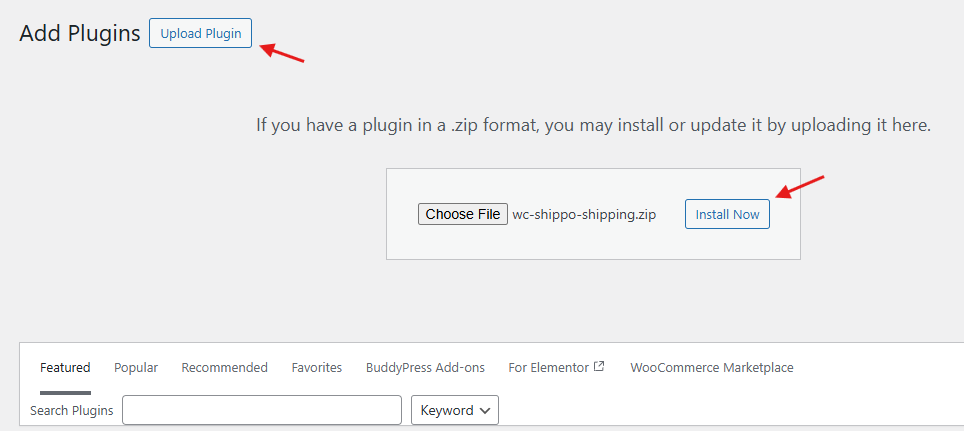
- In your WordPress dashboard, go to Plugins → Add New → Upload Plugin.

- Upload the ZIP file, click Install Now, and then Activate.
Step 2: Connect Your Shippo Account
Once activated:
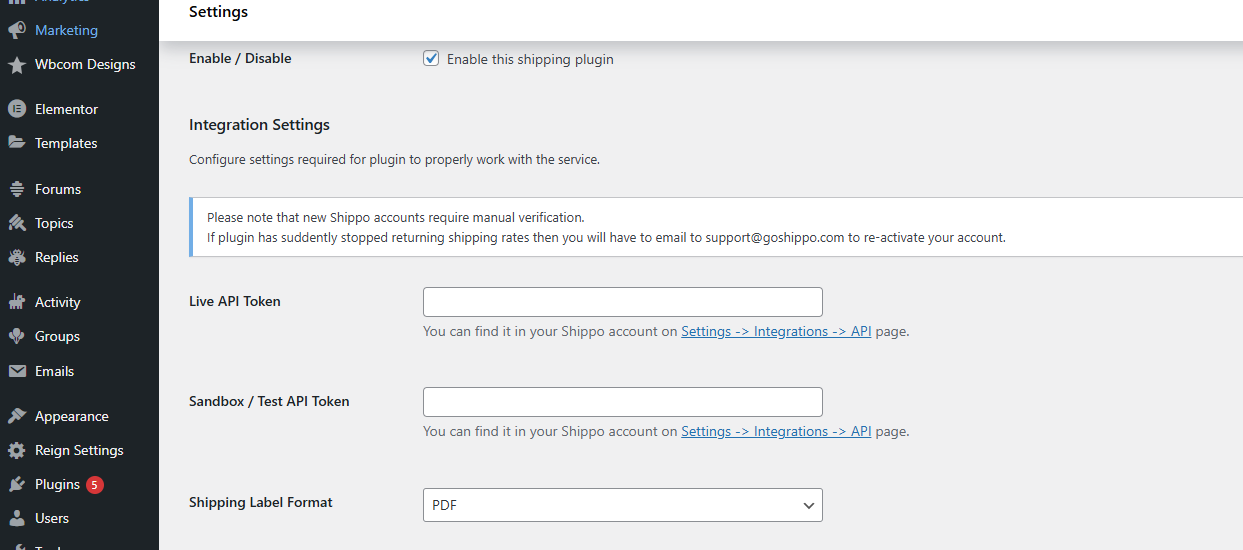
- Go to WooCommerce → Settings → Shipping → Shippo.

- Enter your Shippo API credentials (available in your Shippo dashboard).

- Save your changes to establish a secure connection.

Step 3: Configure Shipping Zones and Rates
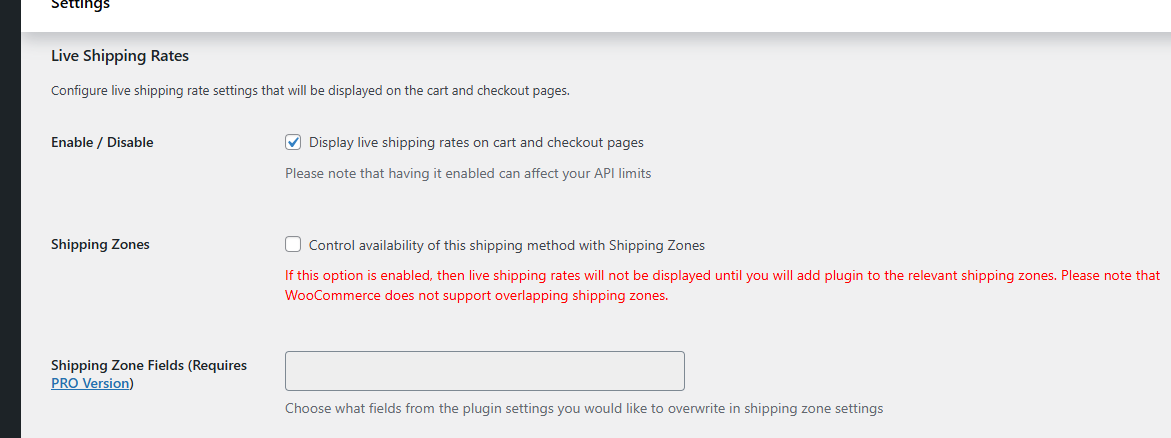
Next, define your shipping zones to cover both domestic and international customers.
- Enable Shippo to fetch real-time carrier rates for each zone.

- Decide whether to show multiple carrier options at checkout or only the cheapest option for simplicity.
Step 4: Set Up Label Printing
Streamline fulfillment by printing labels directly from your WooCommerce dashboard.
- Enable label printing on the orders page.
- Select your default label size, file format (PDF/ZPL), and printer preferences.
Step 5: Automate Tracking Notifications
To keep customers updated automatically:
- Enable tracking notifications in the settings.
- Shippo will send tracking numbers via email as soon as labels are generated.
Step 6: Test the Setup
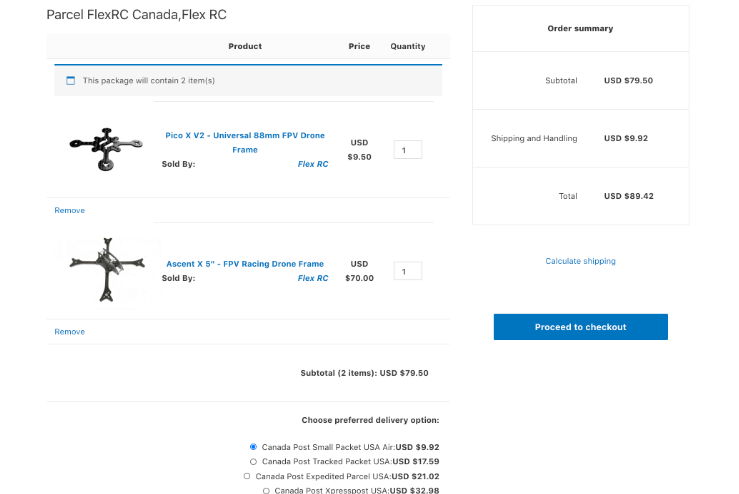
Finally, place a test order to confirm everything works.
- Check that real-time rates display correctly at checkout.
- Verify labels are generated.
- Ensure tracking numbers are emailed to customers.
By following these steps, you’ll successfully connect Shippo with WooCommerce, creating a streamlined, professional shipping process that benefits both your store and your customers.
Advantages of Connecting Shippo with WooCommerce
When you connect Shippo with WooCommerce, you’re not just adding another tool—you’re transforming how your store handles shipping and order fulfillment. This integration creates a smoother workflow for store owners while offering a better overall experience for customers.
1. Discounted Rates
Shippo partners with major carriers like USPS, UPS, DHL, and FedEx to provide pre-negotiated discounted shipping rates. These savings can significantly reduce fulfillment costs, especially for high-volume stores.
2. Seamless Automation
Manual shipping tasks can eat up valuable time. With Shippo, you can automatically generate labels, sync tracking numbers, and streamline notifications, reducing human error and freeing up resources for growth.
3. Improved Checkout Experience
Nothing builds customer trust like transparency at checkout. By showing accurate, real-time shipping rates, customers know exactly what to expect, reducing cart abandonment and increasing completed orders.
4. Global Capabilities
Expanding internationally is easier with Shippo. The platform simplifies customs documentation, duties, and international carrier selection, making it easier for WooCommerce stores to serve a global customer base.
5. Centralized Management
Instead of juggling multiple carrier accounts or platforms, you can manage everything from one Shippo-powered dashboard. From rates and labels to tracking and returns, all shipping operations are streamlined in one place.
Best Practices for Using Shippo with WooCommerce
Integrating Shippo with WooCommerce can transform how your store handles fulfillment, but to maximize its potential, you need to implement it strategically. Here are the best practices to follow:
1. Offer Multiple Shipping Options
Not every customer values the same thing. Some want the lowest cost, while others prioritize speed. Use Shippo to present both budget-friendly and expedited delivery options at checkout.
2. Keep Tracking Transparent
Customers expect visibility into their orders. Enable Shippo’s automated tracking updates to send emails or SMS notifications proactively. This not only reassures buyers but also reduces the number of support inquiries.
3. Automate Wherever Possible
Take full advantage of Shippo’s automation rules. Automatically assign carriers, generate labels, and send tracking numbers to customers, ensuring a consistent and efficient workflow with minimal manual effort.
4. Optimize for International Orders
International shipping can get complicated. Always double-check customs forms, taxes, and duties. Shippo simplifies much of this process, but accurate inputs on your part help prevent costly delays.
5. Monitor Carrier Performance
Regularly review analytics to see which carriers deliver fastest, most reliably, and with fewer issues. Adjust your shipping strategy based on data, not assumptions.
6. Test After Updates
Whenever you update WooCommerce or the Shippo plugin, run a few test orders. This ensures all functions rates, labels, and tracking are still working smoothly for your customers.
How Shippo Improves the Customer Experience
When you connect Shippo with WooCommerce, you’re not just simplifying backend operations—you’re also enhancing the shopping experience. Customers benefit from:
- Accurate, transparent rates at checkout.
- Faster deliveries through reliable carriers.
- Real-time tracking that reduces uncertainty.
- International shipping support for global buyers.
A smoother shipping process builds customer trust, encourages repeat purchases, and helps you compete with larger retailers.

Wrapping Up: Why Connect Shippo with WooCommerce
Shipping is one of the most critical aspects of running an online store. By choosing to connect Shippo with WooCommerce, you can simplify logistics, save money, and provide a superior experience for your customers.
The WC Shippo Shipping plugin makes the integration process seamless, with automation tools for rates, labels, and tracking.
If you’re ready to take your WooCommerce store’s fulfillment to the next level, start with Shippo today. For more tailored solutions, explore custom WooCommerce development services from Wbcom Designs to build shipping workflows designed specifically for your business.
Interesting Reads
How to Integrate Salesforce with WooCommerce (Step-by-Step Guide)
7+ Best WooCommerce Shipment Tracking Plugins In 2025
How to Export and Import WooCommerce Orders & Coupons Without Hassle
