

Discounts and special offers are powerful drivers of online sales. Research shows that over 90% of shoppers actively look for coupons before making a purchase, and nearly 60% say discounts often determine where they shop. For WooCommerce store owners, coupons are more than just a marketing tactic—they’re a tool to attract new customers, increase order value, and encourage repeat purchases.
By default, WooCommerce comes with a built-in coupon system that allows you to create and manage discounts with ease. With just a few steps, you can add coupons in WooCommerce to offer percentage discounts, fixed cart reductions, free shipping, or special promotions.
In this guide, we’ll walk you through the process of creating coupons step by step, explore their advantages, and share best practices to ensure your coupon campaigns boost sales without cutting too deeply into profits.

What Are WooCommerce Coupons?
WooCommerce coupons are discount codes that customers can apply during checkout to reduce their total cost. They can be:
- Percentage Discounts: e.g., 10% off the cart total.
- Fixed Cart Discounts: e.g., $20 off an entire order.
- Fixed Product Discounts: e.g., $5 off a specific product.
- Free Shipping Coupons: Customers get free delivery when they apply.
Coupons can also be customized with restrictions, like minimum spend, usage limits, or product/category exclusions, giving store owners flexibility to run tailored promotions.
Why Add Coupons in WooCommerce?
Adding coupons in WooCommerce offers several advantages for your store:
- Attract New Customers – Discounts can draw in price-conscious shoppers.
- Boost Average Order Value (AOV) – Encourage customers to spend more to unlock bigger discounts.
- Reduce Cart Abandonment – Coupons incentivize customers to complete their purchase instead of leaving.
- Build Customer Loyalty – Rewarding existing customers with exclusive discounts encourages repeat business.
- Promote Seasonal Campaigns – Run time-limited offers for holidays, sales events, or product launches.
Step-by-Step Guide: How to Add Coupons in WooCommerce
WooCommerce makes it simple to create and manage coupons directly from your dashboard. Follow these steps to set up your first coupon and start boosting sales.
Step 1: Enable Coupons in WooCommerce
Before creating a coupon, make sure the feature is active.
- Go to WooCommerce → Settings → General.
- Scroll down to the Enable Coupons section.
- Tick the box for Enable the use of coupon codes.
- Click Save changes.
Step 2: Create a New Coupon
Now you can add your first coupon.
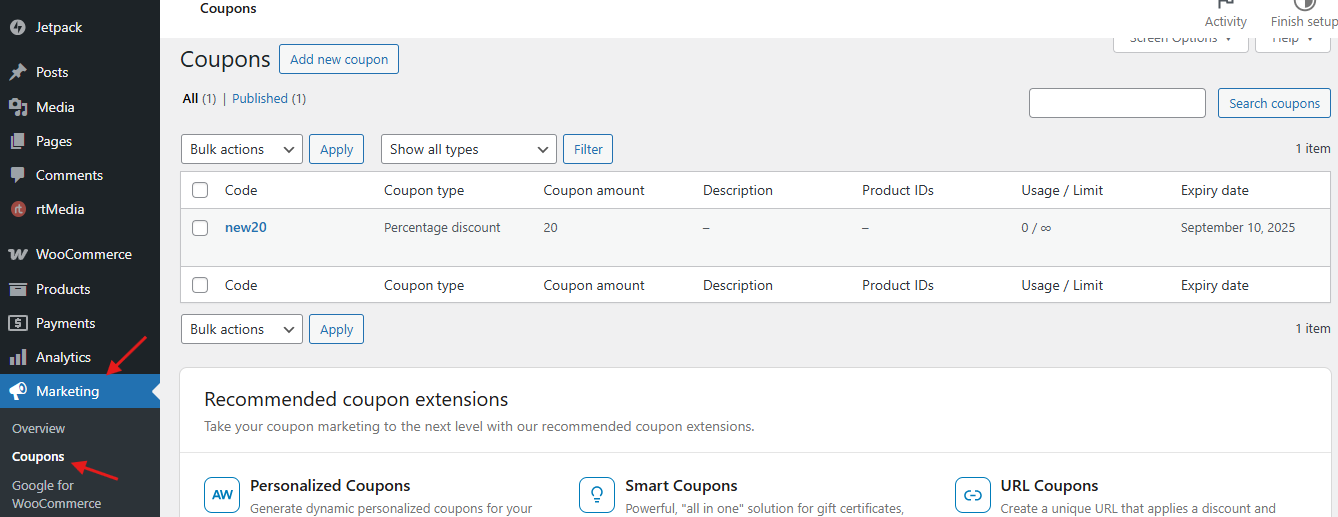
- Navigate to Marketing → Coupons.

- Click Add Coupon.
- Enter a coupon code (e.g., SAVE10) and add a short description so you’ll remember its purpose.
Step 3: Configure Coupon Data
WooCommerce gives you three main tabs to customize your coupon:
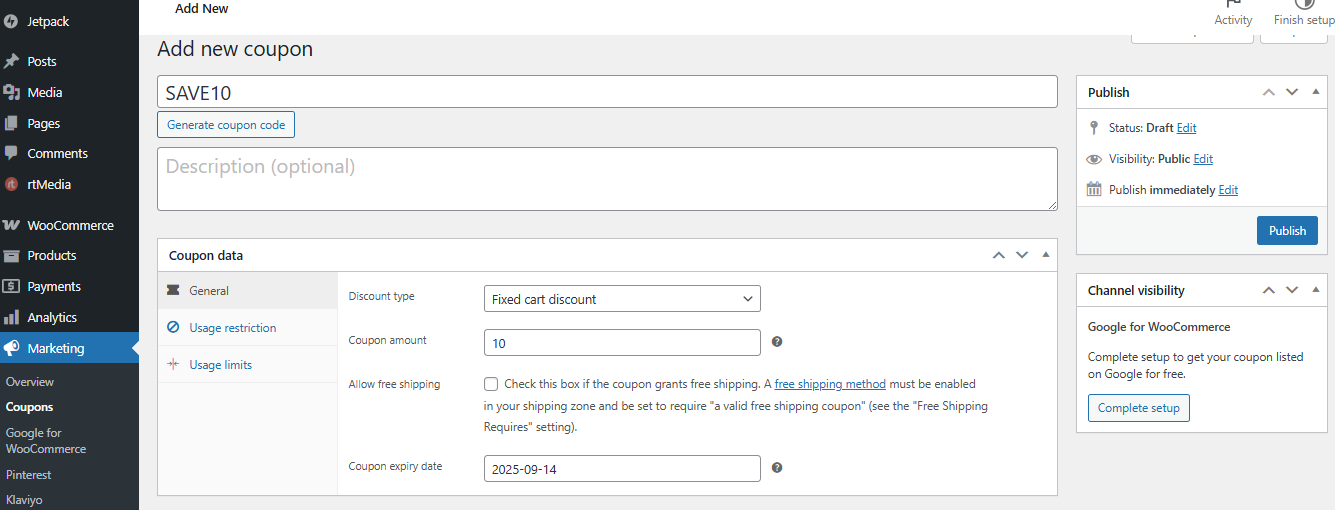
1. General
- Discount type: Choose between Percentage, Fixed Cart, or Fixed Product discount.
- Coupon amount: Example—10 for 10% or 20 for $20 off.
- Free shipping: Tick if the coupon should apply free shipping.
- Expiry date: Set a clear end date for your promotion.

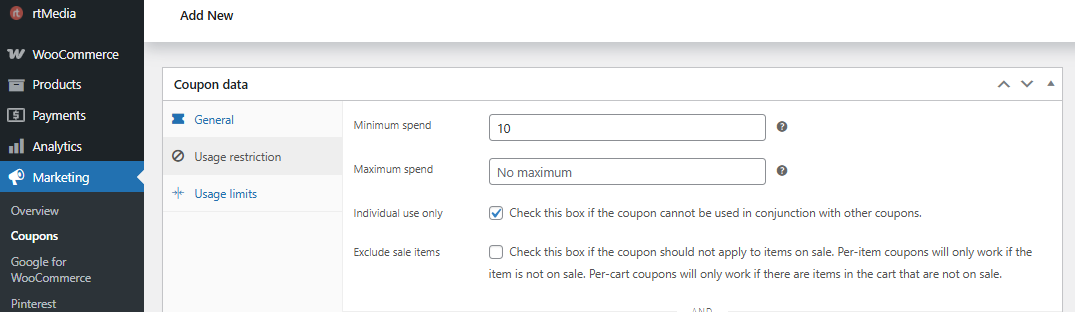
2. Usage Restrictions
- Minimum/maximum spend requirements.

- Include or exclude specific products or categories.
- Restrict coupons to certain emails for targeted campaigns.
3. Usage Limits
- Limit per coupon: Set how many times the coupon can be redeemed overall.
- Limit per user: Control how many times an individual customer can use it.
Step 4: Publish and Share the Coupon
- Click Publish to activate the coupon.
- Promote it through email campaigns, social media posts, or banners on your store.
Step 5: Test the Coupon
Always confirm it works before sharing widely.
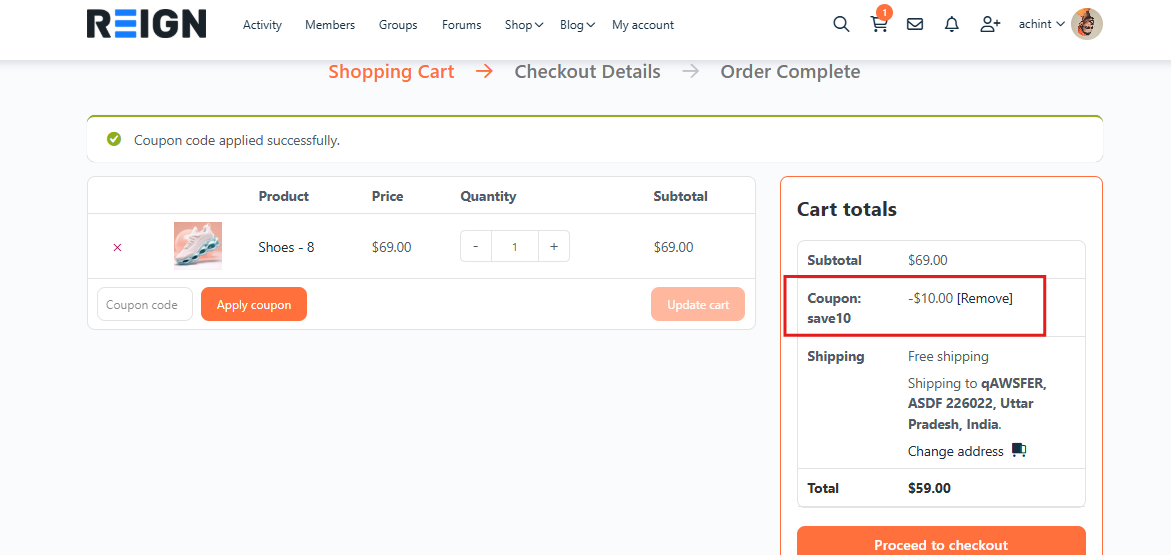
- Place a test order.
- Enter the coupon code at checkout.
- Ensure the discount applies correctly.

By completing these steps, you’ll successfully add coupons in WooCommerce and have them ready to increase sales, reward loyal customers, and attract new buyers.
Also Read: 10 Best WordPress Coupon Plugins for your E-commerce Store
Advantages of Using WooCommerce Coupons
Coupons aren’t just a way to offer discounts—they’re a powerful marketing tool that can boost sales, encourage repeat business, and strengthen customer relationships. When you add coupons in WooCommerce, you unlock a range of benefits that directly impact your store’s growth.
1. Increased Conversions: Sometimes, shoppers just need a little push to complete a purchase. Coupons provide that nudge by reducing the perceived cost barrier, turning hesitant browsers into paying customers.
2. Customer Retention: Acquiring a new customer costs more than keeping an existing one. Exclusive coupons for loyal shoppers, such as birthday discounts or reward codes, encourage them to return and buy again.
3. Upselling Opportunities: With WooCommerce coupons, you can set minimum spend thresholds, like “Save $20 when you spend $100.” These promotions motivate customers to add more items to their cart, boosting your average order value (AOV).
4. Flexibility: Coupons in WooCommerce are highly customizable. You can target specific audiences, apply discounts to selected products or categories, or restrict usage to special campaigns, giving you control over how and when offers are used.
5. Data Insights: Every coupon campaign provides valuable performance data. By tracking which codes drive the most sales, you gain insights into customer behavior and can refine future promotions for maximum impact.
Best Practices for Adding Coupons in WooCommerce
To ensure coupons work effectively without harming profitability, follow these best practices:
1. Set Clear Objectives: Decide if your coupon’s goal is to acquire new customers, clear old stock, or reward loyal buyers.
2. Avoid Overusing Coupons: If discounts are always available, customers may wait for them and never buy at full price.
3. Keep Coupons Simple: Easy-to-remember codes (e.g., SUMMER20) are more likely to be used than complex strings.
4. Combine Coupons with Marketing: Promote coupons through email, social media, and push notifications for maximum reach.
5. Use Time Limits: Create urgency with expiration dates to encourage quicker purchases.
6. Track Performance: Monitor which coupons generate the most sales and optimize future campaigns based on results.
Common Mistakes to Avoid When Using Coupons
While coupons can be a powerful tool to increase sales and build customer loyalty, using them incorrectly can harm your business instead of helping it. Here are some of the most common mistakes WooCommerce store owners should avoid:
1. Overusing Coupons: If discounts are always available, customers may hesitate to buy at full price. Over-reliance on coupons can train shoppers to wait for promotions, reducing overall profitability.
2. Complicated Coupon Rules: Customers don’t want to spend time figuring out how to apply a discount. Long codes, excessive restrictions, or hidden terms can frustrate buyers and cause them to abandon their cart.
3. Ignoring Expiry Dates: Coupons without clear start and end dates can lead to confusion or misuse. Limited-time coupons create urgency and encourage faster purchasing decisions.
4. Not Tracking Performance: If you don’t measure how coupons affect sales, you won’t know what’s working. Tracking usage helps refine strategies and avoid campaigns that hurt margins.
5. Applying Discounts Too Broadly: Giving storewide discounts when you only need to move specific inventory cuts into revenue unnecessarily. Instead, target coupons to categories, products, or customer segments.
How Coupons Improve Customer Experience
Coupons don’t just drive sales—they also enhance the shopping journey. Customers enjoy:
- Savings that make purchases feel more rewarding.
- Exclusive offers that build loyalty.
- Simplified checkout when codes are easy to apply.
This leads to improved satisfaction and a greater chance of repeat business.

Wrapping Up: Why Add Coupons in WooCommerce
Coupons remain one of the most effective marketing tools for e-commerce. By choosing to add coupons in WooCommerce, you can attract new customers, reduce cart abandonment, increase order value, and strengthen customer loyalty.
WooCommerce makes coupon creation simple, flexible, and powerful, giving you the ability to tailor promotions to your exact business goals.
If you’re ready to boost sales with smarter coupon strategies, start creating your WooCommerce coupons today. For more advanced customization, explore custom WooCommerce development solutions from Wbcom Designs to optimize promotions and drive long-term growth.
Interesting Reads
How to Connect Shippo with WooCommerce (Step-by-Step Guide)
How to Style and Display Coupons on WooCommerce Using Smart Coupons
Top 7 WordPress Social Share Discount Plugins To Boost Your Conversions 2025
