BuddyPress Statistics

The BuddyPress Stats plugin creates a comprehensive activity log for everything happening in your BuddyPress-powered community. It provides detailed insights into user interactions, group activities, and community engagement, displayed across user profiles and single groups.

Current version: v1.6.0

Tested Up To:
BuddyPress v14.3.0
Update: 18th March 2025

Packed with Features

If you want to displays a range of statistics about BuddyPress site members in a tab on their profile, Use BuddyPress Stats

Registration Data

Display a comprehensive data of daily, weekly, monthly, and yearly registered users

Active Users

An all-inclusive statistics of daily, weekly, monthly, and yearly active users.

Community Insight

Plugin provides a better insight of websites popularity through the statistics

Members Involvement

Logged-in members can see their involvement through a widget.

Quick Summary

Helps the site administrators to view a quick summary of their site.

Top Groups

Feature to display the top groups of the website.

Key Features of BuddyPress Statistics

Comprehensive Statistics and Engagement Insights

The BuddyPress Statistics plugin displays a diverse set of statistics in a simple and well-organized manner. It helps both administrators and community members track engagement, participation, and growth.

The latest version of BuddyPress Statistics brings powerful new analytics and features to give you deeper insights into your community:

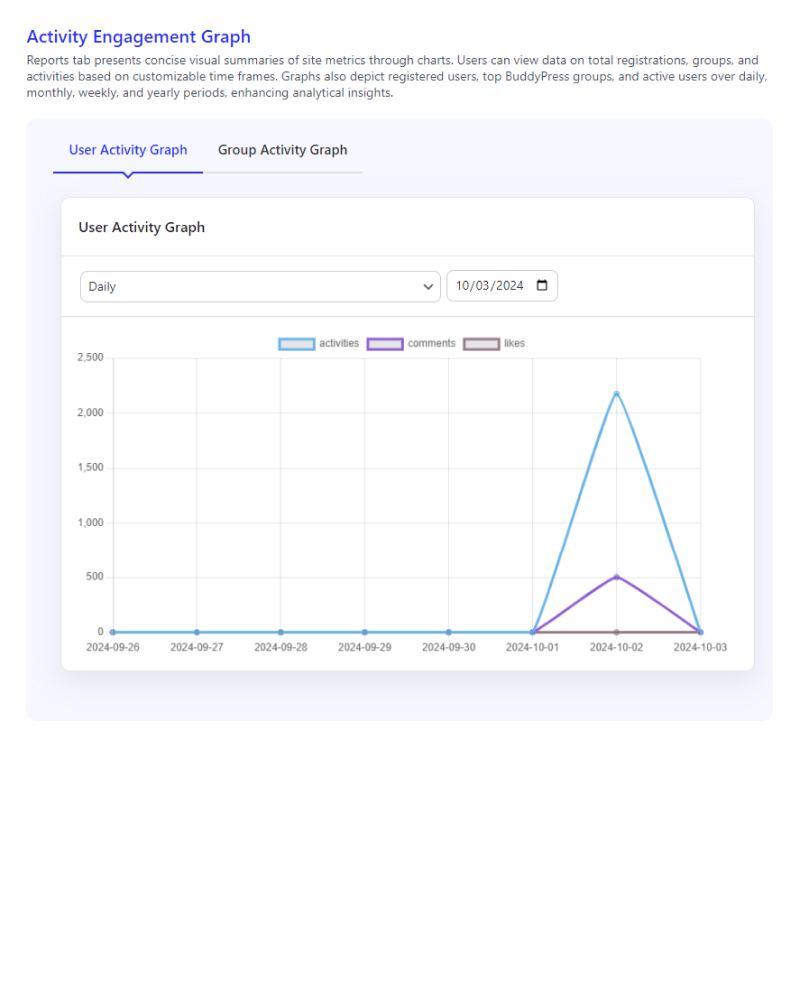
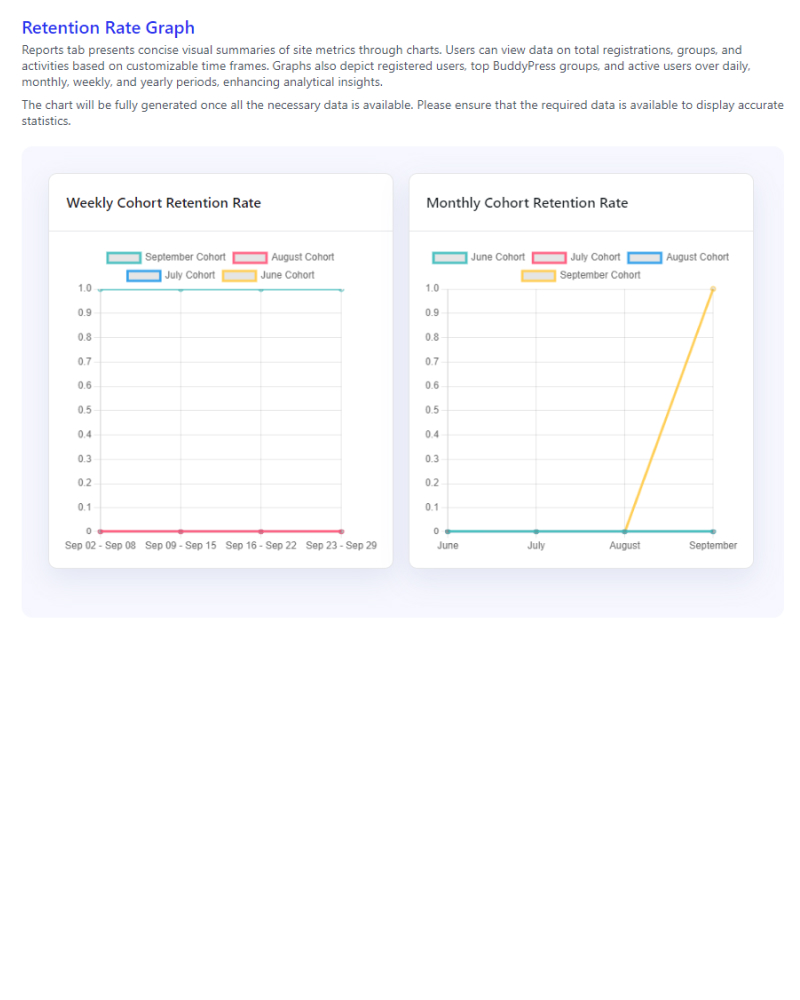
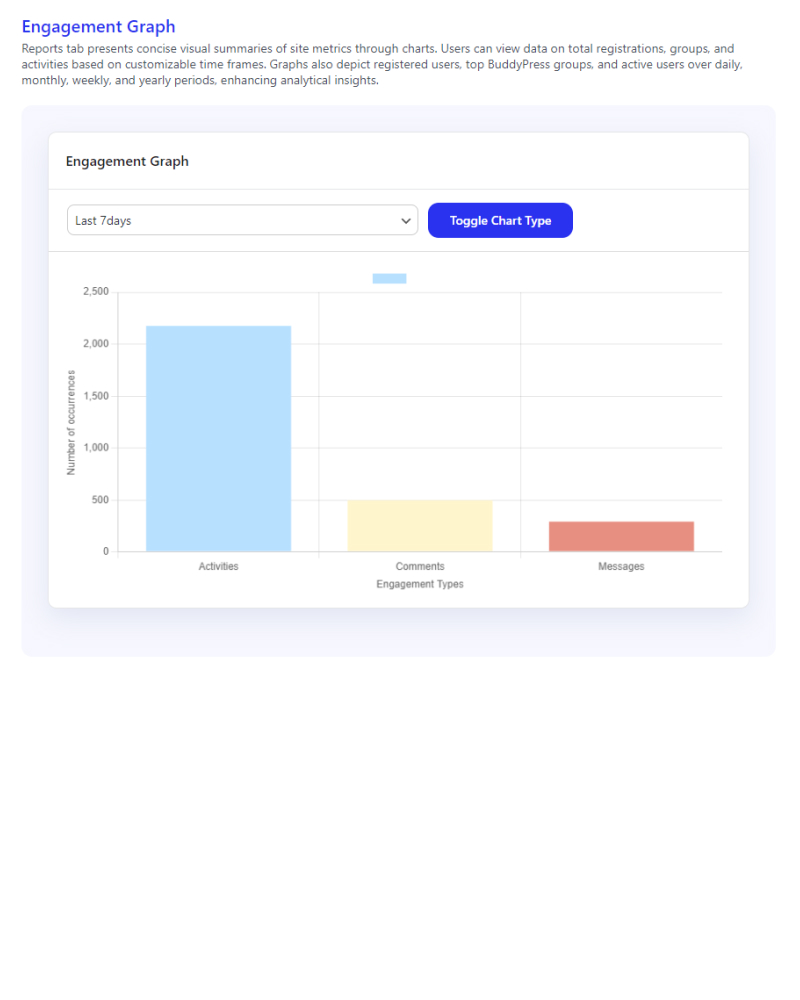
  • Advanced Analytics: Track and visualize key user and group activity metrics with engagement graphs, retention rate statistics, and top contributor analysis.
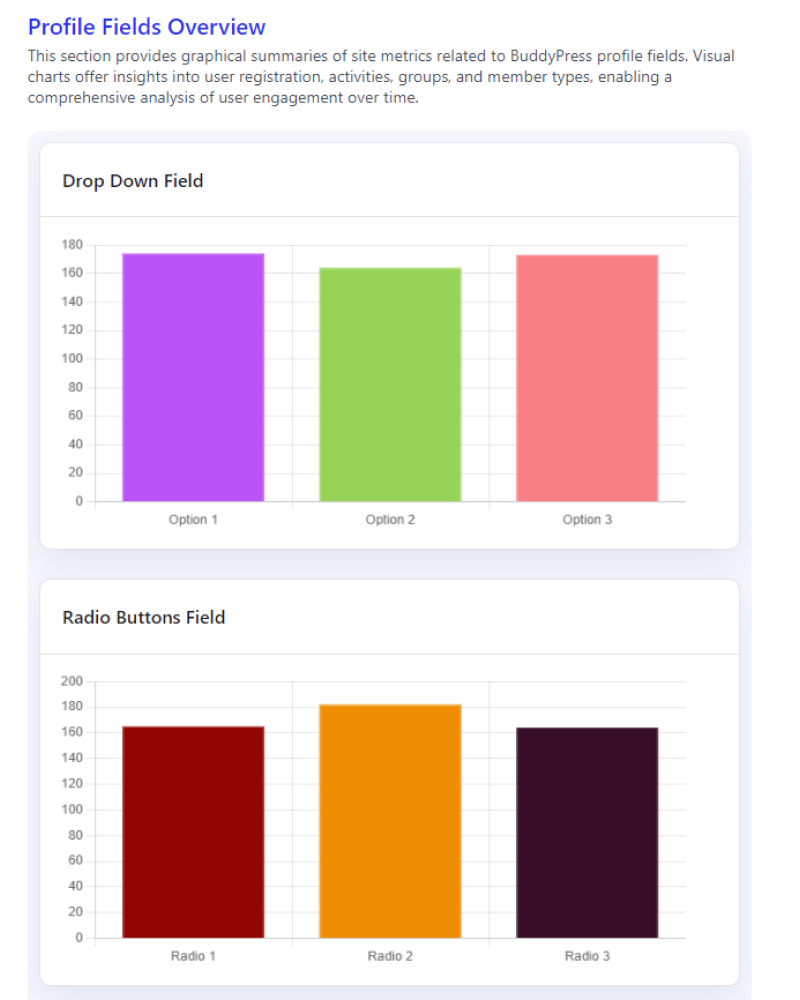
  • Comprehensive Activity Tracking: View detailed user and group engagement, including retention trends and profile field completion rates.
  • Customizable Widgets: Seven different types of widgets allow you to display a range of statistics on your BuddyPress site, including recent user activity, new groups, top contributors, and more.

Simple Pricing

We are here to help! We include extensive documentation to set up every aspect of our products, but if you need further assistance we’ll be right there with you on our fully monitored Support!

Single License

Perfect for new portals just starting out

$49/yr

5 License

Perfect for new portals just starting out

$99/yr

Developer License

Perfect for new portals just starting out

$129/yr

Check out our Refund policy and Support policy.
All pricing is in USD. You can change plans or cancel your account at any time. Read more about the Privacy Policy.

Frequently Asked Questions

You can track several key metrics, including:

  • Total Registrations (daily, weekly, monthly, yearly)
  • Active Users (based on recent login sessions)
  • User and Group Activity (posts, comments, group activity)
  • Engagement Metrics (over customizable timeframes)
  • Retention Rates (weekly and monthly cohort retention)
  • Profile Fields Overview (insights into BuddyPress profile fields)
    Learn more about Profile Statistics
    Explore Group Statistics

Yes, you can customize the time frame for all statistics. You can view data on a daily, weekly, monthly, or yearly basis, allowing for granular insights into how your community is growing and evolving.
Learn more about Retention Rate Graph

The plugin tracks cohort retention rates in both weekly and monthly intervals. This data shows how well your community retains users over time, providing valuable insights into long-term user engagement and the effectiveness of your retention strategies.
Discover more about Engagement Graphs
Learn more about Retention Rates

The Top Contributors feature showcases the most active users and groups in your community, helping you identify key members and groups that drive the most interaction on your site.
Learn more about Top Contributors

Yes, the plugin allows you to export user and group statistics as a CSV file. This makes it easy to analyze the data offline or share it with other stakeholders.
Explore Profile and Group Statistics

Yes, the BuddyPress Statistics Plugin works seamlessly with both BuddyPress and BuddyBoss platforms. It adjusts to the specific features and structure of each platform, allowing you to gather and analyze key community data.
Learn more about General Settings

The plugin is optimized to handle large datasets efficiently. However, if your community has an extensive user base or high activity levels, it’s recommended to monitor performance and use caching solutions if needed.
Explore Profile Fields Overview

Yes, you can view statistics for specific groups or users. In the front-end for users and groups, members can see their activity reports and engagement metrics, while in the back-end, admins can analyze detailed user and group stats.
Learn more about Group Statistics
Learn more about Profile Statistics

The plugin does not collect or store personal data on its own. It displays metrics based on your BuddyPress or BuddyBoss site’s data. To ensure GDPR compliance, ensure your site’s privacy policies and practices align with GDPR regulations.